Facility Control

 View Only
  • 1.  Get Parameter value from Carbonite/Graphite

    Posted 08-02-2019 18:41

    So, yes, I know there are post about this before, but appereantly the way this is done has changed and has several answers throughout the entire forum now... So, I have to ask again, with a demo on how it's NOT working as my example...

    So, what I'm trying to do is to read the state value on wether or not the ME1 button is selected on the mixer. In other words, I want this to be on when my Custom DashBoard opens...
    In other words, I cant just pull in the button from the panel and have people click that, I want to be more elegant and make sure it's allways like that whenever they open my DashBoard... Basically, remove as much human interaction and human error as possible.

    So, what I want to do is to read the state of that button.
    I should get the value of that button parameter, and do a basic check of if NOT on, then run command to set it on.

    So, I open my Graphite parameters (for some reason only the API one showed up for the longest time, but suddenly the "Config" and "Not In Menu" appeared as well. No idea why, but I'm happy with that.

    So! I go into panel, and look at the ME1 button in inspect mode and get this:
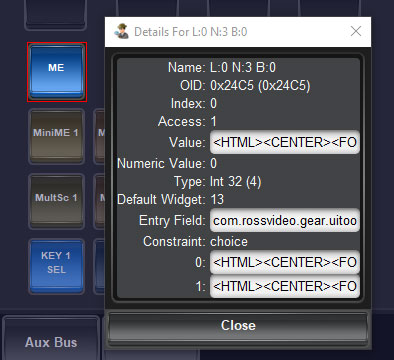
    Ok, so, the OID for the value is 0x24C5, and it should be an integer, constraint, with the values 0 and 1.
    Should be simple and all...

    So, I go to just a simple button and add a task. All this task should do is just to get that value, and send it to debug.
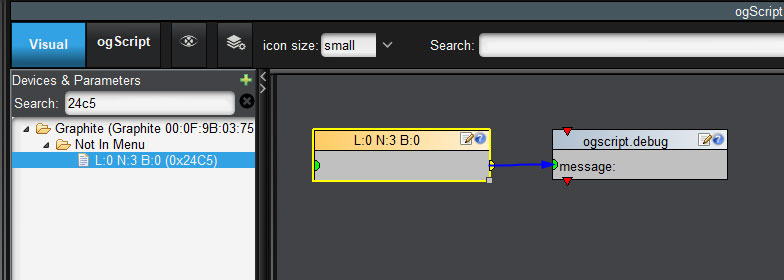
    So, that should be it... No more hocus pocus, and I should get the value of that parameter and send it to debug... Right?
    Well, no matter what I do in my panel, and set the selection to MiniME1 or what not, this button will allways and no matter what send "0" to my debug window...
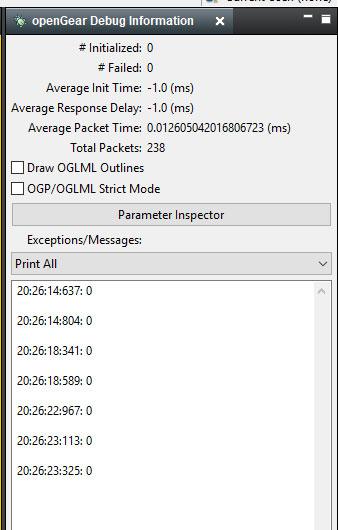
    Regardless of the "state" of that button if it's lit up or not, it allways returns 0...
    Sooo, that aint working...

    So, on to another thing...
    If I then go into the ogScript and want to do my IF check etc there later, this is what I get.

    ogscript.debug(params.getParam("Graphite 00:0F:9B:03:75:03<br>Slot 0<br>Graphite", '0x24C5', 0).getValue());

    (of course some commented out info about the visual logic, but I dont care about that...)
    So, usually, if you want to get the parameter value from your DashBoard the code is:

    // From using Script Palette
    var x = params.getValue('exampleParam', 0);

    // And this is if you use Visual Logic
    params.getValue('exampleParam', 0);

    But when handling values from the Graphite, we suddenly add the .getValue() function at the end instead.
    Anyhow, I tried this:

    var x = params.getParam("Graphite 00:0F:9B:03:75:03<br>Slot 0<br>Graphite", '0x24C5', 0).getValue();
    ogscript.debug('Value is: ' + x);

    Again, no matter what I do though, I cannot get the value to be anything different than 0.
    I also tried this one, just to check if the "params.getValue" could be used instead.

    var x = params.getValue("Graphite 00:0F:9B:03:75:03<br>Slot 0<br>Graphite", '0x24C5', 0);
    ogscript.debug('Value is: ' + x);

    But that just gives me an error message.

    So in the end I'm stuck with two questions...

    1. Why is the value always 0? Why cant I read the state of the button?

    2. How can I eventually SET the value to 1 when I eventually get a read of the value? Seeing as we now use different syntax for reading value, I assume the setting of a value is different as well.

    Graphite Version: 2.2
    DashBoard Version: 8.6.0


  • 2.  RE: Get Parameter value from Carbonite/Graphite

    Posted 08-02-2019 18:45

    And now while testing, all of a sudden, I lost one device in my "Devices & Parameters" window when creating a task, and I can no longer access the "Config" and "Not In Meny" part under the Graphite I added... Gone...

    And yes, I noticed that it suddenly changed name to what I actually have in parameters...


    #DashBoard


  • 3.  RE: Get Parameter value from Carbonite/Graphite

    Posted 08-02-2019 20:02

    Hi Aleksander.

    I'll try to shed a little light into what is going on for the parameters. As for why you are losing the parameter list sometimes, this will require a little more investigation on my side. One technique that might serve you well is to add the device to the Custom Panel and assign it an ID before going into the Visual Logic side:

    One of the things I've done here is assigned the device an "id" to make the code in the panel more flexible. Any parameter interactions in Visual Logic will use the device's "id" instead of the hardware identifier (as you were seeing in your example).

    i.e.

    ogscript.debug(params.getParam("my-carbonite", '0x24C5', 0).getValue());

    The reason you are seeing this type of lookup (with getParam(...).getValue()) instead of params.getValue(...) is because it the CustomPanel has multiple data sources (likely its internal one and the Graphite) and it needs to know which data source to search for the parameter.  

    Now, as for your primary issue, the parameter is correctly returning "0". The issue is that the team appears to have implemented this as a stateless button - you'll notice that, while it does turn blue, it never appears "pressed" in the UI. If it is a stateless button, then it will always automatically reset its value to "0" and always send "1" to act as a button press. 

    I have spoken with the team responsible for creating the panel and, due to reasons of Switcher wizardry that allowed them to create this virtual panel in the first place, there is no parameter exposed that actually indicates what is actually selected.

    The good news is that there is still (kind of) a way to get this information - the colour inside of the parameter's constraint changes based on whether or not it is actually selected. We can use this information to get what we want:

    When the button is off, the constraint shows:

    <HTML><CENTER><FONT size=2>ME 1</FONT></CENTER></HTML><txt-align:center;bg#042245;fg#FFFFFF>

    When the button is on, the constraint shows:

    <HTML><CENTER><FONT size=2>ME 1</FONT></CENTER></HTML><txt-align:center;bg#0075ff;fg#FFFFFF>

    Here's how we can exploit this information:

    var str - params.getParam('my-carbonite', '0x24C5', 0).getValueAsString();
    if (str.indexOf('bg#042245') > 0)
    {
    // OUR BUTTON IS OFF
    }
    else
    {
    // OUR BUTTON IS ON
    }

    #DashBoard


  • 4.  RE: Get Parameter value from Carbonite/Graphite

    Posted 08-03-2019 03:03

    Hi James! Thanks as usual for shedding lights on some of these things that are... Less than obvious at times...

    But ok, that will get me a way of checking if it's active or not, and that is simple enough as you did it there...
    Now that gives me answer to part one of my question. Second question, how do I go about "pressing" that button with code?
    Seeingnas the button is stateless, I assume I cant really use a setParam on it as well then?
    Guess I could do with a CustomControl... Though I was hoping for a more elegant way?


    #DashBoard


  • 5.  RE: Get Parameter value from Carbonite/Graphite

    Posted 08-06-2019 19:37

    You can send a value of 1 to the parameter - it will just never actually report that as its current value. Sending a value of 1 is the equivalent of pressing the button.


    #DashBoard