Facility Control

 View Only
  • 1.  Dashboard w/Blackstorm (Flash Issue??)

    Posted 02-11-2021 21:15

    Anyone still using a Blackstorm?  We do and starting a few weeks ago started having a issue with Dashboard (v8.7) functioning correctly with Blackstorm.  Icons not generating, control status not updating. Player status not updating.  Can control the server, recue, eject but its like Dashboard is not refreshing.  Some panals would update if I switched to a different layout and back but not all.  Updated to the latest version of Dashboard. No go. Even installed Dashboard 8.7 on a separate computer. (PC) Same Behavior.  What is perplexing is that the install of Dashboard on the server itself function perfectly.   Then it hit me....  Could this be a issue with Flash EOL?  I can't find any documentation that Flash is/was used with Dashboard and Blackstorm.  Open to any and all input to try to resolve.  Thanks


  • 2.  RE: Dashboard w/Blackstorm (Flash Issue??)

    Posted 02-24-2021 01:03

    Heya john, 

    Are you using the browser feature in Dasbhoard to access Blackstorm?


    #DashBoard


  • 3.  RE: Dashboard w/Blackstorm (Flash Issue??)

    Posted 02-24-2021 04:16

    Hi Brandon.  We are not.  Straight up Dashboard with a arrangement of panels.


    #DashBoard


  • 4.  RE: Dashboard w/Blackstorm (Flash Issue??)

    Posted 02-24-2021 17:07

    Oh so you aren't using custom panels at all.  Have you tried upping the RAM Dashboard has access to in preferences?   Also what version of dashboard is the Blackstorm server running?


    #DashBoard


  • 5.  RE: Dashboard w/Blackstorm (Flash Issue??)

    Posted 02-24-2021 18:50

    It's definitely not a Flash Issue, DashBoard does not use Flash.

    We have a beta of the BlackStorm DashBoard plugin that was updated to support a more recent version of DashBoard.   But it was never released officially, as BlackStorm is no longer under development.   

    You can download it here: https://transfer.rossvideo.com/f/e93b3df7ac33a110

    Once you have that zip file, go to Help->Install New Software.   Browse to the zip file and install it.   Perhaps that may fix your issue.

    You are welcome to try this plug-in to see if it resolves your issue or not.  


    #DashBoard


  • 6.  RE: Dashboard w/Blackstorm (Flash Issue??)

    Posted 02-25-2021 01:36

    Brandon.  If by custom panels you mean created in the panel builder..No.  But the panels are laid out to our liking.   The Blackstorm is running Dashboard 6.2.5.

    Ben.  I will try the Plugin and Brandon's suggestion on the RAM.  The system has been in use all day so I haven't been able to get to it but wanted to respond back.  Question through.  The Plugin is for installation on the Blackstorm or the system running Dashboard.


    #DashBoard


  • 7.  RE: Dashboard w/Blackstorm (Flash Issue??)

    Posted 02-25-2021 02:17

    The plugin is for the DashBoard system.


    #DashBoard


  • 8.  RE: Dashboard w/Blackstorm (Flash Issue??)

    Posted 02-26-2021 01:47

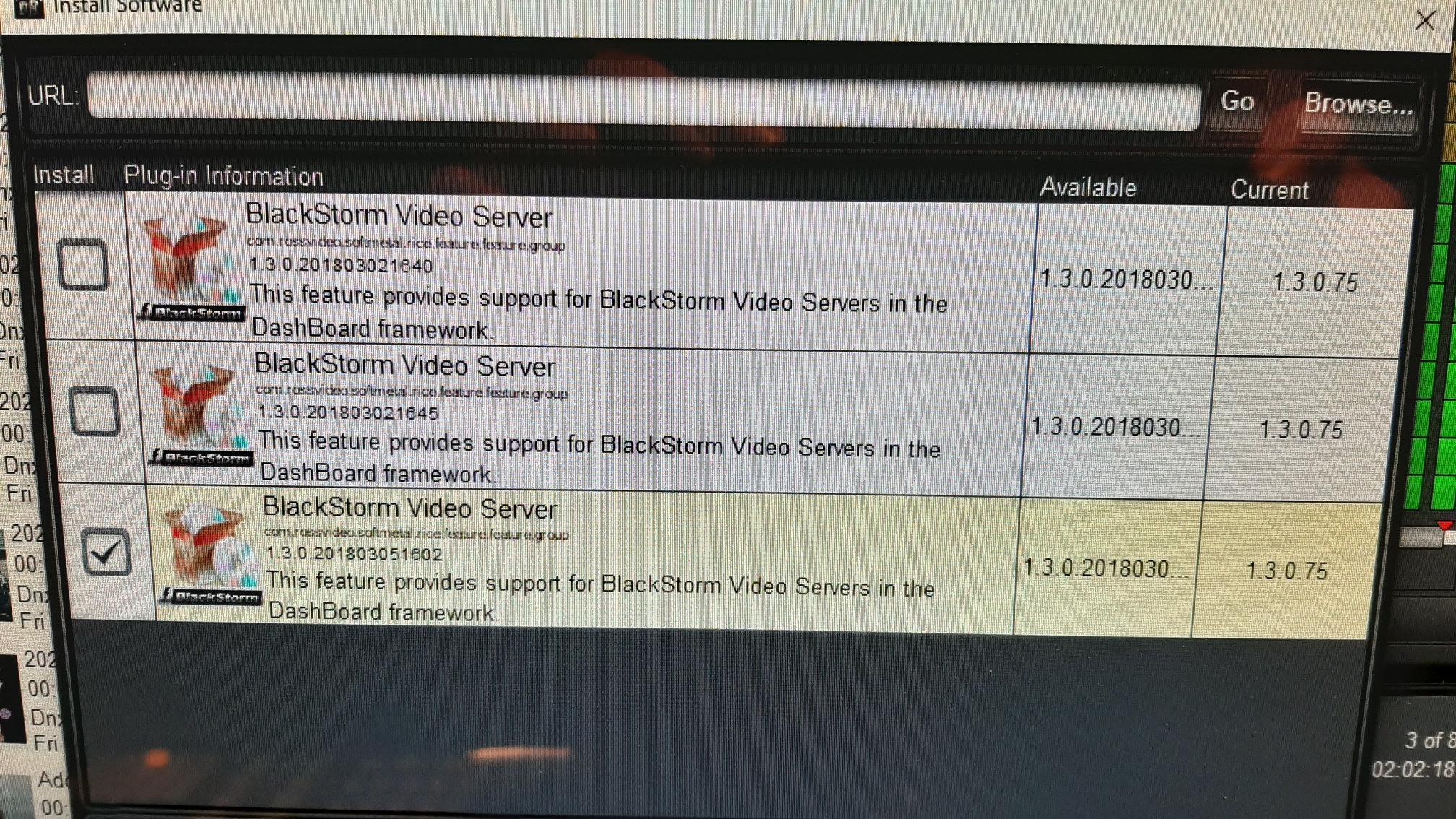
    Hi Ben,  I started to install the plugin and was presented with 3 options.  (One checked by default which appeared to be the most up to date option)  I selected to install this latter option as was prompted that I was about to downgrade my software.   When I look back at the install it appears to me that the current version installed is 1.3.0.75. 

    #DashBoard


  • 9.  RE: Dashboard w/Blackstorm (Flash Issue??)

    Posted 04-22-2021 15:37
    Following, as we have similar issues with Blackstorm not updating playlist once loaded.

    ------------------------------
    Nick Smith
    RESURRECTION LIFE FULL GOSPEL
    ------------------------------


  • 10.  RE: Dashboard w/Blackstorm (Flash Issue??)

    Posted 05-07-2021 15:41
    Hi John
    I would recommend uninstalling the 1.3.0.75 version to allow it to take the 1.3.0.2018XXXXX version. The reason it thinks this is a downgrade is because of the version number format. We typically use MAJOR.MINOR.MICRO.BUILD as the version numbers for DashBoard plug-ins. Major, minor, and micro are all numeric fields and are compared that way. The BUILD field is treated as a word and is compared that way - this means it is detecting the BlackStorm build stamp of "75" as being "newer" than the beta's build number which is actually just a timestamp (yyyyMMddhhss) "2018030..." because "7" is further along in an alphabetical comparison than "2". 

    Hope this is helpful.
    James

    ------------------------------
    James Peltzer
    Ross Video
    ------------------------------