Hi Chiel
This type of behavior goes beyond the normal capabilities of visual logic and requires scripting to achieve. If you would like to use visual logic, I would recommend creating utility functions to update the last execution time and check the last execution time and put them in an <api/> block. You can then use visual logic to call those functions to test how long it has been and visual logic to run your tasks:
function timeSince(key)
{
var time = ogscript.getObject(key);
if (time == null)
{
time = 0;
}
return Date.now() - time;
}

function updateExecutionTime(key)
{
var now = Date.now();
ogscript.putObject(key, now);
return now;
}
Using it in visual logic would look like this (note that we pass "updateExecutionTime" into ogscript.debug - this is to work around an existing visual logic bug when calling user functions).
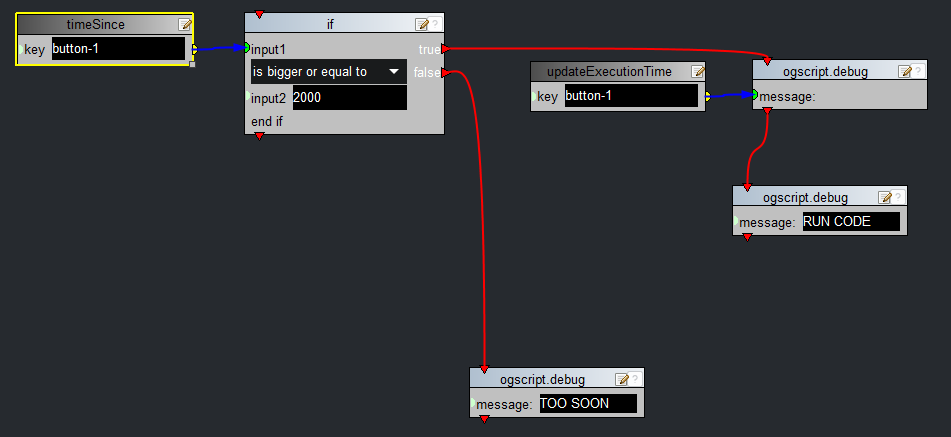
Here is the whole panel - it shows how you can reuse this code on any number of buttons:
<abs contexttype="opengear" keepalive="true">
<meta>
<api>function timeSince(key)
{
var time = ogscript.getObject(key);
if (time == null)
{
time = 0;
}
return Date.now() - time;
}
function updateExecutionTime(key)
{
var now = Date.now();
ogscript.putObject(key, now);
return now;
}
</api>
</meta>
<simplegrid cols="2" height="217" left="44" top="38" width="418">
<button buttontype="push" height="100" left="89" name="Pause for 2 seconds" top="249" width="217">
<task tasktype="ogscript">
/*! block id=1002,1003,1007,1008,1005,1006 !*/
if (timeSince("button-1") >= 2000)
{
ogscript.debug(updateExecutionTime("button-1"));
ogscript.debug("RUN CODE");
} else {
ogscript.debug("TOO SOON");
}
/*!!
<block id="1002" type="if" x="283" y="10" w="268" INPUT1="ID:1003" OPERATION="is bigger or equal to" INPUT2="2000" TRUE="ID:1007" FALSE="ID:1006" IGNORE="" />
<block id="1003" type="function_timeSince" x="56" y="12" w="243" key="button-1" />
<block id="1007" type="ogscript_debug" x="791" y="57" w="243" MESSAGE="ID:1008" next="ID:1005" />
<block id="1008" type="function_updateExecutionTime" x="569" y="59" w="243" key="button-1" />
<block id="1005" type="ogscript_debug" x="771" y="183" w="243" MESSAGE="RUN CODE" />
<block id="1006" type="ogscript_debug" x="508" y="365" w="243" MESSAGE="TOO SOON" />
!!*/
/*!!<checksum>0bf60a85e8710b0de4927554a166d141</checksum>!!*/</task>
</button>
<button buttontype="push" height="100" left="89" name="Pause for 3 seconds" top="249" width="217">
<task tasktype="ogscript">
/*! block id=1002,1003,1007,1008,1005,1006 !*/
if (timeSince("button-2") >= 3000)
{
ogscript.debug(updateExecutionTime("button-2"));
ogscript.debug("RUN MORE CODE");
} else {
ogscript.debug("TOO SOON");
}
/*!!
<block id="1002" type="if" x="283" y="10" w="268" INPUT1="ID:1003" OPERATION="is bigger or equal to" INPUT2="3000" TRUE="ID:1007" FALSE="ID:1006" IGNORE="" />
<block id="1003" type="function_timeSince" x="56" y="12" w="243" key="button-2" />
<block id="1007" type="ogscript_debug" x="791" y="57" w="243" MESSAGE="ID:1008" next="ID:1005" />
<block id="1008" type="function_updateExecutionTime" x="569" y="59" w="243" key="button-2" />
<block id="1005" type="ogscript_debug" x="771" y="183" w="243" MESSAGE="RUN MORE CODE" />
<block id="1006" type="ogscript_debug" x="508" y="365" w="243" MESSAGE="TOO SOON" />
!!*/
/*!!<checksum>4dc19696b68a84026b4b6c18c94bb7ef</checksum>!!*/</task>
</button>
<button buttontype="push" height="100" left="89" name="Pause for 1 second" top="249" width="217">
<task tasktype="ogscript">
/*! block id=1002,1003,1007,1008,1005,1006 !*/
if (timeSince("button-3") >= 1000)
{
ogscript.debug(updateExecutionTime("button-3"));
ogscript.debug("BUTTON 3");
} else {
ogscript.debug("TOO SOON");
}
/*!!
<block id="1002" type="if" x="283" y="10" w="268" INPUT1="ID:1003" OPERATION="is bigger or equal to" INPUT2="1000" TRUE="ID:1007" FALSE="ID:1006" IGNORE="" />
<block id="1003" type="function_timeSince" x="56" y="12" w="243" key="button-3" />
<block id="1007" type="ogscript_debug" x="791" y="57" w="243" MESSAGE="ID:1008" next="ID:1005" />
<block id="1008" type="function_updateExecutionTime" x="569" y="59" w="243" key="button-3" />
<block id="1005" type="ogscript_debug" x="771" y="183" w="243" MESSAGE="BUTTON 3" />
<block id="1006" type="ogscript_debug" x="508" y="365" w="243" MESSAGE="TOO SOON" />
!!*/
/*!!<checksum>bb408629101e061837f863cfcca863b3</checksum>!!*/</task>
</button>
<button buttontype="push" height="100" left="89" name="NO PAUSE" top="249" width="217">
<task tasktype="ogscript">
/*! block id=1005 !*/
ogscript.debug("JUST DO IT");
/*!!
<block id="1005" type="ogscript_debug" x="51" y="54" w="243" MESSAGE="JUST DO IT" />
!!*/
/*!!<checksum>e68eec64effcf3752e978b2d3a8c5bf5</checksum>!!*/</task>
</button>
</simplegrid>
</abs>
Cheers
James
#DashBoard