Well... I guess I wasnt clear enough...
When in the visual editor (WYSIWYG), creating buttons, fields, and so on... Yes, the copy/paste is CTRL + C and CTRL + V...
And that works. I can cut out a button with X as well, and paste with V, or copy with C, etc etc...
And as shown below, that is the case for the Keyboard Shortcuts as well.
Trust me, it was the first I checked!
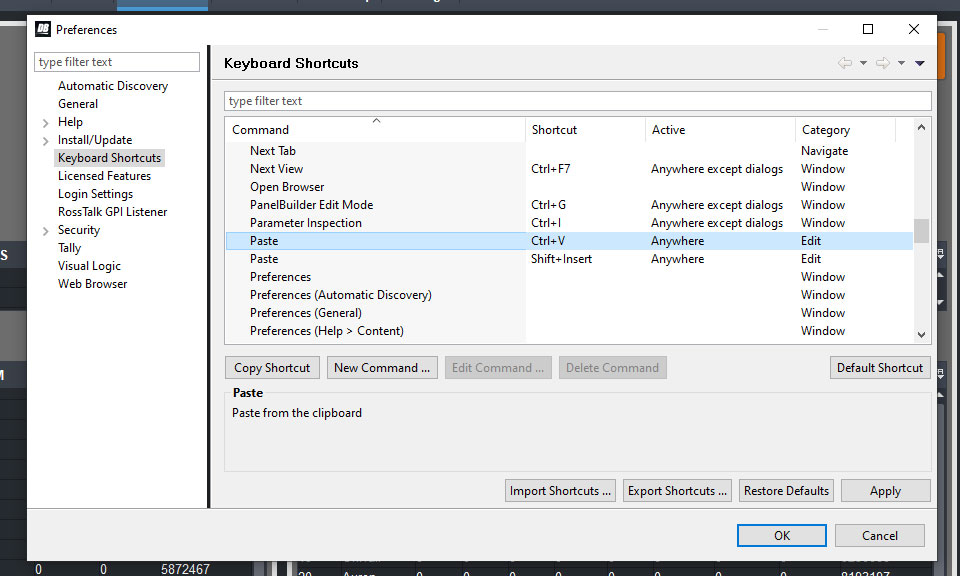
The problem is not when designing the custom dashboards, but if you go in to edit a script in a task..
As in not in Visual, but in ogScript, you get THIS horrible shortcut menu, and no, the original ones does not work.
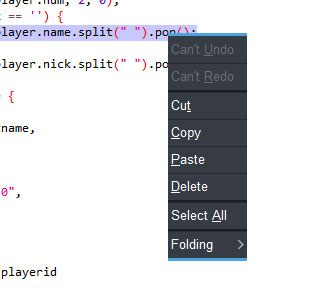
As you can see, the only ones making sense is the copy, wich is C, and select all with A...
Cut = T (X)
Paste = P (V)
Delete = D (?)
Undo = U (Z)
Redo = R (Shift + Z)
(Of course, all with CTRL as the controller...)
I did update to the latest version and the problem is still there.
v9.1.2
2020-08-21 T13:44
Will continue to search for possible mixups elsewhere, but yeah...
Guess next step is to uninstall and reinstall.
Cause it's bugging the crap out of me right now... As I KNOW the "originals" worked before!
Thanks for suggestions though.
#DashBoard