Facility Control

 View Only
Expand all | Collapse all

Text Sizing & Style Issues with Dropdown Boxes

Roger Heyward

Roger Heyward07-29-2020 17:11

  • 1.  Text Sizing & Style Issues with Dropdown Boxes

    Posted 07-29-2020 16:11

    I created a drop down list for the different quarters in basketball which works fine, but i can't change any of the attributes other than the background color.  Any thoughts?


  • 2.  RE: Text Sizing & Style Issues with Dropdown Boxes

    Posted 07-29-2020 17:11

    can you post your code?


    #DashBoard


  • 3.  RE: Text Sizing & Style Issues with Dropdown Boxes

    Posted 07-29-2020 19:27

    I don't actual use the code I just was changing it in the style window, but here is the code


    <param bottom="5" expand="true" height="94" oid="QuarterDropDown" right="3" showlabel="false" style="style:actionButton;tt:Select different quarters.;size:Bigger;font:bold;txt-align:center;" width="249"/>
    .


    #DashBoard


  • 4.  RE: Text Sizing & Style Issues with Dropdown Boxes

    Posted 07-29-2020 20:22

    im assuming your trying to change the style of a button. is that true? whatever it is, is it in a table or a grid? 


    #DashBoard


  • 5.  RE: Text Sizing & Style Issues with Dropdown Boxes

    Posted 07-29-2020 20:28

    Yes it is a dropdown list.  Not in a table.


    #DashBoard


  • 6.  RE: Text Sizing & Style Issues with Dropdown Boxes

    Posted 07-29-2020 20:32

    nm. i just realized that you said you were trying to work on a dropdownlist. ok. so i believe these attributes are not customizable, but maybe one of the experts will confirm.


    #DashBoard


  • 7.  RE: Text Sizing & Style Issues with Dropdown Boxes

    Posted 08-05-2020 16:17

    I have the same exact question.  In code it just shows as a <param> tag with no access to the underlying elements.


    #DashBoard


  • 8.  RE: Text Sizing & Style Issues with Dropdown Boxes

    Posted 08-05-2020 20:16

    While there are a limited number of attributes that impact the dropdown list when applied to the <param/> tag for a dropdown list, you can impact many more properties if you put the style information into the text component of your constraints.

    Here is an example:

    <param access="1" constrainttype="INT_CHOICE" name="Dropdown Test" oid="Dropdown_Test" precision="0" type="INT32" value="2" widget="default">

       <constraint key="0">aaa&lt;size:big;fg#FF0000;bg#000000&gt;</constraint>

       <constraint key="1">bbb&lt;size:small;fg#00FF00;bg#aaaaaa&gt;</constraint>

       <constraint key="2">ccc&lt;size:normal;fg#0000FF;bg#FF00FF&gt;</constraint>

    </param>


    Cheers

    James


    #DashBoard


  • 9.  RE: Text Sizing & Style Issues with Dropdown Boxes

    Posted 11-12-2020 03:18

    Hi James

    Is there a way to add attributes to <param> instead of modifying the constraints individually? There are two problems with that.

    1. it's a hassle to operate.
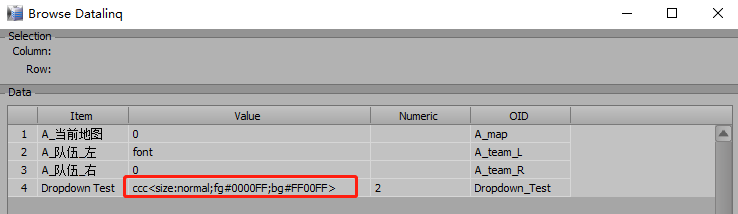
    2. it does change the style, but when you use this panel to stream it to datalinq.It displays the code in full, but that's not what I want.

    PS: Does this work for String type params?


    #DashBoard


  • 10.  RE: Text Sizing & Style Issues with Dropdown Boxes

    Posted 08-23-2021 12:37
    Hi James,

    Is the font size for dropdowns still a fixed size in #DashBoard 9.2?
    I've tried the above method of adding style information in the text component, but it's quite messy and doesn't seem to work.

    Thanks,
    ​​

    ------------------------------
    Noah
    ------------------------------


  • 11.  RE: Text Sizing & Style Issues with Dropdown Boxes

    Posted 08-23-2021 13:30
    Hi Noah
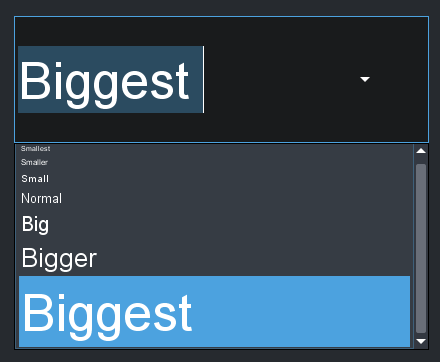
    Putting the size information into the choices is still the only mechanism that can impact the dropdown list fonts. I have verified that it is working in the shipping version (DB 9.2.1) of DashBoard. I understand that putting it into the string value for the parameter is not your preferred choice but it is the mechanism we have available.  If using the value as a String for DataLinq is problematic, you can also copy the non-style part of the string to a different parameter and DataLinq that one.
    <abs contexttype="opengear" id="_top" keepalive="false" style="">
    <meta>
    <params>
    <param access="1" constrainttype="INT_CHOICE" name="Choices" oid="choices" precision="0" type="INT16" value="2" widget="combo">
    <constraint key="0">Smallest&lt;size:smallest&gt;</constraint>
    <constraint key="1">Smaller&lt;size:smaller&gt;</constraint>
    <constraint key="2">Small&lt;size:small&gt;</constraint>
    <constraint key="3">Normal&lt;size:normal&gt;</constraint>
    <constraint key="4">Big&lt;size:big&gt;</constraint>
    <constraint key="5">Bigger&lt;size:bigger&gt;</constraint>
    <constraint key="6">Biggest&lt;size:biggest&gt;</constraint>
    </param>
    <param access="1" maxlength="0" name="Selected Choice String" oid="selected_choice_string" type="STRING" value="Small" widget="label"/>
    </params>
    </meta>
    <param expand="true" height="127" left="141" oid="choices" runtasksonload="true" showlabel="false" top="159" width="415">
    <task tasktype="ogscript">var choiceString = this.getValueAsString() + '';
    var styleStart = choiceString.indexOf('&lt;');
    if (styleStart &gt; 0)
    {
    params.setValue('selected_choice_string', 0, choiceString.substring(0, styleStart));
    }
    else
    {
    params.setValue('selected_choice_string', 0, choiceString);
    }</task>
    </param>
    <param expand="true" height="45" left="145" oid="selected_choice_string" showlabel="false" top="317" width="413"/>
    </abs>

    Cheers
    James

    ------------------------------
    James Peltzer
    Ross Video
    ------------------------------


  • 12.  RE: Text Sizing & Style Issues with Dropdown Boxes

    Posted 08-23-2021 14:58
    Hi James,
    Thanks for getting back to me. I can get your example to work as the parameter is an INT16 choice constraint.
    When I try and do the same on a String Key/Value constraint it doesn't seem to work. Is that to be expected?
    <param access="1" constraintstrict="false" constrainttype="STRING_STRING_CHOICE" maxlength="0" name="OS1_FIRST_A" oid="0x8" type="STRING" value="0" widget="default">
            <constraint key="0">Smallest&lt;size:smallest&gt;</constraint>
            <constraint key="178">Normal&lt;size:normal&gt;</constraint>
            <constraint key="242">Biggest&lt;size:biggest&gt;</constraint>
    </param>
    

    I appreciate in this example an INT16 constraint would be a better choice. Should the formatting work here too?
    Thanks,

    ------------------------------
    Noah
    ------------------------------


  • 13.  RE: Text Sizing & Style Issues with Dropdown Boxes

    Posted 08-23-2021 15:08
    Hi Noah
    Presently, the style formatter is only passed into the INT version of the dropdown list. I will flag a feature request for it to apply to all dropdown list types.

    ------------------------------
    James Peltzer
    Ross Video
    ------------------------------


  • 14.  RE: Text Sizing & Style Issues with Dropdown Boxes

    Posted 08-23-2021 15:27
    Thanks! Much appreciated.

    ------------------------------
    Noah
    ------------------------------