You can even go further, and add other html tags to the label. Something like this:
<html><center><strong>Hello</strong><br/><font color="#ff0000">World</font></center></html>
That will bold the first line, and make the second line red.
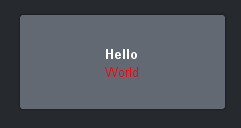
You can change colors and fonts and font sizes using this method.
------------------------------
Ben Gatien
Ross Video
------------------------------
Original Message:
Sent: 09-15-2021 09:05
From: Chance Hagerman
Subject: Custom Panel Text Buttons
Thanks Ben!
Love this community!
------------------------------
Chance Hagerman
AVL engineer
Christ Chapel
Original Message:
Sent: 09-15-2021 08:56
From: Ben Gatien
Subject: Custom Panel Text Buttons
In the text for the button, you can add "\n" for a carriage return. For example Back-up\nServer
That will automatically convert it to an HTML label, which will then look like this:
<html>Back-up<br>Server</html>
Where the <br> means a line break.
------------------------------
Ben Gatien
Ross Video
Original Message:
Sent: 09-15-2021 08:52
From: Chance Hagerman
Subject: Custom Panel Text Buttons
I'm designing a custom panel for a 2RU Ultritouch. How can I split the text lines on these buttons? We don't want to use smaller text than this for these buttons.
------------------------------
Chance Hagerman
AVL engineer
Christ Chapel
------------------------------