Here is an example panel that shows the different config options for touch wheels:
<?xml version="1.0" encoding="UTF-8"?><abs contexttype="opengear" gridsize="20" id="_top" keepalive="false" style="">
<meta>
<params>
<param access="1" constraint="0.0;100.0;0.0;100.0;1" constrainttype="INT_STEP_RANGE" name="integer1" oid="integer1" precision="0" type="INT32" value="29" widget="wheel"/>
</params>
</meta>
<param expand="true" height="180" left="100" oid="integer1" top="140" width="220"/>
<param expand="true" height="180" left="320" oid="integer1" top="140" width="220">
<config key="w.loop">false</config>
</param>
<param expand="true" height="180" left="540" oid="integer1" top="140" width="220">
<config key="w.loop">false</config>
<config key="w.numloops">5</config>
</param>
<label height="20" left="100" name="no config options" style="txt-align:west" top="320" width="220"/>
<label height="20" left="340" name="w.loop=false" style="txt-align:west;" top="320" width="220"/>
<param expand="true" height="40" left="100" oid="integer1" showlabel="false" top="380" widget="spinner" width="160"/>
<label height="20" left="560" name="w.loop=false, w.numloops=5" style="txt-align:west;" top="320" width="220"/>
<param expand="true" height="180" left="760" oid="integer1" top="140" width="220">
<config key="w.thumbcolor">#DD44FF</config>
</param>
<label height="20" left="780" name="w.thumbcolor=#AA44FF" style="txt-align:west;" top="320" width="220"/>
<param expand="true" height="180" left="980" oid="integer1" top="140" width="220">
<config key="w.zero">135</config>
</param>
<label height="20" left="1000" name="w.zero=135" style="txt-align:west;" top="320" width="220"/>
<label height="60" left="60" name="Touch Wheel Config Options" style="txt-align:west;size:Bigger;" top="20" width="720"/>
</abs>
I think the one you want is the w.zero one.
If you double click on the touch wheel, you put it here:
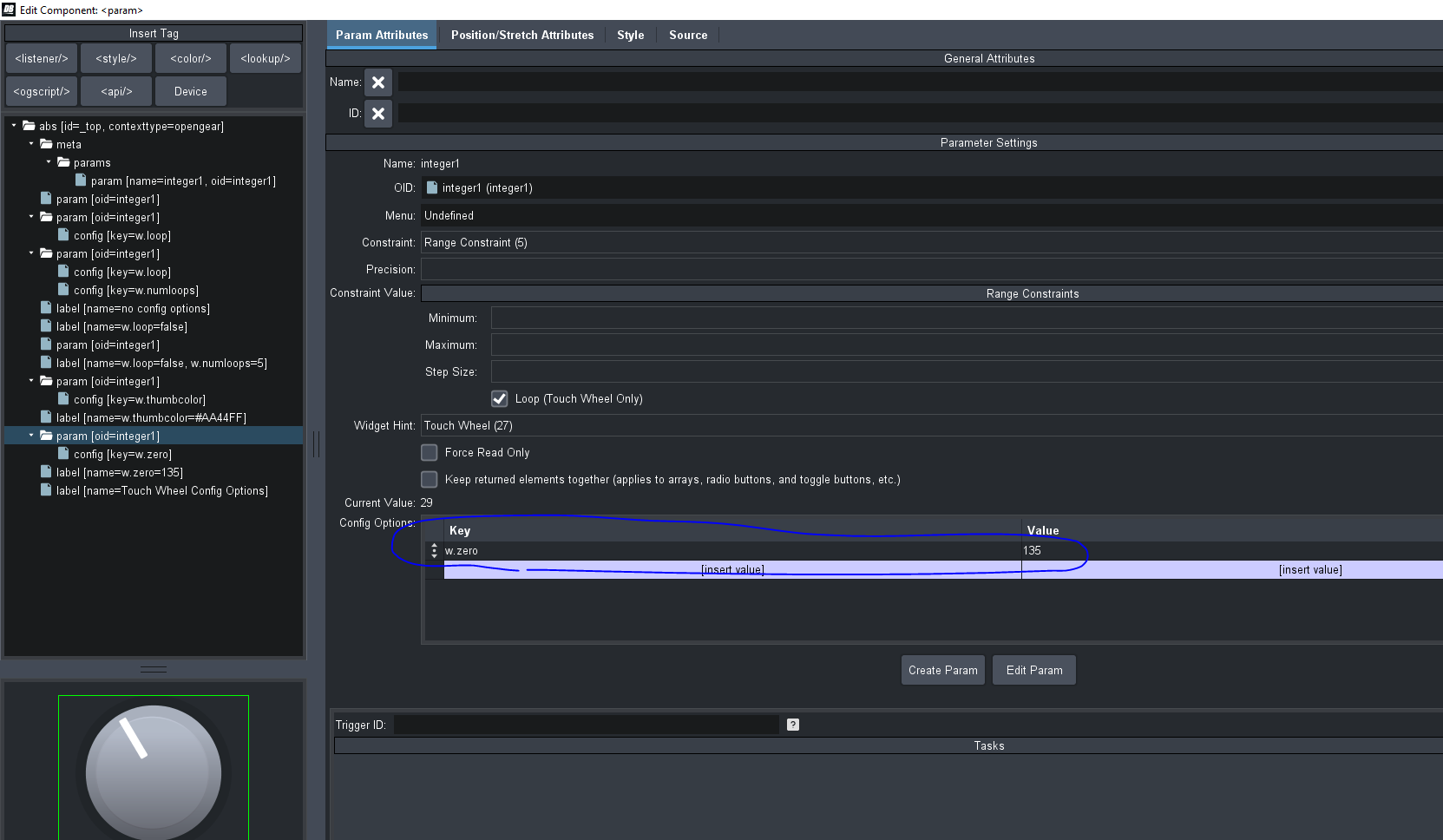
There's a little "?" next to that config options that list all the config options for different parameter widgets.
------------------------------
Ben Gatien
Ross Video
------------------------------
Original Message:
Sent: 10-23-2021 21:34
From: Plamen Marinov
Subject: Rotate TouchWheel interface
Hello all,
I am building a digital RCP on Dashboard and was wondering if I'm overlooking a way to rotate a TouchWheel interface so that the center point is at the top rather than on the left side.
I've tried adjusting the range and default values as a fix, but the hard stops when turning the dial are not even on each side when that's done.
Any suggestions or input would be appreciated from this Dashboard novice!
Thanks!
------------------------------
Plamen
------------------------------