Facility Control

 View Only
  • 1.  Carbonite Virtual Panel

    Posted 07-08-2021 12:03
    Hello,

    I've been having issues with DashBoard because when I try to add the Carbonite Virtual/Soft Panel on there and I put the 5257 Port, it automatically changes to the 5253 and it gives me the frame. 
    I'm not quite sure what is going on and I was hoping someone would help me.

    Thank you.

    ------------------------------
    Bruna Gregorio
    ------------------------------


  • 2.  RE: Carbonite Virtual Panel

    Posted 07-08-2021 12:11
    Hi Bruna,

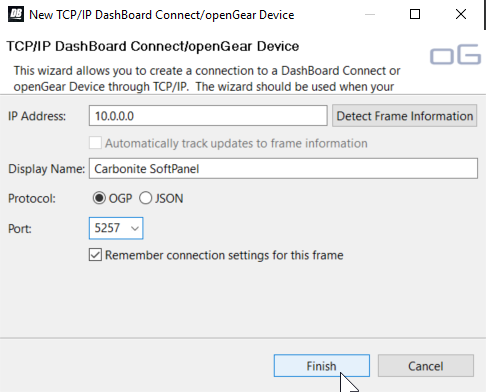
    When adding the device in DashBoard input the ip address, port and the display name manually. Following that DO NOT click "Detect Frame Information". Click finish.

    If you click the "Detect Frame Information" button it will auto detect the 5253 port for the Carbonite. That is very likely what you are seeing happen.

    See image below for my configuration.

    ------------------------------
    Antony Giraldo
    Ross Video
    ------------------------------


  • 3.  RE: Carbonite Virtual Panel

    Posted 07-12-2021 09:49
    Hello Antony, 

    Thank you! It's working now.

    I actually have another question about the Virtual Panel, so I changed the background and preset buttons names on the Bus Map and it updated on the actual panel but not on the Virtual Panel, do you know how I can link them together so whenever I change the Bus Map it will update on the Virtual Panel too?

    Thank you so much!

    ------------------------------
    Bruna Gregorio
    ------------------------------


  • 4.  RE: Carbonite Virtual Panel

    Posted 07-13-2021 00:49
    Hey Bruna 
    Think of them as completely separate panels so you can't change the bus maps at the same time. (so the virtual panel is a satellite panel).
    BUT depending on which Carbonite you have and which version of software you're running you can bus map in DashBoard from the Personality node which is way easier.

    ------------------------------
    Jos Ford
    Ross Video
    ------------------------------


  • 5.  RE: Carbonite Virtual Panel

    Posted 07-13-2021 10:08
    Hello Jos,

    So I was able to change the names of my Master Panel on the Personality tab but I was hoping to change it on the Virtual Panel as well and that's what I'm struggling with, I don't know where to go to change the button names on the Virtual Panel. Could you help me please?

    Thank you!

    ------------------------------
    Bruna Gregorio
    ------------------------------


  • 6.  RE: Carbonite Virtual Panel

    Posted 07-15-2021 01:17
    If you're wanting to change the bus map - open the soft panel and from the navigation menu (at the right above the fader) chose the Personality menu. There will be a bus map node which will be a satellite panel (probably 3) and you can set it from there (or use the menu display > config > bus map to do it).
    If you are wanting to change the source names that is done in the input menu and is the same across all panels.

    ------------------------------
    Jos Ford
    Ross Video
    ------------------------------


  • 7.  RE: Carbonite Virtual Panel

    Posted 07-15-2021 11:33
    Hi Jos,

    That was exactly what I was trying to do!
    Thank you, now the Bus Map on the Soft Panel is the way I wanted it to look like.

    Thank you so much for your time and help!

    ------------------------------
    Bruna Gregorio
    ------------------------------