Hi Steve,
No worries on where to post this. This is common for multi-product solutions, product overlaps with one another.
1. 2 settings that we can check.
a) Ensure that the on-air status for the ME is turned on.
- In DashBoard, Configuration > On Air
- Check that the On Air status for the ME is turned on.
b) Ensure that Red and Green Tally for the MV boxes are turned on.
- In DashBoard, Configuration > MultiViewer
- Click on the MV boxes and check that 'Green Tally' and 'Red Tally' are turned on.
2. Dashboard PTZ plugin acts as a gateway for tally. Carbonite sends tally to Dashboard, Dashboard in turn sends tally to the PTZ cam.
- This link will guide you to setup Carbonite to send tally to DashBoard:
http://help.rossvideo.com/carbonite-device/Topics/Devices/UMD/TSL.html - IP: Dashboard PC's IP address
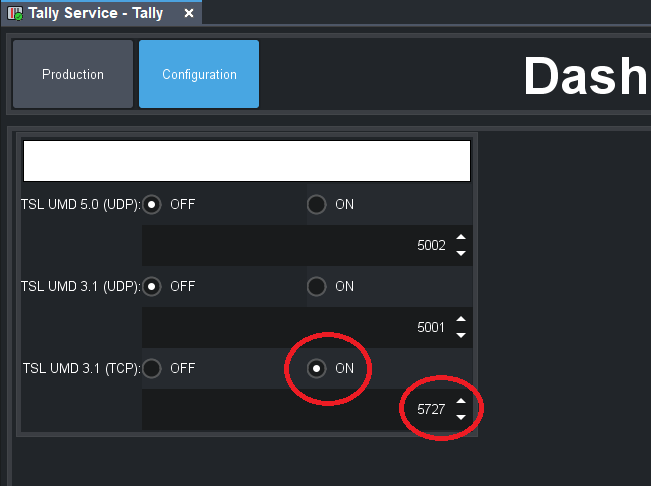
- Port: 5727 (default)
- Set the tally IDs for the PTZ cams in the Carbonite's Input config page.

- On Dashboard, turn on the Listener for TSL tally. (In Device Tree > Dashboard Services > Tally)
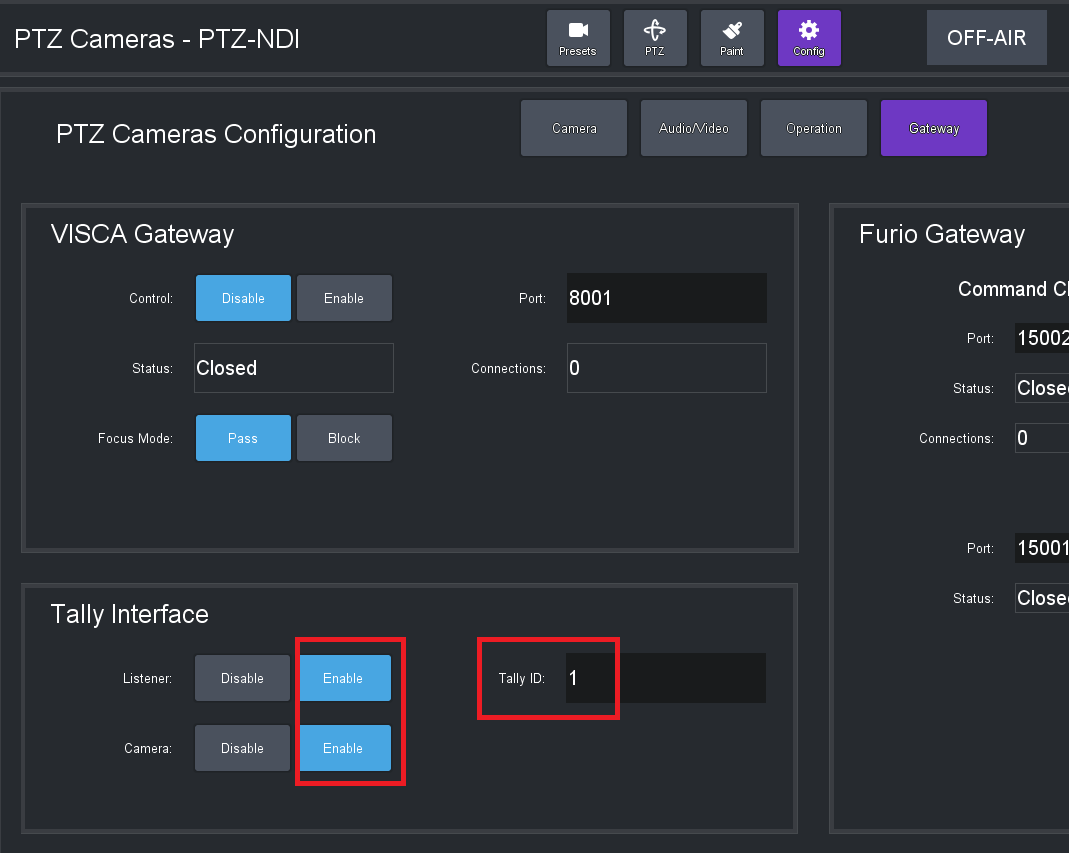
- In PTZ plugin, go to Config > Gateway
- Enable Listener and Camera, and set the same Tally ID as was set in Carbonite in the earlier step.
- After this, the red and green tally on the PTZ cam should light up when the source is on preview or program.
3. For Carbonite to control the PTZ-12G, DashBoard is used as the VISCA gateway. Below is the document to guide you to set this up on Dashboard side. (pg.42 onwards)
-
https://documentation.rossvideo.com/files/Manuals/Cameras/PTZ/User_Manual_for_PTZ_Camera_Control_Plugin_(8351DR-015).pdf- On Carbonite, set up a VISCA device and point it to the DashBoard machine's IP (and configured port)
Hope this helps! Let me know how it goes.
------------------------------
Aaron
Business Development Manager - Production Switchers & Servers
Ross Video
------------------------------
Original Message:
Sent: 05-11-2022 21:42
From: Steve Witwicki
Subject: Tally Control - Dashboard & New PTZ-12 Cameras
I wasn't exactly sure which group to post this issue. We have a Black Solo 13 Switcher and we're running Dashboard. Recently, we replaced our 3 PivotCams with the new PTZ-12 models (and we love them) but we have some issues:
- We don't have the red and green borders on the individual source windows indicating if a specific camera is in Preview or Program on our Multiview monitor.
- We don't have the tally lights display on the physical cameras themselves.
- While we can control zoom and positioning with Dashboard through the custom panels I built, we can no longer control them on the switcher surface using the little joystick or know to control focus.
I'm guessing that all of these can be addressed by changing settings in Dashboard, although I have no idea what panel to use. Any chance you can either direct me to step-by-step instructions somewhere on your website or a downloadable resource?
------------------------------
Steve Witwicki
Video Technical Director
Light of Christ Church
------------------------------