I don't know much about the UltriSync licensing, so I asked our Ultrix team. Here is what they responded with:
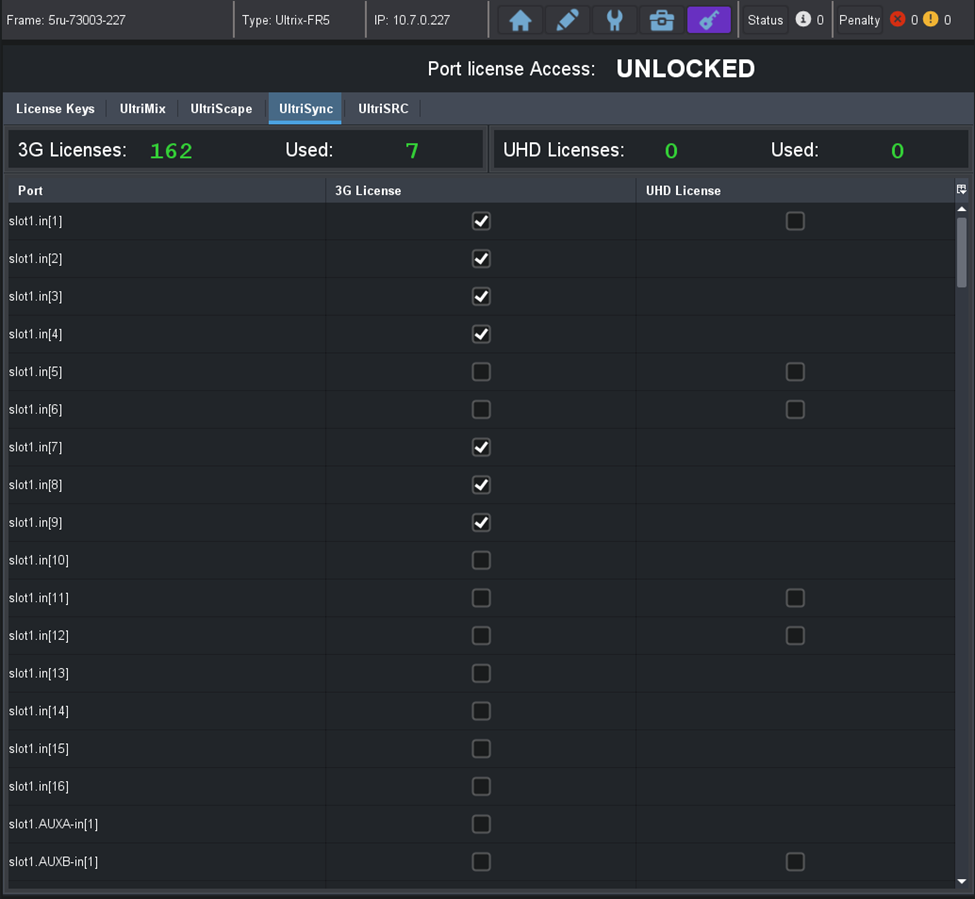
UltriSync list is arrange by slot and input order.
For example:
slot1.in[1] is row 0
slot1.in[2] is row 1
slot1.AUXA-in[1] is row 16
slot1.AUXB-in[1] is row 17
slot2.in[1] is row 18
:
OGP parameters are in params.framesync.ports
"params.framesync.ports.#.port" – the port name"params.framesync.ports.#.license" – port UltriSync enable/disable
Note : # is the row number. In a FR5 frame, "flex" slot and its input ports are placed at the end of the list.
Hopefully that helps you. If not, let me know and I can ask a few more questions.
Ben
------------------------------
Ben Gatien
Ross Video
------------------------------
Original Message:
Sent: 01-27-2022 11:52
From: Bill Brown
Subject: Dashboard Custom Grid
I am trying to make a custom grid to display the port licenses so if we need to we can toggle UltriSync on/off or reassign from an easy to get to location. Drop and drag in edit mode does not transfer the selection part of the page only the header. Anyone done anything similar or have any ideas. TIA
------------------------------
Bill Brown
Regional Video Engineer
Mediacom Communications/MC22
------------------------------