Hi Bruna,
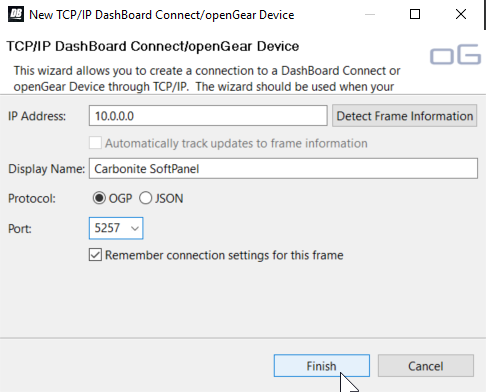
When adding the device in DashBoard input the ip address, port and the display name manually. Following that
DO NOT click "Detect Frame Information". Click finish.
If you click the "Detect Frame Information" button it will auto detect the 5253 port for the Carbonite. That is very likely what you are seeing happen.
See image below for my configuration.
------------------------------
Antony Giraldo
Ross Video
------------------------------
Original Message:
Sent: 07-08-2021 12:03
From: Bruna Gregorio
Subject: Carbonite Virtual Panel
Hello,
I've been having issues with DashBoard because when I try to add the Carbonite Virtual/Soft Panel on there and I put the 5257 Port, it automatically changes to the 5253 and it gives me the frame.
I'm not quite sure what is going on and I was hoping someone would help me.
Thank you.
------------------------------
Bruna Gregorio
------------------------------