Facility Control

 View Only
  • 1.  Baseball Control Dashboard Two-Way CSV Read/Write

    Posted 01-06-2020 20:58

    Project Outline: I'm trying to create a panel that can run the graphics for a baseball game. Nine batters per team in the lineup and the result of their at-bat, plus two pitchers that will have some simple stats tracked as the game goes on. There are no season-stats tracked, so it's just what I can track during the game I'm covering that I need to worry about.

    Pre-XPression I had all my team general info and my player info for both teams in separate worksheets in Excel, and I do a lot of copy/pasta to get the various players and their info into Excel from their online rosters and that was read directly by my graphics program and their "control panel" dashboard-like interface.

    I want the operator to be able to quickly WRITE to the backend database if spelling errors are discovered, or a player is replaced in the lineup, and have it READ the db to populate these fields in dashboard all based on jersey number.

    James has explained how to do this for me with XML, and I understood SOME of that, except I can't get a schema that works right to save my life, so I'm hoping CSV will be easier for me and my (high school) operators.  So far in my Javascript learning, I cannot wrap my head around arrays and loops, which, as I understand it, is a LOT of what I need to do for this project...

    Here's what my dashboard looks like right now (The buttons and fields are cartoonishly large because the Surface tablet we're using has such a high screen resolution!)
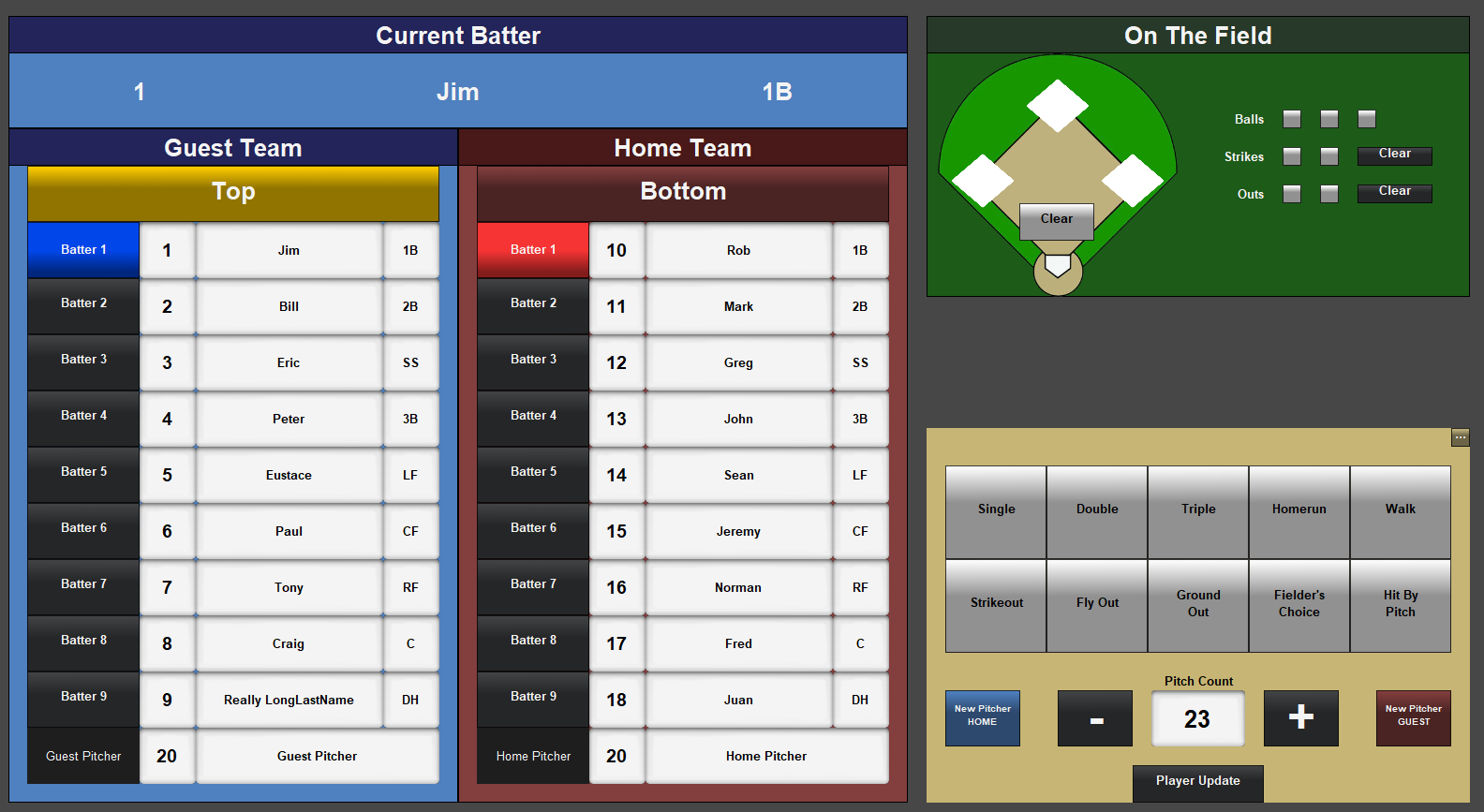
    The vertical selection buttons next to each player are one constrained parameter inside a simple grid to be vertical. The text entry boxes are all individual parameters.

    I'm hoping someone could hold my hand a bit through getting this set up? Assuming the player numbers aren't just all in order like they are in the image above, how do I use the jersey number for each team and fill in the other fields, or write in those fields and have it update the correct player in the CSV? Is it possible without an array? Or can someone send me a code snippet that's heavily commented so I understand what's happening?

    I'm almost wondering if it would be easier for me to put each player with all their information in different files on specific line numbers and just read and write from there individually, but that wouldn't help get the info I'm not displaying here (like height/weight/hometown, etc.) into XPression.

    Sorry to be such a noob, but I'm really trying, and just failing and I'm frustrated with myself at the moment. I'm worried I bit off more than I can chew. But I'm hoping that once I REALLY understand the read/write part of this, I'll be able to do the rest...


  • 2.  RE: Baseball Control Dashboard Two-Way CSV Read/Write

    Posted 01-07-2020 14:21

    Hi Dan.

    It will be very difficult read and write your data to your file system without employing arrays and loops - relatively basic ones anyhow.

    The good news is that you can create functions in an <api/> block, write them once (or copy them from an online resource) and then just call them whenever you need to.

    Do you have a copy of your data in CSV format you can post?

    James


    #DashBoard


  • 3.  RE: Baseball Control Dashboard Two-Way CSV Read/Write

    Posted 01-07-2020 16:36

    don't overreact. you're learning something new, and from the looks of your dashboard you're trying to run before you crawl.
    keep learning JavaScript. it will come to you with practice and patience. try to break your dashbaord down into bite size chucks.
    and share your .grid, .csv, .xml, and any other pertinent files. where is your data coming from?
    do these rosters live on a website or is some organization emailing them to you?
    and why do you need to write the data back to the Excel file if stats are only for individual games?
    it's a lot easier to keep your data flow 1 direction, so essentially, you'd just hit a button "get data", and that button would
    store all that data in your dashboard for later use.


    #DashBoard


  • 4.  RE: Baseball Control Dashboard Two-Way CSV Read/Write

    Posted 01-07-2020 16:51

    You're absolutely right, I'm totally trying to run. I'm actually going to step back from both of these projects for a little bit and try something simpler. But to answer your question, I am getting the player data from an online source, but it's Single-A baseball, so that data is notoriously incorrect, spelled badly, or changes 5 minutes before the game as someone gets added or removed due to frequent trades and level changes for the players. So I was hoping to be able to write back directly from the dashboard instead of going back into the CSV or XML database. That is definitely possible, but I'm working with a High School crew, so training them in reading and editing a file like that is more difficult than doing it all in Dashboard.

    The good news is, I have until next summer to get either of these major projects working, so I'm going to concentrate on something a bit simpler moving forward. I have also discovered that the new scoreboard system we're getting (a SportzHub) sends info in XML, so even though CSV can be edited in excel easily for my operators, I think I'm going to try to standardize on XML after all.

    So thanks both of you for your help, I'll post more I'm sure, but I'm going to let this thread languish for a bit!


    #DashBoard