Hi Dave
There are 2 mechanisms to achieve this. If you add the fullscreen argument to DashBoard.ini, that will work even when launching grid files directly (though the ini is overwritten each time DashBoard is installed/upgraded).
Another option would be to use Saved Layouts. You can launch with your grid file open and the application in full screen, then use SHIFT+F10 to save a new layout. Make sure the "Maintain current state" option is toggled off:
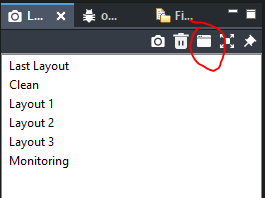
Now you can launch DashBoard with the -layout LAYOUT_NAME argument instead of the -fullscreen true argument.
Cheers
------------------------------
James Peltzer
Ross Video
------------------------------
Original Message:
Sent: 02-07-2022 07:34
From: Dave Whitehead
Subject: Launching a dashboard panel in full screen mode
Very interesting James. I'd prefer this approach, however, instead of launching Dashboard, we launch the grid file as part of our startup process to ensure the right thing is opened, and the user never actually sees or interacts with the other aspects of DB. When I tested this approach with a grid file it doesn't work - I'm guessing that the arguments section is not being passed along when the executable is called.
Is there a way when launching the DB app to specify a grid file to open as well fullscreen mode?
------------------------------
Dave Whitehead
Enterprise Architect
House of Commons
Canada
------------------------------
Original Message:
Sent: 02-04-2022 14:20
From: James Peltzer
Subject: Launching a dashboard panel in full screen mode
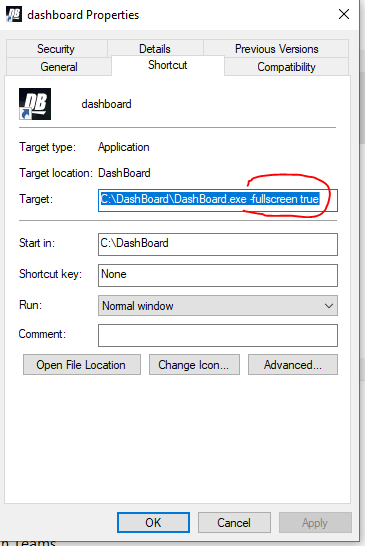
You can also launch with -fullscreen true argument.
------------------------------
James Peltzer
Ross Video
Original Message:
Sent: 02-03-2022 10:59
From: Michael Posch
Subject: Launching a dashboard panel in full screen mode
That works, thank you Dave
------------------------------
Michael Posch
Video Engineer
BR
Original Message:
Sent: 02-03-2022 10:21
From: Dave Whitehead
Subject: Launching a dashboard panel in full screen mode
I haven't found a way to do that via launch switches in the shortcut, but that would be ideal. What I currently do is save the grid file while full screen, and close DB without reverting it (Alt-F4). Then launching the grid file will open in fullscreen mode.
If there's a better way I'd also love to know how.
------------------------------
Dave Whitehead
Enterprise Architect
House of Commons
Canada