I tried it immediately.
But apparently I couldn't succeed.
It's beyond my understanding, but I think Resolume has some rules on how to receive the data.
Thank you for taking the time to write down the details, even though it's not a Ross product.
I'm going to give up for now, but it would be very helpful if I could succeed, so if anyone else sees this question and has had success or has any tips, that would be very helpful.
------------------------------
I-zy
Japan
------------------------------
Original Message:
Sent: 11-08-2021 16:08
From: James Peltzer
Subject: Accessing Resolume with OSC from Dashboard
Visual Logic does not have the capability built-in as it does not handle the MessageBuilder object. For mixed/binary OSC messages, you need to send the string part of the message with null padding (and a null terminator) to make its length divisible by 4 followed by the format bytes, followed by the binary part of the message.
We do not typically post examples of 3rd-party protocols but I am happy to show you how to use the message builder to write strings, null characters, and binary to a byte array:
var messageBuilder = ogscript.createMessageBuilder();
messageBuilder.writeString("/composition/layers/1/video/opacity"); //35 bytes
messageBuilder.writeChar(0); //NULL TERMINATOR - this happens to bring us to 36 bytes which is divisible by 4 so no padding necessary
messageBuilder.writeChar(','); //Start the format part
messageBuilder.writeChar('f'); //Padding
messageBuilder.writeChar(0); //Padding
messageBuilder.writeChar(0); //Padding
messageBuilder.writeFloat(0.25)
rosstalk.sendBytes('host_or_ip', port, messageBuilder.toByteArray(), null);
Cheers
James
------------------------------
James Peltzer
Ross Video
Original Message:
Sent: 11-01-2021 22:24
From: I-zy I-zy
Subject: Accessing Resolume with OSC from Dashboard
Thanks for sharing your tips.
As I mentioned, I'm not good at scripting, but it helped me to understand.
But unfortunately, the result was the same with UDP.
I think maybe I need to split the content of the message into "/composition/layers/1/video/opacity" and "0.25" as you said.
Is there a way to combine these two in Visual Logic in Dashboard and send them as OSC?
Original Message:
Sent: 11-01-2021 12:04
From: James Peltzer
Subject: Accessing Resolume with OSC from Dashboard
Hi I-zy
We wouldn't know anything about the Resolume receiver for OSC but I can tell you that there are a number of variations on the receivers for it. In some cases, the messages a mixed payload of binary and ASCII data. If Resolume uses this type of OSC message, you will need to use a message builder to build-up the parts of your message to send.
The other OSC processors we have encountered use pure ASCII data (and the good news is that this looks like it might be what you have here). The last one brought-up on the forums used UDP instead of TCP/IP so the first thing I would try is using exactly what you already have but with the "Send UDP Messages (String)" Visual Logic block.
Hope this helps.
James
------------------------------
James Peltzer
Ross Video
Original Message:
Sent: 11-01-2021 00:56
From: I-zy I-zy
Subject: Accessing Resolume with OSC from Dashboard
I would like to send OSC signal from Dashboard to Resolume of VJ software and control Resolume.
I have read the Resolume manual and also read the post at the URL above, but Resolume did not respond when I tried the same thing.
On the Resolume side of the mamual, it says that I can set the IP and port and send a message to get the operation to work.
"For instance, if you would like to set the opacity of layer 1 to 25%, you send an OSC message to the address "/composition/layers/1/video/ For instance, if you would like to set the opacity of layer 1 to 25%, you send an OSC message to the address
/composition/layers/1/video/opacity 0.25"
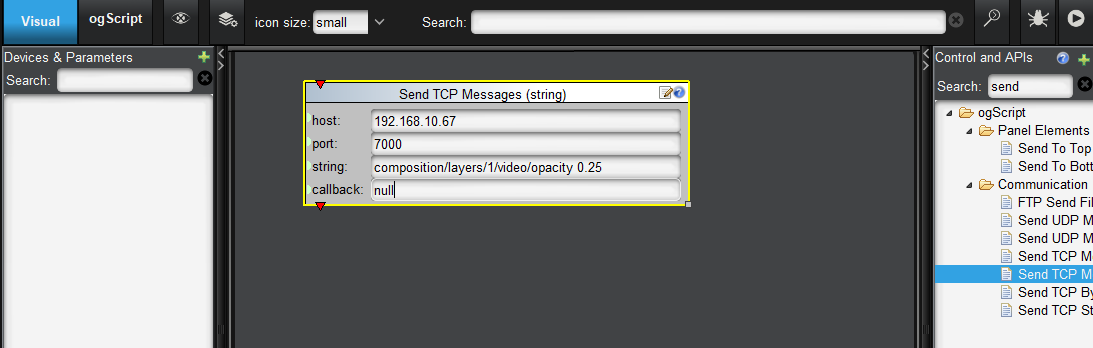
I can usually access Xpression and Carbonite on other computers from the Dashboard, so there should be no IP differences, but I'm not good at scripting, so I may be making a mistake.
Please let me know if you have any tips or successful methods.