As you know, you can change the constraints of a parameter. At the bottom of this post is a panel that shows examples of changing constraints on different types of parameters. Take a look at that, and if you still can't figure it out, let me know and I'll see if I can figure out how to do it with your specific panel.
When you change constraints, it does NOT change the value of any existing parameters even if those values no longer fit the constraints.
<abs contexttype="opengear" gridsize="20" id="_top">
<meta>
<params>
<param access="1" constrainttype="STRING_CHOICE" maxlength="0" name="choiceString" oid="choiceString" type="STRING" value="One" widget="radio-toggle">
<constraint>One</constraint>
<constraint>Two</constraint>
<constraint>Three</constraint>
<constraint>Four</constraint>
<constraint>Five</constraint>
</param>
<param access="1" constraintstrict="false" constrainttype="STRING_STRING_CHOICE" maxlength="0" name="keyChoiceString" oid="keyChoiceString" type="STRING" value="0" widget="default">
<constraint key="0">zero</constraint>
<constraint key="10">ten</constraint>
<constraint key="20">twenty</constraint>
<constraint key="30">thirty</constraint>
<constraint key="40">forty</constraint>
</param>
<param access="1" constrainttype="INT_CHOICE" name="choiceInt" oid="choiceInt" precision="0" type="INT16" value="2" widget="radio-vertical">
<constraint key="0">zero</constraint>
<constraint key="1">one</constraint>
<constraint key="2">two</constraint>
</param>
<param access="1" constraint="1.0;46.0;1.0;46.0;5" constrainttype="INT_STEP_RANGE" name="rangeInt" oid="rangeInt" precision="0" type="INT16" value="46" widget="default"/>
</params>
</meta>
<param expand="true" height="80" left="60" oid="choiceString" showlabel="false" top="200" width="500"/>
<button buttontype="push" height="60" left="660" name="English" top="200" width="160">
<task tasktype="ogscript">var choices = new Array();
choices[0] = 'One';
choices[1] = 'Two';
choices[2] = 'Three';
choices[3] = 'Four';
choices[4] = 'Five';
var newCon = params.createStringChoiceConstraint(choices);
params.replaceConstraint("choiceString", newCon);</task>
</button>
<button buttontype="push" height="60" left="840" name="French" top="200" width="160">
<task tasktype="ogscript">var choices = new Array();
choices[0] = 'Un';
choices[1] = 'Deux';
choices[2] = 'Trois';
choices[3] = 'Quatre';
choices[4] = 'Cinq';
var newCon = params.createStringChoiceConstraint(choices);
params.replaceConstraint("choiceString", newCon);</task>
</button>
<param expand="true" height="120" left="60" oid="keyChoiceString" showlabel="false" top="340" widget="list" width="120"/>
<button buttontype="push" height="60" left="660" name="Exponential" top="340" width="160">
<task tasktype="ogscript">var newValues = []
newValues.push({"key": "1", "value": "one"});
newValues.push({"key": "2", "value": "two"});
newValues.push({"key": "4", "value": "four"});
newValues.push({"key": "8", "value": "eight"});
newValues.push({"key": "16", "value": "sixteen"});
var newCon = params.createStringStringChoiceConstraint(newValues);
params.replaceConstraint("keyChoiceString", newCon);</task>
</button>
<button buttontype="push" height="60" left="840" name="Linear" top="340" width="160">
<task tasktype="ogscript">var newValues = []
newValues.push({"key": "0", "value": "zero"});
newValues.push({"key": "10", "value": "ten"});
newValues.push({"key": "20", "value": "twenty"});
newValues.push({"key": "30", "value": "thirty"});
newValues.push({"key": "40", "value": "forty"});
var newCon = params.createStringStringChoiceConstraint(newValues);
params.replaceConstraint("keyChoiceString", newCon);</task>
</button>
<label height="40" left="40" name="String Key/Value Constraint" style="txt-align:west;size:Big;" top="300" width="380"/>
<label height="40" left="40" name="String Choice Constraint" style="txt-align:west;size:Big;" top="160" width="340"/>
<label height="40" left="40" name="Int Choice Constraint" style="txt-align:west;size:Big;" top="480" width="340"/>
<label height="40" left="40" name="Int Range Constraint" style="txt-align:west;size:Big;" top="700" width="340"/>
<button buttontype="push" height="60" left="660" name="Alphabetical" top="520" width="160">
<task tasktype="ogscript">var choices = new Array();
choices[0] = 'A';
choices[1] = 'B';
choices[2] = 'C';
var choiceConstraint = params.createIntChoiceConstraint(choices);
params.replaceConstraint("choiceInt", choiceConstraint);</task>
</button>
<button buttontype="push" height="60" left="840" name="Numerical" top="520" width="160">
<task tasktype="ogscript">var choices = new Array();
choices[0] = 'one';
choices[1] = 'two';
choices[2] = 'three';
choices[3] = 'four';
choices[4] = 'five';
choices[5] = 'six';
var choiceConstraint = params.createIntChoiceConstraint(choices);
params.replaceConstraint("choiceInt", choiceConstraint);</task>
</button>
<param expand="true" height="160" left="60" oid="choiceInt" showlabel="false" top="520" widget="list" width="160"/>
<param expand="true" height="60" left="60" oid="rangeInt" showlabel="false" top="740" width="500"/>
<button buttontype="push" height="80" left="660" name="Small (1-10)" top="720" width="160">
<task tasktype="ogscript">var rConstraint = params.createIntRangeConstraint(1,10);
params.replaceConstraint("rangeInt", rConstraint);</task>
</button>
<button buttontype="push" height="80" left="840" name="<html><center>Medium (1-50)<br/>Step 5</center></html>" top="720" width="160">
<task tasktype="ogscript">var rConstraint = params.createIntRangeConstraint(1,50,5);
params.replaceConstraint("rangeInt", rConstraint);</task>
</button>
<button buttontype="push" height="80" left="1020" name="<html><center>Large (0-100)<br/>Step 10<br>Display 1000 more</center></html>" top="720" width="180">
<task tasktype="ogscript">var rConstraint = params.createIntRangeConstraint(0,100,1000,1100,10);
params.replaceConstraint("rangeInt", rConstraint);</task>
</button>
<label height="60" left="40" name="Replacing Constraints Examples" style="txt-align:west;size:Bigger;" top="40" width="620"/>
<label height="20" left="40" name="Parameters that have constraints can be updated to have new constraints. So you can change the choices, or the ranges that apply to a specific parameter." style="txt-align:west;" top="100" width="1100"/>
<label height="20" left="40" name="Each constraint type has a different ogscript method to create new constraints. Look at the code in the button tasks for examples." style="txt-align:west;" top="120" width="1120"/>
</abs>
------------------------------
Ben Gatien
Ross Video
------------------------------
Original Message:
Sent: 12-13-2021 07:38
From: Aleksander Stalsberg
Subject: Drop down combo list in a structured table in Dashboard
Followup question for you here Ben...
Is it possible to change the options in the dropdown then? I'm used to the createIntChoiceConstraint, but this seems to be a StringChoiceConstraint? And also, since the collunm is identified with a SubOID, would the replaceConstraint know to look for that as well as an OID?
I've been trying it here a bit, but I cant seem to get quite there, even without getting error messages in the debug.. heh...
And if so, how would the current value react to new options in the dropdown, or even having a value that since has been removed from the options?
------------------------------
Aleksander Stalsberg
Lillehammer Icehockey Club
Original Message:
Sent: 12-06-2021 13:35
From: Ben Gatien
Subject: Drop down combo list in a structured table in Dashboard
Hopefully I'm understanding what you want.
Try this:
<abs contexttype="opengear" gridsize="20" id="_top" keepalive="false">
<meta>
<params>
<param access="1" constrainttype="STRUCT" name="table" oid="table" stream="false" structtype="table" type="STRUCT" widget="table">
<value>
<subparam access="1" maxlength="-1" name="#" suboid="num" type="STRING" value="---" widget="default"/>
<subparam access="1" maxlength="-1" name="Player" suboid="player" type="STRING" value="---" widget="default"/>
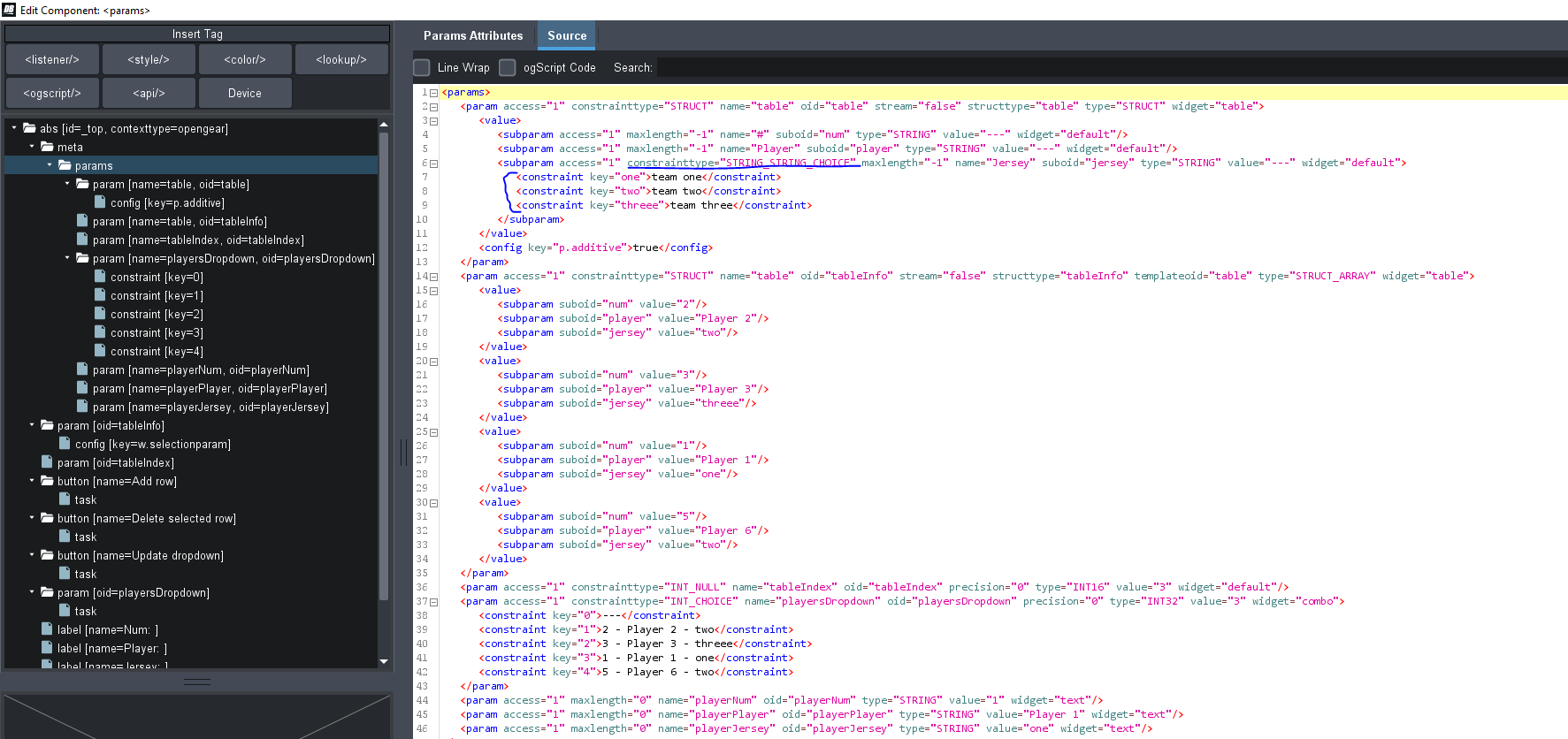
<subparam access="1" constrainttype="STRING_STRING_CHOICE" maxlength="-1" name="Jersey" suboid="jersey" type="STRING" value="---" widget="default">
<constraint key="one">team one</constraint>
<constraint key="two">team two</constraint>
<constraint key="threee">team three</constraint>
</subparam>
</value>
<config key="p.additive">true</config>
</param>
<param access="1" constrainttype="STRUCT" name="table" oid="tableInfo" stream="false" structtype="tableInfo" templateoid="table" type="STRUCT_ARRAY" widget="table">
<value>
<subparam suboid="num" value="2"/>
<subparam suboid="player" value="Player 2"/>
<subparam suboid="jersey" value="two"/>
</value>
<value>
<subparam suboid="num" value="3"/>
<subparam suboid="player" value="Player 3"/>
<subparam suboid="jersey" value="threee"/>
</value>
<value>
<subparam suboid="num" value="1"/>
<subparam suboid="player" value="Player 1"/>
<subparam suboid="jersey" value="one"/>
</value>
<value>
<subparam suboid="num" value="5"/>
<subparam suboid="player" value="Player 6"/>
<subparam suboid="jersey" value="two"/>
</value>
</param>
<param access="1" constrainttype="INT_NULL" name="tableIndex" oid="tableIndex" precision="0" type="INT16" value="3" widget="default"/>
<param access="1" constrainttype="INT_CHOICE" name="playersDropdown" oid="playersDropdown" precision="0" type="INT32" value="3" widget="combo">
<constraint key="0">---</constraint>
<constraint key="1">2 - Player 2 - two</constraint>
<constraint key="2">3 - Player 3 - threee</constraint>
<constraint key="3">1 - Player 1 - one</constraint>
<constraint key="4">5 - Player 6 - two</constraint>
</param>
<param access="1" maxlength="0" name="playerNum" oid="playerNum" type="STRING" value="1" widget="text"/>
<param access="1" maxlength="0" name="playerPlayer" oid="playerPlayer" type="STRING" value="Player 1" widget="text"/>
<param access="1" maxlength="0" name="playerJersey" oid="playerJersey" type="STRING" value="one" widget="text"/>
</params>
</meta>
<param expand="true" height="300" left="40" oid="tableInfo" showlabel="false" style="bg#DDDDDD;fg#000000;" top="60" width="540">
<config key="w.selectionparam">tableIndex</config>
</param>
<param expand="true" height="40" left="600" oid="tableIndex" style="txt-align:center;size:Big;font:bold;" top="60" widget="text-display" width="40"/>
<button buttontype="push" height="60" left="40" name="Add row" top="380" width="160">
<task tasktype="ogscript">var x = params.getElementCount('tableInfo');
var newPlayer = {
num: '',
player: '',
jersey: ''
}
params.setValue('tableInfo', x, newPlayer);</task>
</button>
<button buttontype="push" height="60" left="220" name="Delete selected row" top="380" width="160">
<task tasktype="ogscript">var i = params.getValue('tableIndex', 0);
var x = params.getElementCount('tableInfo');
if (x > 1) {
params.getParam('tableInfo', i).remove();
params.setValue('tableIndex', 0, i-1);
} else {
var newPlayer = {
"num": "",
"player": "",
"jersey": "",
};
params.setValue('tableInfo', 0, newPlayer);
params.setValue('tableIndex', 0, 0);
}</task>
</button>
<button buttontype="push" height="60" left="400" name="Update dropdown" top="380" width="160">
<task tasktype="ogscript">var players = ['---'];
var x = params.getElementCount('tableInfo');
for (var i = 0; i < x; i++) {
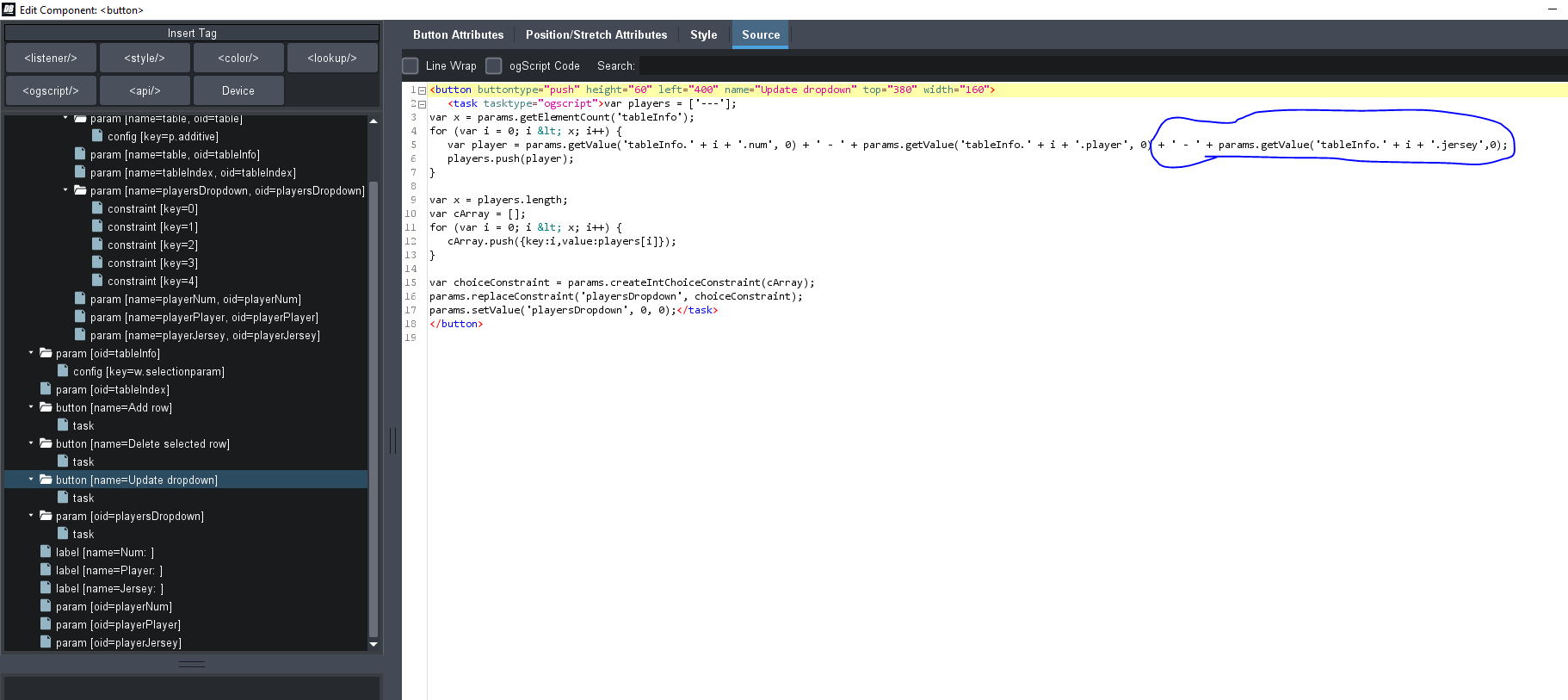
var player = params.getValue('tableInfo.' + i + '.num', 0) + ' - ' + params.getValue('tableInfo.' + i + '.player', 0) + ' - ' + params.getValue('tableInfo.' + i + '.jersey',0);
players.push(player);
}
var x = players.length;
var cArray = [];
for (var i = 0; i < x; i++) {
cArray.push({key:i,value:players[i]});
}
var choiceConstraint = params.createIntChoiceConstraint(cArray);
params.replaceConstraint('playersDropdown', choiceConstraint);
params.setValue('playersDropdown', 0, 0);</task>
</button>
<param expand="true" height="40" left="40" oid="playersDropdown" top="460" width="340">
<task tasktype="ogscript">var sel = params.getValueAsString('playersDropdown', 0);
var num = '';
var player = '';
var jersey = '';
if(sel != '---') {
var check = sel.substr(0,sel.indexOf(' '));
var x = params.getElementCount('tableInfo');
for (var i = 0; i < x; i++) {
if(params.getValue('tableInfo.' + i + '.num', 0) == check) {
num = params.getValue('tableInfo.' + i + '.num', 0);
player = params.getValue('tableInfo.' + i + '.player', 0);
jersey = params.getValue('tableInfo.' + i + '.jersey', 0);
break;
}
}
}
params.setValue('playerNum', 0, num);
params.setValue('playerPlayer', 0, player);
params.setValue('playerJersey', 0, jersey);</task>
</param>
<label height="40" left="40" name="Num: " style="txt-align:east;size:Big;" top="520" width="100"/>
<label height="40" left="40" name="Player: " style="txt-align:east;size:Big;" top="580" width="100"/>
<label height="40" left="40" name="Jersey: " style="txt-align:east;size:Big;" top="640" width="100"/>
<param expand="true" height="40" left="140" oid="playerNum" top="520" width="80"/>
<param expand="true" height="40" left="140" oid="playerPlayer" top="580" width="220"/>
<param expand="true" height="40" left="140" oid="playerJersey" top="640" width="220"/>
</abs>
I changed this:
and this:
------------------------------
Ben Gatien
Ross Video
Original Message:
Sent: 12-06-2021 12:59
From: Rich Worthley
Subject: Drop down combo list in a structured table in Dashboard
Thank you Ben! This is exactly what I was looking for. Now if I can combine some of the code that Aleksander had provided and yours I'll be happy camper. Here is the code that he provided. The main thing I'm looking for is pulling data from the table with a drop down and filling text boxes from the drop down. Your approach may be a little different, but that is okay as long as the end result is what I described.
<abs contexttype="opengear" gridsize="20" id="_top" keepalive="false" style="">
<meta>
<params>
<param access="1" constrainttype="STRUCT" name="table" oid="table" stream="false" structtype="table" type="STRUCT" widget="table">
<value>
<subparam access="1" maxlength="-1" name="#" suboid="num" type="STRING" value="---" widget="default"/>
<subparam access="1" maxlength="-1" name="Player" suboid="player" type="STRING" value="---" widget="default"/>
<subparam access="1" maxlength="-1" name="Jersey" suboid="jersey" type="STRING" value="---" widget="default"/>
</value>
<config key="p.additive">true</config>
</param>
<param access="1" constrainttype="STRUCT" name="table" oid="tableInfo" stream="false" structtype="tableInfo" templateoid="table" type="STRUCT_ARRAY" widget="table">
<value>
<subparam suboid="num" value="1"/>
<subparam suboid="player" value="Player 1"/>
<subparam suboid="jersey" value="Jersey 1"/>
</value>
<value>
<subparam suboid="num" value="2"/>
<subparam suboid="player" value="Player 2"/>
<subparam suboid="jersey" value="Jersey 2"/>
</value>
<value>
<subparam suboid="num" value="3"/>
<subparam suboid="player" value="Player 3"/>
<subparam suboid="jersey" value="Jersey 3"/>
</value>
</param>
<param access="1" constrainttype="INT_NULL" name="tableIndex" oid="tableIndex" precision="0" type="INT16" value="2" widget="default"/>
<param access="1" constrainttype="INT_CHOICE" name="playersDropdown" oid="playersDropdown" precision="0" type="INT32" value="3" widget="combo">
<constraint key="0">---</constraint>
<constraint key="1">1 - Player 1</constraint>
<constraint key="2">2 - Player 2</constraint>
<constraint key="3">3 - Player 3</constraint>
</param>
<param access="1" maxlength="0" name="playerNum" oid="playerNum" type="STRING" value="3" widget="text"/>
<param access="1" maxlength="0" name="playerPlayer" oid="playerPlayer" type="STRING" value="Player 3" widget="text"/>
<param access="1" maxlength="0" name="playerJersey" oid="playerJersey" type="STRING" value="Jersey 3" widget="text"/>
</params>
</meta>
<param expand="true" height="300" left="40" oid="tableInfo" showlabel="false" style="bg#DDDDDD;fg#000000;" top="60" width="540">
<config key="w.selectionparam">tableIndex</config>
</param>
<param expand="true" height="40" left="600" oid="tableIndex" style="txt-align:center;size:Big;font:bold;" top="60" widget="text-display" width="40"/>
<button buttontype="push" height="60" left="40" name="Add row" top="380" width="160">
<task tasktype="ogscript">var x = params.getElementCount('tableInfo');
var newPlayer = {
num: '',
player: '',
jersey: ''
}
params.setValue('tableInfo', x, newPlayer);</task>
</button>
<button buttontype="push" height="60" left="220" name="Delete selected row" top="380" width="160">
<task tasktype="ogscript">var i = params.getValue('tableIndex', 0);
var x = params.getElementCount('tableInfo');
if (x > 1) {
params.getParam('tableInfo', i).remove();
params.setValue('tableIndex', 0, i-1);
} else {
var newPlayer = {
"num": "",
"player": "",
"jersey": "",
};
params.setValue('tableInfo', 0, newPlayer);
params.setValue('tableIndex', 0, 0);
}</task>
</button>
<button buttontype="push" height="60" left="400" name="Update dropdown" top="380" width="160">
<task tasktype="ogscript">var players = ['---'];
var x = params.getElementCount('tableInfo');
for (var i = 0; i < x; i++) {
var player = params.getValue('tableInfo.' + i + '.num', 0) + ' - ' + params.getValue('tableInfo.' + i + '.player', 0);
players.push(player);
}
var x = players.length;
var cArray = [];
for (var i = 0; i < x; i++) {
cArray.push({key:i,value:players[i]});
}
var choiceConstraint = params.createIntChoiceConstraint(cArray);
params.replaceConstraint('playersDropdown', choiceConstraint);
params.setValue('playersDropdown', 0, 0);
</task>
</button>
<param expand="true" height="40" left="40" oid="playersDropdown" top="460" width="340">
<task tasktype="ogscript">var sel = params.getValueAsString('playersDropdown', 0);
var num = '';
var player = '';
var jersey = '';
if(sel != '---') {
var check = sel.substr(0,sel.indexOf(' '));
var x = params.getElementCount('tableInfo');
for (var i = 0; i < x; i++) {
if(params.getValue('tableInfo.' + i + '.num', 0) == check) {
num = params.getValue('tableInfo.' + i + '.num', 0);
player = params.getValue('tableInfo.' + i + '.player', 0);
jersey = params.getValue('tableInfo.' + i + '.jersey', 0);
break;
}
}
}
params.setValue('playerNum', 0, num);
params.setValue('playerPlayer', 0, player);
params.setValue('playerJersey', 0, jersey);</task>
</param>
<label height="40" left="40" name="Num: " style="txt-align:east;size:Big;" top="520" width="100"/>
<label height="40" left="40" name="Player: " style="txt-align:east;size:Big;" top="580" width="100"/>
<label height="40" left="40" name="Jersey: " style="txt-align:east;size:Big;" top="640" width="100"/>
<param expand="true" height="40" left="140" oid="playerNum" top="520" width="80"/>
<param expand="true" height="40" left="140" oid="playerPlayer" top="580" width="220"/>
<param expand="true" height="40" left="140" oid="playerJersey" top="640" width="220"/>
</abs>
Thanks in advance for your help.
------------------------------
Rich Worthley
INTERNATIONAL SOUND CORPORATION
Original Message:
Sent: 12-06-2021 11:00
From: Ben Gatien
Subject: Drop down combo list in a structured table in Dashboard
Is it something like this that you want?
<abs contexttype="opengear" keepalive="true">
<meta>
<params>
<param access="1" constrainttype="INT_NULL" name="Table" oid="params.table" precision="0" type="INT16" value="0" widget="script-table"/>
<param access="1" constrainttype="INT_NULL" name="Column 1" oid="params.col1" precision="0" type="INT16_ARRAY" value="0;1;2;3;4;5;6" widget="default"/>
<param access="1" maxlength="0" name="Column 2" oid="params.col2" precision="0" type="STRING_ARRAY" widget="default">
<value>horsename1</value>
<value>horsename2</value>
<value>horsename3</value>
<value>horsename4</value>
<value>horsename5</value>
<value>horsename6</value>
<value>horsename7</value>
</param>
<param access="1" constraintstrict="true" constrainttype="STRING_STRING_CHOICE" maxlength="0" name="Column 3" oid="params.col3" precision="0" type="STRING_ARRAY" widget="combo">
<value>two</value>
<value>three</value>
<value>two</value>
<value>one</value>
<value>two</value>
<value>three</value>
<value>two</value>
<constraint key="one">Race One</constraint>
<constraint key="two">Race Two</constraint>
<constraint key="three">Race Three</constraint>
<constraint key=""/>
</param>
</params>
</meta>
<param expand="true" height="507" left="13" oid="params.table" showlabel="false" top="13" width="567">
<config key="w.rowheight">45</config>
<config key="w.model">var model = {
isCellEditable: function(row, col)
{
return true;
},
getColumnCount: function()
{
return 3;
},
getRowCount: function()
{
return params.getElementCount('params.col1');
},
getColumnName: function(col)
{
return "Column " + (col + 1);
},
getParamOid: function(row, col)
{
return 'params.col' + (col + 1);
},
getParamIndex: function(row, col)
{
return row;
}
}
model</config>
</param>
</abs>
------------------------------
Ben Gatien
Ross Video
Original Message:
Sent: 11-29-2021 15:09
From: Rich Worthley
Subject: Drop down combo list in a structured table in Dashboard
Hi again!
Is it possible to have a drop down combo list in a structure table? Aleksander was kind enough to send me code that I had lost in a server crash to get data from a table from a drop down list. What he sent me works perfectly. But in my old version, I was able to designate one of the fields (parameters) in the table as a string with a String Key/Value Constraint. I can't recall how I did it, but I think the coding from my original version was a bit different from what Aleksander sent.
What I had was a 3 field table. The first field was an integer, the second was a string and the third was a string with the String Key/Value Constraint. The first field was just a number, the second would contain text, for inputting changes in a horse race (like a scratch or driver change), the third contained the race number (string key) where the change was occurring. But the value of the field would have a file location to call up the appropriate background from Xpression that looked like this "D:\Expression\Images\Pick 4 Changes R1 Bgd.png". The data would be streamed from Dashboard to Xpression, and connected via DataLinq.
Any help would be greatly appreciated!
Thanks
------------------------------
Rich Worthley
INTERNATIONAL SOUND CORPORATION
------------------------------