Hi Chris,
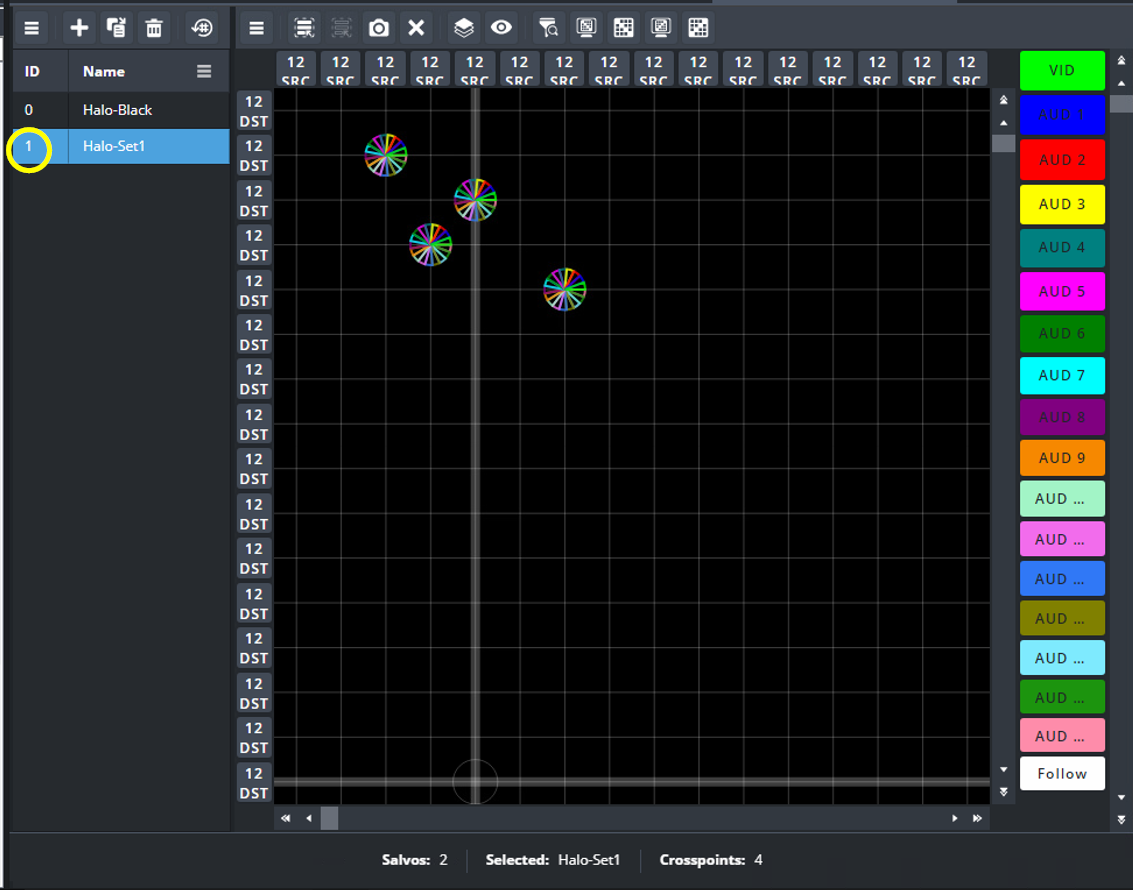
Yes, you're exactly right. The GPI maps to the Salvo index number. So, the command GPI 01 will trigger salvo #1. There isn't a method to query Salvo or crosspoint status via RossTalk, but I'll definitely suggest that to our development team.
Index number is shown in the Salvo configuration page in the Database Configuration:
------------------------------
Alun Fryer
Technical Marketing Lead, Hyperconverged Solutions
Ross Video
------------------------------
Original Message:
Sent: 07-24-2026 11:22
From: Chris Spacone
Subject: Automate Ultrix
Alun,
Good information in the document you pointed us to.
I note that the GVG protocol embodies the TS command which directly recalls a given salvo by name. Like Nate, I have a use case for 'automating' routing changes based on time of day. For example, we run a number of outputs from our FR12 into a signage system deployed in our common spaces. One of the systems (we refer to it as the Halo) would, in particular, benefit from a timed salvo execution. One salvo called "Halo Black (ID 0)" does as you would expect by routing black to all of the diplay processor inputs. Likewise "Halo Norm (ID 4)" sets those same destination crosspoints to a variety of sources available on the FR12.
While it appears that the GVG protocol would serve my need I'd much rather use RossTalk. Looking at the command table begining on page 80 it is unclear to me how I would execute a given salvo using RossTalk commands. The table refers to toe command "GPI ##" where "##" represents an index number. Would I simply craft a RossTalk command to sent GPI 01 CRLF (Halo Black) to the BCS at x.x.x.180?
An elegant and desirable extension to this would be knowing the state of a given salvo or corsspoint.and before executing any salvo, compare that state to what is expected and upon matching only then execute the salvo.
In general, am I on the right track with this?
-Chris Spacone
USC Annenberg
------------------------------
Chris Spacone
Broadcast Engineer
USC / ASG
------------------------------
Original Message:
Sent: 07-24-2026 09:46
From: Alun Fryer
Subject: Automate Ultrix
Hi Nate,
Ultrix and Ultricore-BCS don't have a built-in scheduling feature, but this can be done with an external program or script that can trigger the desired switching actions on the time interval or scheduled time-of-day. Out of the box, we support GV Native and Probel SW-P-08 protocols. But if you're handcrafting your own automation script, RossTalk is probably the easiest; it is a simple fire-and-forget ASCII protocol that can trigger the Ultrix or BCS to switch on demand.RossTalk can be used as part of a DashBoard CustomPanel or stand-alone script or application (ChatGPT could probably whip up a simple Python script for you in no time).
RossTalk protocol is outlined "Ultrix and Ultricore Database Guide" found here.
Cheers,
------------------------------
Alun Fryer
Technical Marketing Lead, Hyperconverged Solutions
Ross Video
------------------------------