Have you tried render views yet?
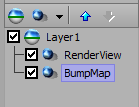
You could make a scene with the grey and the text in and then you make a material either in another scene or even in the same scene but using a different camera or you can use something called owner scene.
Either way you make a material that has a render view shader that's looking on your quad and text objects which will make it all one "flat" texture, then add a bump map shader on that same texture and the bump will affect it all as one thing. Pretty sure that will achieve what you want.
------------------------------
Simon Redmile
Senior Graphic Programmer & Designer
Ross Video
Bristol United Kingdom
------------------------------
Original Message:
Sent: 06-29-2022 14:23
From: Shaun Coy
Subject: Can we use 'bumpmap' to displace graphics text like this?
@Simon Redmile How would you suggest applying a normal mask to distort a graphic in this way? I see that a map (png, image file) can be applied to a material, but how does one distort multiple objects in a scene with either a png or avi map?
------------------------------
sctv
------------------------------
Original Message:
Sent: 06-29-2022 03:49
From: Simon Redmile
Subject: Can we use 'bumpmap' to displace graphics text like this?
XPression supports normal maps.
------------------------------
Simon Redmile
Senior Graphic Programmer & Designer
Ross Video
Bristol United Kingdom