Your best path to do this is to create a context in your panel that points to your switcher. You do this by selecting the "Device" button in the OGLML source editor. You can then set the ID field to whatever you want to use as the name and click the 'configure' button to point it at your actual switcher.
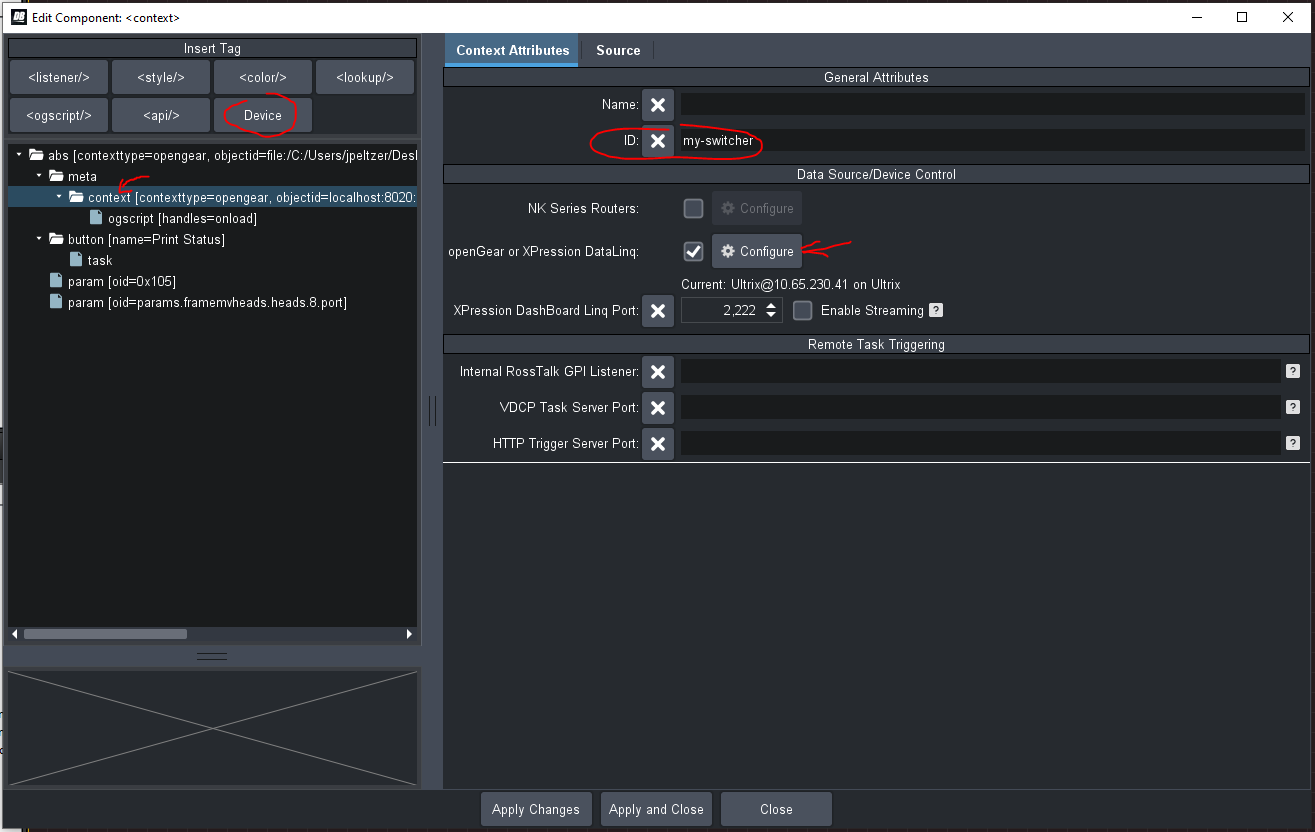
In the case above, I use "my-switcher" as the ID so, in ogScript, I can access its parameters with: params.getParam('my-switcher', PARAMETER_OID, 0).setValue(1);
Note - when you are getting or setting a parameter inside of a different context than the main panel, you need to use params.getParam(CONTEXT_ID, OID, INDEX).setValue(NEW_VALUE) or .getValue(). The syntax I gave in my original message is incorrect (I will fix it).
Cheers
James
------------------------------
James Peltzer
Ross Video
------------------------------
Original Message:
Sent: 08-04-2022 15:46
From: Scott Sumner
Subject: Capture from Dashboard panel / HTML
What is / where would I find the NAME_OF_SWITCHER_CONTEXT? Would that be the IP of the frame or console?
Scott
--
Scott Sumner
Media Coordinator
Glorifying Christ by Making Disciples Who Worship, Serve, Grow in Missional Communities, and Multiply Churches.
C. 469-323-6172
5522 Whitman Ave.
Fort Worth, TX 76133
This communication contains information which is confidential and may also be privileged. It is for the exclusive use of the intended recipient(s). If you are not the intended recipient(s) please note that any distribution, copying or use of this communication or the information in it is strictly prohibited. If you have received this communication in error please notify us by email (info@wedgwoodbc.org) or by telephone (817-292-1400) and then delete the email and any copies of it.
Original Message:
Sent: 8/4/2022 8:54:00 AM
From: James
Subject: RE: Capture from Dashboard panel / HTML
Hi Scott
The button you copied over to your panel is likely a pushbutton parameter. The HTML triggers will only execute DashBoard-side ogScripts associated with the UI component when it is pressed. The capture is likely being done by DashBoard sending a set value request to the switcher whenever the button is actually pressed.
If this is the case, you can trigger the same functionality by creating a regular <button/> with an HTML trigger and, in its task, call params.setValue('NAME_OF_SWITCHER_CONTEXT', OID_OF_CAPTURE_BUTTON, 1);
If that doesn't work, I would check the constraint of the Capture button to see if it is expecting a value other than '1'.
Hope this helps.
James
------------------------------
James Peltzer
Ross Video
------------------------------