Production Switchers

 View Only
  • 1.  Capture Xpression GFX in Carbonite

    Posted 10-04-2022 21:00
    For reasons too silly to explain, I want to capture an Xpression lower third (with altha) in Carbonite Media Manager and save it as a Capture or Still. For very obvious reasons, Media Manager is not an input source in .... Media Manager (where you do that capture). I can send the graphic to Carbonite the traditional way (Device Configuration and CC), but from there I can't get it into Media Manager / Capture or Still. 

    Thoughts (besides "he's nuts")?

    ------------------------------
    [Danny] [Skarka] Ross Pilot since Synergy
    [Producer, Director, Technical Director]
    ------------------------------


  • 2.  RE: Capture Xpression GFX in Carbonite

    Posted 10-04-2022 22:07
    you can also "export take item" as an .avi, a sequence of stills or you can pick the exact frame you want. Save it to a thumb drive and add it to your switcher. or ftp if you have that set up.

    ------------------------------
    Malcolm Thorpe
    Free Lance Xpression Designer/Carbonite TD
    ------------------------------


  • 3.  RE: Capture Xpression GFX in Carbonite

    Posted 10-05-2022 20:05
    What are the steps to do that export and does it get me alpha?

    ------------------------------
    [Danny] [Skarka] Ross Pilot since Synergy
    [Producer, Director, Technical Director]
    ------------------------------


  • 4.  RE: Capture Xpression GFX in Carbonite

    Posted 10-05-2022 20:32
    From the sequencer, right click on the scene you want to export. If it is a single frame the. Select that box and decide which frame you want. Alpha SHOULD follow to the exported frame.

    Sent from my iPhone


  • 5.  RE: Capture Xpression GFX in Carbonite

    Posted 10-05-2022 11:07
    Hi Danny,

    I'm not sure of your end goal here.  but for a quick XPression graphic > Carbonite i recommend using the Rosslinq feature.  Rosslinq allows you to set up a channel in XPression to directly FTP a graphic to a Carbonite still store.  you just set this up under Edit > Hardware, add it to the channel list, put in the carbonite frame IP and pick which Media Store channel to load the still into.  You can create a channel for each still store if you would like.

    I have also in the past built a custom control to capture a media store.  MS 1 & 2 allow you to capture a still with alpha, it will save it to your USB drive then load it into the MS channel you stored it too.

    Hope this helps

    ------------------------------
    Brandon Rhoda
    Ross Video
    United States
    ------------------------------


  • 6.  RE: Capture Xpression GFX in Carbonite

    Posted 10-05-2022 18:39
    The reason for this is to work around the delay and how sometimes the see the graphic build when send to the Media Player from Xpression via FTP. My idea is to store these in Media Manager and play them back using CC, which gives an immediate, clean take.

    ------------------------------
    [Danny] [Skarka] Ross Pilot since Synergy
    [Producer, Director, Technical Director]
    ------------------------------


  • 7.  RE: Capture Xpression GFX in Carbonite

    Posted 10-05-2022 12:13

    To answer though your question about how to capture. 

    in dashboard live assist menu go to the media tab and there you will have the sub tabs including the capture tab. 

    note that you can only capture a still not a sequence of images. 

    mid you need the animation Mal points to using the sequence to export to images - then you can select range of the scene (in case it was built with a longer scene director than the sequence - don't want to load extra black frames and waste ram ). Export to PNG and make sure you select with alpha. 


    ------------------------------
    Les O'Reilly
    Director - Switcher Product Management
    ------------------------------


  • 8.  RE: Capture Xpression GFX in Carbonite

    Posted 10-05-2022 20:08
    Les,
    I understand all but the last paragraph. What source would I select to capture as none seem to carry the alpha. I am looking to capture lower 3rds with alpha from Xpression and add them to the Media Manager for playback via CC to bypass the delay and sometimes rough transfer when using XP as a device FTPing to the MediaManager.

    ------------------------------
    [Danny] [Skarka] Ross Pilot since Synergy
    [Producer, Director, Technical Director]
    ------------------------------


  • 9.  RE: Capture Xpression GFX in Carbonite

    Posted 10-06-2022 10:34
    Here is what i would do now that i understand this a bit better and knowing this is a pre-production workflow.

    In XPression I would select all the sequence items i need for the show and the export them as images.
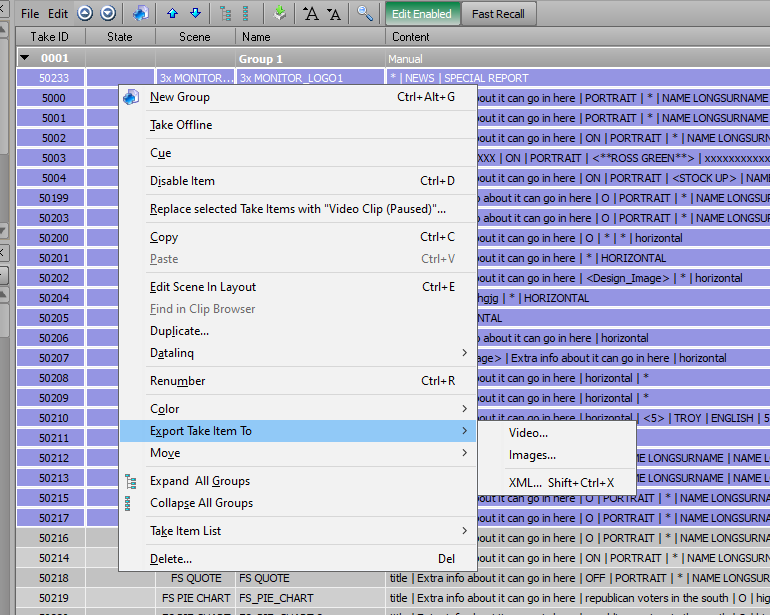
    In export to images select "Single Frame." Select the target folder to export all the images too, and make sure the format is PNG or TGA. Then hit export.
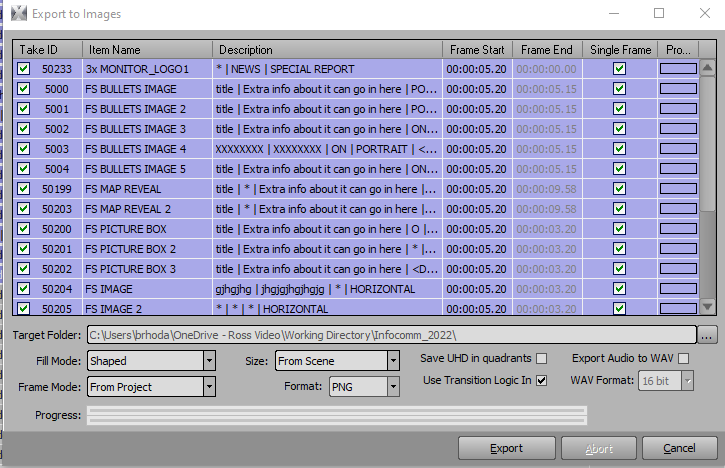
    If you want the full animations then you wouldn't select single frame, just know you only have so much Cache and it will fill up quickly. you don't want to be waiting for graphics to load during a show.

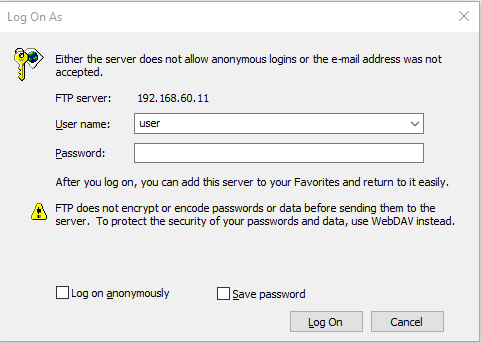
    From here FTP into carbonite USB.  User name: user  Password: password
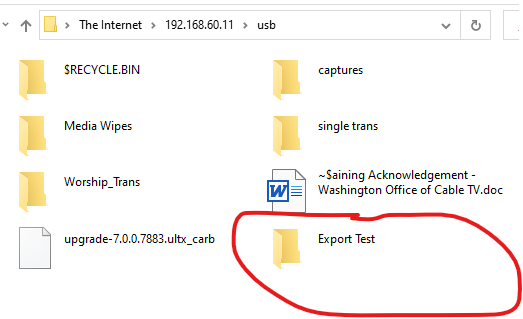
    go to the usb folder and transfer your folder here.
    Then in Media Manager
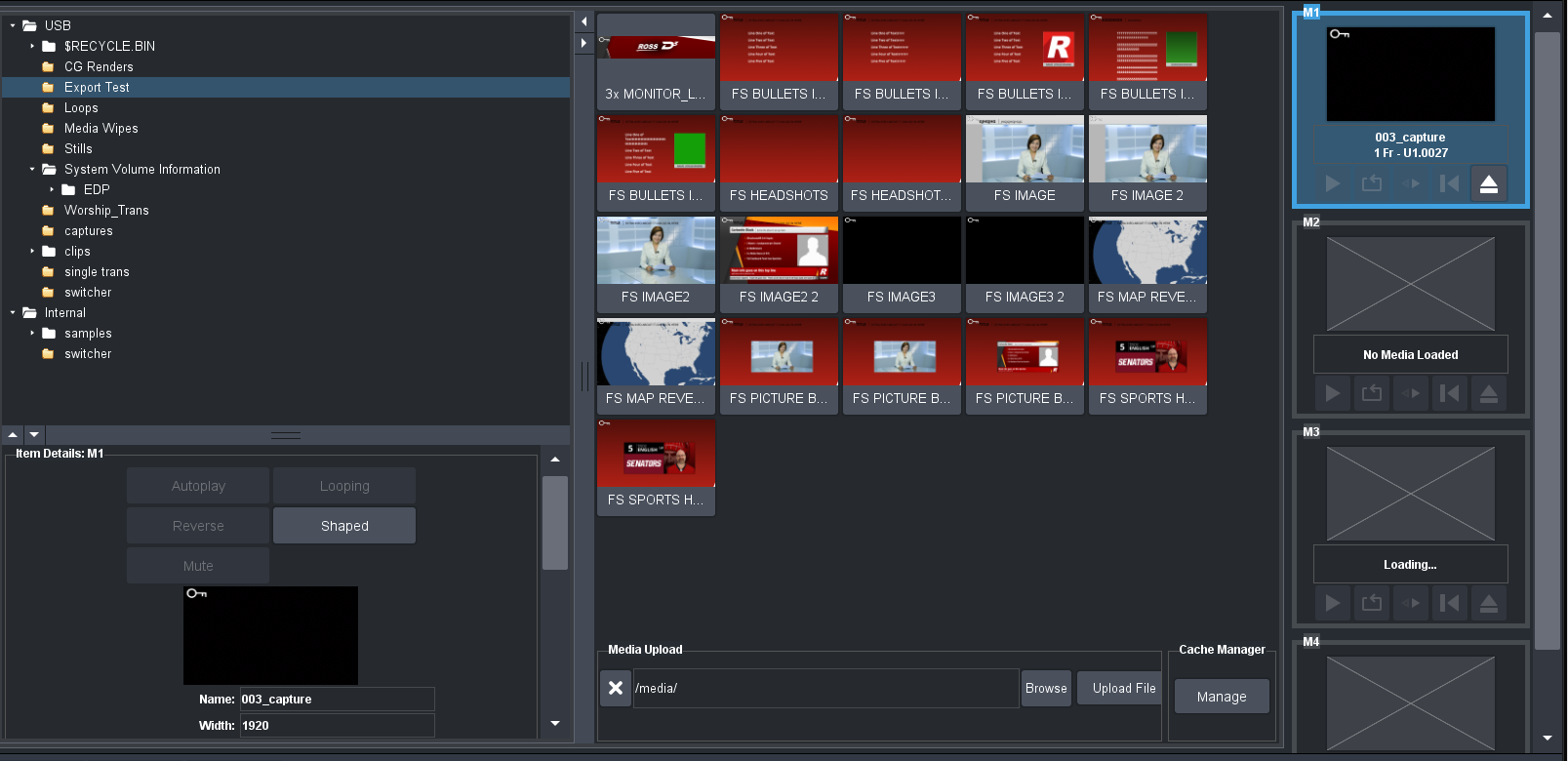
    *You can also upload in Dashboard in media manager as seen in the image

    If you are layering graphics and actually need to capture, you are correct that you can't select a Media store as a capture source, so your best bet is to export your scenes and import them into carbonite.


    ------------------------------
    Brandon Rhoda
    Ross Video
    United States
    ------------------------------