Well I feel silly. I dig through these folders all the time copying specific things from directory to directory, renumbering things. It's a great lazy way to move things. I use Filezilla. Until you mentioned it, I didn't notice the rstate file.
Sorry to waste you time.
Original Message:
Sent: 06-27-2023 11:00
From: Les
Subject: Carbonite Attributes
Hi Danny,
You will need to do this "manually"..
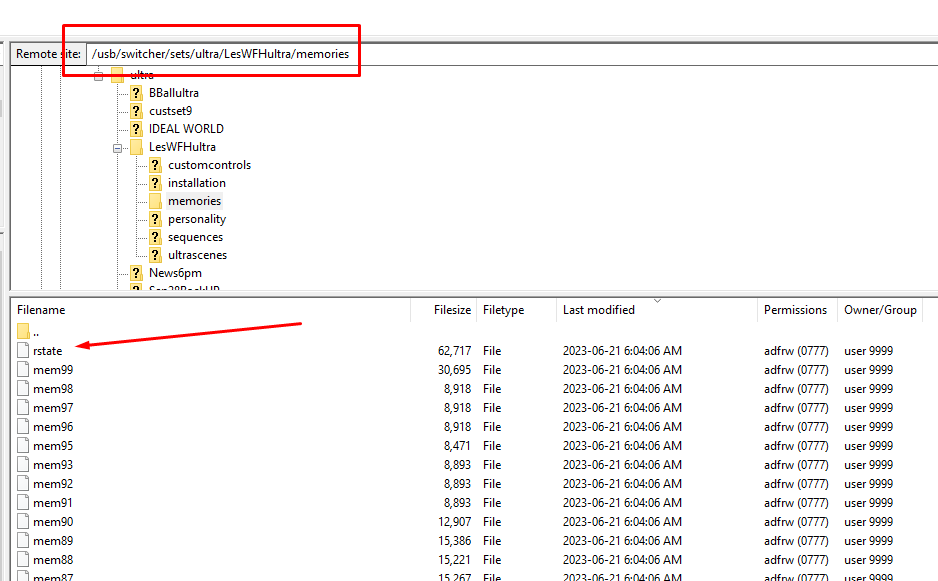
Either via FTP to the Frame or by pulling out the USB and doing it from a PC..
under the USB - switcher - sets - ultra
Then you will find your individual Set files (also how you can rename the default SET0-SET9) and inside of those you then go into:
memories
In that folder you will find all of the mem files and the one labeled "rstate" you want to copy that file to your PC.. Then you can go to each of the other show files are replace it in those files.
------------------------------
Les O'Reilly
Director - Switcher Product Management
------------------------------
Original Message:
Sent: 06-23-2023 18:58
From: Danny
Subject: Carbonite Attributes
Impressive reply. Maybe more detail next time? :)
RSTATE: I'd like to copy this from show file to show file. Is there a good proceedure for this?
Yes, I know .. I always have questions! Look at it this way .. I'm a user that really digs into Ross products. I'm annoying the people over at Xpression now also.
------------------------------
[Danny] [Skarka] Ross Pilot since Synergy
[Producer, Director, Technical Director]
Original Message:
Sent: 06-18-2023 13:06
From: Les
Subject: Carbonite Attributes
Hi Danny,
I will try to work in getting to a Updated Memories Video.. Thanks for the Suggestion. Especially with the Addition of the UltraScene it would be a good time to get that done.
Until then I will try to break it down here.
Recall Attributes:
- These allow you to have an "Over Ride" of the Stored Memory Attributes. Normally you would like to have these Set to Orange (As Stored). The Recall Attributes are a single set of values. They do not change with each memory recall.
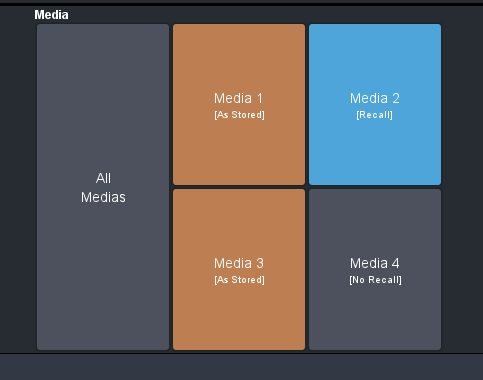
ORANGE (As Stored) - This will adhere to the how the Memory Attributes are set based on what the "STORE" Side was set to prior to Saving the Memory.
GREY (No Recall) - This will Over Ride the Stored Attribute and Not Allow the item to recall anything.
BLUE (Recall) - This is going to force this Item to Recall even if the memory was stored with the "STORE" side to NO RECALL.
Store Attributes:
- These allow you to set the "flags" prior to saving each memory. Even though you might set something to NO RECALL the values of that item are still stored in the memory. The Flags for if they are to recall or not recall are then also set inside the memory. With Every Recall of a memory the STORE side attributes will change to reflect what they were when the memory was stored. If you need to change an Attribute you would Recall the memory so that Attributes change to show you this .. then you modify the memory and the attribute flags then you store the memory again.
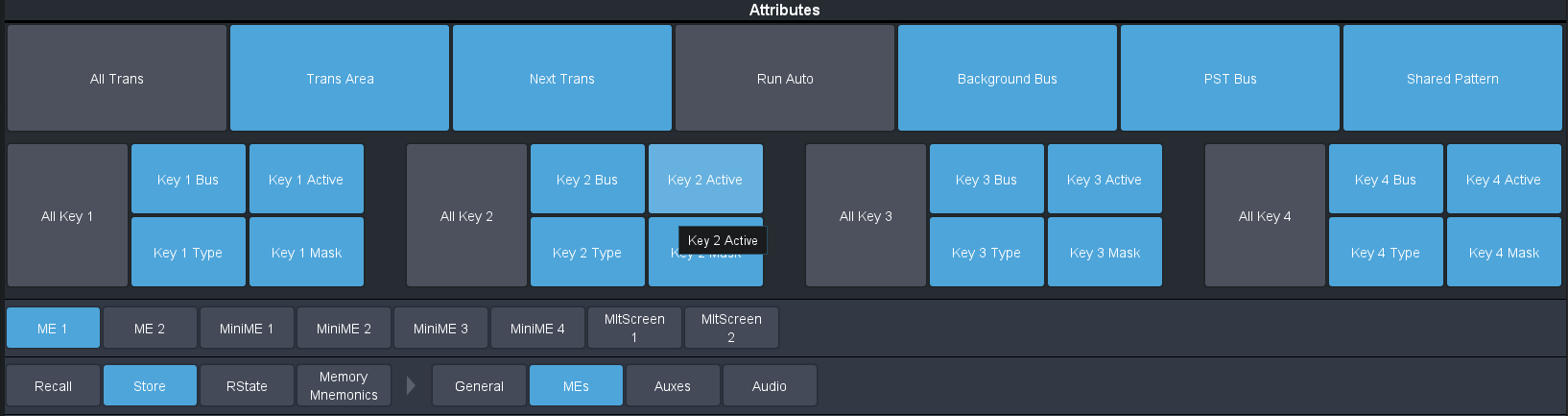
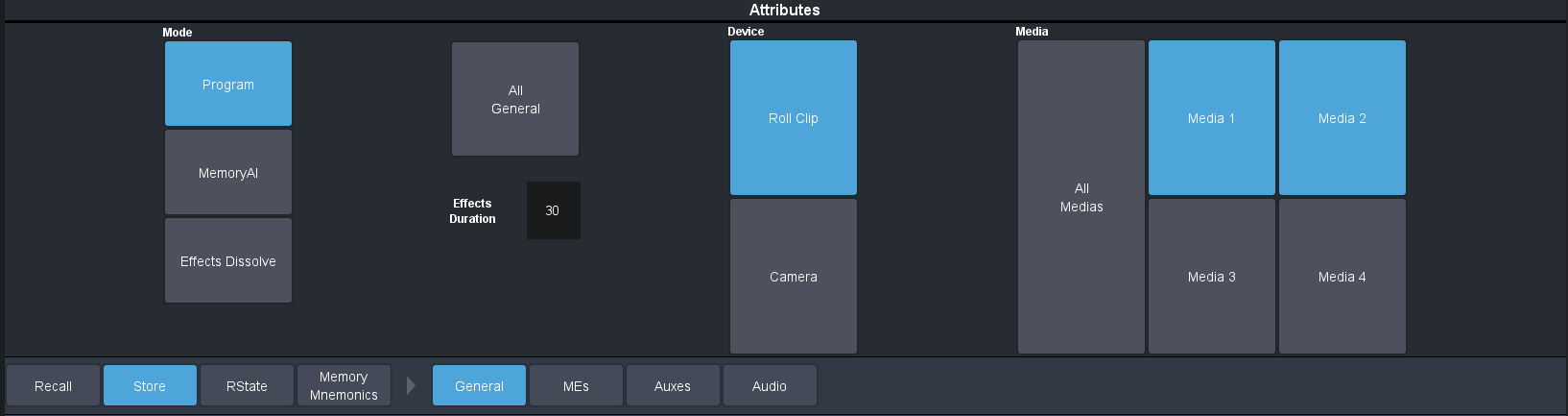
BLUE - RECALL
GREY - NO RECALL
The Recall Attributes just give you that one extra Higher Archie as a toolset. The example I like to use is where you might have a special requirement this one time to have up a "special week" graphic (I always used Jimmy V week as that example). Instead of having to go through 20-30 memories to add in that Media 3 needs to recall this graphic and Key 3 is going to be on air with it thus recalling / editing / storing and then next week going back through to fix it ... I can just use the Recall Attributes to Force MEDIA 3 to NO RECALL and KEY 3 not change any of its attributes.. Then at the end of the week I just set those back to ORANGE on the RECALL side and now my effects all go back to working as they did before.
RSTATE:
RSTATE is the "Reset" State for the switcher... this is like MEMORY 00000 and allows the operator to define (and yes it is per show file) how and what items will change with the RESET (ALL-ALL as we have called it since Synergy)... Also on a TD Panel if you have memory Keypads you Hold the STORE button and then you can use Local Row to RESET just the ME assigned to that Row or you use the ALL button to RESET the entire switcher just like the old ALL-ALL on Synergy / Vision and Acuity. If you Hold down the MENU Button in the panel mini menu the screen will change to show a "Reset All" button that if you press will also do the full "ALL-ALL" RSTATE recall.
RSTATE allows you to define how that is going to look. The MEs will always be part of the RSTATE. That is why there is no Include option for them on the RSTATE page for MEs.. Anytime you do the ALL-ALL type Reset the MEs will All RECALL to how they were stored in the RSTATE (the default is that all buses go to Black, all keyers are turned off, Dissolve and the default frame rate, only BKGD in the next trans and the Keyers all go back to Auto Key mode with all DVE turned off and the settings for a standard Linear Key values..
If you Want to have a different Default for the switcher when ever it would REBOOT or you would RESET ALL then you need to set your switcher up to be exactly how you want it ... ie go though each ME and setup everything the way you want it.. Key Values / Key States / Bus Assignments for all the keyers if you have defaults you want... Setup the Trans Rates for individual Key values and the next transition area as well..
Then you can use the RSTATE TAB to "ADD" which additional items are to RECALL .. in the case of AUX buses if they are NOT set to recall then they will not change on a RESET .. Which is good in that if you do a RESET ALL (Load RSTATE) then they won't change from what they are Currently assigned. That also means on a Restart or reboot you will find that they are all set to BLACK since the switcher always has all buses in black when it boots up then recalls the RSTATE to function..
Same with the Media Items .. I like to include them since I don't use a RESET ALL to often and my memories and custom controls will force the media items anyway.. This way though with each show file I can set what my 4 default Media Items are that I need to load in... especially with using Media Wipes this is a nice way for me to get my Animations loaded in on boot up for those 4 items.. then I don't have to load or wait on it the first time.
One other very very important thing regarding RSTATE is that the RECALL ATTRIBUTES are part of the RSTATE .. This is where you define them.. So it is very very important that when you are setting up your RSTATE that before you hit that SAVE button ... Make sure you have the RECALL tab assigned in the way that you want the switcher to "come up" in.. For me that is making it have everything Orange. That way when I do a RESET ALL my RECALL attributes are going to go back to doing what ever the individual memory was stored as doing..
GENERAL TAB Items:
These actually have "multiple" entries in the memories. Technically each ME / MiniME can be stored with different values if done one by one... When doing a RECALL though it is decided based on the ORDER of PGM ME / Highest ME... Then MiniME / Highest MiniME... Then Canvases..
So if I am recalling Multiple MEs + MiniMEs then it is going to be the General Attributes from the Highest ME... If I am just recalling Multiple MiniMEs then it is the highest of those.
------------------------------
Les O'Reilly
Director - Switcher Product Management