Facility Control

 View Only
  • 1.  Changing Label Background Color

    Posted 08-18-2022 14:18
    I'm working on a new Dashboard panel with two buttons and two labels. I'd love to figure out a way to change the background color of the labels when the buttons get pushed (sort of a tally system to let you know which preset is active)

    Could someone help me understand how I might accomplish that?

    ------------------------------
    John Folsom
    Director of Integration
    ------------------------------


  • 2.  RE: Changing Label Background Color

    Posted 08-19-2022 10:41
    Hi John
    There are several ways to achieve this but they all involve OGLML style attributes.
    If you are dealing with a simple <label/>, you would typically use ogscript.setStyle('label-id', 'bg#RRGGBB'); (where RRGGBB is a hex code for the red, green, blue components of the colour you want to use).

    You could also put the style attributes into the name of the label. These attributes are included if the label's name ends with "<STYLE INFO HERE>" For example "I'm a red label<bg#FF0000>".  

    <abs contexttype="opengear" keepalive="true" style="bg#dark;">
       <meta>
          <params>
             <param access="1" constrainttype="INT_CHOICE" name="Label Color" oid="Label_Color" precision="0" type="INT32" value="0" widget="radio-toggle">
                <constraint key="0">Red</constraint>
                <constraint key="1">Green</constraint>
                <constraint key="2">Blue</constraint>
                <constraint key="3">Yellow</constraint>
             </param>
          </params>
       </meta>
       <param expand="true" height="80" left="61" oid="Label_Color" runtasksonload="true" style="style:toggleButton;" top="84" width="260">
          <task tasktype="ogscript">switch (this.getValue())
    {
       case 0:
          ogscript.setStyle('my-label', 'bg#FF0000');
          break;
       case 1:
          ogscript.setStyle('my-label', 'bg#00FF00');
          break;
       case 2:
          ogscript.setStyle('my-label', 'bg#0000FF');
          break;
       case 3:
          ogscript.setStyle('my-label', 'bg#FFFF00');
          break;
    }
    </task>
       </param>
       <label height="38" id="my-label" left="62" name="I'm the label!" style="txt-align:center" top="22" width="256"/>
    </abs>
    ​
    There are many other style attributes available - if you use the 'style' tab on a control to design a look, you can copy the value of the style attribute and use it in the call to setStyle:
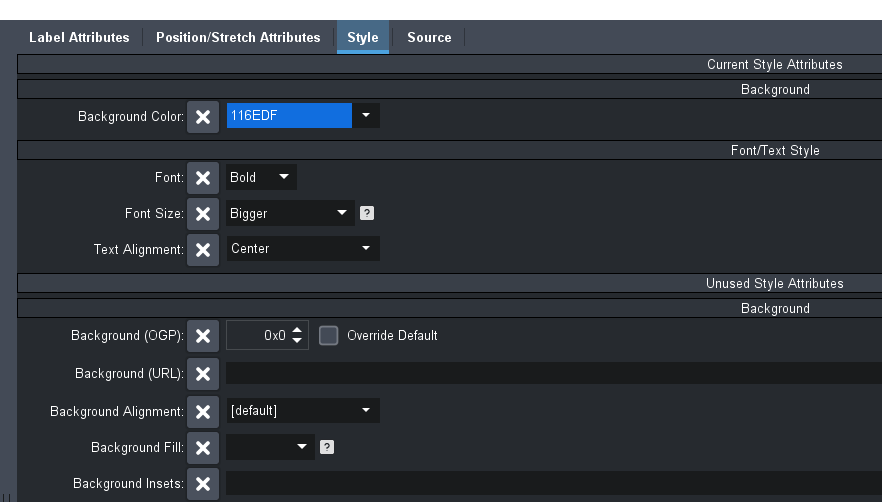

    Cheers
    James


    ------------------------------
    James Peltzer
    Ross Video
    ------------------------------


  • 3.  RE: Changing Label Background Color

    Posted 08-19-2022 11:05
    Thanks James!

    the ogscript.setStyle command was exactly what I needed. Really appreciate the guidence!

    ------------------------------
    John Folsom
    Director of Integration
    ------------------------------


  • 4.  RE: Changing Label Background Color

    Posted 11-30-2023 12:18

    hello

    any idea how can i set label color as per colo  picker parameter 


    ------------------------------
    sunil Blank
    Freelancer Graphics Designer
    Freelancer
    Kathmandu Nepal
    ------------------------------


  • 5.  RE: Changing Label Background Color

    Posted 11-30-2023 13:05

    Thank you i got it myself 


    ------------------------------
    sunil Blank
    Freelancer Graphics Designer
    Freelancer
    Kathmandu Nepal
    ------------------------------