Les,
I never closed the loop on this conversation but I thought others in the community might find the resolution helpful. The site you sent me does well, but I went down the site a little bit.
https://colordesigner.io/convert/rgbtohsl
This is where you can put in the RBG info you get from Photoshop and convert it into Carbonite-friendly HSL.
Process:
- Take a screengrab of the portion of the graphic that has the color you need to know and drop in into Photoshop.
- Click on the little color boxes on the bottom of the PS tool bar and call up the color menu.
- Mouse over the screengrab to activate the color picker and click. That gives me the RGB. Type these values into the website, inside the ( ), and you get the numbers you need for Carbonite.
Perfect for the non-Photoshop master use like me.
I hope this helps others.
------------------------------
[Danny] [Skarka] Ross Pilot since Synergy
[Producer, Director, Technical Director]
------------------------------
Original Message:
Sent: 05-24-2023 20:17
From: Les
Subject: Color matching using Carbonite color picker
Okay so that converter I posted a link to would say to match your HSB to HSL should give us 50, 100,59
Would be interesting to see if those numbers give you a close enough as well
------------------------------
Les O'Reilly
Director - Switcher Product Management
------------------------------
Original Message:
Sent: 05-24-2023 17:10
From: Danny
Subject: Color matching using Carbonite color picker
Les,
PS says
H: 50
S: 82
B:100 (yes, National Geographic yellow, but thats not the client)
Carbonite:
H:50
S: 96
L: 58
I think my initial premise is wrong. I'm comparing two incompatible things.
------------------------------
[Danny] [Skarka] Ross Pilot since Synergy
[Producer, Director, Technical Director]
Original Message:
Sent: 05-22-2023 23:36
From: Les
Subject: Color matching using Carbonite color picker
Can you give me the Values from Photoshop, and the Values you used in the Carbonite to make them the same?
I will see if we can try to create something internally to look at it..
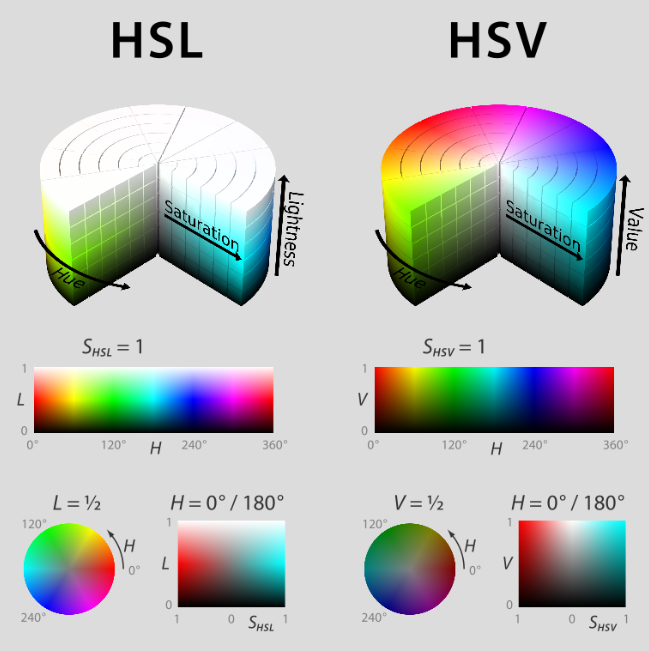
Technically the switcher is Hue Saturation and Luminance ... But I think the DashBoard widget calls it "lightness" and is a stock item.. I am not a "fan" but it seems like we can't over ride the label...
Yes HSB is not equal to HSL..
HSB and HSV are the same though..
------------------------------
Les O'Reilly
Director - Switcher Product Management
Original Message:
Sent: 05-22-2023 18:53
From: Danny
Subject: Color matching using Carbonite color picker
I Les. I didn't explain this well. I have a logo (png) from a company and used the Photoshop color picker to find its value numbers. The png in itself is not usable as a graphic in the show. It was just my color guide.
My thinking was I could go into the DVE border color picker, type in those same hue, saturation and brightness values and I would get the same color. It doesn't seem to work that way. What I found after playing around a bit is the hue and saturation values match (photoshop vs Carbonite) but the brightness doesn't.
My workaround was to load the png into the media player and simply play with the DVE border color brightness until it matched. Not a big deal but I was wondering why my initial process was wrong. Photoshop uses the term "brightness" and Carbonite uses the term "lightness". Did I interpret the function incorrectly?
------------------------------
[Danny] [Skarka] Ross Pilot since Synergy
[Producer, Director, Technical Director]
Original Message:
Sent: 05-22-2023 17:35
From: Les
Subject: Color matching using Carbonite color picker
if you export an image with those values from Photoshop and load it into the media store .. does it look different than the DVE Border Value?
Also is the colour Background giving the same "off" value??
------------------------------
Les O'Reilly
Director - Switcher Product Management