It will be easiest if you to use a parameter to concatenate the strings. If you use a Variable that you declare within the task, from what I found yesterday, the variable does not retain it's old value when the task runs again. I attribute this to the re-declaration of the Variable when the task runs removing the the value from the previous task.
The only concern I have, which admittedly the panel I sent suffers from, is how do you know when the beginning or ending of the messages happens?
The method I made in the example I sent would still work, but it is kind of a work around and is prone to breaking if you don't know how many messages are going to be sent.
If you have some control over what messages are sent or if there is a pattern of the same starting and ending message then you could use an if statement similar to what I did in my example, but instead of checking the number, check the message.
Original Message:
Sent: 05-26-2026 16:11
From: Larry Mitchell
Subject: Dashboard: Display UDP Data
Hi Taylor -
Your code worked for me. I am still having some trouble with concatenation of the strings (made a variable CombinedMessage and have the line CombinedMessage += Message; to add the new to it). If I can't make the concatenation work, I'll be back. Appreciate the assist!
------------------------------
Larry Mitchell
Mavrick Productions
------------------------------
Original Message:
Sent: 05-26-2026 14:08
From: Taylor Shane
Subject: Dashboard: Display UDP Data
Hello Larry!
I want to preface with the fact that I don't make listeners too often, so I may not have all the answers on the listener front. However, it does look like Richard provided most of the answers you would need for how to set up the UDP listener. In fact, I followed his instructions to be able to recreate your current issue! 😅
All that said, I believe found that the issue you are having lies within your script, not necessarily listening issues. However, to make sure that is the case I want to clarify a couple details.
You said you receive 20 separate messages and want them stored as an array, correct?
To test this, I used the example sender panel that Richard sent, but added a button to send an array.
<abs contexttype="opengear" gridsize="20" id="_top" style=""> <meta> <params> <param access="1" maxlength="0" name="StringToSend" oid="StringToSend" type="STRING" value="this is really important2" widget="text"/> <param access="1" maxlength="0" name="address" oid="address" type="STRING" value="localhost" widget="text"/> <param access="1" constraint="0.0;30000.0;0.0;30000.0;1" constrainttype="INT_STEP_RANGE" name="port" oid="port" precision="0" type="INT32" value="21321" widget="spinner"/> <param access="1" maxlength="0" name="ArrayToSend" oid="ArrayToSend" precision="0" type="STRING_ARRAY" widget="text"> <value>this is really important</value> <value>Number2</value> <value>3rd message sdfg</value> <value>its number 4 time</value> <value>Number5</value> </param> </params> </meta> <label height="60" left="40" name="UDP Sender" style="txt-align:west;size:Bigger;" top="40" width="640"/> <param expand="true" height="20" left="140" oid="StringToSend" top="200" width="420"/> <button buttontype="push" height="60" left="40" name="Send UDP Message" top="240" width="160"> <task tasktype="ogscript">ogscript.sendUDPString(params.getValue("address",0), params.getValue("port",0), params.getValue("StringToSend",0));</task> </button> <label height="20" left="40" name="String to Send:" style="txt-align:west;" top="200" width="140"/> <label height="20" left="40" name="This panel can be used to send UDP messages to a specific address and port." style="txt-align:west;" top="100" width="760"/> <label height="20" left="40" name="Address:" style="txt-align:west" top="160" width="160"/> <param expand="true" height="20" left="100" oid="address" top="160" width="220"/> <label height="20" left="340" name="Port:" style="txt-align:west" top="160" width="100"/> <param expand="true" height="20" left="380" oid="port" top="160" width="120"/> <button buttontype="push" height="60" left="260" name="Send UDP Array" top="240" width="200"> <task tasktype="ogscript">var HostName = params.getValue("address",0);var PortNum = params.getValue("port",0);for (var i = 0; i < 5; i++){ ogscript.sendUDPString(HostName, PortNum, params.getValue("ArrayToSend",i));}</task> </button> <simplegrid bottom="-2" cols="1" height="640" left="0" width="480"> <param expand="true" oid="ArrayToSend" showlabel="false"/> </simplegrid></abs>
I added the:
<param access="1" maxlength="0" name="ArrayToSend" oid="ArrayToSend" precision="0" type="STRING_ARRAY" widget="text">
  <value>this is really important</value>
  <value>Number2</value>
  <value>3rd message</value>
  <value>its number 4 time</value>
  <value>Number5</value>
</param>
And:
   <button buttontype="push" height="60" left="260" name="Send UDP Array" top="240" width="200">
      <task tasktype="ogscript">
var HostName = params.getValue("address",0);
var PortNum = params.getValue("port",0);

for (var i = 0; i < 5; i++)
{
   ogscript.sendUDPString(HostName, PortNum, params.getValue("ArrayToSend",i));
}

</task>
   </button>
This allowed me to send 5 UDP messages back to back.
On the listener, I discovered that when receiving multiple UDP messages, DashBoard would run the for loop each message. Which for me, cause the array on the listener panel to have the same message in each slot.
To fix this, I made a parameter for the string array, a parameter to keep track of what number we are on, and a parameter to set the max number of messages expected.
Here is the listener panel I made:
<abs contexttype="opengear" gridsize="20" id="_top" keepalive="true"> <meta> <params> <param access="1" maxlength="1024" name="UDPstring" oid="0x2" type="STRING" value="blank" widget="default"/> <param access="1" maxlength="1024" name="UDPstring" oid="UDPstring" type="STRING" value="Number5" widget="default"/> <param access="1" constrainttype="INT_NULL" name="MsgNum" oid="MsgNum" precision="0" type="INT16" value="5" widget="default"/> <param access="1" maxlength="0" name="FullMessage" oid="FullMessage" precision="0" type="STRING_ARRAY" widget="default"> <value>this is really important</value> <value>Number2</value> <value>3rd message sdfg</value> <value>its number 4 time</value> <value>Number5</value> </param> <param access="1" constrainttype="INT_NULL" name="MsgNumMax" oid="MsgNumMax" precision="0" type="INT16" value="5" widget="default"/> </params> <listener autostart="true" id="UDPListener" listenport="21321" maxlength="1024" name="UDPListen" string="true" udp="true"> <task tasktype="ogscript">//Get Param valuevar MaxNum = params.getValue('MsgNumMax', 0) - 1;if (event.isMessageEvent()) { //Reset Number if too bigif (params.getValue('MsgNum', 0) > MaxNum){ ogscript.debug("Number too Big, reseting..."); params.setValue('MsgNum', 0, 0);} // Get the raw message string from the event var Message = event.getBytesAsString(); //Set Array Value and Increment Number params.setValue('FullMessage', params.getValue('MsgNum', 0), Message); params.setValue('MsgNum', 0, params.getValue('MsgNum', 0) + 1); //Print Values ogscript.debug(Message); ogscript.debug(params.getValue('MsgNum', 0)); }</task> </listener> </meta> <label height="50" id="001" left="121" name="Test" style="txt-align:west" top="57" width="304"/> <label height="122" id="UDPstring" left="121" style="txt-align:west" top="157" width="304"/> <param expand="true" height="54" left="122" oid="UDPstring" showlabel="false" top="303" width="328"/> <table bottom="0" height="160" left="0" width="180"> <tr> <label colspan="1" fill="both" height="80" name="<html><center>Max<br/>Num</center></html>" rowspan="1" style="txt-align:center;" weightx="1.0" weighty="1.0" width="90"/> <param colspan="1" expand="true" fill="both" height="80" oid="MsgNumMax" rowspan="1" showlabel="false" weightx="1.0" weighty="1.0" width="90"/> </tr> <tr> <button buttontype="push" height="80" name="<html><center>Reset<br/>Num</center></html>" width="90"> <task tasktype="ogscript">/*! block id=1000 !*/params.setValue('MsgNum', 0, 0);/*!! <block id="1000" type="param_setvalue" x="191" y="113" w="318" PARAM="[root, Params for UDP%20Listener%20Testing.grid, Not In Menu, MsgNum (MsgNum)]" PARAM_DATA="_top&amp;MsgNum[0]" VALUE="0" />!!*//*!!<checksum>6b57683ad15c1447cf1f4181208d41c0</checksum>!!*/</task> </button> <param expand="true" height="80" oid="MsgNum" showlabel="false" style="txt-align:center;" widget="text-display" width="90"/> </tr> </table> <simplegrid cols="1" height="740" left="500" top="20" width="260"> <param expand="true" oid="FullMessage" showlabel="false" style="bdr#panelbg;bdr:line;txt-align:center;size:Big;" widget="text-display"/> </simplegrid></abs>
These are the modifications I made to your task:
<task tasktype="ogscript">//Get Param value
var MaxNum = params.getValue('MsgNumMax', 0) - 1;
if (event.isMessageEvent()) {
//Reset Number if too big
if (params.getValue('MsgNum', 0) > MaxNum)
{
ogscript.debug("Number too Big, reseting...");
params.setValue('MsgNum', 0, 0);
}
// Get the raw message string from the event
var Message = event.getBytesAsString();
//Set Array Value and Increment Number
params.setValue('FullMessage', params.getValue('MsgNum', 0), Message);
params.setValue('MsgNum', 0, params.getValue('MsgNum', 0) + 1);
//Print Values
ogscript.debug(Message);
ogscript.debug(params.getValue('MsgNum', 0));
}</task>
Important notes, this task relies on the parameters I made and it no longer write to a label, instead it writes directly to a String Array parameter.
There is probably a better way to do this, but this is what I was able to come up with to accomplish what I understood your goal to be.
Let me know if this helps and/or if you have any other questions,
------------------------------
Taylor Shane
Senior Demo & Training Product Specialist - Prime, DashBoard
M: +1 (682) 800-7115
Ross Video | Let's make it real
Visit us at rossvideo.com
Original Message:
Sent: 05-23-2026 17:03
From: Larry Mitchell
Subject: Dashboard: Display UDP Data
Same topic, followup question:
The entire UDP message that I am trying to capture is actually 20 separate "messages". Trying to make a for loop and build an array message. Debug either shows an "function reserved" error OR never shows my loop going above 2. Here's the code:
<task tasktype="ogscript">
var x = 20;
for (var a=0; a <= x; a++) {
ogscript.debug("Current value of A is: " + a);
if (event.isMessageEvent()) {
// Get the raw message string from the event
var message = event.getBytesAsString();
var fullmessage = fullmessage + message;
// Update the DashBoard Parameter with the new array
params.setAllValues('udp_data_array', fullmessage);
ogscript.debug("Current UDP Array: " + fullmessage);
// Logic to write to a parameter (e.g., 'myParam')
ogscript.debug("Received UDP: " + message);
params.setValue('UDPstring', 0, message);
ogscript.rename('UDPstring',message + '123456-ABCDEF');
if (a=20) {
var fullmessage = [];
var a=0;
} } }
</task>
Yes, until I get it right, I am not writing parameters or parsing out the string. I am certain that this is something simple that I am just too close to and not seeing it.
Appreciate any suggestions
------------------------------
Larry Mitchell
Mavrick Productions
Original Message:
Sent: 05-21-2026 09:40
From: Larry Mitchell
Subject: Dashboard: Display UDP Data
That worked and I found my error. Thank you!
------------------------------
Larry Mitchell
Mavrick Productions
Original Message:
Sent: 05-21-2026 04:26
From: Richard Crutwell
Subject: Dashboard: Display UDP Data
Hi Larry,
Here is a UDP sender panel you can use to test the listener.
Best regards,
Richard
<abs contexttype="opengear" gridsize="20" id="_top" style=""> <meta> <params> <param access="1" maxlength="0" name="StringToSend" oid="StringToSend" type="STRING" value="this is really important" widget="text"/> <param access="1" maxlength="0" name="address" oid="address" type="STRING" value="localhost" widget="text"/> <param access="1" constraint="0.0;30000.0;0.0;30000.0;1" constrainttype="INT_STEP_RANGE" name="port" oid="port" precision="0" type="INT32" value="21321" widget="spinner"/> </params> </meta> <label height="60" left="40" name="UDP Sender" style="txt-align:west;size:Bigger;" top="40" width="640"/> <param expand="true" height="20" left="140" oid="StringToSend" top="200" width="420"/> <button buttontype="push" height="60" left="40" name="Send UDP Message" top="240" width="160"> <task tasktype="ogscript">ogscript.sendUDPString(params.getValue("address",0), params.getValue("port",0), params.getValue("StringToSend",0));</task> </button> <label height="20" left="40" name="String to Send:" style="txt-align:west;" top="200" width="140"/> <label height="20" left="40" name="This panel can be used to send UDP messages to a specific address and port." style="txt-align:west;" top="100" width="760"/> <label height="20" left="40" name="Address:" style="txt-align:west" top="160" width="160"/> <param expand="true" height="20" left="100" oid="address" top="160" width="220"/> <label height="20" left="340" name="Port:" style="txt-align:west" top="160" width="100"/> <param expand="true" height="20" left="380" oid="port" top="160" width="120"/></abs>
------------------------------
Richard Crutwell
Ross Video UK
Original Message:
Sent: 05-20-2026 10:06
From: Larry Mitchell
Subject: Dashboard: Display UDP Data
Hi Richard -
Appreciate the advice and assist. Your explanation of how to update labels (and the example of how to direct write the parameter) helped a lot.
Is there a way to test the listener? Looking at WireShark, I can see UDP data passing on the correct port. But in dashboard, the initial value is the only thing that is imaged to the screen.
It seems like I am missing something.
------------------------------
Larry Mitchell
Mavrick Productions
Original Message:
Sent: 05-20-2026 04:59
From: Richard Crutwell
Subject: Dashboard: Display UDP Data
Hi Larry,
There's a missing connection here that I can point out. The UDP listener is fine, just the addressing of the label and last bit of data management.
When using param.setValue(id, index, value), the id must be the OID of the parameter. In this case, it was set to 0x02, which is just the default value. It should instead be set to UDPstring.
When creating params, a good practice is to use the same name as the OID, as it makes debugging much simpler.
With that change, the string param itself will update correctly, but the label still will not. Labels require an id to address them as a string, and this attribute is an id, not an objectid.
To update a label ID, you need to use:
ogscript.rename(id, value)
Using:
params.setValue(id, index, value)
will only update the parameter value itself.
To fix this, you can either:
draw the param directly onto the page, or
Remove and update id on the label and update the script to use ogscript.rename(id, value).
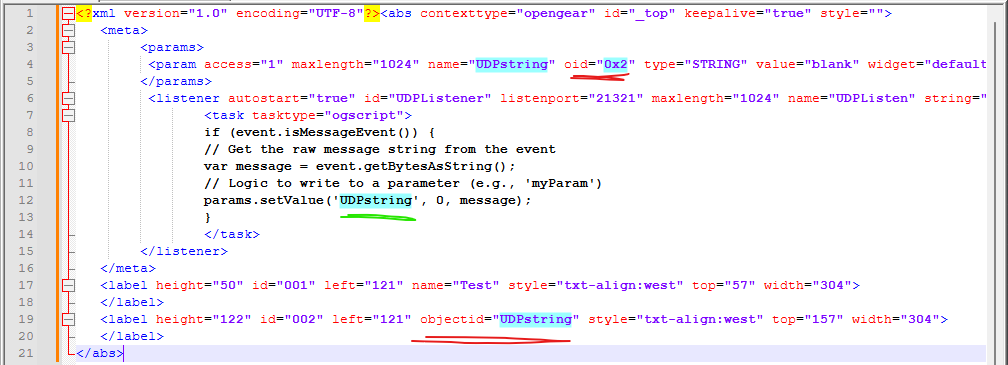
Here is an updated version:
<?xml version="1.0" encoding="UTF-8"?><abs contexttype="opengear" id="_top" keepalive="true" style=""> <meta> <params> <param access="1" maxlength="1024" name="UDPstring" oid="0x2" type="STRING" value="blank" widget="default"/> <param access="1" maxlength="1024" name="UDPstring" oid="UDPstring" type="STRING" value="gjkhjghasdfasdfsdsadf" widget="default"/> </params> <listener autostart="true" id="UDPListener" listenport="21321" maxlength="1024" name="UDPListen" string="true" udp="true"> <task tasktype="ogscript">if (event.isMessageEvent()) { // Get the raw message string from the event var message = event.getBytesAsString(); // Logic to write to a parameter (e.g., 'myParam') ogscript.debug(message); params.setValue('UDPstring', 0, message); ogscript.rename('UDPstring',message + '123456-ABCDEF'); }</task> </listener> </meta> <label height="50" id="001" left="121" name="Test" style="txt-align:west" top="57" width="304"/> <label height="122" id="UDPstring" left="121" style="txt-align:west" top="157" width="304"/> <param expand="true" height="54" left="122" oid="UDPstring" showlabel="false" top="303" width="328"/></abs>
Best Regards,
Richard
------------------------------
Richard Crutwell
Ross Video UK