Looking at your code, the only thing art_num seems to be set to is the total number of articles in your table and that is only getting updated when the selection is changed. The value that would change in DataLinq as you select rows in the table would be "selection" itself. Which parameter was supposed to hold the data in DataLinq and what information do you want it to have?
Original Message:
Sent: 04-14-2023 18:59
From: Tejus Surendran
Subject: Dashboard - XML List with searchability
Hi James,
Thank you for your response.
However after trying your suggestion I am still having the issue that the new parameter is not updating in datalinq based on the selected row. Which would should in theory be based on the parameter named 'selection'.
I have attached my code below for reference and the new parameter I have added to contain the article number has the OID: art_num.
I think if I can get the first one I should be able to duplicate that process for the other 2 parameters, however I am unsure as to how to remove the already existing variables from datalinq.
Along with that I am still not sure how I would be able to add rows in the dashboard and update the table. Ideally I would have buttons to create a new row, and one add it to the table.
Thank you for your help!
<?xml version="1.0" encoding="UTF-8"?><abs contexttype="opengear" gridsize="20" id="_top" keepalive="false"> <meta> <params> <param access="1" constrainttype="STRUCT" name="article_template" oid="article_template" type="STRUCT" widget="table"> <value> <subparam access="1" maxlength="0" name="Article Number" suboid="number" type="STRING" value="Article 1" widget="default"/> <subparam access="1" maxlength="0" name="Article Description" suboid="description" type="STRING" value="Reports of Town Officers/Committees" widget="default"/> <subparam access="1" maxlength="0" name="Article Short" suboid="short" type="STRING" value="Reports" widget="default"/> </value> </param> <param access="1" constrainttype="STRUCT" name="article_template" oid="articles" templateoid="article_template" type="STRUCT_ARRAY" widget="table"> <value> <subparam suboid="number" value="Article 1"/> <subparam suboid="description" value="Reports of Town Officers/Committees"/> <subparam suboid="short" value="Reports"/> </value> </param> <param access="1" constrainttype="INT_NULL" name="selection" oid="selection" precision="0" type="INT16" value="14" widget="default"/> <param access="1" maxlength="0" name="filename" oid="filename" type="STRING" value="Full-Articles.xml" widget="text"/> <param access="1" maxlength="0" name="article number" oid="art_num" type="STRING" value="Article 1" widget="label"/> </params> </meta> <label height="60" left="40" name="Reading XML Files " style="txt-align:west;size:Bigger;" top="40" width="620"/> <label height="20" left="40" name="ogScript can be used to read an XML file and put the data in a structured parameter." style="txt-align:west;" top="100" width="1100"/> <param expand="true" height="680" left="60" oid="articles" showlabel="false" top="200" width="740"> <config key="w.selectionparam">selection</config> </param> <button buttontype="push" height="40" left="560" name="Read" top="140" width="120"> <task tasktype="ogscript">var xmlDocument = ogscript.parseXML(params.getValue("filename", 0)); //Parse the XMLvar nodeList = xmlDocument.getElementsByTagName("Article"); //Get the tags we want to include in the constraintvar articleData = new Array();for (var i = 0; i < nodeList.getLength(); i++) //Loop through each tag we found{ var node = nodeList.item(i); //Get the node articleData.push({"number": node.getAttribute("ArticleNumber"), "description": node.getAttribute("ArticleDescription"),"short": node.getAttribute("ArticleShort")}); }if (articleData.length == 0) //Placeholder if we don't have anything (OPTIONAL){ articleData.push({"number": "Article 0", "description": "No Data Found","short": "N/A"}); }params.setAllValues("articles", articleData);</task> </button> <param expand="true" height="40" left="60" oid="filename" top="140" widget="file-picker" width="480"/> <button buttontype="push" height="40" left="700" name="Clear" top="140" width="100"> <task tasktype="ogscript">var articleData = new Array();articleData.push({"number": "Article 0", "description": "No Data Found","short": "N/A"}); params.setValue("articles", articleData);</task> </button> <param expand="true" height="40" left="820" oid="selection" top="220" width="160"> <task tasktype="ogscript">var selected = params.getValue("selection", 0);params.setValue('art_num', 0, params.getElementCount("articles", 0));var first = params.getValue("articles." + selected + ".fname", 0);var last = params.getValue("articles." + selected + ".lname", 0);ogscript.rename("PrintSpace", "<html><center>" + first + "<br>" + last + "</center></html>");</task> </param> <label height="20" left="820" name="Selected Row:" style="txt-align:west" top="200" width="160"/> <param expand="true" height="53" left="83" oid="art_num" showlabel="false" top="332" width="353"/></abs>
------------------------------
Tejus Surendran
------------------------------
Original Message:
Sent: 04-14-2023 18:45
From: James
Subject: Dashboard - XML List with searchability
Hi Tejus
You can add a new element to a parameter with params.setValue('OID_GOES_HERE', params.getElementCount('OID_GOES_HERE'), 'VALUE GOES HERE');
------------------------------
James Peltzer
Ross Video
Original Message:
Sent: 04-13-2023 14:52
From: Tejus
Subject: Dashboard - XML List with searchability
Hi James,
I just wanted to follow up on my previous message with regards to modifying the xml structure of the code to only show the selected/clicked row in the table at one time in datalinq. Along with that, would there be a way to add a realtime update mechanism where a user can type in a new row of information and add it to the table and upload it from there to datalinq when selected upon.
I have attached the code below.
Thank you for your help!
Tejus
<?xml version="1.0" encoding="UTF-8"?><abs contexttype="opengear" gridsize="20" id="_top" keepalive="false"> <meta> <params> <param access="1" constrainttype="STRUCT" name="article_template" oid="article_template" type="STRUCT" widget="table"> <value> <subparam access="1" maxlength="0" name="Article Number" suboid="number" type="STRING" value="Article 1" widget="default"/> <subparam access="1" maxlength="0" name="Article Description" suboid="description" type="STRING" value="Reports of Town Officers/Committees" widget="default"/> <subparam access="1" maxlength="0" name="Article Short" suboid="short" type="STRING" value="Reports" widget="default"/> </value> </param> <param access="1" constrainttype="STRUCT" name="article_template" oid="articles" templateoid="article_template" type="STRUCT_ARRAY" widget="table"> <value> <subparam suboid="number" value="Article 1"/> <subparam suboid="dsecription" value="Reports of Town Officers/Committees"/> <subparam suboid="short" value="Reports"/> </value> </param> <param access="1" constrainttype="INT_NULL" name="selection" oid="selection" precision="0" type="INT16" value="14" widget="default"/> <param access="1" maxlength="0" name="filename" oid="filename" type="STRING" value="Full-Articles.xml" widget="text"/> </params> </meta> <label height="60" left="40" name="Reading XML Files " style="txt-align:west;size:Bigger;" top="40" width="620"/> <label height="20" left="40" name="ogScript can be used to read an XML file and put the data in a structured parameter." style="txt-align:west;" top="100" width="1100"/> <param expand="true" height="680" left="60" oid="articles" showlabel="false" top="200" width="740"> <config key="w.selectionparam">selection</config> </param> <button buttontype="push" height="40" left="560" name="Read" top="140" width="120"> <task tasktype="ogscript">var xmlDocument = ogscript.parseXML(params.getValue("filename", 0)); //Parse the XMLvar nodeList = xmlDocument.getElementsByTagName("Article"); //Get the tags we want to include in the constraintvar articleData = new Array();for (var i = 0; i < nodeList.getLength(); i++) //Loop through each tag we found{ var node = nodeList.item(i); //Get the node articleData.push({"number": node.getAttribute("ArticleNumber"), "description": node.getAttribute("ArticleDescription"),"short": node.getAttribute("ArticleShort")}); }if (articleData.length == 0) //Placeholder if we don't have anything (OPTIONAL){ articleData.push({"number": "Article 0", "description": "No Data Found","short": "N/A"}); }params.setAllValues("articles", articleData);</task> </button> <param expand="true" height="40" left="60" oid="filename" top="140" widget="file-picker" width="480"/> <button buttontype="push" height="40" left="700" name="Clear" top="140" width="100"> <task tasktype="ogscript">var articleData = new Array();articleData.push({"number": "Article 0", "description": "No Data Found","short": "N/A"}); params.setAllValues("articles", articleData);</task> </button> <param expand="true" height="40" left="820" oid="selection" top="220" width="160"> <task tasktype="ogscript">var selected = params.getValue("selection", 0);var first = params.getValue("articles." + selected + ".fname", 0);var last = params.getValue("articles." + selected + ".lname", 0);ogscript.rename("PrintSpace", "<html><center>" + first + "<br>" + last + "</center></html>");</task> </param> <label height="20" left="820" name="Selected Row:" style="txt-align:west" top="200" width="160"/> <label bottom="560" id="PrintSpace" left="820" right="620" style="txt-align:center;bdr:shadow;" top="300"/> <label height="20" left="820" name="Name in Row:" style="txt-align:west" top="280" width="180"/></abs>
<?xml version="1.0" encoding="UTF-8" standalone="yes"?><ArticleFile> <Article ArticleNumber="Article 1" ArticleDescription="Reports of Town Officers/Committees" ArticleShort="Reports"/> <Article ArticleNumber="Article 2" ArticleDescription="Cemetery Improvement and Development Fund" ArticleShort="Cemetery Fund"/> <Article ArticleNumber="Article 3" ArticleDescription="Appropriate Commonwealth Transportation Infrastructure Fund Monies" ArticleShort="Transportation Fund"/> <Article ArticleNumber="Article 4" ArticleDescription="Sewer Construction Stabilization Fund" ArticleShort="Sewer Fund"/> <Article ArticleNumber="Article 5" ArticleDescription="Affordable Housing Stabilization Fund" ArticleShort="Housing Fund"/> <Article ArticleNumber="Article 6" ArticleDescription="Funding for Collective Bargaining Agreements" ArticleShort="Collective Bargaining"/> <Article ArticleNumber="Article 7" ArticleDescription="Unpaid Bills Prior Fiscal Year" ArticleShort="Unpaid Bills"/> <Article ArticleNumber="Article 8" ArticleDescription="Amend Fiscal Year 2023 Operating Budget " ArticleShort="Amend Budget"/> <Article ArticleNumber="Article 9" ArticleDescription="Appropriation of Statewide Opioid Settlement Abatement Funds" ArticleShort="Opioid Settlement"/> <Article ArticleNumber="Article 10" ArticleDescription="Citizen Petition – Funding for School Department Professional Support Personnel" ArticleShort="Citizen Petition"/> <Article ArticleNumber="Article 11" ArticleDescription="Roadway and Sidewalk Construction" ArticleShort="Roadway/Sidewalk"/> <Article ArticleNumber="Article 12" ArticleDescription="Sewer Capital Improvements" ArticleShort="Sewer Improvements"/> <Article ArticleNumber="Article 13" ArticleDescription="PFAS Remediation at 54 Richardson Road" ArticleShort="PFAS Remediation"/> <Article ArticleNumber="Article 14" ArticleDescription="Transfer Free Cash to Reduce Fiscal Year 2023 Property Tax Levy" ArticleShort="Free Cash Transfer"/> <Article ArticleNumber="Article 15" ArticleDescription="Transfer Free Cash to the General Stabilization Fund " ArticleShort="Free Cash Transfer"/> <Article ArticleNumber="Article 16" ArticleDescription="Community Preservation Fund – Historical Commission Property Inventory Program " ArticleShort="CPC Fund"/> <Article ArticleNumber="Article 17" ArticleDescription="Increase Senior Property Tax Work Off Funding " ArticleShort="Senior Tax Rebate"/> <Article ArticleNumber="Article 18" ArticleDescription="Increase Chapter 59, Section 5, Clause 41C Property Tax Exemption to Seniors" ArticleShort="Chpt 59 Tax Exempt"/> <Article ArticleNumber="Article 19" ArticleDescription="Charter Amendment – Annual Audit" ArticleShort="Charter Amendment"/> <Article ArticleNumber="Article 20" ArticleDescription="Removal of Deputy Fire Chief from Civil Service" ArticleShort="Deputy Fire Chief"/> <Article ArticleNumber="Article 21" ArticleDescription="Zoning Bylaw Amendment – Warehouse " ArticleShort="Zoning Warehouse"/> <Article ArticleNumber="Article 22" ArticleDescription="Zoning Bylaw Amendment - Distribution Center" ArticleShort="Zoning Distribution Center"/> <Article ArticleNumber="Article 23" ArticleDescription="Zoning Bylaw Amendment - Use Regulation Table" ArticleShort="Zoning Use Regulation "/> <Article ArticleNumber="Article 24" ArticleDescription="Odd Fellows Property Brook Walk Easement Acceptance " ArticleShort="Odd Fellows Easement"/> <Article ArticleNumber="Article 25" ArticleDescription="Charles Way – Authorization to Acquire Permanent Easement" ArticleShort="Charles Way Easement"/> <Article ArticleNumber="Article 26" ArticleDescription="Street Acceptance – Nabnasset Drive" ArticleShort="Street Acceptance"/> <Article ArticleNumber="Consent Agenda" ArticleDescription="Articles 21, 22, 23" ArticleShort="Articles 21-23"/></ArticleFile>
------------------------------
Tejus Surendran
Original Message:
Sent: 04-10-2023 14:58
From: Tejus
Subject: Dashboard - XML List with searchability
Hi James,
I had a question about a new dashboard I was working on and was wondering if you would be able to help me. I have attached the code below for your reference.
For context I based this on the Reading XML into structure example. As it stands once the xml file is read, all variables are uploaded to Datalinq, however I was wondering if there is a way to simply make it so that I can only upload the selected row to Datalinq, that way I am not bombarded with unnecessary information. Along with that, would there be a way to add a Realtime update mechanism where a user can type in a new row of information and add it to the table and upload it from there to datalinq.
Thank you for your help!
Tejus
<?xml version="1.0" encoding="UTF-8" standalone="yes"?><ArticleFile> <Article ArticleNumber="Article 1" ArticleDescription="Reports of Town Officers/Committees" ArticleShort="Reports"/> <Article ArticleNumber="Article 2" ArticleDescription="Cemetery Improvement and Development Fund" ArticleShort="Cemetery Fund"/> <Article ArticleNumber="Article 3" ArticleDescription="Appropriate Commonwealth Transportation Infrastructure Fund Monies" ArticleShort="Transportation Fund"/> <Article ArticleNumber="Article 4" ArticleDescription="Sewer Construction Stabilization Fund" ArticleShort="Sewer Fund"/> <Article ArticleNumber="Article 5" ArticleDescription="Affordable Housing Stabilization Fund" ArticleShort="Housing Fund"/> <Article ArticleNumber="Article 6" ArticleDescription="Funding for Collective Bargaining Agreements" ArticleShort="Collective Bargaining"/> <Article ArticleNumber="Article 7" ArticleDescription="Unpaid Bills Prior Fiscal Year" ArticleShort="Unpaid Bills"/> <Article ArticleNumber="Article 8" ArticleDescription="Amend Fiscal Year 2023 Operating Budget " ArticleShort="Amend Budget"/> <Article ArticleNumber="Article 9" ArticleDescription="Appropriation of Statewide Opioid Settlement Abatement Funds" ArticleShort="Opioid Settlement"/> <Article ArticleNumber="Article 10" ArticleDescription="Citizen Petition – Funding for School Department Professional Support Personnel" ArticleShort="Citizen Petition"/> <Article ArticleNumber="Article 11" ArticleDescription="Roadway and Sidewalk Construction" ArticleShort="Roadway/Sidewalk"/> <Article ArticleNumber="Article 12" ArticleDescription="Sewer Capital Improvements" ArticleShort="Sewer Improvements"/> <Article ArticleNumber="Article 13" ArticleDescription="PFAS Remediation at 54 Richardson Road" ArticleShort="PFAS Remediation"/> <Article ArticleNumber="Article 14" ArticleDescription="Transfer Free Cash to Reduce Fiscal Year 2023 Property Tax Levy" ArticleShort="Free Cash Transfer"/> <Article ArticleNumber="Article 15" ArticleDescription="Transfer Free Cash to the General Stabilization Fund " ArticleShort="Free Cash Transfer"/> <Article ArticleNumber="Article 16" ArticleDescription="Community Preservation Fund – Historical Commission Property Inventory Program " ArticleShort="CPC Fund"/> <Article ArticleNumber="Article 17" ArticleDescription="Increase Senior Property Tax Work Off Funding " ArticleShort="Senior Tax Rebate"/> <Article ArticleNumber="Article 18" ArticleDescription="Increase Chapter 59, Section 5, Clause 41C Property Tax Exemption to Seniors" ArticleShort="Chpt 59 Tax Exempt"/> <Article ArticleNumber="Article 19" ArticleDescription="Charter Amendment – Annual Audit" ArticleShort="Charter Amendment"/> <Article ArticleNumber="Article 20" ArticleDescription="Removal of Deputy Fire Chief from Civil Service" ArticleShort="Deputy Fire Chief"/> <Article ArticleNumber="Article 21" ArticleDescription="Zoning Bylaw Amendment – Warehouse " ArticleShort="Zoning Warehouse"/> <Article ArticleNumber="Article 22" ArticleDescription="Zoning Bylaw Amendment - Distribution Center" ArticleShort="Zoning Distribution Center"/> <Article ArticleNumber="Article 23" ArticleDescription="Zoning Bylaw Amendment - Use Regulation Table" ArticleShort="Zoning Use Regulation "/> <Article ArticleNumber="Article 24" ArticleDescription="Odd Fellows Property Brook Walk Easement Acceptance " ArticleShort="Odd Fellows Easement"/> <Article ArticleNumber="Article 25" ArticleDescription="Charles Way – Authorization to Acquire Permanent Easement" ArticleShort="Charles Way Easement"/> <Article ArticleNumber="Article 26" ArticleDescription="Street Acceptance – Nabnasset Drive" ArticleShort="Street Acceptance"/> <Article ArticleNumber="Consent Agenda" ArticleDescription="Articles 21, 22, 23" ArticleShort="Articles 21-23"/></ArticleFile>
<?xml version="1.0" encoding="UTF-8"?><abs contexttype="opengear" gridsize="20" id="_top" keepalive="false"> <meta> <params> <param access="1" constrainttype="STRUCT" name="article_template" oid="article_template" type="STRUCT" widget="table"> <value> <subparam access="1" maxlength="0" name="Article Number" suboid="number" type="STRING" value="Article 1" widget="default"/> <subparam access="1" maxlength="0" name="Article Description" suboid="description" type="STRING" value="Reports of Town Officers/Committees" widget="default"/> <subparam access="1" maxlength="0" name="Article Short" suboid="short" type="STRING" value="Reports" widget="default"/> </value> </param> <param access="1" constrainttype="STRUCT" name="article_template" oid="articles" templateoid="article_template" type="STRUCT_ARRAY" widget="table"> <value> <subparam suboid="number" value="Article 1"/> <subparam suboid="dsecription" value="Reports of Town Officers/Committees"/> <subparam suboid="short" value="Reports"/> </value> </param> <param access="1" constrainttype="INT_NULL" name="selection" oid="selection" precision="0" type="INT16" value="14" widget="default"/> <param access="1" maxlength="0" name="filename" oid="filename" type="STRING" value="Full-Articles.xml" widget="text"/> </params> </meta> <label height="60" left="40" name="Reading XML Files " style="txt-align:west;size:Bigger;" top="40" width="620"/> <label height="20" left="40" name="ogScript can be used to read an XML file and put the data in a structured parameter." style="txt-align:west;" top="100" width="1100"/> <param expand="true" height="680" left="60" oid="articles" showlabel="false" top="200" width="740"> <config key="w.selectionparam">selection</config> </param> <button buttontype="push" height="40" left="560" name="Read" top="140" width="120"> <task tasktype="ogscript">var xmlDocument = ogscript.parseXML(params.getValue("filename", 0)); //Parse the XMLvar nodeList = xmlDocument.getElementsByTagName("Article"); //Get the tags we want to include in the constraintvar articleData = new Array();for (var i = 0; i < nodeList.getLength(); i++) //Loop through each tag we found{ var node = nodeList.item(i); //Get the node articleData.push({"number": node.getAttribute("ArticleNumber"), "description": node.getAttribute("ArticleDescription"),"short": node.getAttribute("ArticleShort")}); }if (articleData.length == 0) //Placeholder if we don't have anything (OPTIONAL){ articleData.push({"number": "Article 0", "description": "No Data Found","short": "N/A"}); }params.setAllValues("articles", articleData);</task> </button> <param expand="true" height="40" left="60" oid="filename" top="140" widget="file-picker" width="480"/> <button buttontype="push" height="40" left="700" name="Clear" top="140" width="100"> <task tasktype="ogscript">var articleData = new Array();articleData.push({"number": "Article 0", "description": "No Data Found","short": "N/A"}); params.setAllValues("articles", articleData);</task> </button> <param expand="true" height="40" left="820" oid="selection" top="220" width="160"> <task tasktype="ogscript">var selected = params.getValue("selection", 0);var first = params.getValue("articles." + selected + ".fname", 0);var last = params.getValue("articles." + selected + ".lname", 0);ogscript.rename("PrintSpace", "<html><center>" + first + "<br>" + last + "</center></html>");</task> </param> <label height="20" left="820" name="Selected Row:" style="txt-align:west" top="200" width="160"/> <label bottom="560" id="PrintSpace" left="820" right="620" style="txt-align:center;bdr:shadow;" top="300"/> <label height="20" left="820" name="Name in Row:" style="txt-align:west" top="280" width="180"/></abs>
------------------------------
Tejus Surendran
Original Message:
Sent: 04-03-2023 22:32
From: James
Subject: Dashboard - XML List with searchability
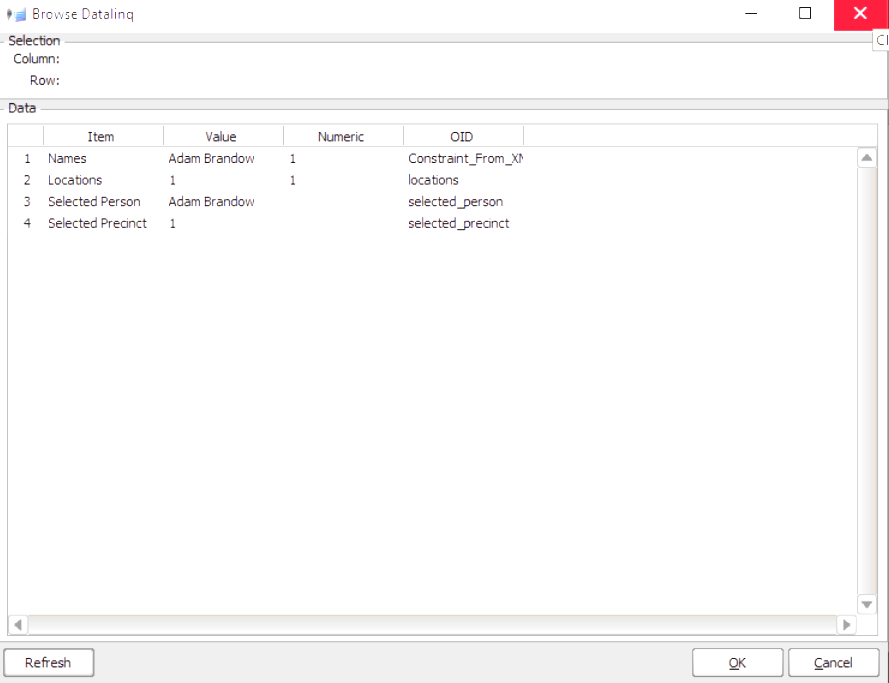
In my most recent example code, the "Value" of "Constraint_From_XML" and "locations" is simply the selected index. The "Value As String" is what we parsed out of the XML file (which is why that is the value I write to the "Selected Name" and "Selected Location" parameters.
------------------------------
James Peltzer
Ross Video
Original Message:
Sent: 04-03-2023 16:59
From: Tejus
Subject: Dashboard - XML List with searchability
I was sifting further through the documentation guide and I was wondering if it is possible that the replaceConstraint function may be overwriting the precinct information with the user id info?
------------------------------
Tejus Surendran
Original Message:
Sent: 04-03-2023 16:35
From: Tejus
Subject: Dashboard - XML List with searchability
Hi James,
Thank you for your help.
I was going through your code and I think I am getting a hang of things for the most part. However I noticed in datalinq that the precinct is still showing the id number for the person. How would I be able to fix that? Thank you!
------------------------------
Tejus Surendran
Original Message:
Sent: 04-03-2023 15:44
From: James
Subject: Dashboard - XML List with searchability
This version uses 2 parameters with INT_CHOICE constraints. The only one we show on screen is the one for searching the names - whenever its value changes, we set the location one to the same value to keep it in sync.
<abs contexttype="opengear" style=""> <meta> <params> <param access="1" constrainttype="INT_CHOICE" name="Names" oid="Constraint_From_XML" precision="0" type="INT32" value="0" widget="combo"> <constraint key="0">Aaron Cunningham</constraint> <constraint key="1">Adam Brandow</constraint> <constraint key="2">Adam McCusker</constraint> <constraint key="3">Albert Glenn Diggs</constraint> </param> <param access="1" constrainttype="INT_CHOICE" name="Locations" oid="locations" precision="0" type="INT32" value="0" widget="combo"> <constraint key="0">PRECINCT 9</constraint> <constraint key="1">PRECINCT 6</constraint> <constraint key="2">PRECINCT 2</constraint> <constraint key="3">PRECINCT 2</constraint> </param> <param access="1" maxlength="0" name="Selected Precinct" oid="selected_precinct" type="STRING" value="PRECINCT 9" widget="label"/> <param access="1" maxlength="0" name="Selected Person" oid="selected_person" type="STRING" value="Aaron Cunningham" widget="label"/> </params> <ogscript handles="onload">var newConstraint = params.createIntChoiceConstraint(["Nothing"]);params.replaceConstraint('Constraint_From_XML', newConstraint);params.replaceConstraint('locations', newConstraint);</ogscript> <api>function getXML(file){ return ogscript.parseXML(file); //Parse the XML}function loadData(dataFile){ var xmlDocument = getXML(dataFile); //Parse the XML var nodeList = xmlDocument.getElementsByTagName("person"); //Get the tags we want to include in the constraint var constraintData = []; //Placeholder for the new constraint data var locationData = []; //Placeholder for the location data for (var i = 0; i < nodeList.getLength(); i++) //Loop through each tag we found { var node = nodeList.item(i); //Get the node var location = node.getAttribute("location"); var name = node.getTextContent(); locationData.push(location); constraintData.push(name); //Push the key/value pair } if (constraintData.length == 0) //Placeholder if we don't have anything (OPTIONAL) { constraintData.push("Nothing"); } var constraint = params.createIntChoiceConstraint(constraintData); //Create the constraint params.replaceConstraint('Constraint_From_XML', constraint); //Replace the constraint constraint = params.createIntChoiceConstraint(locationData); //Create the constraint params.replaceConstraint('locations', constraint); //Replace the constraint}</api> </meta> <param expand="true" height="90" left="32" oid="Constraint_From_XML" top="48" width="626"> <task tasktype="ogscript">params.setValue('locations', 0, this.getValue());params.setValue('selected_precinct', 0, params.getParam('locations', 0).getValueAsString());params.setValue('selected_person', 0, this.getValueAsString());ogscript.rename('selected-take', this.getValue());</task> </param> <button buttontype="push" height="95" left="673" name="Load" top="47" width="183"> <task tasktype="ogscript">loadData('constraint-xml-tester.xml');</task> </button> <label height="142" id="selected-take" left="34" style="txt-align:center" top="164" width="815"/> <param expand="true" height="53" left="83" oid="selected_precinct" showlabel="false" top="332" width="353"/> <param expand="true" height="55" left="454" oid="selected_person" showlabel="false" top="330" width="340"/></abs>
------------------------------
James Peltzer
Ross Video
Original Message:
Sent: 04-03-2023 15:15
From: Tejus
Subject: Dashboard - XML List with searchability
Hi James,
I was trying to modify the existing XML format to add the precinct array and swap the key with an integer, however I was having issues with getting it to work. Do you have any recommendations for how to add the parameter within the constraint. If I am trying to access it incorrectly or if my XML schema is simply incorrect. Based on the code from above do you have any recommendations?
Thank you again!
Tejus
------------------------------
Tejus Surendran
Original Message:
Sent: 04-03-2023 11:27
From: Tejus
Subject: Dashboard - XML List with searchability
Hi James,
Thank you for your help!
Yes, I think the duplicate Precincts are causing the issue.
I think the idea you are describing could work as I do believe my dataset provides a unique number for each person. However would you be able to provide an example of how to incorporate the parameter array into my existing code, as I am not sure how to modify it for the .GRID file as well as the schema.
Thank you
<abs contexttype="opengear" style=""> <meta> <params> <param access="1" constraintstrict="false" constrainttype="STRING_STRING_CHOICE" maxlength="-1" name="Constraint From XML" oid="Constraint_From_XML" type="STRING" value="PRECINCT 2" widget="combo"> <constraint key="PRECINCT 9">Aaron Cunningham</constraint> <constraint key="PRECINCT 6">Adam Brandow</constraint> <constraint key="PRECINCT 2">Adam McCusker</constraint> <constraint key="PRECINCT 2">Albert Glenn Diggs</constraint> </param> <param access="1" maxlength="0" name="Selected Precinct" oid="selected_precinct" type="STRING" value="PRECINCT 2" widget="label"/> <param access="1" maxlength="0" name="Selected Person" oid="selected_person" type="STRING" value="Albert Glenn Diggs" widget="label"/> </params> <ogscript handles="onload">var newConstraint = params.createStringStringChoiceConstraint(["Nothing"]);params.replaceConstraint('Constraint_From_XML', newConstraint);</ogscript> <api>function getXML(file){ return ogscript.parseXML(file); //Parse the XML}function loadData(dataFile){ var xmlDocument = getXML(dataFile); //Parse the XML var nodeList = xmlDocument.getElementsByTagName("person"); //Get the tags we want to include in the constraint var constraintData = []; //Placeholder for the new constraint data for (var i = 0; i < nodeList.getLength(); i++) //Loop through each tag we found { var node = nodeList.item(i); //Get the node var location = node.getAttribute("location"); var name = node.getTextContent(); constraintData.push({"key": location, "value": name}); //Push the key/value pair } if (constraintData.length == 0) //Placeholder if we don't have anything (OPTIONAL) { constraintData.push({"key": 0, "value": "Nothing"}); } var constraint = params.createStringStringChoiceConstraint(constraintData); //Create the constraint params.replaceConstraint('Constraint_From_XML', constraint); //Replace the constraint}</api> </meta> <param expand="true" height="90" left="32" oid="Constraint_From_XML" top="48" width="626"> <task tasktype="ogscript">params.setValue('selected_precinct', 0, this.getValue());params.setValue('selected_person', 0, this.getValueAsString());ogscript.rename('selected-take', this.getValue());</task> </param> <button buttontype="push" height="95" left="673" name="Load" top="47" width="183"> <task tasktype="ogscript">loadData('constraint-xml-tester.xml');</task> </button> <label height="142" id="selected-take" left="34" style="txt-align:center" top="164" width="815"/> <param expand="true" height="53" left="83" oid="selected_precinct" showlabel="false" top="332" width="353"/> <param expand="true" height="55" left="454" oid="selected_person" showlabel="false" top="330" width="340"/></abs>
------------------------------
Tejus Surendran
Original Message:
Sent: 04-03-2023 10:13
From: James
Subject: Dashboard - XML List with searchability
Hi Tejus
I'm noticing your sample data reuses the same key for multiple display values (for example, I see Precinct 2 listed twice). Are these the ones behaving this way? If so, the problem is that the keys need to be unique. The workaround is to just use integer values for the keys (similar to the earlier examples) and write the precinct information to an array parameter (that you don't show on the screen). You would then use the value of the name search field as the index of the string array to copy into the data linq value.
------------------------------
James Peltzer
Ross Video
Original Message:
Sent: 04-03-2023 09:06
From: Tejus
Subject: Dashboard - XML List with searchability
Hi James,
I just wanted to reach out as it had been a few days since I last posted regarding how the UI was sometime loading the wrong person (picture above).
I was thinking about it some more and I was wondering if the issue had to do with the fact that the key in this key/value pair was actually the person's location instead of their name. Therefore when we search by the key which is the location, since there may be multiple people from the same location it prints out someone else's details. Please let me know if I have this backwards and the name of the person is in fact the key. I am not really sure how to fix the problem as I tried to flip the name and location based on some of your earlier templates and it seems to have broken the UI.
Thank you once again for your help!
Tejus
------------------------------
Tejus Surendran
Original Message:
Sent: 03-29-2023 14:22
From: Tejus
Subject: Dashboard - XML List with searchability
Hi James,
Thank you for your help!
I think I now understand your idea, and I think that it should work.
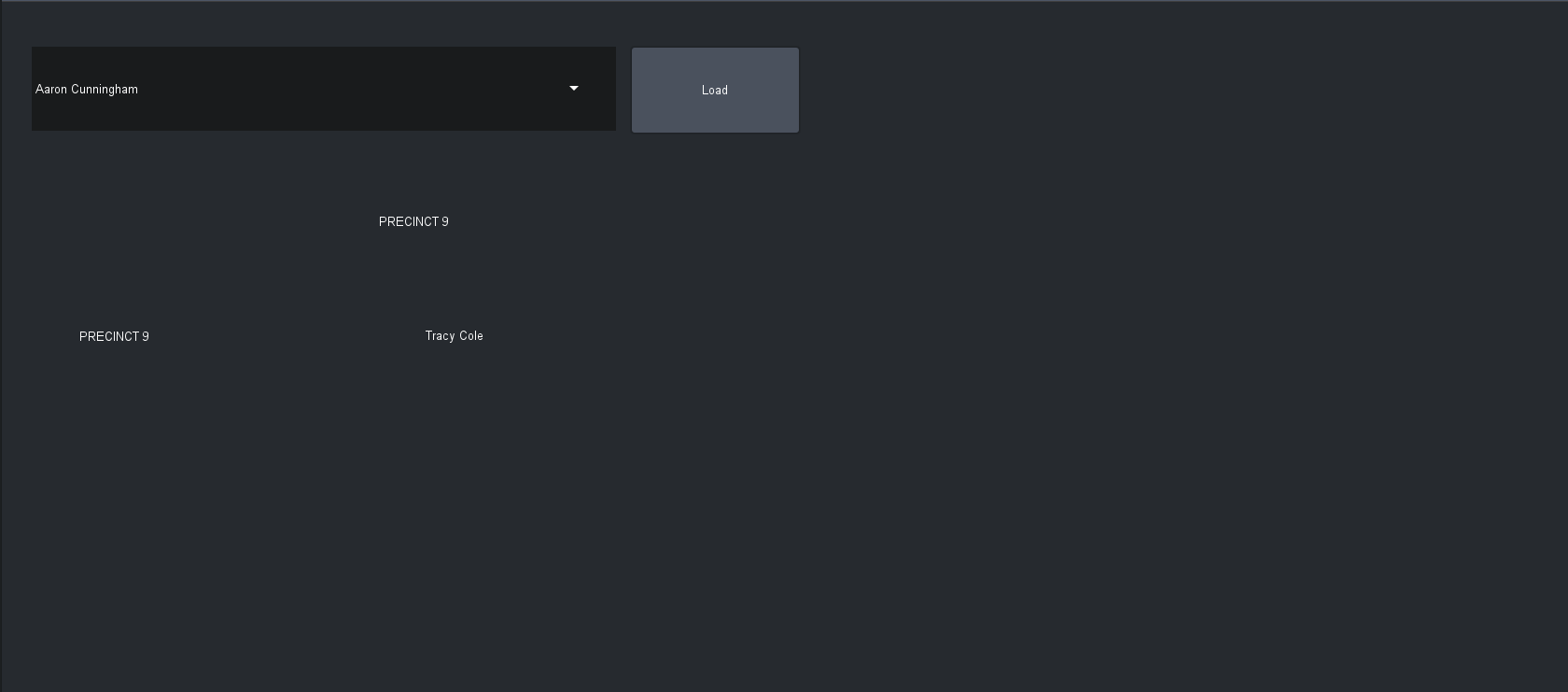
I tried implementing it on a bigger dataset and its acting a bit strange as when I type a person's name into the bar it prints a different person's name below. Along with that sometimes when I press the load button, the name in the bar also changes. I have attached a screenshot describing the problem below.
Thank you once again for helping me through this process as I navigate Dashboard. I very much appreciate it!
Tejus
------------------------------
Tejus Surendran
Original Message:
Sent: 03-29-2023 13:44
From: James
Subject: Dashboard - XML List with searchability
Hi Tejus
While you could use a struct to add additional parameter information, I don't know if your use case is complex enough to warrant it. You can just create 2 new parameters to hold the 2 parts of the parameter (the selected value and the selected display name). You can then simply write to these parameters whenever they change and use THOSE for DataLinq.
<abs contexttype="opengear" style=""> <meta> <params> <param access="1" constraintstrict="false" constrainttype="STRING_STRING_CHOICE" maxlength="-1" name="Constraint From XML" oid="Constraint_From_XML" type="STRING" value="PRECINCT 2" widget="combo"> <constraint key="PRECINCT 9">Aaron Cunningham</constraint> <constraint key="PRECINCT 6">Adam Brandow</constraint> <constraint key="PRECINCT 2">Adam McCusker</constraint> <constraint key="PRECINCT 2">Albert Glenn Diggs</constraint> </param> <param access="1" maxlength="0" name="Selected Precinct" oid="selected_precinct" type="STRING" value="PRECINCT 2" widget="label"/> <param access="1" maxlength="0" name="Selected Person" oid="selected_person" type="STRING" value="Albert Glenn Diggs" widget="label"/> </params> <ogscript handles="onload">var newConstraint = params.createStringStringChoiceConstraint(["Nothing"]);params.replaceConstraint('Constraint_From_XML', newConstraint);</ogscript> <api>function getXML(file){ return ogscript.parseXML(file); //Parse the XML}function loadData(dataFile){ var xmlDocument = getXML(dataFile); //Parse the XML var nodeList = xmlDocument.getElementsByTagName("person"); //Get the tags we want to include in the constraint var constraintData = []; //Placeholder for the new constraint data for (var i = 0; i < nodeList.getLength(); i++) //Loop through each tag we found { var node = nodeList.item(i); //Get the node var location = node.getAttribute("location"); var name = node.getTextContent(); constraintData.push({"key": location, "value": name}); //Push the key/value pair } if (constraintData.length == 0) //Placeholder if we don't have anything (OPTIONAL) { constraintData.push({"key": 0, "value": "Nothing"}); } var constraint = params.createStringStringChoiceConstraint(constraintData); //Create the constraint params.replaceConstraint('Constraint_From_XML', constraint); //Replace the constraint}</api> </meta> <param expand="true" height="90" left="32" oid="Constraint_From_XML" top="48" width="626"> <task tasktype="ogscript">params.setValue('selected_precinct', 0, this.getValue());params.setValue('selected_person', 0, this.getValueAsString());ogscript.rename('selected-take', this.getValue());</task> </param> <button buttontype="push" height="95" left="673" name="Load" top="47" width="183"> <task tasktype="ogscript">loadData('constraint-xml-tester.xml');</task> </button> <label height="142" id="selected-take" left="34" style="txt-align:center" top="164" width="815"/> <param expand="true" height="53" left="83" oid="selected_precinct" showlabel="false" top="332" width="353"/> <param expand="true" height="55" left="454" oid="selected_person" showlabel="false" top="330" width="340"/></abs>
------------------------------
James Peltzer
Ross Video
Original Message:
Sent: 03-29-2023 09:09
From: Tejus
Subject: Dashboard - XML List with searchability
Hi James, I just wanted to follow up on my previous question from a few days ago to see if there was a way to add a second parameter that would appear in datalinq, based on the code snippets from above.
I was also reading the openGear Development Guide and I noticed that there was a STRUCT that might be able to hold multiple sub parameters under it. Would that be a better alternative?
Thank you
Tejus
------------------------------
Tejus Surendran
Original Message:
Sent: 03-27-2023 16:30
From: Tejus
Subject: Dashboard - XML List with searchability
Hi James,
Thank you for your response.
I have tried to modify my xml file based on your xml version 2 you had posted above from a while ago. However I am still having issues separating the name and precinct into 2 separate columns in datalinq. Specifically when I add a new parameter to my existing file.
I have placed a version of my currently working xml file below, please let me know if you have any recommendations on how to split the precinct and names into 2 columns.
Thank you
Tejus
<abs contexttype="opengear" style=""> <meta> <params> <param access="1" constrainttype="STRING_STRING_CHOICE" name="Constraint From XML" oid="Constraint_From_XML" precision="0" type="STRING" value="PRECINCT 9" widget="combo"> <constraint key="PRECINCT 9">Aaron Cunningham</constraint> <constraint key="PRECINCT 6">Adam Brandow</constraint> <constraint key="PRECINCT 2">Adam McCusker</constraint> <constraint key="PRECINCT 2">Albert Glenn Diggs</constraint> </param> </params> <ogscript handles="onload">var newConstraint = params.createStringStringChoiceConstraint(["Nothing"]);params.replaceConstraint('Constraint_From_XML', newConstraint);</ogscript> <api>function getXML(file){ return ogscript.parseXML(file); //Parse the XML}function loadData(dataFile){ var xmlDocument = getXML(dataFile); //Parse the XML var nodeList = xmlDocument.getElementsByTagName("person"); //Get the tags we want to include in the constraint var constraintData = []; //Placeholder for the new constraint data for (var i = 0; i < nodeList.getLength(); i++) //Loop through each tag we found { var node = nodeList.item(i); //Get the node var location = node.getAttribute("location"); var name = node.getTextContent(); constraintData.push({"key": location, "value": name}); //Push the key/value pair } if (constraintData.length == 0) //Placeholder if we don't have anything (OPTIONAL) { constraintData.push({"key": 0, "value": "Nothing"}); } var constraint = params.createStringStringChoiceConstraint(constraintData); //Create the constraint params.replaceConstraint('Constraint_From_XML', constraint); //Replace the constraint}</api> </meta> <param expand="true" height="90" left="32" oid="Constraint_From_XML" top="48" width="626"> <task tasktype="ogscript">ogscript.rename('selected-take', this.getValue());</task> </param> <button buttontype="push" height="95" left="673" name="Load" top="47" width="183"> <task tasktype="ogscript">loadData('constraint-xml-tester.xml');</task> </button> <label height="142" id="selected-take" left="34" style="txt-align:center" top="164" width="815"/></abs>
------------------------------
Tejus Surendran
Original Message:
Sent: 03-27-2023 13:09
From: James
Subject: Dashboard - XML List with searchability
Hi Tejus
You can expose as many parameters to DataLinq as you like. If you want to write additional details to DataLinq, you would create additional parameters and set their values whenever the selection in the dropdown list is changed.
You might want to look the example where I change the selection in the table based on whatever was searched for in the text field.
------------------------------
James Peltzer
Ross Video
Original Message:
Sent: 03-27-2023 12:39
From: Tejus
Subject: Dashboard - XML List with searchability
Hi James,
I hope you are doing well.
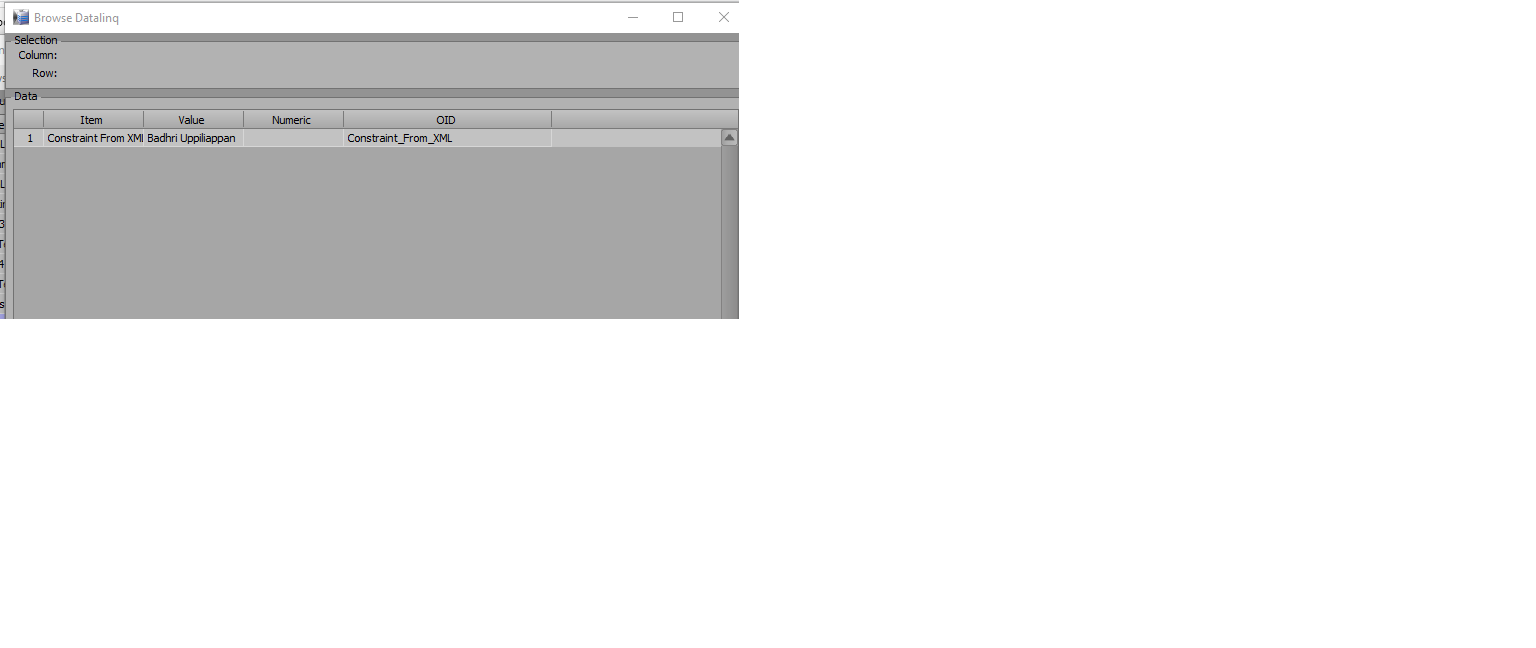
I had a couple questions regarding connecting datalinq to DashBoard. Based on the code you had provided last week I was able to get the xml working. However when I try to load the information from DashBoard to Datalinq I am having 2 issues.
- Sometimes when I type a person's name in and press load it appears that the name resets to something else than what I typed.
- After loading a name and value from dashboard when I check the datalinq side, it appears that only the name is loaded and not the appropriate Precinct accompanied. I have attached a screenshot describing the second issue I am facing below.
Thank you for your help!
Tejus
------------------------------
Tejus Surendran
Original Message:
Sent: 03-23-2023 17:17
From: James
Subject: Dashboard - XML List with searchability
Hi Tejus
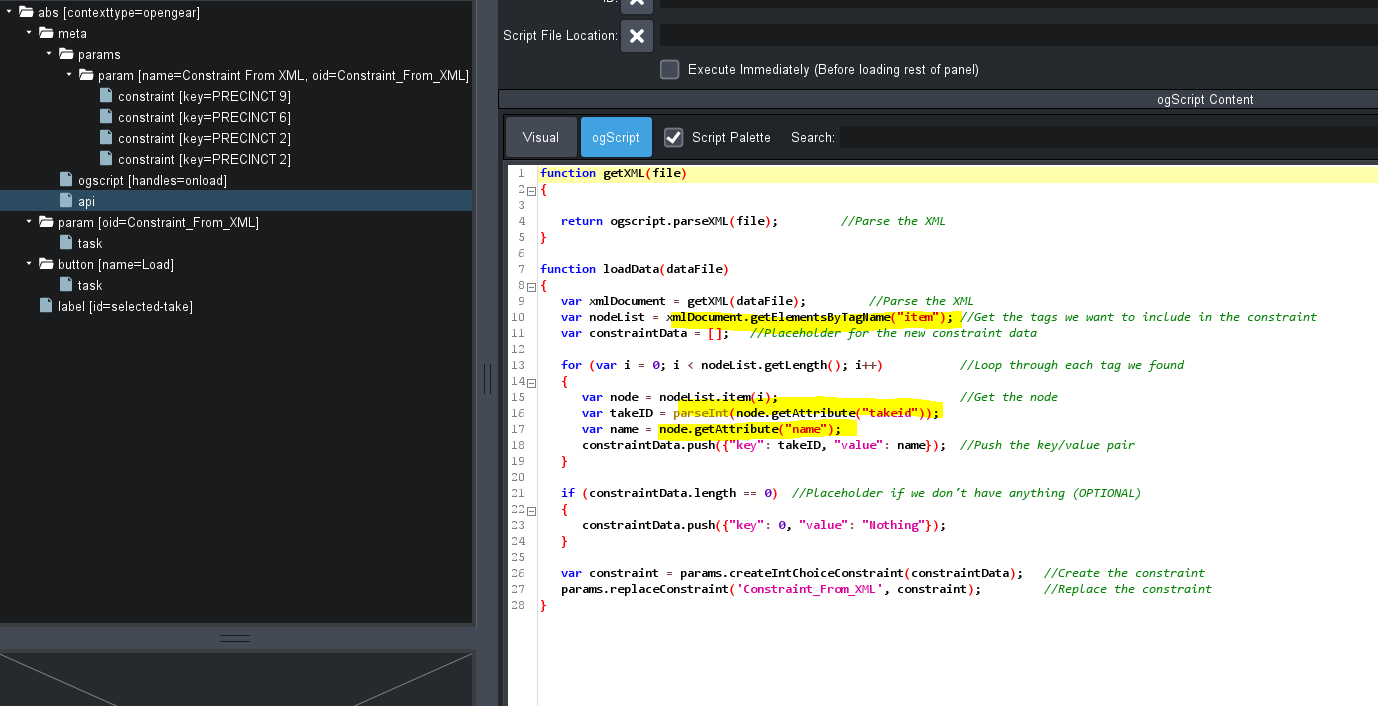
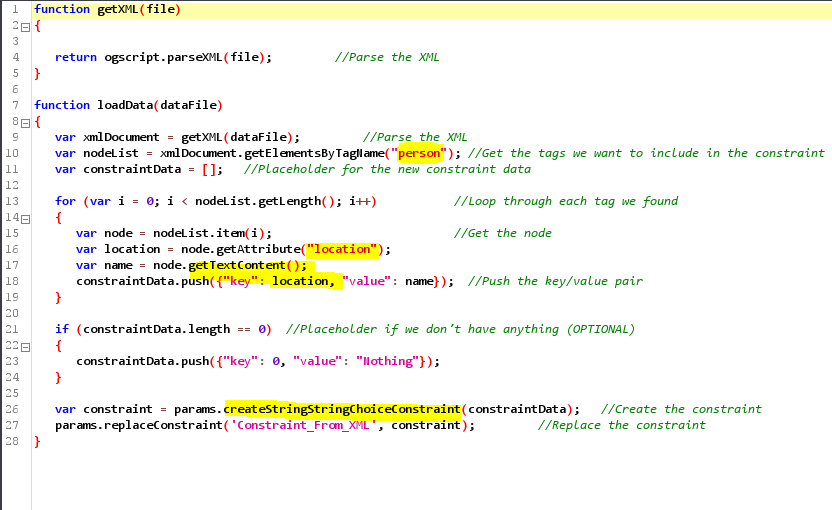
I'm a little confused by your source XML file. The ogScript in the Custom Panel is looking for <item/> tags with attributes called "takeid" and "name" inside of the root document (see picture) but you appear to be embedding an <abs/>, <param/>, and <constraint/> tag. The XML file is whatever you want it to be but this appears to be an odd collection of tags to use for your data.
The changes I had suggested for your file would look like this:
<abs contexttype="opengear" style=""> <meta> <params> <param access="1" constrainttype="STRING_STRING_CHOICE" name="Constraint From XML" oid="Constraint_From_XML" precision="0" type="STRING" value="PRECINCT 9" widget="combo"> <constraint key="PRECINCT 9">Aaron Cunningham</constraint> <constraint key="PRECINCT 6">Adam Brandow</constraint> <constraint key="PRECINCT 2">Adam McCusker</constraint> <constraint key="PRECINCT 2">Albert Glenn Diggs</constraint> </param> </params> <ogscript handles="onload">var newConstraint = params.createStringStringChoiceConstraint(["Nothing"]);params.replaceConstraint('Constraint_From_XML', newConstraint);</ogscript> <api>function getXML(file){ return ogscript.parseXML(file); //Parse the XML}function loadData(dataFile){ var xmlDocument = getXML(dataFile); //Parse the XML var nodeList = xmlDocument.getElementsByTagName("person"); //Get the tags we want to include in the constraint var constraintData = []; //Placeholder for the new constraint data for (var i = 0; i < nodeList.getLength(); i++) //Loop through each tag we found { var node = nodeList.item(i); //Get the node var location = node.getAttribute("location"); var name = node.getTextContent(); constraintData.push({"key": location, "value": name}); //Push the key/value pair } if (constraintData.length == 0) //Placeholder if we don't have anything (OPTIONAL) { constraintData.push({"key": 0, "value": "Nothing"}); } var constraint = params.createStringStringChoiceConstraint(constraintData); //Create the constraint params.replaceConstraint('Constraint_From_XML', constraint); //Replace the constraint}</api> </meta> <param expand="true" height="90" left="32" oid="Constraint_From_XML" top="48" width="626"> <task tasktype="ogscript">ogscript.rename('selected-take', this.getValue());</task> </param> <button buttontype="push" height="95" left="673" name="Load" top="47" width="183"> <task tasktype="ogscript">loadData('constraint-xml-tester.xml');</task> </button> <label height="142" id="selected-take" left="34" style="txt-align:center" top="164" width="815"/></abs>
And a companion data file would look like this:
<?xml version="1.0" encoding="UTF-8" standalone="yes"?><people> <person location="PRECINCT 9">Aaron Cunningham</person> <person location="PRECINCT 6">Adam Brandow</person> <person location="PRECINCT 2">Adam McCusker</person> <person location="PRECINCT 2">Albert Glenn Diggs</person></people>
These are the changed areas to match the new file with the Custom Panel:
------------------------------
James Peltzer
Ross Video
Original Message:
Sent: 03-23-2023 15:57
From: Tejus
Subject: Dashboard - XML List with searchability
Hi James,
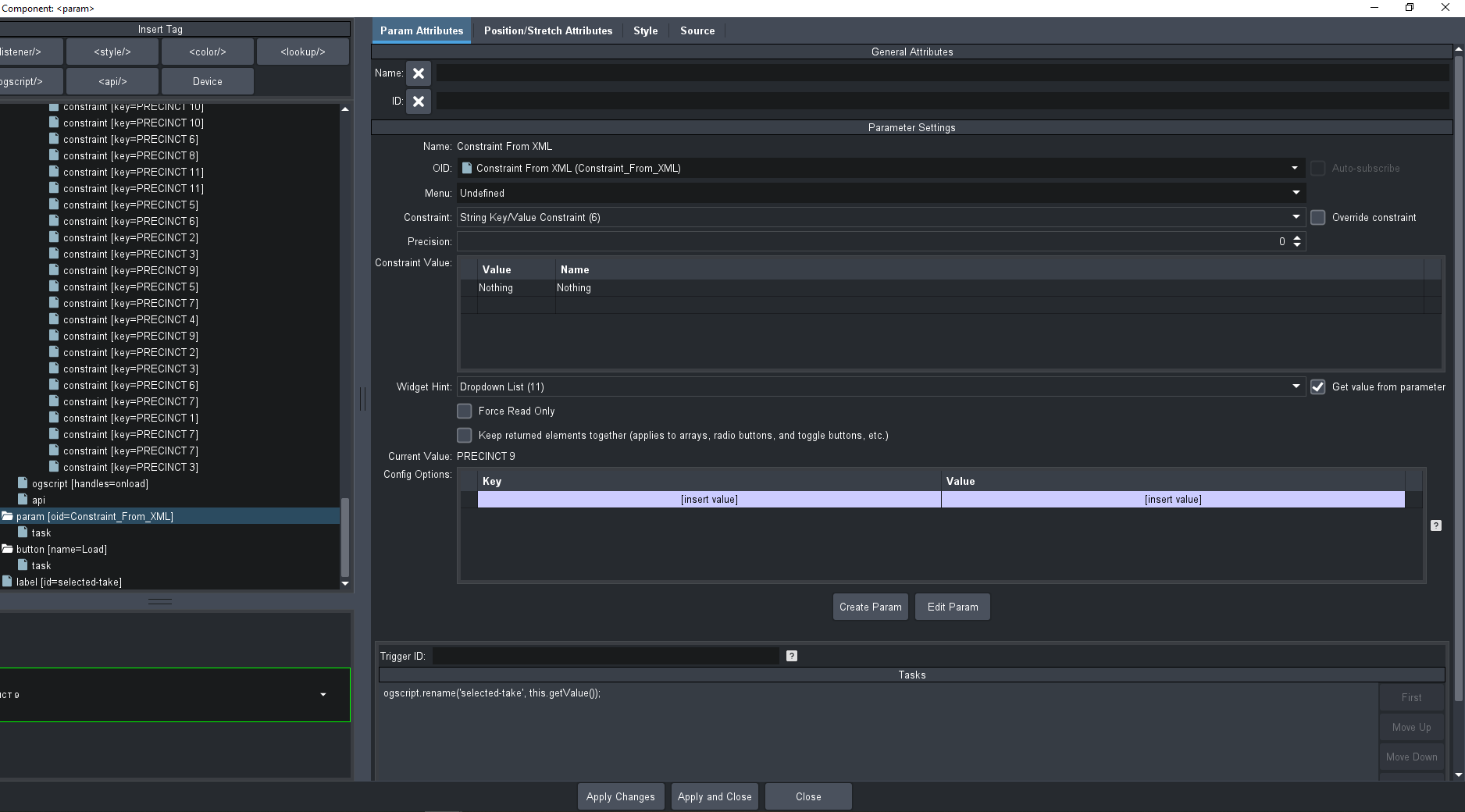
Thank you for the information, I have tried to modify the parameters based on your suggestions however I am still having the issue where the key value pairs are not appearing in the parameter attributes section.
I have attached a copy of the new code as well as a picture of what I am describing. I am unsure whether its an issue with reading in the file or if there is something else I am missing. I know that you had mentioned that you created some sudo data for testing the functions, however after removing that it seems like the files are not being detected.
<?xml version="1.0" encoding="UTF-8"?><abs contexttype="opengear" style=""> <meta> <params> <param access="1" constrainttype="STRING_STRING_CHOICE" name="Constraint From XML" oid="Constraint_From_XML" precision="0" type="STRING" value="PRECINCT 9" widget="combo"> <constraint key="PRECINCT 9">Aaron Cunningham</constraint> <constraint key="PRECINCT 6">Adam Brandow</constraint> <constraint key="PRECINCT 2">Adam McCusker</constraint> <constraint key="PRECINCT 2">Albert Glenn Diggs</constraint> </param> </params> <ogscript handles="onload">var newConstraint = params.createStringStringChoiceConstraint(["Nothing"]);params.replaceConstraint('Constraint_From_XML', newConstraint);</ogscript> <api>function getXML(file){ return ogscript.parseXML(file); //Parse the XML}function loadData(dataFile){ var xmlDocument = getXML(dataFile); //Parse the XML var nodeList = xmlDocument.getElementsByTagName("item"); //Get the tags we want to include in the constraint var constraintData = []; //Placeholder for the new constraint data for (var i = 0; i < nodeList.getLength(); i++) //Loop through each tag we found { var node = nodeList.item(i); //Get the node var takeID = parseInt(node.getAttribute("takeid")); var name = node.getAttribute("name"); constraintData.push({"key": takeID, "value": name}); //Push the key/value pair } if (constraintData.length == 0) //Placeholder if we don't have anything (OPTIONAL) { constraintData.push({"key": 0, "value": "Nothing"}); } var constraint = params.createIntChoiceConstraint(constraintData); //Create the constraint params.replaceConstraint('Constraint_From_XML', constraint); //Replace the constraint}</api> </meta> <param expand="true" height="90" left="32" oid="Constraint_From_XML" top="48" width="626"> <task tasktype="ogscript">ogscript.rename('selected-take', this.getValue());</task> </param> <button buttontype="push" height="95" left="673" name="Load" top="47" width="183"> <task tasktype="ogscript">loadData('constraint-xml-tester.xml');</task> </button> <label height="142" id="selected-take" left="34" style="txt-align:center" top="164" width="815"/></abs>
Below is the xml file that contains the initial data:
<?xml version="1.0" encoding="UTF-8" standalone="yes"?><abs xmlns:xsi="http://www.w3.org/2001/XMLSchema-instance"> <constraints> <param access="1" constrainttype="STRING_CHOICE" name="Constraint From XML" oid="Constraint_From_XML" precision="0" type="STRING_ARRAY" value="PRECINCT 9" widget="combo"> <constraint key="PRECINCT 9">Aaron Cunningham</constraint> <constraint key="PRECINCT 6">Adam Brandow</constraint> <constraint key="PRECINCT 2">Adam McCusker</constraint> <constraint key="PRECINCT 2">Albert Glenn Diggs</constraint> </param> </constraints></abs>
Lastly I have attached a screenshot of the missing Name value pairs section:
Thank you once again for your help
------------------------------
Tejus Surendran
Original Message:
Sent: 03-23-2023 15:44
From: James
Subject: Dashboard - XML List with searchability
Hi Tejus
The constraints themselves are limited to key/value pairs. In the table examples I provided, you would be able to add additional fields by creating additional array parameters and adding them to the table.
If you want to include additional data in the dropdown list itself, you will need to concatenate the string yourself if you want to display it.
If you're trying to include it in the value, you can change your parameter type from INT32 to STRING and change from createIntChoiceConstraint to createStringStringChoiceConstraint (and the constraint attribute in the parameter definition to STRING_STRING_CHOICE). You could then add additional data (again, via concatenation) to the value component.
------------------------------
James Peltzer
Ross Video
Original Message:
Sent: 03-23-2023 13:05
From: Tejus
Subject: Dashboard - XML List with searchability
Hi James,
I tried to create a xml file based on the templates you had provided above, however I am having issues reading it in ross. In this instance I have the name and number associated with each person, however I will also need a third variable to hold a location associated with each person. When trying to read the file into ross it appears that the Key value pairs do not appear. I am not sure if there is an issue with reading the file, however when I change the constrainttype from "INT_CHOICE" to "STRING_CHOICE" it appears that the names of are detectable in the edit component screen.
I have attached a copy of my file below, however I have removed several of the people in order to simplify the file.
Thank you
<?xml version="1.0" encoding="UTF-8"?><abs contexttype="opengear" style="">
<meta>
<params>
<param access="1" constrainttype="INT_CHOICE" name="Constraint From XML" oid="Constraint_From_XML" precision="0" type="INT32" value="10001" widget="combo">
<constraint key="2001">Aaron Cunningham</constraint>
<constraint key="2002">Adam Brandow</constraint>
<constraint key="2003">Adam McCusker</constraint>
<constraint key="2004">Albert Glenn Diggs</constraint>
</param>'
</params>
<ogscript handles="onload">var newConstraint = params.createIntChoiceConstraint(["Nothing"]);
params.replaceConstraint('Constraint_From_XML', newConstraint);</ogscript>
<api>function getXML(file)
{
return ogscript.parseXML(file); //Parse the XML
}
function loadData(dataFile)
{
var xmlDocument = getXML(dataFile); //Parse the XML
var nodeList = xmlDocument.getElementsByTagName("item"); //Get the tags we want to include in the constraint
var constraintData = []; //Placeholder for the new constraint data
for (var i = 0; i < nodeList.getLength(); i++) //Loop through each tag we found
{
var node = nodeList.item(i); //Get the node
var takeID = parseInt(node.getAttribute("takeid"));
var name = node.getAttribute("name");
constraintData.push({"key": takeID, "value": name}); //Push the key/value pair
}
if (constraintData.length == 0) //Placeholder if we don't have anything (OPTIONAL)
{
constraintData.push({"key": 0, "value": "Nothing"});
}
var constraint = params.createIntChoiceConstraint(constraintData); //Create the constraint
params.replaceConstraint('Constraint_From_XML', constraint); //Replace the constraint
}</api>
</meta>
<param expand="true" height="90" left="32" oid="Constraint_From_XML" top="48" width="626">
<task tasktype="ogscript">ogscript.rename('selected-take', this.getValue());</task>
</param>
<button buttontype="push" height="95" left="673" name="Load" top="47" width="183">
<task tasktype="ogscript">loadData('name-rep-number-xml.xml');</task>
</button>
<label height="142" id="selected-take" left="34" style="txt-align:center" top="164" width="815"/>
</abs>
------------------------------
Tejus Surendran
Original Message:
Sent: 03-16-2023 09:17
From: James
Subject: Dashboard - XML List with searchability
Hopefully once you look at the pattern, it will be fairly straight forward. To add additional attributes, you would simply add a new array parameter to hold the data and update the constraint of the table parameter to include it.
The examples I created were using this (baked-in) xml:
<?xml version="1.0" encoding="UTF-8" standalone="yes"?><graphics> <item takeid="10001" name="Arthur A. Aaronson"/> <item takeid="10015" name="Buford B. Buckthorn"/> <item takeid="2156" name="Carl C. Carlson"/> <item takeid="8469" name="Dianna D. Dickenson"/> <item takeid="2449" name="Erica E. Ellis"/></graphics>'
------------------------------
James Peltzer
Ross Video
Original Message:
Sent: 03-16-2023 08:09
From: Tom
Subject: Dashboard - XML List with searchability
James,
Theses examples are great and exactly what I am looking for. I plan on trying to add an xml file to these tomorrow. Two questions, could you provide me an example xml file that would work with these? Also, the names will also need a second field associated with the names for titles. Will this be hard to do?
------------------------------
Thomas Peterson
Original Message:
Sent: 03-15-2023 14:49
From: James
Subject: Dashboard - XML List with searchability
There are several ways to solve this. One option would be to use a dropdown list constraint - these already automatically have an autocomplete capability in DashBoard:
<abs contexttype="opengear" style=""> <meta> <params> <param access="1" constrainttype="INT_CHOICE" name="Constraint From XML" oid="Constraint_From_XML" precision="0" type="INT32" value="10001" widget="combo"> <constraint key="10001">Arthur A. Aaronson</constraint> <constraint key="10015">Buford B. Buckthorn</constraint> <constraint key="2156">Carl C. Carlson</constraint> <constraint key="8469">Dianna D. Dickenson</constraint> <constraint key="2449">Erica E. Ellis</constraint> </param> </params> <ogscript handles="onload">var newConstraint = params.createIntChoiceConstraint(["Nothing"]);params.replaceConstraint('Constraint_From_XML', newConstraint);</ogscript> <api>function getXML(file){ //for testing, I am replacing the file XML with hard-coded XML. Remove these lines for loading an actual file file = '<?xml version="1.0" encoding="UTF-8" standalone="yes"?>\n' + '<graphics>\n' + ' <item takeid="10001" name="Arthur A. Aaronson"/>\n' + ' <item takeid="10015" name="Buford B. Buckthorn"/>\n' + ' <item takeid="2156" name="Carl C. Carlson"/>\n' + ' <item takeid="8469" name="Dianna D. Dickenson"/>\n' + ' <item takeid="2449" name="Erica E. Ellis"/>\n' + '</graphics>' return ogscript.parseXML(file); //Parse the XML}function loadData(dataFile){ var xmlDocument = getXML(dataFile); //Parse the XML var nodeList = xmlDocument.getElementsByTagName("item"); //Get the tags we want to include in the constraint var constraintData = []; //Placeholder for the new constraint data for (var i = 0; i < nodeList.getLength(); i++) //Loop through each tag we found { var node = nodeList.item(i); //Get the node var takeID = parseInt(node.getAttribute("takeid")); var name = node.getAttribute("name"); constraintData.push({"key": takeID, "value": name}); //Push the key/value pair } if (constraintData.length == 0) //Placeholder if we don't have anything (OPTIONAL) { constraintData.push({"key": 0, "value": "Nothing"}); } var constraint = params.createIntChoiceConstraint(constraintData); //Create the constraint params.replaceConstraint('Constraint_From_XML', constraint); //Replace the constraint}</api> </meta> <param expand="true" height="90" left="32" oid="Constraint_From_XML" top="48" width="626"> <task tasktype="ogscript">ogscript.rename('selected-take', this.getValue());</task> </param> <button buttontype="push" height="95" left="673" name="Load" top="47" width="183"> <task tasktype="ogscript">loadData('data.xml');</task> </button> <label height="142" id="selected-take" left="34" style="txt-align:center" top="164" width="815"/></abs>
You can also provide the dropdown list as a search field and show your whole table:
<abs contexttype="opengear" style=""> <meta> <params> <param access="1" constrainttype="INT_CHOICE" name="Constraint From XML" oid="Constraint_From_XML" precision="0" type="INT32" value="10015" widget="combo"> <constraint key="10001">Arthur A. Aaronson</constraint> <constraint key="10015">Buford B. Buckthorn</constraint> <constraint key="2156">Carl C. Carlson</constraint> <constraint key="8469">Dianna D. Dickenson</constraint> <constraint key="2449">Erica E. Ellis</constraint> </param> <param access="1" constrainttype="INT_NULL" name="Take IDs" oid="all-take-ids" precision="0" type="INT16_ARRAY" value="10001;10015;2156;8469;2449" widget="label"/> <param access="1" maxlength="0" name="Names" oid="all-names" precision="0" type="STRING_ARRAY" widget="label"> <value>Arthur A. Aaronson</value> <value>Buford B. Buckthorn</value> <value>Carl C. Carlson</value> <value>Dianna D. Dickenson</value> <value>Erica E. Ellis</value> </param> <param access="1" constrainttype="STRING_CHOICE" name="Table" oid="table" precision="0" type="INT32" value="1" widget="table"> <constraint>all-take-ids</constraint> <constraint>all-names</constraint> </param> </params> <ogscript handles="onload">var newConstraint = params.createIntChoiceConstraint(["Nothing"]);params.replaceConstraint('Constraint_From_XML', newConstraint);</ogscript> <api>function getXML(file){ //for testing, I am replacing the file XML with hard-coded XML. Remove these lines for loading an actual file file = '<?xml version="1.0" encoding="UTF-8" standalone="yes"?>\n' + '<graphics>\n' + ' <item takeid="10001" name="Arthur A. Aaronson"/>\n' + ' <item takeid="10015" name="Buford B. Buckthorn"/>\n' + ' <item takeid="2156" name="Carl C. Carlson"/>\n' + ' <item takeid="8469" name="Dianna D. Dickenson"/>\n' + ' <item takeid="2449" name="Erica E. Ellis"/>\n' + '</graphics>' return ogscript.parseXML(file); //Parse the XML}function loadData(dataFile){ var xmlDocument = getXML(dataFile); //Parse the XML var nodeList = xmlDocument.getElementsByTagName("item"); //Get the tags we want to include in the constraint var allTakeIDs = []; var allNames = []; var constraintData = []; //Placeholder for the new constraint data for (var i = 0; i < nodeList.getLength(); i++) //Loop through each tag we found { var node = nodeList.item(i); //Get the node var takeID = parseInt(node.getAttribute("takeid")); var name = node.getAttribute("name"); constraintData.push({"key": takeID, "value": name}); //Push the key/value pair allTakeIDs.push(takeID); allNames.push(name); } if (constraintData.length == 0) //Placeholder if we don't have anything (OPTIONAL) { constraintData.push({"key": 0, "value": "Nothing"}); allTakeIDs.push(0); allNames.push(''); } var constraint = params.createIntChoiceConstraint(constraintData); //Create the constraint params.replaceConstraint('Constraint_From_XML', constraint); //Replace the constraint params.setAllValues('all-take-ids', allTakeIDs); params.setAllValues('all-names', allNames);}</api> </meta> <param expand="true" height="90" left="32" oid="Constraint_From_XML" top="48" width="626"> <task tasktype="ogscript">var index = this.getConstraint().getChoice(this.getValue());params.setValue('table', 0, index);</task> </param> <button buttontype="push" height="95" left="673" name="Load" top="47" width="183"> <task tasktype="ogscript">loadData('data.xml');</task> </button><param bottom="8" expand="true" height="792" left="7" oid="table" right="9" showlabel="false"> <config key="w.rowheight">40</config> </param></abs>
Lastly, you could do a search box that looks for a full or partial match as the user types:
<abs contexttype="opengear" style=""> <meta> <params> <param access="1" constrainttype="INT_NULL" name="Take IDs" oid="all-take-ids" precision="0" type="INT16_ARRAY" value="10001;10015;2156;8469;2449" widget="label"/> <param access="1" maxlength="0" name="Names" oid="all-names" precision="0" type="STRING_ARRAY" widget="label"> <value>Arthur A. Aaronson</value> <value>Buford B. Buckthorn</value> <value>Carl C. Carlson</value> <value>Dianna D. Dickenson</value> <value>Erica E. Ellis</value> </param> <param access="1" constrainttype="STRING_CHOICE" name="Table" oid="table" precision="0" type="INT32" value="-1" widget="table"> <constraint>all-take-ids</constraint> <constraint>all-names</constraint> </param> <param access="1" maxlength="0" name="Search Box" oid="search" stateless="true" type="STRING" value=" " widget="text"/> </params> <api>function getXML(file){ //for testing, I am replacing the file XML with hard-coded XML. Remove these lines for loading an actual file file = '<?xml version="1.0" encoding="UTF-8" standalone="yes"?>\n' + '<graphics>\n' + ' <item takeid="10001" name="Arthur A. Aaronson"/>\n' + ' <item takeid="10015" name="Buford B. Buckthorn"/>\n' + ' <item takeid="2156" name="Carl C. Carlson"/>\n' + ' <item takeid="8469" name="Dianna D. Dickenson"/>\n' + ' <item takeid="2449" name="Erica E. Ellis"/>\n' + '</graphics>' return ogscript.parseXML(file); //Parse the XML}function loadData(dataFile){ var xmlDocument = getXML(dataFile); //Parse the XML var nodeList = xmlDocument.getElementsByTagName("item"); //Get the tags we want to include in the constraint var allTakeIDs = []; var allNames = []; for (var i = 0; i < nodeList.getLength(); i++) //Loop through each tag we found { var node = nodeList.item(i); //Get the node var takeID = parseInt(node.getAttribute("takeid")); var name = node.getAttribute("name"); allTakeIDs.push(takeID); allNames.push(name); } if (allNames.length == 0) //Placeholder if we don't have anything (OPTIONAL) { allTakeIDs.push(0); allNames.push(''); } params.setAllValues('all-take-ids', allTakeIDs); params.setAllValues('all-names', allNames);}function search(partial){ partial = partial.toLowerCase(); var allNames = params.getAllValues('all-names'); //LOOK FOR AN EXACT MATCH for (var i = 0; i < allNames.length; i++) { if (partial == allNames[i].toLowerCase()) { return i; } } //LOOK FOR AN "STARTS WITH" MATCH for (var i = 0; i < allNames.length; i++) { if (allNames[i].toLowerCase().indexOf(partial) == 0) { return i; } } //LOOK FOR AN "ANYWHERE" MATCH for (var i = 0; i < allNames.length; i++) { if (allNames[i].toLowerCase().indexOf(partial) >= 0) { return i; } } return -1;}function findName(partial){ var selectedIndex = search(partial); params.setValue('table', 0, selectedIndex);}function clearSearch(){ params.setValue('search', 0, '');}</api> </meta> <param expand="true" height="90" left="32" oid="search" onmousedown="clearSearch()" top="48" width="626"> <config key="w.immediate">true</config> <task tasktype="ogscript">if (this.getValue() != ''){ findName(this.getValue());}</task> </param> <button buttontype="push" height="95" left="673" name="Load" top="47" width="183"> <task tasktype="ogscript">loadData('data.xml');</task> </button> <param bottom="8" expand="true" height="792" left="7" oid="table" right="9" showlabel="false"> <config key="w.rowheight">40</config> </param></abs>
------------------------------
James Peltzer
Ross Video
Original Message:
Sent: 03-11-2023 09:30
From: Tom
Subject: Dashboard - XML List with searchability
James,
The list of name will come from excel and I was planning on converting it into an xml file so that Dashboard can read it.
------------------------------
Thomas Peterson
Original Message:
Sent: 03-10-2023 17:03
From: James
Subject: Dashboard - XML List with searchability
Hi Tom
Where is the list of names coming from? Are they input into the system manually or are you trying to pull them from somewhere?
------------------------------
James Peltzer
Ross Video