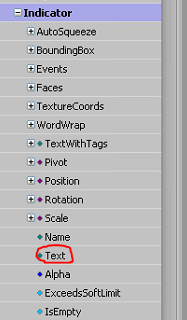
That's just a text object I renamed. You can see the project in the project file I attached previously.
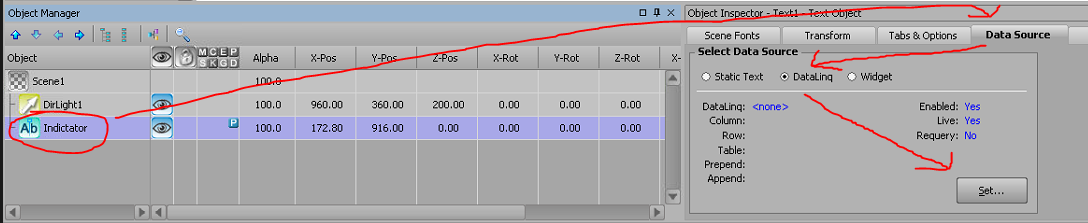
Here's how to link the text object to datalinq:
------------------------------
Omar Reyes
------------------------------
Original Message:
Sent: 03-23-2023 13:26
From: jnov15
Subject: Datalinq Dakstats Bases
Wow! This is awesome thank you much. I am confused as to where I get the "indicator text" box. Is that just the datalinq? I've built the rest of the setup. I really appreciate your help!
------------------------------
Jack Novelli
Video Production Manager
Columbia Fireflies
------------------------------
Original Message:
Sent: 03-23-2023 11:12
From: Omar
Subject: Datalinq Dakstats Bases
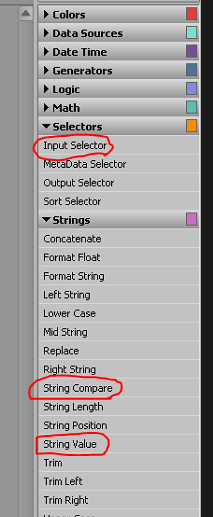
The way I would do it on visual logic is to use an Input Selector.
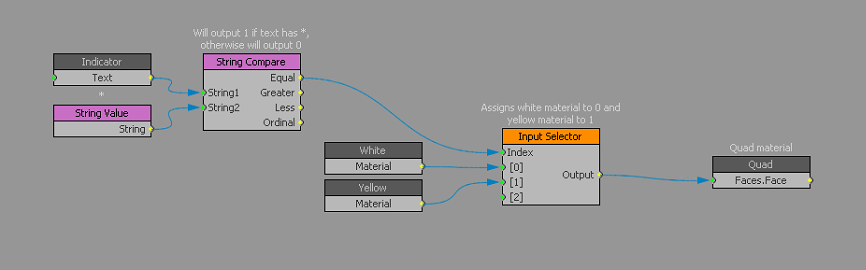
Use String Compare node to compare the Indicator text object to a String Value node which has * as the value. So when the text has * it will turn on the String Compare node and will output a 1. Connect this to the Input Selector node's index. Put the two materials into the Input Selector inputs, 0 being the base and1 being the yellow material. Then just connect the output to the quad face.
Basic setup:
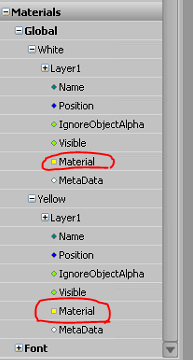
Material nodes:
Quad face node: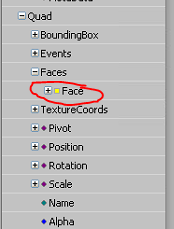
Text field node:
Function nodes:
------------------------------
Omar Reyes