Original Message:
Sent: 08-11-2023 06:53
From: Rob van Rooyen
Subject: DataLinq Source
Thanks! I'm not a big fan of scripting (just don't have the knowledge), but this is something I can work with :-).
------------------------------
Rob van Rooyen
Senior Graphics Specialis
NEP The Netherlands
Hilversum Netherlands
Original Message:
Sent: 08-10-2023 06:23
From: Simon Redmile
Subject: DataLinq Source
Yes but only through scripting.
For example;
dim stat, sport as xpTextObject
for i as integer = 1 to 4
scene.GetObjectByName("Stat " & i, stat)
scene.GetObjectByName("Sport", sport)
Select Case sport
Case "Football"
stat.Datalinq.LinkName="Roster_Football"
Case "Soccer"
stat.Datalinq.LinkName="Roster_Soccer"
End Select
next
------------------------------
Simon Redmile
Senior Graphic Programmer & Designer
Ross Video
Bristol United Kingdom
Original Message:
Sent: 08-10-2023 06:17
From: Rob van Rooyen
Subject: DataLinq Source
Is there a way to make the source of the DataLinq flexibel?
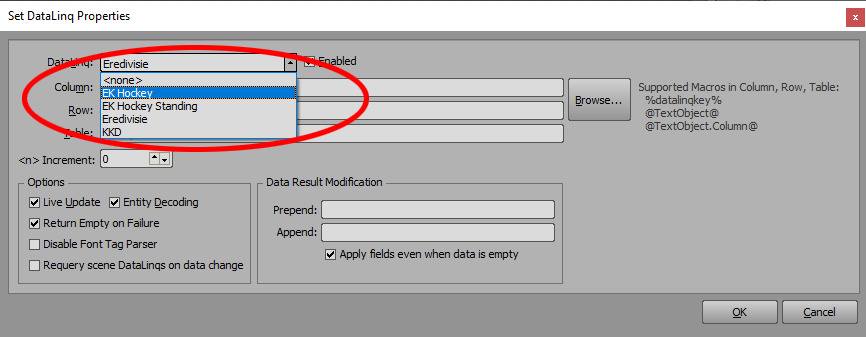
I've got two competitions with info of the participating teams stored as sheets in two separate Excel files (Eredivisie.xlsx and KKD.xlsx).
Right now, I've got two exact the same XPression scenes that only differ in the source of the specific Datalinq connections. If I could do this in one and the same XPression scene, I would be far more flexible if there are competitions added and/or the graphics needs updating...
One solution would be, to merge the two Excel files into one, but than that file becomes rather unreadable due the many teams involved.
------------------------------
Rob van Rooyen
Senior Graphics Specialis
NEP The Netherlands
Hilversum Netherlands
------------------------------