Hey Garner, thank you so much for the help. I setup the UDP field parser like you recommended and it worked perfectly!
Now, the second part of the data I need to read (scores, leaderboard info, etc) is a TCP ASCII scoring data feed. This part I couldn't get it to work on my test.
I used the same ASCII Datalinq Source, with the right port and it didn't receive any data. I've tried many combination of 'start of packet' and 'end of packet' and still no luck.
The provider gave me his IP address but I didn't see anywhere to plug that info in Datalinq.
The protocol os attached. Any help is appreciated...
------------------------------
Paulo Dias
------------------------------
Original Message:
Sent: 10-06-2022 14:31
From: Garner Millward
Subject: Datalinq UDP feed
That doesn't look like the formatting of the transmission protocols from before, but the princible is the same, you just need to build the field parser for it in the ASCII Datalinq setup. I'm not familiar with the ALGE Timey protocol.
You will bind the clock data to a text object.
Original Message:
Sent: 10-06-2022 05:30
From: Paulo Dias
Subject: Datalinq UDP feed
Hey Garner, here is a screenshot of the trace log, which was provided by the scoring/timing provider. I couldn't upload the actual log (unsupported file)...
They also said that the clock feed is actually an emulation of the ALGE Timy protocol.
If I get the time feed to work on Datalinq, should I bind it to a text object or to a widget timer, in order for me to be in sync?
Thanks again,
------------------------------
Paulo Dias
Original Message:
Sent: 10-05-2022 11:02
From: Garner Millward
Subject: Datalinq UDP feed
Can you provide the full documentation? I can't see what the start of packet is, and the documentation may have examples of transmitted data.
Just throwing something together based on the "Running Time (without 1/10 seconds)" transmission protocol format (I doubt this will work it will need tweaking).
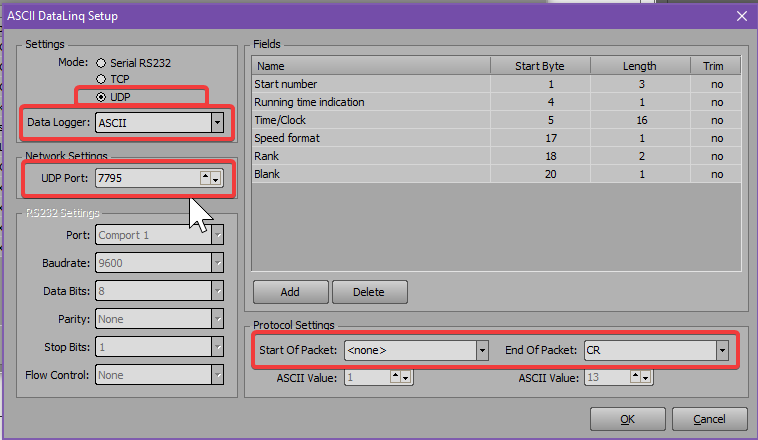
I've highlighted where to enable the Data Logger. This should only be used to capture data for analysis, don't leave it enabled during normal operation.
We will need to know what the start packet is of the transmission.
Original Message:
Sent: 10-05-2022 02:03
From: Paulo Dias
Subject: Datalinq UDP feed
Thanks for the answer Garner!
I actually have the documentation about the formatting (attached). I have a test in a couple days so I would really appreciate your help setting this parser up as I have no experience with this whatsoever.
------------------------------
Paulo Dias
Original Message:
Sent: 10-05-2022 00:44
From: Garner Millward
Subject: Datalinq UDP feed
Datalinq does support UDP data broadcasts.
Most likely it would use the ASCII Datalinq source - you will have create the field parser for the clock in the ASCII Datalinq setup.
Do you have any documentation about the formatting of the clock data?
If you do not - You could also setup the ASCII datalinq source, set it to UDP, and then enable the DataLogger (ASCII). If you capture some raw data of the UDP source using the Datalinq server and then post a copy of the Datalinq Server log we could probably help you create the field parser.
Or you could use something like telnet or Docklight Scripting to captue the data and give us a sample of that.