Facility Control

 View Only
  • 1.  Displaying Tally on Dashboard

    Posted 06-07-2022 10:34
    I'm looking for a way to show when one of our 3 PTZ-12 cameras is ON AIR on the custom Dashboard panel that I built:

    I couldn't find anything in the individual camera widgets to indicate program/preview status. Let me know if there's another place I can find this info to pull it into my panel. Ideally, instead of just showing a small indicator somewhere for each camera, I would love to change the blue background in each of the labels at the top of each camera's controls (the ones that say Camera 1, 2, etc.) to turn red if the camera is ON AIR. If it matters, we're using a Ross Carbonite Black Solo 13 switcher.

    Thanks in advance.

    ------------------------------
    Steve Witwicki
    Video Technical Director
    Light of Christ Church
    ------------------------------


  • 2.  RE: Displaying Tally on Dashboard

    Posted 06-08-2022 09:19
    Hi Steve,

    To get access to tally status for the PTZ-12G cameras, you will need a TSL 3.1 tally source.  You can then follow the following steps:
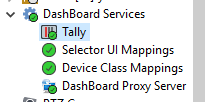
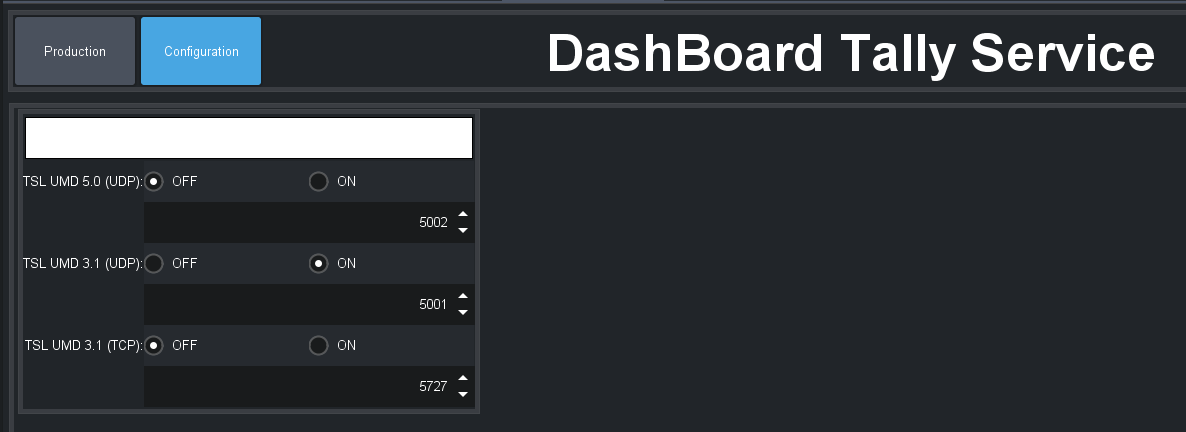
    1. In your DashBoard tree, find Tally under DashBoard Services to open the DashBoard Tally Service.  Select the Configuration page and turn on the listener for your chosen tally source, making sure that the port is correct (note that the TSL UMD 5.0 (UDP) option does not work in DashBoard 9.4.1 or earlier versions of DashBoard).  Once you have this turned on, you can switch to the Production tab and test that you can receive tally from your chosen tally source (typically your Carbonite switcher).
    2. In the PTZ camera plugin page for each camera, select Configuration and press the Gateway button and look for the section marked Tally Interface
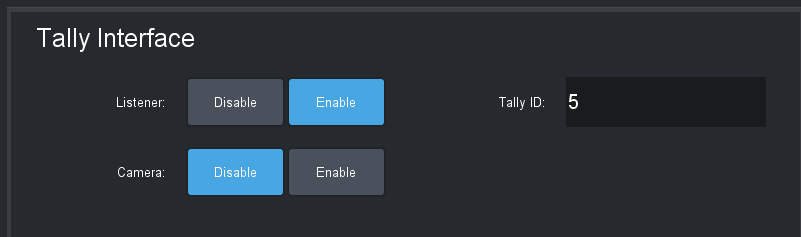
    • Set the correct tally ID for your camera
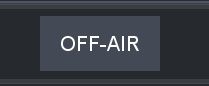
    • Set Listener to Enable to start the camera plug-in listening for tally on your chosen tally ID - you should now see that the tally indicator in the camera UI pages shows the current tally status of the camera 
    • If you also want DashBoard to set the tally light on the camera itself, set the Camera option to Enable
    3. To add the tally indicator to your custom panel, you can use the parameter tally.state (or drag it from the camera plugin UI)

    Hopefully this is enough information to get you going

    Barbara

    ------------------------------
    Barbara Sharp
    Software Developer, Technical Lead - Robotics
    Ross Video
    ------------------------------


  • 3.  RE: Displaying Tally on Dashboard

    Posted 06-10-2022 16:55
    Thanks so much, Barbara! My panel turned out way better than I expected. Couldn't figure out where I was going to place an indicator for the tally of each camera on the panel and instead decided to make the label at the top of each column into an indicator. Now, hopefully, my VD will clearly see which camera is on air and won't inadvertently hit a preset when that camera is already live! By the way, we also have two stationary (Canon XF405) cameras on tripods. One is manned (Cam4) in the production booth and the other is in a far corner of the room connected by ethernet. We use it for wide shots of the room and other cutaways. While we can't pan or tilt it, we do have the ability to change zoom via a browser control. I included it in a drawer on the Dashboard panel. When you click the drawer with the camera icon and number 5 on it you'll see the browser control slide out to the right to make any changes. And you were right about the auto-focus setting, too. I found that and now we're happy campers. Ross rocks.


    ------------------------------
    Steve Witwicki
    Video Technical Director
    Light of Christ Church
    ------------------------------


  • 4.  RE: Displaying Tally on Dashboard

    Posted 06-10-2022 17:10
    I'm happy to hear that it worked for you.  Thanks for sharing the screenshot of your panel.

    Barbara

    ------------------------------
    Barbara Sharp
    Software Developer, Technical Lead - Robotics
    Ross Video
    ------------------------------


  • 5.  RE: Displaying Tally on Dashboard

    Posted 06-14-2022 18:33
    Must say, that panel turned out Great!
    Question, how do you talk to the cameras? Is that VISCA IP or?

    ------------------------------
    Aleksander Stalsberg
    Inland Norway University of Applied Sciences/Lillehammer Icehockey Club
    Norway
    ------------------------------


  • 6.  RE: Displaying Tally on Dashboard

    Posted 06-14-2022 22:38

    Yes, it uses the VISCA protocol. The cameras are the new Ross PTZ-12 models (we replaced our original PivotCams which we had issues with) and really like these much better. They perform better in low light situations and are more responsive using the controls on our panels. We can actually perform a smooth movement while the camera is live.


    LOC Logo   Steve Witwicki
    LIGHT OF CHRIST CHURCH
    Video Team Leader and Social Media Manager
    Cell: 847-271-0623
     
    Light of Christ exists to INVITE people into Christian community, NURTURE them in a life-changing
    relationship with Jesus Christ, so they can faithfully and joyfully SERVE Him.
     
     
    On 6/14/2022 5:35 PM, Aleksander via Ross Video Limited wrote:
    01000181645b784b-dcfda274-c15b-4eb9-a45f-a1a82cbf726f-000000@email.amazonses.com">
    Must say, that panel turned out Great! Question, how do you talk to the cameras? Is that VISCA IP or? ------------------------------ Aleksander... -posted to the "Facility Control" community
    Ross Video Limited

    Facility Control

    Post New Message
    Re: Displaying Tally on Dashboard
    Reply to Group Reply to Sender
    Jun 14, 2022 6:33 PM
    Aleksander
    Must say, that panel turned out Great!
    Question, how do you talk to the cameras? Is that VISCA IP or?

    ------------------------------
    Aleksander Stalsberg
    Inland Norway University of Applied Sciences/Lillehammer Icehockey Club
    Norway
    ------------------------------
      Reply to Group Online   View Thread   Recommend   Forward   Flag as Inappropriate  


    You are receiving this notification because you followed the 'Displaying Tally on Dashboard' message thread. If you do not wish to follow this, please click here.

    Update your email preferences to choose the types of email you receive

    Unsubscribe from all participation emails


    Original Message:
    Sent: 6/14/2022 6:33:00 PM
    From: Aleksander
    Subject: RE: Displaying Tally on Dashboard

    Must say, that panel turned out Great!
    Question, how do you talk to the cameras? Is that VISCA IP or?

    ------------------------------
    Aleksander Stalsberg
    Inland Norway University of Applied Sciences/Lillehammer Icehockey Club
    Norway
    ------------------------------

    Original Message:
    Sent: 06-10-2022 16:55
    From: Steve Witwicki
    Subject: Displaying Tally on Dashboard

    Thanks so much, Barbara! My panel turned out way better than I expected. Couldn't figure out where I was going to place an indicator for the tally of each camera on the panel and instead decided to make the label at the top of each column into an indicator. Now, hopefully, my VD will clearly see which camera is on air and won't inadvertently hit a preset when that camera is already live! By the way, we also have two stationary (Canon XF405) cameras on tripods. One is manned (Cam4) in the production booth and the other is in a far corner of the room connected by ethernet. We use it for wide shots of the room and other cutaways. While we can't pan or tilt it, we do have the ability to change zoom via a browser control. I included it in a drawer on the Dashboard panel. When you click the drawer with the camera icon and number 5 on it you'll see the browser control slide out to the right to make any changes. And you were right about the auto-focus setting, too. I found that and now we're happy campers. Ross rocks.


    ------------------------------
    Steve Witwicki
    Video Technical Director
    Light of Christ Church

    Original Message:
    Sent: 06-08-2022 09:19
    From: Barbara Sharp
    Subject: Displaying Tally on Dashboard

    Hi Steve,

    To get access to tally status for the PTZ-12G cameras, you will need a TSL 3.1 tally source.  You can then follow the following steps:
    1. In your DashBoard tree, find Tally under DashBoard Services to open the DashBoard Tally Service.  Select the Configuration page and turn on the listener for your chosen tally source, making sure that the port is correct (note that the TSL UMD 5.0 (UDP) option does not work in DashBoard 9.4.1 or earlier versions of DashBoard).  Once you have this turned on, you can switch to the Production tab and test that you can receive tally from your chosen tally source (typically your Carbonite switcher).


    2. In the PTZ camera plugin page for each camera, select Configuration and press the Gateway button and look for the section marked Tally Interface

    • Set the correct tally ID for your camera
    • Set Listener to Enable to start the camera plug-in listening for tally on your chosen tally ID - you should now see that the tally indicator in the camera UI pages shows the current tally status of the camera 
    • If you also want DashBoard to set the tally light on the camera itself, set the Camera option to Enable
    3. To add the tally indicator to your custom panel, you can use the parameter tally.state (or drag it from the camera plugin UI)

    Hopefully this is enough information to get you going

    Barbara

    ------------------------------
    Barbara Sharp
    Software Developer, Technical Lead - Robotics
    Ross Video

    Original Message:
    Sent: 06-07-2022 10:34
    From: Steve Witwicki
    Subject: Displaying Tally on Dashboard

    I'm looking for a way to show when one of our 3 PTZ-12 cameras is ON AIR on the custom Dashboard panel that I built:

    I couldn't find anything in the individual camera widgets to indicate program/preview status. Let me know if there's another place I can find this info to pull it into my panel. Ideally, instead of just showing a small indicator somewhere for each camera, I would love to change the blue background in each of the labels at the top of each camera's controls (the ones that say Camera 1, 2, etc.) to turn red if the camera is ON AIR. If it matters, we're using a Ross Carbonite Black Solo 13 switcher.

    Thanks in advance.

    ------------------------------
    Steve Witwicki
    Video Technical Director
    Light of Christ Church
    ------------------------------