Can you please help me with what you need in the dropdowns? Should it be just the Jersey number or should it be appended string of JerseyNumber + Name + Position as one option?
Original Message:
Sent: 09-14-2023 15:23
From: Shawn Callaway
Subject: Excel doc import into tables for player numbers, names, positions
Altaz,
I am now trying to get my table parameters to connect to select dropdowns to be used for lower 3rds and the parameters that are used in the table are not showing up in my list of parameters that I already have existing. How do I get them to merge?
I am really lost here, thank you!
------------------------------
Shawn Callaway
------------------------------
Original Message:
Sent: 09-14-2023 10:46
From: Altaz Daruwala
Subject: Excel doc import into tables for player numbers, names, positions
Hi Shawn,
Thanks for using and confirming the functionality of the home table. I used the grid panel code from the previous message and it works fine and the code looks good too. Can you please confirm that the XML file that you are using for the away table follows the pattern of the a.Roster.xml that you attached previously?
Best Regards,
------------------------------
Altaz Daruwala
Ross Video
Original Message:
Sent: 09-14-2023 10:36
From: Shawn Callaway
Subject: Excel doc import into tables for player numbers, names, positions
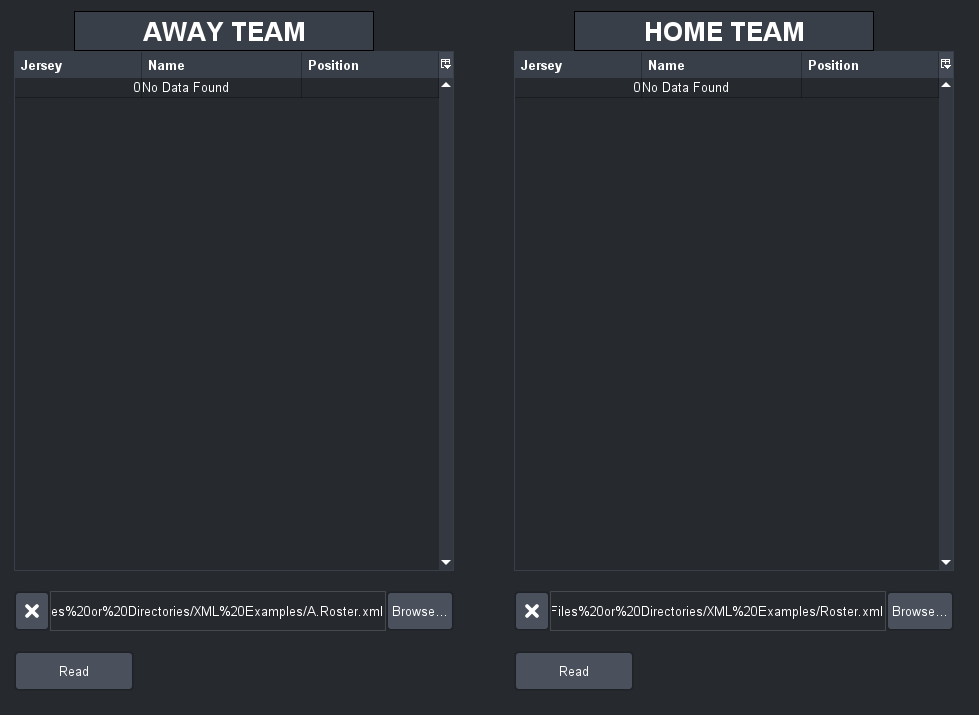
I put this into my code, and it worked great! Except for the Away team read button, it is not populating the Away table.
<abs contexttype="opengear" gridsize="20" height="879" id="_top" keepalive="false" left="0" top="1" width="994"> <meta> <params> <param access="1" constrainttype="STRUCT" name="home_player_template" oid="home_player_template" type="STRUCT" widget="table"> <value> <subparam access="1" constrainttype="INT_NULL" name="Jersey No." precision="0" suboid="jersey" type="INT16" value="0" widget="default"/> <subparam access="1" maxlength="0" name="Name" suboid="name" type="STRING" value="First" widget="default"/> <subparam access="1" maxlength="0" name="Position" suboid="position" type="STRING" value="Position" widget="default"/> </value> </param> <param access="1" constrainttype="STRUCT" name="home_player_template" oid="home_players" templateoid="home_player_template" type="STRUCT_ARRAY" widget="table"> <value> <subparam suboid="jersey" value="1"/> <subparam suboid="name" value="Shawn Callaway"/> <subparam suboid="position" value="E"/> </value> <value> <subparam suboid="jersey" value="2"/> <subparam suboid="name" value="Brian Preece"/> <subparam suboid="position" value="CG"/> </value> <value> <subparam suboid="jersey" value="3"/> <subparam suboid="name" value="Ty Weeks"/> <subparam suboid="position" value="D"/> </value> <value> <subparam suboid="jersey" value="4"/> <subparam suboid="name" value="Emil Karlsson"/> <subparam suboid="position" value="CO"/> </value> <value> <subparam suboid="jersey" value="5"/> <subparam suboid="name" value="Saxton Nelson"/> <subparam suboid="position" value="AE"/> </value> <value> <subparam suboid="jersey" value="6"/> <subparam suboid="name" value="Jeramiah Jenson"/> <subparam suboid="position" value="C"/> </value> </param> <param access="1" constrainttype="INT_NULL" name="home_selection" oid="home_selection" precision="0" type="INT16" value="0" widget="default"/> <param access="1" maxlength="0" name="home_filename" oid="home_filename" type="STRING" value="file:/C:/Users/calla/OneDrive/Desktop/h.Roster.xml" widget="text"/> <param access="1" constrainttype="STRUCT" name="away_player_template" oid="away_player_template" type="STRUCT" widget="table"> <value> <subparam access="1" constrainttype="INT_NULL" name="Jersey No." precision="0" suboid="jersey" type="INT16" value="0" widget="default"/> <subparam access="1" maxlength="0" name="Name" suboid="name" type="STRING" value="First" widget="default"/> <subparam access="1" maxlength="0" name="Position" suboid="position" type="STRING" value="Position" widget="default"/> </value> </param> <param access="1" constrainttype="STRUCT" name="away_player_template" oid="away_players" templateoid="away_player_template" type="STRUCT_ARRAY" widget="table"> <value> <subparam suboid="jersey" value="0"/> <subparam suboid="name" value="No Data Found"/> <subparam suboid="position" value=""/> </value> </param> <param access="1" constrainttype="INT_NULL" name="away_selection" oid="away_selection" precision="0" type="INT16" value="0" widget="default"/> <param access="1" maxlength="0" name="away_filename" oid="away_filename" type="STRING" value="file:/C:/Users/calla/OneDrive/Desktop/a.Roster.xml" widget="text"/> </params> </meta> <param expand="true" height="500" left="20" oid="away_players" showlabel="false" top="60" width="460"> <config key="w.selectionparam">away_selection</config> </param> <button buttontype="push" height="40" left="740" name="Read Home" top="640" width="120"> <task tasktype="ogscript">var xmlDocument = ogscript.parseXML(params.getValue("home_filename", 0)); //Parse the XMLvar nodeList = xmlDocument.getElementsByTagName("player"); //Get the tags we want to include in the constraintvar homePlayerData = new Array();var jerseyList = ogscript.runXPath('/roster/player/h.jersey', xmlDocument); var nameList = ogscript.runXPath('/roster/player/h.name', xmlDocument); var positionList = ogscript.runXPath('/roster/player/h.position', xmlDocument); for (var i = 0; i < nodeList.getLength(); i++){var currentJersey = "";currentJersey = currentJersey + jerseyList.item(i).getTextContent();var currentName = "";currentName = currentName + nameList.item(i).getTextContent();var currentPosition = "";currentPosition = currentPosition + positionList.item(i).getTextContent();if(currentJersey != "" || currentName != "" || currentPosition != ""){homePlayerData.push({"jersey": currentJersey, "name": currentName,"position": currentPosition}); }}params.setAllValues("home_players", homePlayerData);</task> </button> <param expand="true" height="40" left="500" oid="home_filename" top="580" widget="file-picker" width="480"/> <button buttontype="push" height="40" left="860" name="Clear Home" top="640" width="100"> <task tasktype="ogscript">var homePlayerData = new Array();homePlayerData.push({"jersey": 0, "name": "No Data Found","position": ""}); params.setAllValues("home_players", homePlayerData);</task> </button> <button buttontype="push" height="40" left="20" name="Read" top="640" width="120"> <task tasktype="ogscript">var xmlDocument = ogscript.parseXML(params.getValue("away_filename", 0)); //Parse the XMLvar nodeList = xmlDocument.getElementsByTagName("player"); //Get the tags we want to include in the constraintvar awayPlayerData = new Array();var jerseyList = ogscript.runXPath('/roster/player/a.jersey', xmlDocument); var nameList = ogscript.runXPath('/roster/player/a.name', xmlDocument); var positionList = ogscript.runXPath('/roster/player/a.position', xmlDocument); for (var i = 0; i < nodeList.getLength(); i++){var currentJersey = "";currentJersey = currentJersey + jerseyList.item(i).getTextContent();var currentName = "";currentName = currentName + nameList.item(i).getTextContent();var currentPosition = "";currentPosition = currentPosition + positionList.item(i).getTextContent();if(currentJersey != "" || currentName != "" || currentPosition != ""){awayPlayerData.push({"jersey": currentJersey, "name": currentName,"position": currentPosition}); }}params.setAllValues("away_players", awayPlayerData);</task> </button> <param expand="true" height="40" left="0" oid="away_filename" top="580" widget="file-picker" width="480"/> <button buttontype="push" height="40" left="140" name="Clear" top="640" width="100"> <task tasktype="ogscript">var awayPlayerData = new Array();awayPlayerData.push({"jersey": 0, "name": "No Data Found","position": ""}); params.setAllValues("away_players", awayPlayerData);</task> </button> <label height="40" left="80" name="Away Team" style="txt-align:center;font:bold;size:Bigger;bg#tableheader;" top="20" width="260"/> <param expand="true" height="500" left="500" oid="home_players" showlabel="false" top="60" width="460"> <config key="w.selectionparam">away_selection</config> </param> <button buttontype="push" height="80" left="20" name="Populate Dropdowns" top="780" width="180"> <task tasktype="ogscript">ogscript.debug('Starting to Create Dropdowns'); ogscript.debug('HomeNames.length:' + HomeNames.length); ogscript.debug('AwayNames.length:' + AwayNames.length);</task> </button> <label height="40" left="580" name="Home Team" style="txt-align:center;bg#tabbg;font:bold;size:Bigger;" top="20" width="260"/></abs>
------------------------------
Shawn Callaway
Original Message:
Sent: 09-14-2023 09:31
From: Altaz Daruwala
Subject: Excel doc import into tables for player numbers, names, positions
Hi Shawn,
Here is a custom panel grid that has two tables reading data from two different XML files which follow the pattern you attached. Here we make use of ogscript.runXPath() method after parsing the XML.
<abs contexttype="opengear" gridsize="20" id="_top" keepalive="false"> <meta> <params> <param access="1" constrainttype="STRUCT" name="home_player_template" oid="home_player_template" type="STRUCT" widget="table"> <value> <subparam access="1" constrainttype="INT_NULL" name="Jersey No." precision="0" suboid="jersey" type="INT16" value="0" widget="default"/> <subparam access="1" maxlength="0" name="Name" suboid="name" type="STRING" value="First" widget="default"/> <subparam access="1" maxlength="0" name="Position" suboid="position" type="STRING" value="Position" widget="default"/> </value> </param> <param access="1" constrainttype="STRUCT" name="home_player_template" oid="home_players" templateoid="home_player_template" type="STRUCT_ARRAY" widget="table"> <value> <subparam suboid="jersey" value="1"/> <subparam suboid="name" value="Shawn Callaway"/> <subparam suboid="position" value="E"/> </value> <value> <subparam suboid="jersey" value="2"/> <subparam suboid="name" value="Brian Preece"/> <subparam suboid="position" value="CG"/> </value> <value> <subparam suboid="jersey" value="3"/> <subparam suboid="name" value="Ty Weeks"/> <subparam suboid="position" value="D"/> </value> <value> <subparam suboid="jersey" value="4"/> <subparam suboid="name" value="Emil Karlsson"/> <subparam suboid="position" value="CO"/> </value> <value> <subparam suboid="jersey" value="5"/> <subparam suboid="name" value="Saxton Nelson"/> <subparam suboid="position" value="AE"/> </value> <value> <subparam suboid="jersey" value="6"/> <subparam suboid="name" value="Jeramiah Jenson"/> <subparam suboid="position" value="C"/> </value> </param> <param access="1" constrainttype="INT_NULL" name="home_selection" oid="home_selection" precision="0" type="INT16" value="0" widget="default"/> <param access="1" maxlength="0" name="home_filename" oid="home_filename" type="STRING" value="xml%20panels/home.xml" widget="text"/> <param access="1" constrainttype="STRUCT" name="away_player_template" oid="away_player_template" type="STRUCT" widget="table"> <value> <subparam access="1" constrainttype="INT_NULL" name="Jersey No." precision="0" suboid="jersey" type="INT16" value="0" widget="default"/> <subparam access="1" maxlength="0" name="Name" suboid="name" type="STRING" value="First" widget="default"/> <subparam access="1" maxlength="0" name="Position" suboid="position" type="STRING" value="Position" widget="default"/> </value> </param> <param access="1" constrainttype="STRUCT" name="away_player_template" oid="away_players" templateoid="away_player_template" type="STRUCT_ARRAY" widget="table"> <value> <subparam suboid="jersey" value="1"/> <subparam suboid="name" value="Shawn Callaway"/> <subparam suboid="position" value="E"/> </value> <value> <subparam suboid="jersey" value="2"/> <subparam suboid="name" value="Brian Preece"/> <subparam suboid="position" value="CG"/> </value> <value> <subparam suboid="jersey" value="3"/> <subparam suboid="name" value="Ty Weeks"/> <subparam suboid="position" value="D"/> </value> <value> <subparam suboid="jersey" value="4"/> <subparam suboid="name" value="Emil Karlsson"/> <subparam suboid="position" value="CO"/> </value> <value> <subparam suboid="jersey" value="5"/> <subparam suboid="name" value="Saxton Nelson"/> <subparam suboid="position" value="AE"/> </value> <value> <subparam suboid="jersey" value="6"/> <subparam suboid="name" value="Jeramiah Jenson"/> <subparam suboid="position" value="C"/> </value> </param> <param access="1" constrainttype="INT_NULL" name="away_selection" oid="away_selection" precision="0" type="INT16" value="0" widget="default"/> <param access="1" maxlength="0" name="away_filename" oid="away_filename" type="STRING" value="xml%20panels/away.xml" widget="text"/> </params> </meta> <param expand="true" height="520" left="840" oid="away_players" showlabel="false" top="200" width="580"> <config key="w.selectionparam">away_selection</config> </param> <button buttontype="push" height="40" left="180" name="Read" top="820" width="120"> <task tasktype="ogscript">var xmlDocument = ogscript.parseXML(params.getValue("home_filename", 0)); //Parse the XMLvar nodeList = xmlDocument.getElementsByTagName("player"); //Get the tags we want to include in the constraintvar homePlayerData = new Array();var jerseyList = ogscript.runXPath('/roster/player/h.jersey', xmlDocument); var nameList = ogscript.runXPath('/roster/player/h.name', xmlDocument); var positionList = ogscript.runXPath('/roster/player/h.position', xmlDocument); for (var i = 0; i < nodeList.getLength(); i++){var currentJersey = "";currentJersey = currentJersey + jerseyList.item(i).getTextContent();var currentName = "";currentName = currentName + nameList.item(i).getTextContent();var currentPosition = "";currentPosition = currentPosition + positionList.item(i).getTextContent();if(currentJersey != "" || currentName != "" || currentPosition != ""){homePlayerData.push({"jersey": currentJersey, "name": currentName,"position": currentPosition}); }}params.setAllValues("home_players", homePlayerData);</task> </button> <param expand="true" height="40" left="80" oid="home_filename" top="760" widget="file-picker" width="480"/> <button buttontype="push" height="40" left="320" name="Clear" top="820" width="100"> <task tasktype="ogscript">var homePlayerData = new Array();homePlayerData.push({"jersey": 0, "name": "No Data Found","position": ""}); params.setAllValues("home_players", homePlayerData);</task> </button> <label height="40" left="180" name="Home Team" style="txt-align:center" top="140" width="260"/> <button buttontype="push" height="40" left="980" name="Read" top="820" width="120"> <task tasktype="ogscript">var xmlDocument = ogscript.parseXML(params.getValue("away_filename", 0)); //Parse the XMLvar nodeList = xmlDocument.getElementsByTagName("player"); //Get the tags we want to include in the constraintvar awayPlayerData = new Array();var jerseyList = ogscript.runXPath('/roster/player/a.jersey', xmlDocument); var nameList = ogscript.runXPath('/roster/player/a.name', xmlDocument); var positionList = ogscript.runXPath('/roster/player/a.position', xmlDocument); for (var i = 0; i < nodeList.getLength(); i++){var currentJersey = "";currentJersey = currentJersey + jerseyList.item(i).getTextContent();var currentName = "";currentName = currentName + nameList.item(i).getTextContent();var currentPosition = "";currentPosition = currentPosition + positionList.item(i).getTextContent();if(currentJersey != "" || currentName != "" || currentPosition != ""){awayPlayerData.push({"jersey": currentJersey, "name": currentName,"position": currentPosition}); }}params.setAllValues("away_players", awayPlayerData);</task> </button> <param expand="true" height="40" left="920" oid="away_filename" top="760" widget="file-picker" width="480"/> <button buttontype="push" height="40" left="1120" name="Clear" top="820" width="100"> <task tasktype="ogscript">var awayPlayerData = new Array();awayPlayerData.push({"jersey": 0, "name": "No Data Found","position": ""}); params.setAllValues("away_players", awayPlayerData);</task> </button> <label height="40" left="1040" name="Away Team" style="txt-align:center" top="160" width="260"/> <param expand="true" height="500" left="100" oid="home_players" showlabel="false" top="200" width="560"> <config key="w.selectionparam">away_selection</config> </param></abs>
I hope this helps. Please reach out if you have any other questions.
Best Regards,
------------------------------
Altaz Daruwala
Ross Video
Original Message:
Sent: 09-13-2023 14:29
From: Shawn Callaway
Subject: Excel doc import into tables for player numbers, names, positions
Here is an example of the h.roster and a.roster
------------------------------
Shawn Callaway
Original Message:
Sent: 09-13-2023 14:13
From: James Peltzer
Subject: Excel doc import into tables for player numbers, names, positions
Hi Shawn
Do you have an example of the CSV or XML file/files you'll be using?
------------------------------
James Peltzer
Ross Video
Original Message:
Sent: 09-13-2023 13:54
From: Shawn Callaway
Subject: Excel doc import into tables for player numbers, names, positions
This did not do what I wanted to have. It created one table of 16 columns.
I am looking to create a way to "Browse"a files either xml or csv. To then import the values in the file into a table that consists of a jersey number, name, and position.
I need to do this for a home team and an away team. I tried using the xml table loader in the example sets under Reading and Writing Files or Directories. I cannot figure out how to change parameters and seperate them to make a home team and away team. In the parameters I would like to have (a.jersey ; a.name ; a.position) for the away team and (h.jersey ; h.name ; h.position) for the home team. These perameters are used also to fill in a Lower 3rd in Xpression.
Please help ASAP
Thanks
------------------------------
Shawn Callaway
Original Message:
Sent: 09-07-2023 15:58
From: Altaz Daruwala
Subject: Excel doc import into tables for player numbers, names, positions
Hi Shawn!
You can use the following OGLML code template to import the csv file into your table:
//Start of example
<abs contexttype="opengear">
<meta>
<params>
<param access="1" maxlength="0" name="Column 1" oid="cols.1" precision="0" stateless="true" type="STRING_ARRAY" value="" widget="label">
<value/>
</param>
<param access="1" maxlength="0" name="Column 2" oid="cols.2" precision="0" stateless="true" type="STRING_ARRAY" value="" widget="label">
<value/>
</param>
<param access="1" maxlength="0" name="Column 3" oid="cols.3" precision="0" stateless="true" type="STRING_ARRAY" value="" widget="label">
<value/>
</param>
<param access="1" maxlength="0" name="Column 4" oid="cols.4" precision="0" stateless="true" type="STRING_ARRAY" value="" widget="label">
<value/>
</param>
<param access="1" maxlength="0" name="Column 5" oid="cols.5" precision="0" stateless="true" type="STRING_ARRAY" value="" widget="label">
<value/>
</param>
<param access="1" maxlength="0" name="Column 6" oid="cols.6" precision="0" stateless="true" type="STRING_ARRAY" value="" widget="label">
<value/>
</param>
<param access="1" maxlength="0" name="Column 7" oid="cols.7" precision="0" stateless="true" type="STRING_ARRAY" value="" widget="label">
<value/>
</param>
<param access="1" maxlength="0" name="Column 8" oid="cols.8" precision="0" stateless="true" type="STRING_ARRAY" value="" widget="label">
<value/>
</param>
<param access="1" maxlength="0" name="Column 9" oid="cols.9" precision="0" stateless="true" type="STRING_ARRAY" value="" widget="label">
<value/>
</param>
<param access="1" maxlength="0" name="Column 10" oid="cols.10" precision="0" stateless="true" type="STRING_ARRAY" value="" widget="label">
<value/>
</param>
<param access="1" maxlength="0" name="Column 11" oid="cols.11" precision="0" stateless="true" type="STRING_ARRAY" value="" widget="label">
<value/>
</param>
<param access="1" maxlength="0" name="Column 12" oid="cols.12" precision="0" stateless="true" type="STRING_ARRAY" value="" widget="label">
<value/>
</param>
<param access="1" maxlength="0" name="Column 13" oid="cols.13" precision="0" stateless="true" type="STRING_ARRAY" value="" widget="label">
<value/>
</param>
<param access="1" maxlength="0" name="Column 14" oid="cols.14" precision="0" stateless="true" type="STRING_ARRAY" value="" widget="label">
<value/>
</param>
<param access="1" maxlength="0" name="Column 15" oid="cols.15" precision="0" stateless="true" type="STRING_ARRAY" value="" widget="label">
<value/>
</param>
<param access="1" maxlength="0" name="Column 16" oid="cols.16" precision="0" stateless="true" type="STRING_ARRAY" value="" widget="label">
<value/>
</param>
<param access="1" maxlength="0" name="Column 0" oid="cols.0" precision="0" stateless="true" type="STRING_ARRAY" value="" widget="label">
<value/>
</param>
<param access="1" constrainttype="STRING_CHOICE" name="table" oid="table" precision="0" type="INT16" value="-1" widget="table">
<constraint>cols.0</constraint>
<constraint>cols.1</constraint>
<constraint>cols.2</constraint>
<constraint>cols.3</constraint>
<constraint>cols.4</constraint>
<constraint>cols.5</constraint>
<constraint>cols.6</constraint>
<constraint>cols.7</constraint>
<constraint>cols.8</constraint>
<constraint>cols.9</constraint>
<constraint>cols.10</constraint>
<constraint>cols.11</constraint>
<constraint>cols.12</constraint>
<constraint>cols.13</constraint>
<constraint>cols.14</constraint>
<constraint>cols.15</constraint>
<constraint>cols.16</constraint>
</param>
</params>
</meta>
<param bottom="5" expand="true" left="6" oid="table" right="8" showlabel="false" top="104"/>
<button buttontype="push" height="84" left="5" name="Read" top="7" width="186">
<task tasktype="ogscript">function processCSV(fileContent)
{
if (fileContent == null)
{
ogscript.debug("CAN'T LOAD FILE");
return;
}
var rows = fileContent.split('\n');
var dataByColumn = []; //It is more efficient if we only call "SET" on the parameters once
for (var r = 0; r < rows.length; r++)
{
var cols = rows[r].trim().split(',');
for (var c = 0; c < cols.length; c++)
{
if (c >= dataByColumn.length)
{
dataByColumn.push([]); //Add a new column if it wasn't already created
}
dataByColumn[c][r] = cols[c].trim(); //Push the cell's value into the array of column data at row "r"
}
}
//Now that we have collected all of the data for each column into an array, we can call setAllValues for the array parameter
for (var c = 0; c < dataByColumn.length; c++)
{
params.setAllValues('cols.' + c, dataByColumn[c]); //Set all of the values in the column
}
}
ogscript.asyncPost('CSV Reader Data.csv', null, processCSV);</task>
</button>
</abs>
//End of example
Feel free to reach out if you have any more questions!
Cheers
------------------------------
Altaz Daruwala
Ross Video