Good afternoon,
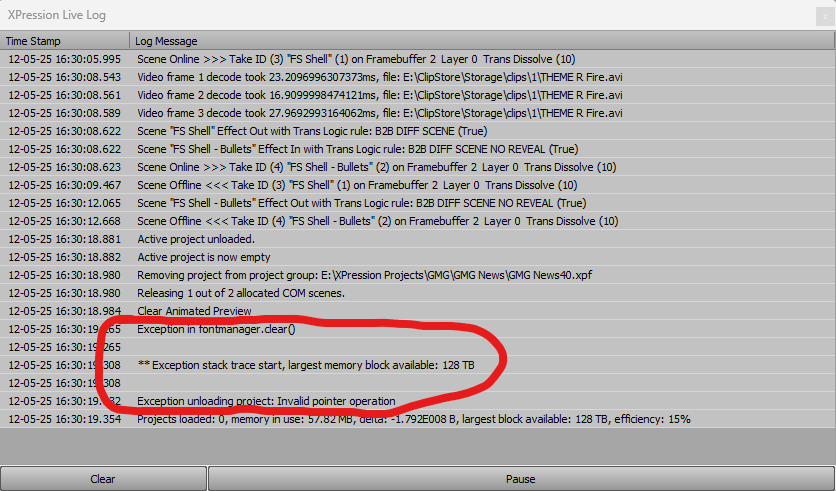
I have an issue where a segment of my OnPrepare script is throwing exception errors when played back-to-back then unloaded from Studio. These errors seem to stack, eventually causing Studio to freeze. Our full screen templates have the option for users to select built-in backgrounds, as well as drop in background animations from ClipStore. When a clip is dropped in the script grabs the filename from the background's shader layer, truncates the filename, then sets a string variable based on the remaining text. This is the section that throws the error (screenshot below). I've included the script, bolding the part that I think is the issue. It's been suggested that I use a global script, as this is used in multiple templates, but I am unfamiliar with how to use those. Thank you all for your assistance.
Select Case txtStyle.Text
Case = "Normal"
objBkgd.SetMaterial(0, matBkgdBlue)
style = "Blue"
Case = "Breaking"
objBkgd.SetMaterial(0, matBkgdRed)
style = "Red"
Case = "Elections"
objBkgd.SetMaterial(0, matBkgdElections)
style = "Elections"
Case = "Sports"
objBkgd.SetMaterial(0, matBkgdSports)
style = "Sports"
Case = "Custom" 'set background style if custom
objBkgd.Visible = False
objBkgdCustom.Visible = True
objBkgdCustom.ShowInTemplateData = True
objBkgdCustom.GetMaterial(0, matBkgd)
matBkgd.GetShader(0, shadBkgd)
'select custom clip path and theme
path = left(shadBkgd.FileName, 36)
path = right(path, 7)
txtBkgd.Text = shadBkgd.FileName
txtPath.Text = path
engine.DebugMessage("Background Path = " & shadBkgd.FileName, 0)
engine.DebugMessage("Theme = " & path, 0)
If path = "THEME R" Then
style = "Red"
Else If path = "THEME E" Then
style = "Elections"
Else If path = "THEME S" Then
style = "Sports"
Else
style = "Blue"
End If
End Select
------------------------------
John Robbins
Graham Media Group INC
------------------------------