Connectivity

 View Only
  • 1.  Exporting Ultrix DB

    Posted 01-10-2022 17:28
    Hi!
    I was wanting to do an export of our current DB (Sources/Destinations in particular) , into something I can edit (CSV file etc), for some documentation of our facility. 
    I can see the UDA file export option in System Status, is this file readable by any PC apps?
    or is there a way of exporting the Sources & Destination Names / Descriptions etc?

    Thanks
    Simon


    ------------------------------
    Simon Dargaville
    ------------------------------


  • 2.  RE: Exporting Ultrix DB

    Posted 01-10-2022 19:13
    Hi Simon
    You can open up the ultrix source table in dashboard,
    Select the first cell input 1
     hold down ctrl + a to select all,
     ctrl + c to copy 
    then paste the info into excel or google spreadsheet.
    The same can be done on the destination side.
    This is the easiest way to get the information out. The UDA file is a proprietary file and isn't ledgible. 
    Hope this helps
    Mike Pomerleau
    Team lead Hyperconverged solutions architects. 


  • 3.  RE: Exporting Ultrix DB

    Posted 01-13-2022 02:12
    Thanks Mike ! That's an awesome tip ! Did the job perfectly. Cheers
    Simon

    ------------------------------
    Simon Dargaville
    ------------------------------


  • 4.  RE: Exporting Ultrix DB

    Posted 01-23-2022 14:59
    Mike is it possible to edit names in excel and then copy/paste that back into the Ultrix source table? For the life of me I can't get it to work!

    ------------------------------
    Vincent Lepore
    FULL SAIL UNIVERSITY
    ------------------------------


  • 5.  RE: Exporting Ultrix DB

    Posted 01-23-2022 16:42
    Absolutely. 

    My trick is to select all of the name cells that I want to copy and then use Ctrl+c (Even on my Mac!)
    Paste them into excel make changes. Highlight all of the cells and paste them all back in with Ctrl+V

    The thing is that Dashboard doesn't work 100% with these functions. One of the things you will notice is that leaving a cell blank in excel and trying to paste it back into the database...dashboard will shift all of the below cells up or over. Dashboard doesn't like blanks. 


    ------------------------------
    Mike Pomerleau
    Ross Video
    ------------------------------


  • 6.  RE: Exporting Ultrix DB

    Posted 08-21-2025 15:51

    2025 addition to this information. If you happen to be using Dashboard on a Mac, there's a weird programming glitch where the normal copy/paste shortcut of command+c and command+v won't work. You actually have to use the Windows shortcuts of control+c and control+v to get copy and past function. 


    ------------------------------
    Kirk Meyers
    Director of Video Production
    Watermark Community Church
    ------------------------------


  • 7.  RE: Exporting Ultrix DB

    Posted 08-25-2025 09:35

    Addition to Kirk's 2025 addition....

    In version 6.0 and later, there is a native Excel import / export function available in the UI for the Sources, Destinations and Alias tables. This is the preferred way to do it.
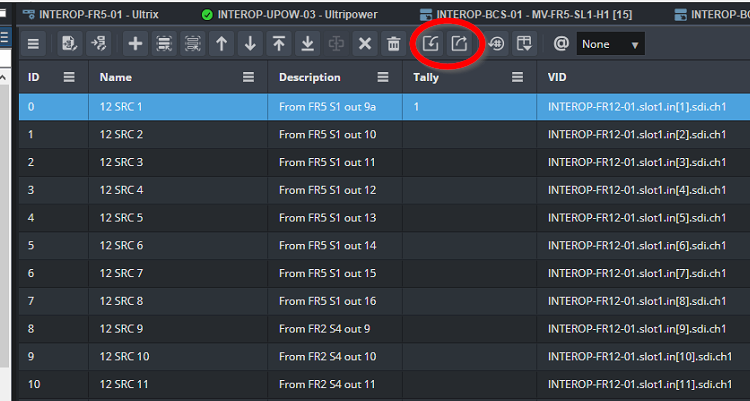
    Check out this video at Ross University that walks you through it: Database Editing in Excel - Ross Video


    ------------------------------
    Alun Fryer
    Technical Marketing Lead, Hyperconverged Solutions
    Ross Video
    ------------------------------


  • 8.  RE: Exporting Ultrix DB

    Posted 08-25-2025 15:46

    Oh, interesting great feature. We're running 5.5.1 at the moment but certainly planning to update in the near future.


    ------------------------------
    Kirk Meyers
    Director of Video Production
    Watermark Community Church
    ------------------------------