Original Message:
Sent: 07-07-2026 12:54
From: Jared Calvert
Subject: Font color - Data driven
Apologies for not knowing this earlier, but ended up getting to where I needed by creating a hidden quad objects tied to my home and away swatches. Made those objects dynamic materials, and was able to link the faces of those objects to the face of my text objects.
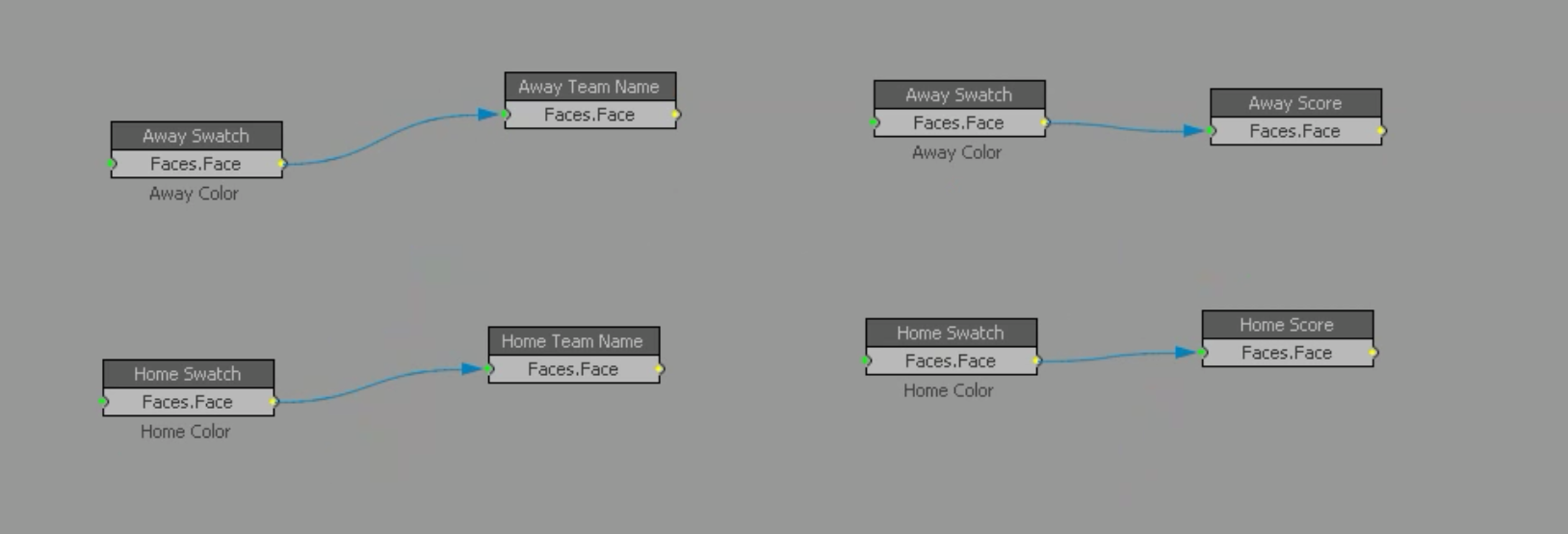
Then since my VL from above was in place to change the texture coordinates based on my text swatch selector, I was able to easily change the from white to primary to secondary.
Thank you for talking through some of this stuff!
------------------------------
Jared Calvert
Producer
Iowa State Athletics
------------------------------
Original Message:
Sent: 07-06-2026 16:09
From: Simon Redmile
Subject: Font color - Data driven
No problem.
So you make a white font for your texts.
Then those tags I show do not link to fonts they link to general materials.
Using M: in your font tags using general materials instead.
So when you set your primary colour via Swatch via path you can just use that to recolour your fonts.
Hope that makes sense.
------------------------------
Simon Redmile
Senior Graphic Programmer & Designer
Ross Video
Bristol United Kingdom
------------------------------
Original Message:
Sent: 07-06-2026 16:01
From: Jared Calvert
Subject: Font color - Data driven
In your example, how are the tags pointing to a file path? Apologies from any misunderstandings on my part.
------------------------------
Jared Calvert
Producer
Iowa State Athletics
------------------------------
Original Message:
Sent: 07-06-2026 14:21
From: Simon Redmile
Subject: Font color - Data driven
Perfect, can you use my example with primary and secondary swatches then?
------------------------------
Simon Redmile
Senior Graphic Programmer & Designer
Ross Video
Bristol United Kingdom
------------------------------
Original Message:
Sent: 07-06-2026 14:13
From: Jared Calvert
Subject: Font color - Data driven
Yes, we have an excel sheet that has a setup tab that allows us to not only set up the teams' swatch and logo files, but also allows us to input the color selection based on the swatch file selected.
------------------------------
Jared Calvert
Producer
Iowa State Athletics
------------------------------
Original Message:
Sent: 07-06-2026 13:59
From: Simon Redmile
Subject: Font color - Data driven
text = "{M:AWAY}" & text
or
text = "{M:HOME}" & text
or more detailed would be
text = "{M:HOME_PRI}" & text
text = "{M:HOME_SEC}" & text
if you have primary and secondary colours.
If you have 32 teams you must have some kind of setup page that looks up the swatches and sets them for the project?
------------------------------
Simon Redmile
Senior Graphic Programmer & Designer
Ross Video
Bristol United Kingdom
------------------------------
Original Message:
Sent: 07-06-2026 13:43
From: Jared Calvert
Subject: Font color - Data driven
If I only had a few colors I needed to switch between, font tags would seem like a good idea. However, I'm looking to be able to quickly change the font color based on the team colors of about 32 different teams.
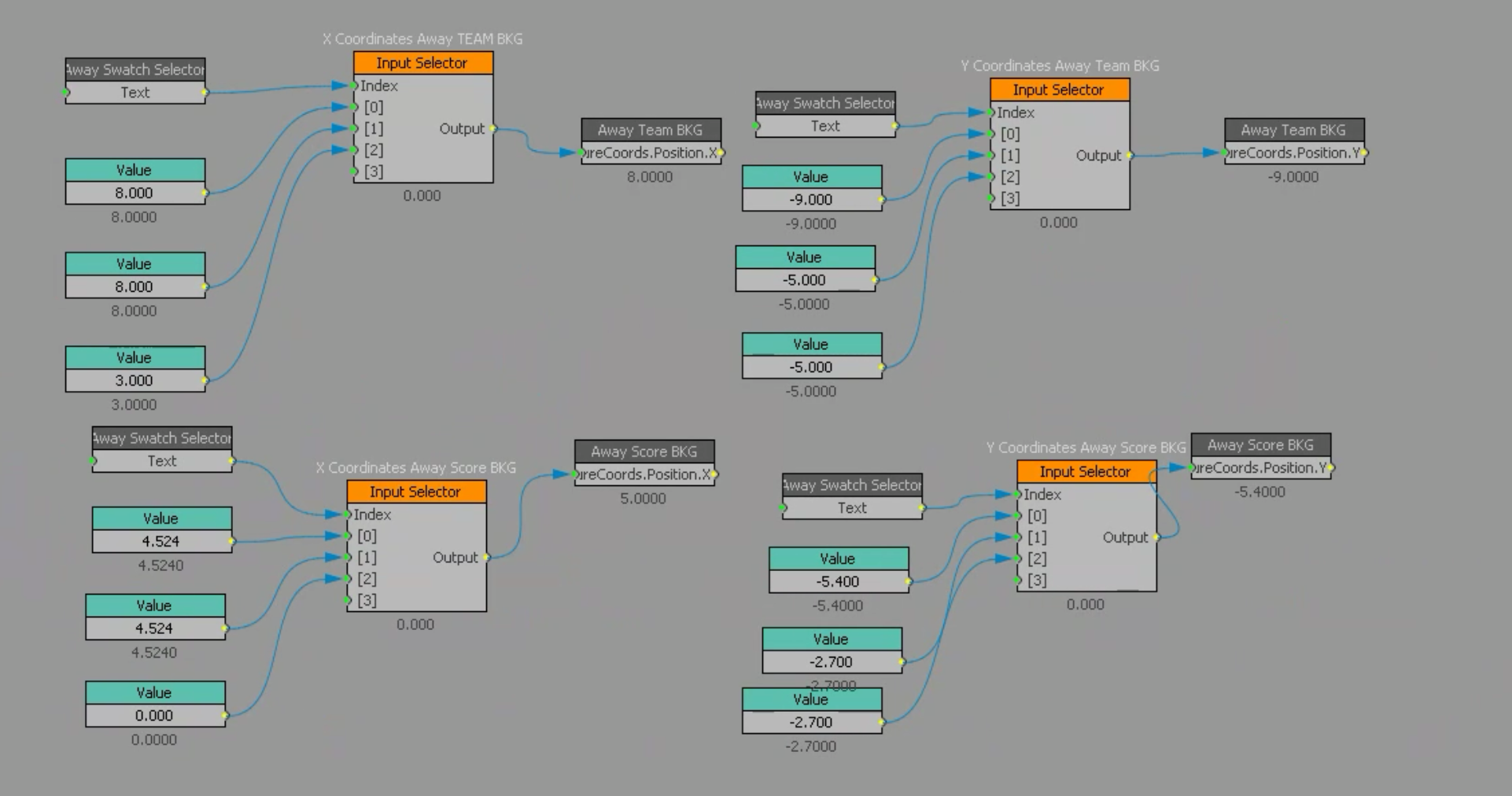
I'll have swatch files made for each of the teams because that is what drives the background of my graphics. Since those backgrounds are quad objects, I can make them a dynamic material, input the file path to my D: drive (D:\Swatches\) and have a text field that says "Away Color" drive which file is selected for that quad's material (final path -> "D:\Swatches\@Away Color@") The visual logic tree above then allowed me to plot specific areas of the swatch file as texture coordinate X and Y values tied to another text layer called "Swatch Selector" that corresponded to the input selector values in VL.
I've mapped the texture coordinates for my visible text layers in my graphic as well. However, because font layers don't have the option to be a dynamic material, I'd have to load in all of the swatch files as materials and manually change the font's edit material (something I'd like to avoid if possible).
Is there a way to use VL or scripting to make this possible?
------------------------------
Jared Calvert
Producer
Iowa State Athletics
------------------------------
Original Message:
Sent: 07-06-2026 11:22
From: Simon Redmile
Subject: Font color - Data driven
For example
text = "{M:RED}" & text
------------------------------
Simon Redmile
Senior Graphic Programmer & Designer
Ross Video
Bristol United Kingdom
------------------------------
Original Message:
Sent: 07-03-2026 11:22
From: Simon Redmile
Subject: Font color - Data driven
I use font tags and do it vis a very short script.
------------------------------
Simon Redmile
Senior Graphic Programmer & Designer
Ross Video
Bristol United Kingdom
------------------------------
Original Message:
Sent: 07-02-2026 16:00
From: Jared Calvert
Subject: Font color - Data driven
I currently have the team colors on my bug linking to a multicolored ,png swatch file on a local server. Because the object for the team colors is a quad, I was able to make it a dynamic material, pointing to a folder location and ending the file path with my text object "@AwayColor@." I also set up a "Swatch Selector" text layer to change the X & Y Values of the texture coordinates to "change the color."
Is there a way I could do the same thing with the material of a font? I tried to create a new font with the diffuse face pointing to a specific file, but I couldn't seem to make the end of the file path dynamic. Rather than bring all of the swatch files in as materials, I'd like to be able to link the file path that i've used for dynamic quad objects and output that to the face of my font material.
Any help would be appreciated.
Thank you!
------------------------------
Jared Calvert
Producer
Iowa State Athletics
------------------------------
Original Message:
Sent: 01-24-2025 22:01
From: JOSHUA KEAGY
Subject: Font color - Data driven
Thank you so much for showing both methods, after doing some experimenting I like the input selector block.
This is has helped me solve my problem! And to explore new workflows with this project, Thanks!
------------------------------
JOSHUA KEAGY
Xpression operator
Blue Ridge 11
------------------------------
Original Message:
Sent: 01-24-2025 15:42
From: Zachary Fradette
Subject: Font color - Data driven
Yeah! I've got 2 main ways that I prefer to change text color using visual logic.
Way #1 would be what I use within a setup scene. Because Materials are PROJECT WIDE, if we change a Font Material within Visual Logic, that will apply to the whole material, the whole font, and the whole project. We can use that to our advantage in a scene where I want to set specific font colors for the team as a whole. Maybe, in more than one scene, I'd need to swap from white text to a colored text.
In this example, you see that I grab the first material within the Font, then dive into the Layer1>Colors>Diffuse. You can use the color blocks within VL if you'd like, though you can also just directly set a hex code with it!
Way #2 would be useful if within a single scene I wanted to flip between (maybe a couple different choices) without changing anything else!
In this Visual Logic sequence, I'm using a value block to change between the names of Materials that I'd like to use. That Value block should be changed to be whatever you want. It could be "White/Non-White" or a String Match block that has "White, Black, Primary, Secondary, Tertiary" etc. However you choose to do it! From there, I translate that 'value' into an Input Selector to choose the correct Material Name, then I use a 'display' text object and a 'real' text object with some material tags.
------------------------------
Zachary Fradette
United States
------------------------------
Original Message:
Sent: 01-24-2025 14:25
From: JOSHUA KEAGY
Subject: Font color - Data driven
Awesome.
When the Home/Away team is wearing a white Jersey instead of their normal colors, I'd like to change the color of all the font that is over the light background to the teams "primary" color in the bug. Since there is multiple fonts in the bug (School Name, score, fouls, Pos, etc..) I didn't if there was smart way to change all of them at once.
Hopefully that makes sense
------------------------------
JOSHUA KEAGY
Xpression operator
Blue Ridge 11
Original Message:
Sent: 01-23-2025 16:39
From: Zachary Fradette
Subject: Font color - Data driven
There's a couple of different ways that don't involve scripting!
What are some scenarios that you would see wanting to utilize it with?
------------------------------
Zachary Fradette
United States