Okay So I got the panel back up and now I am rebooting the frame with the dashboard on my PC also off .. once it is up I will connect again from dashboard on my pc.. Still now it's lost for me as well :)
Upgraded to v7.1 and all is good again... So I guess this will also not happen again after v7.1 which should be soon...
Original Message:
Sent: 03-22-2023 11:03
From: Les
Subject: Fun TD2 Trick
So I turned off my TD2S and then loaded up v7.0.3 and when it came up I now had only 1 Row not 2 rows in that menu..
I turned on my TD2S and sure enough the changing of the Bus Map and that ONE row does work but I don't have the 2nd row showing...
I then removed my Connection for the virtual panel (the connection from my PC on 5257 and only kept the MP 5253) and then restarted the frame and now I don't have anything either...
------------------------------
Les O'Reilly
Director - Switcher Product Management
------------------------------
Original Message:
Sent: 03-21-2023 18:02
From: Danny
Subject: Fun TD2 Trick
We have not made any changes here. Connections are the same and I am accessing Dashboard as usual (a desktop pc). It's been months since I looked for this menu item so I don't know when it went away but I did s/w upgarsed across the board (DB/TD/TD touch screen) in January. Thats the only delta I can think of.
------------------------------
[Danny] [Skarka] Ross Pilot since Synergy
[Producer, Director, Technical Director]
Original Message:
Sent: 03-21-2023 16:32
From: Les
Subject: Fun TD2 Trick
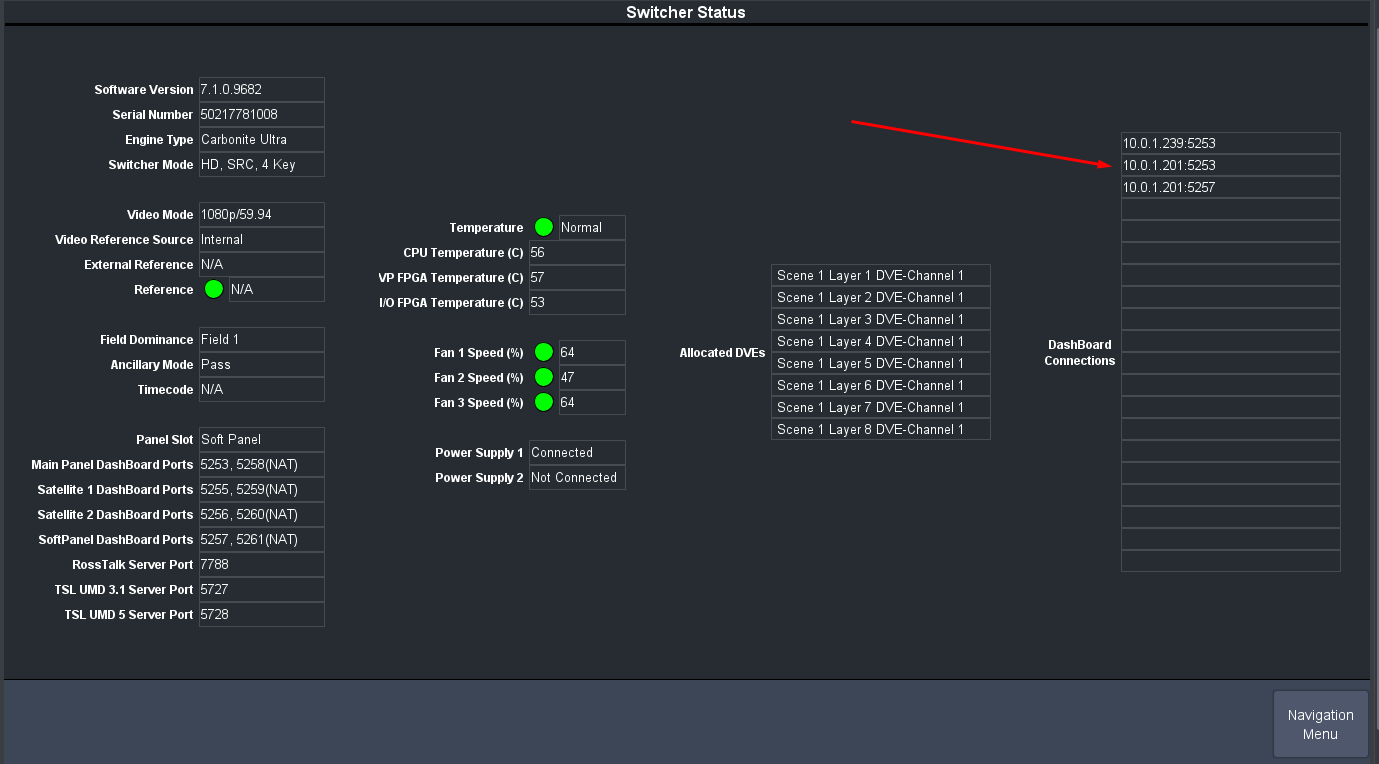
Status menu will show us the connections being made by DashBoard clients
------------------------------
Les O'Reilly
Director - Switcher Product Management
Original Message:
Sent: 03-21-2023 16:31
From: Les
Subject: Fun TD2 Trick
Is this connection from your laptop? if so which connection are you using? If your connected to a port that is not the same as your Physical panel you won't see options for that.. ie if I connect my laptop to SAT 1 and no panel is on SAT 1 port then I won't get options for row mnemonics. Sam as if I connect to the Softpanel connection then I won't see any in it's personality..
------------------------------
Les O'Reilly
Director - Switcher Product Management
Original Message:
Sent: 03-21-2023 14:49
From: Danny
Subject: Fun TD2 Trick
I searched for it and couldn't find it. It was where you think it is now. Happy to take this off the boards since I'm sure it's not an issue the community has.
------------------------------
[Danny] [Skarka] Ross Pilot since Synergy
[Producer, Director, Technical Director]
Original Message:
Sent: 03-21-2023 13:25
From: Les
Subject: Fun TD2 Trick
Well that is strange ... What does it show in the Custom Controls Menu - Mnemonics Menu ?
------------------------------
Les O'Reilly
Director - Switcher Product Management
Original Message:
Sent: 03-21-2023 12:53
From: Danny
Subject: Fun TD2 Trick
This is my screen with DB 9.51 and Carbonite 7.03. And yes, the Shift function works well too.
------------------------------
[Danny] [Skarka] Ross Pilot since Synergy
[Producer, Director, Technical Director]
Original Message:
Sent: 03-20-2023 21:33
From: Les
Subject: Fun TD2 Trick
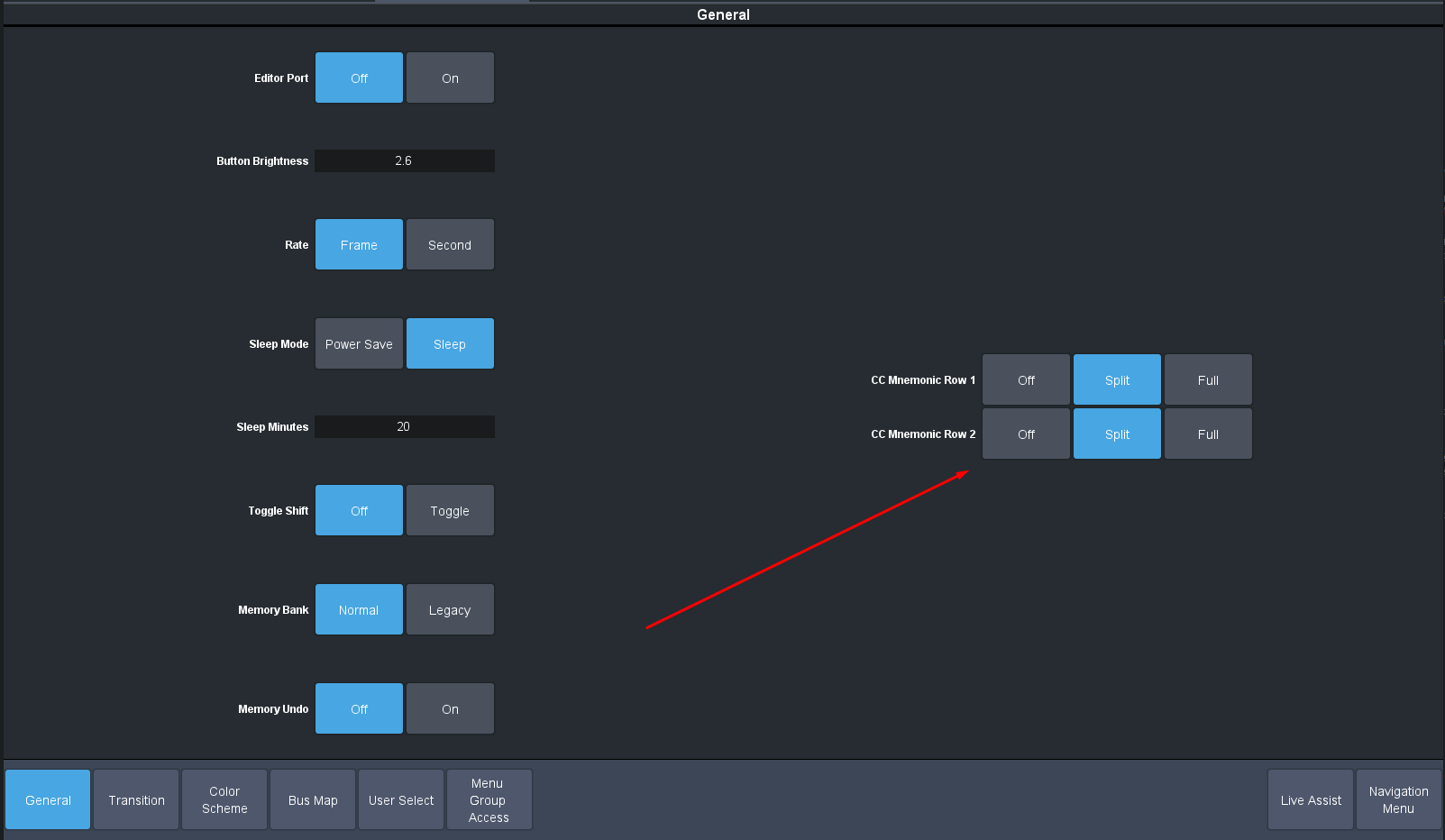
That is where the Setup of the Mnemonics to Rows is located..
FYI there is also the "Shift" MV Option.. Where you can assign second set of sources to each MV window and when you press and Hold the Shift Button on the Panel it will Flip the windows to those sources for you .. I do like your CC idea though.. That is also really cool!!
------------------------------
Les O'Reilly
Director - Switcher Product Management