Graphics

 View Only
  • 1.  Getting a "shadow" in a keyframe animation

    Posted 04-22-2025 10:29

    Hi All

    I have several keyframe animations in my project, ex. for different lower thirds and so on.
    My problem is, that there is something like a shadow during the animation and i dont know, how to avoid this.
    There ist no black element in the animation, only font or png-files.

    Does anybody else have this problem and can help me to fix it?
    See examples in the attachments.

    Txh
    Markus


    ------------------------------
    Markus Stoerk
    ------------------------------


  • 2.  RE: Getting a "shadow" in a keyframe animation

    Posted 04-22-2025 10:47

    Any chance your key channel is not delayed and your fill channel is? 


    ------------------------------
    Simon Redmile
    Senior Graphic Programmer & Designer
    Ross Video
    Bristol United Kingdom
    ------------------------------


  • 3.  RE: Getting a "shadow" in a keyframe animation

    Posted 04-23-2025 05:18

    Hi Simon

    Yes, a good point :-)
    Is there also a setting in XPression or do I only have to look at the mixer?

    Best
    Markus


    ------------------------------
    Markus Stoerk
    ------------------------------


  • 4.  RE: Getting a "shadow" in a keyframe animation

    Posted 04-23-2025 05:25

    Are the fill and key paired in XPression? 
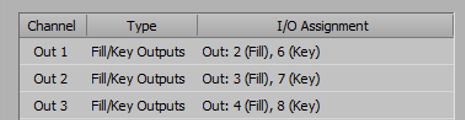
    If so any delay would happen to them both the same so I'd start with the mixer. 


    ------------------------------
    Simon Redmile
    Senior Graphic Programmer & Designer
    Ross Video
    Bristol United Kingdom
    ------------------------------


  • 5.  RE: Getting a "shadow" in a keyframe animation

    Posted 04-23-2025 13:21

    This issue is almost always caused by the video mixer having a frame sync turned on for the XPression fill channel but not the key channel. 

    You can check the Horizontal timing offset in XPression (depending on the framebuffer type), but even if there is an offset here it usually is not enough to cause the issue you are seeing (a full frame of delay). 

    XPression > Edit > Hardware Setup > Configure Framebuffer > Output # > Horizontal Timing Offset > Fill / Key