I appreciate it a lot! I'm gonna work on a couple possible solutions today and see if I can get something working before diving into the scripting too much, but if I hit a wall I'll be sure to let you know!
Original Message:
Sent: 07-25-2023 04:47
From: Red
Subject: Graphic cycling dynamic material images when taken online
Cool, if you want to go down the script route and need help writing something let me know.
------------------------------
Simon Redmile
Senior Graphic Programmer & Designer
Ross Video
Bristol United Kingdom
------------------------------
Original Message:
Sent: 07-24-2023 17:09
From: Cole
Subject: Graphic cycling dynamic material images when taken online
I think that could work, but I also thought of another work around that could be similar. If I can get the order of champions and figure out which lines of the 15 they are on, there may be a way for me to assign their positional numbers to text objects as well and then use those numbers as macros to tell my datalinq fields which rows to pull from specifically rather than filtering out the unnecessary ones. I can try both approaches and see what works best if there is no other way to filter through JSON than looking for specific attributes.
------------------------------
Cole Vierra
Original Message:
Sent: 07-24-2023 17:03
From: Red
Subject: Graphic cycling dynamic material images when taken online
Could you data link the position data to a text object and then use that as a logic to base some scripting off of?
So you have your datalinq text object type to that position object.
Then you can have something like this onOnline;
dim posData as xpTextObject
scene.GetObjectByName("PositionData1". posData)
if posData <> 0
'do the thing you want
end if
That would be quite easy to turn into a loop as well and do all 15 objects.
------------------------------
Simon Redmile
Senior Graphic Programmer & Designer
Ross Video
Bristol United Kingdom
Original Message:
Sent: 07-24-2023 16:56
From: Red
Subject: Graphic cycling dynamic material images when taken online
oh damn after writing all that I realise you don't want this, you want something that doesn't equal this.
I don't think these are supported because we are looking for a single result and greater/less than logic might yield multiple answers.
------------------------------
Simon Redmile
Senior Graphic Programmer & Designer
Ross Video
Bristol United Kingdom
Original Message:
Sent: 07-24-2023 16:55
From: Red
Subject: Graphic cycling dynamic material images when taken online
Yeah for sure, so it would be something like this;
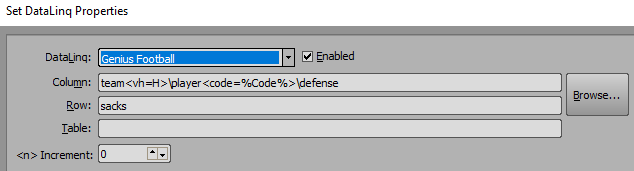
so the reason I am doing a search in team for vh=H is because I want the home team so that's a fixed value I am looking for for team.
Then I am looking for play code in the data because in this case I am looking at College Football and player numbers are repeated so we use codes for look up rather than number.
So inside there data tree the above is taking me to
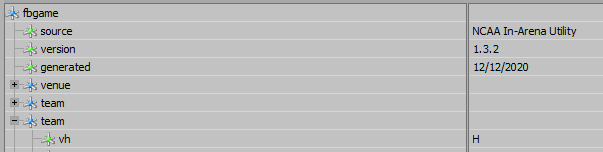
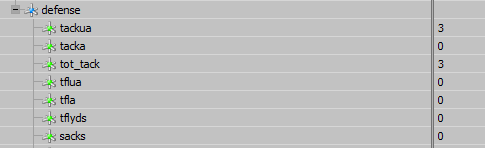
the second lookup is taking me to here

then finally to defense stats and to sacks in this example
------------------------------
Simon Redmile
Senior Graphic Programmer & Designer
Ross Video
Bristol United Kingdom
Original Message:
Sent: 07-24-2023 16:45
From: Cole
Subject: Graphic cycling dynamic material images when taken online
Ok I figured it had to be something with the visual logic since the elements in the graphic that don't go through that were handling it just fine.
My follow up would be is there a way to sort JSON data so that it would NOT have to go through this visual logic? I know that I can use something like champion<position=0> to find a specific instance to pull, but is there a way to do the opposite where I can have a datalinq field look through to JSON and pull anything that DOES NOT equal 0 for example? I have tried <position<>0> but I don't think that format would work, and since it's a JSON I don't believe SQL would work to filter out specific names or attributes either
------------------------------
Cole Vierra
Original Message:
Sent: 07-24-2023 16:41
From: Red
Subject: Graphic cycling dynamic material images when taken online
This is almost definitely your issue.
My guess is when the scene comes online and looks at that macro to resolve the path the visual logic isn't complete yet so that text object doesn't yet say the path name you're expecting.
------------------------------
Simon Redmile
Senior Graphic Programmer & Designer
Ross Video
Bristol United Kingdom
Original Message:
Sent: 07-24-2023 16:37
From: Cole
Subject: Graphic cycling dynamic material images when taken online
Correct! Essentially how it goes currently is I have my visual logic looking at 15 possible objects in my JSON data (keep in mind this is per player so there would be 8 of these total). We have 10 display spots for images, and some of those 15 are not relevant so I have sort selectors looking at values relevant to each attribute (in this case each characters current position to see if they are being used or not). I then use sort selectors to order the datalinqs in a way that it prioritizes those characters that are in play first, then puts the out of play characters on the back end of those 10 possible spots. I then have it recheck the board position of those characters and if they are not on the board currently it will hide them from being visible. This then determines the correct order for these character names and applies them to hidden text objects within the graphic, which are then used as @textobject@ macros to complete dynamic material paths in order to display the images of the correctly ordered characters and their related attributes/info.
Here is the per player visual logic I currently have running:
------------------------------
Cole Vierra
Original Message:
Sent: 07-24-2023 16:22
From: Simon Redmile
Subject: Graphic cycling dynamic material images when taken online
To complete the dynamic path are you using any macros such as @textobject@?
------------------------------
Simon Redmile
Senior Graphic Programmer & Designer
Ross Video
Bristol United Kingdom
Original Message:
Sent: 07-24-2023 16:17
From: Cole
Subject: Graphic cycling dynamic material images when taken online
The same problem occurs still, I am wondering if it's the visual logic taking a while to rearrange the assets since I have to use a few sort selectors for each player to determine the order to display their info in.
------------------------------
Cole Vierra
Original Message:
Sent: 07-24-2023 16:02
From: Garner
Subject: Graphic cycling dynamic material images when taken online
Does the graphic go online correctly if it is CUE'd first?
Right click CUE or use the decimal key on the numpad.