If you're okay with using a single toggle button for the stream stop and start, you can edit the following for the card1State and card2State params:
To change the Encoder RTMP Status parameter, you can navigate to the Style tab -> Font/Text Style, and change the Foreground Color setting:
Original Message:
Sent: 06-05-2026 11:21
From: davidc Coleman
Subject: How to create Start/Stop Encoding Streams macro button in Panelbuilder
And is there a way to change the way the Encoder RTMP Status parameter looks? Maybe a simple font color change or what the indicator lights looks like
------------------------------
David Coleman
AV Systems Engineers
------------------------------
Original Message:
Sent: 06-05-2026 11:20
From: davidc Coleman
Subject: How to create Start/Stop Encoding Streams macro button in Panelbuilder
Thank you, this looks like it should do the trick!
My next challenge is how should I go about associating these fancy .PNG graphics with the parameters so that the respective stream start, stream stop, and confirm buttons illuminate or change when clicked. ideally the start/stop buttons would stay lit until the confirm button is pressed
Thanks again!

------------------------------
David Coleman
AV Systems Engineers
------------------------------
Original Message:
Sent: 06-04-2026 17:20
From: Michael Quach
Subject: How to create Start/Stop Encoding Streams macro button in Panelbuilder
Hi David, I've attached an example panel below to help out with your question.
In the example panel, we use the parameter card1state to store whether the streams for card 1 should be started or stopped when we hit the confirmation button. It's a temporary variable, and has the states 0 = Stopped, 1 = Running, but doesn't directly change the Encoder State parameters.
The confirmation button has an attached task that when clicked, takes the value of card1state and sets the values of card1Stream1, card1Stream2, card1Stream3 accordingly. You can substitute card1Stream1, card1Stream2, card1Stream3 for your Encoder State parameters in your own panel.
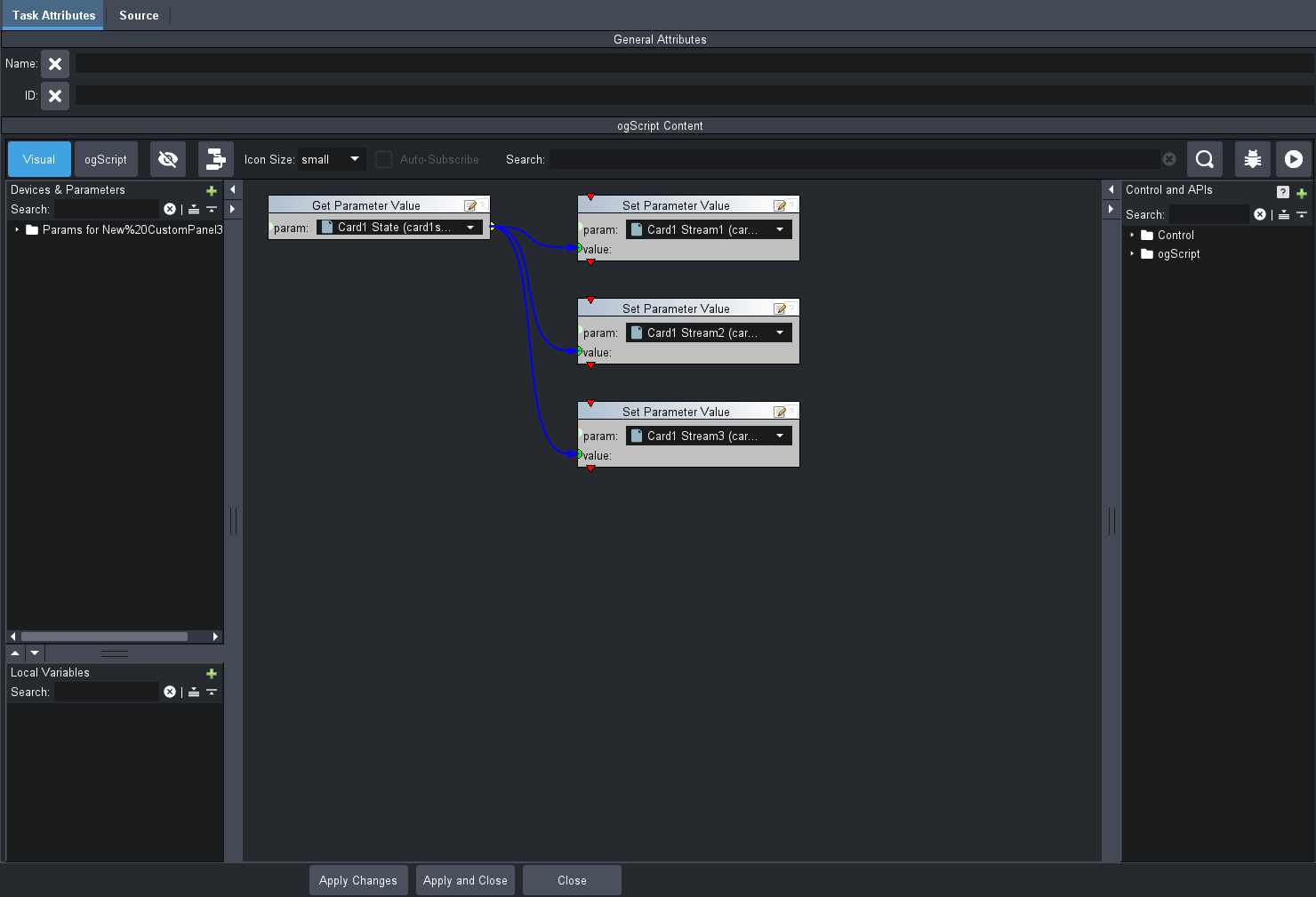
Then, we repeat the same with another set of parameters and buttons for Card 2.
Please let me know if you have any questions!
<abs contexttype="opengear" gridsize="20" id="_top" keepalive="false" style=""> <meta> <params> <param access="1" constrainttype="INT_CHOICE" name="Card1 State" oid="card1state" precision="0" type="INT32" value="0" widget="radio-toggle"> <constraint key="0">Stopped</constraint> <constraint key="1">Running</constraint> </param> <param access="1" constrainttype="INT_CHOICE" name="Card2 State" oid="card2state" precision="0" type="INT32" value="0" widget="radio-toggle"> <constraint key="0">Stopped</constraint> <constraint key="1">Running</constraint> </param> <param access="1" constrainttype="INT_CHOICE" name="Card2 Stream2" oid="card2Stream2" precision="0" type="INT16" value="0" widget="text-display"> <constraint key="0">Stopped</constraint> <constraint key="1">Running</constraint> </param> <param access="1" constrainttype="INT_CHOICE" name="Card2 Stream1" oid="card2Stream1" precision="0" type="INT16" value="0" widget="text-display"> <constraint key="0">Stopped</constraint> <constraint key="1">Running</constraint> </param> <param access="1" constrainttype="INT_CHOICE" name="Card2 Stream3" oid="card2Stream3" precision="0" type="INT16" value="0" widget="text-display"> <constraint key="0">Stopped</constraint> <constraint key="1">Running</constraint> </param> <param access="1" constrainttype="INT_CHOICE" name="Card1 Stream1" oid="card1Stream1" precision="0" type="INT16" value="0" widget="text-display"> <constraint key="0">Stopped</constraint> <constraint key="1">Running</constraint> </param> <param access="1" constrainttype="INT_CHOICE" name="Card1 Stream2" oid="card1Stream2" precision="0" type="INT16" value="0" widget="text-display"> <constraint key="0">Stopped</constraint> <constraint key="1">Running</constraint> </param> <param access="1" constrainttype="INT_CHOICE" name="Card1 Stream3" oid="card1Stream3" precision="0" type="INT16" value="0" widget="text-display"> <constraint key="0">Stopped</constraint> <constraint key="1">Running</constraint> </param> </params> </meta> <param expand="true" height="100" left="40" oid="card1state" showlabel="false" top="80" width="320"/> <param expand="true" height="100" left="680" oid="card1Stream1" showlabel="false" top="80" width="80"/> <param expand="true" height="100" left="800" oid="card1Stream2" showlabel="false" top="80" width="80"/> <param expand="true" height="100" left="920" oid="card1Stream3" showlabel="false" top="80" width="80"/> <button buttontype="push" height="100" id="confirmationButton1" left="400" name="Confirm Changes" top="80" width="160"> <task tasktype="ogscript">/*! block id=1002,1003 !*/params.setValue('card1Stream1', 0, params.getValue('card1state', 0));/*! block id=1005,1003 !*/params.setValue('card1Stream2', 0, params.getValue('card1state', 0));/*! block id=1006,1003 !*/params.setValue('card1Stream3', 0, params.getValue('card1state', 0));/*!! <block id="1002" type="param_setvalue" x="358" y="10" w="318" PARAM="[root, Params for New%20CustomPanel3.grid, Not In Menu, Card1 Stream1 (card1Stream1)]" PARAM_DATA="_top&amp;card1Stream1[0]" VALUE="ID:1003" /><block id="1003" type="param_getvalue" x="10" y="10" w="318" PARAM="[root, Params for New%20CustomPanel3.grid, Not In Menu, Card1 State (card1state)]" PARAM_DATA="_top&amp;card1state[0]" /><block id="1005" type="param_setvalue" x="358" y="126" w="318" PARAM="[root, Params for New%20CustomPanel3.grid, Not In Menu, Card1 Stream2 (card1Stream2)]" PARAM_DATA="_top&amp;card1Stream2[0]" VALUE="ID:1003" /><block id="1003" type="param_getvalue" x="10" y="10" w="318" PARAM="[root, Params for New%20CustomPanel3.grid, Not In Menu, Card1 State (card1state)]" PARAM_DATA="_top&amp;card1state[0]" /><block id="1006" type="param_setvalue" x="358" y="242" w="318" PARAM="[root, Params for New%20CustomPanel3.grid, Not In Menu, Card1 Stream3 (card1Stream3)]" PARAM_DATA="_top&amp;card1Stream3[0]" VALUE="ID:1003" /><block id="1003" type="param_getvalue" x="10" y="10" w="318" PARAM="[root, Params for New%20CustomPanel3.grid, Not In Menu, Card1 State (card1state)]" PARAM_DATA="_top&amp;card1state[0]" />!!*//*!!<checksum>3a543b3dc2cf12b3a479e6d4fd63495c</checksum>!!*/</task> </button> <label height="40" left="40" name="Card 1" style="txt-align:west;" top="40" width="60"/> <label height="40" left="680" name="Stream 1" style="txt-align:west;" top="40" width="60"/> <label height="40" left="800" name="Stream 2" style="txt-align:west;" top="40" width="60"/> <label height="40" left="920" name="Stream 3" style="txt-align:west;" top="40" width="60"/> <param expand="true" height="100" left="40" oid="card2state" showlabel="false" top="480" width="320"/> <param expand="true" height="100" left="680" oid="card2Stream1" showlabel="false" top="480" width="80"/> <param expand="true" height="100" left="800" oid="card2Stream2" showlabel="false" top="480" width="80"/> <param expand="true" height="100" left="920" oid="card2Stream3" showlabel="false" top="480" width="80"/> <button buttontype="push" height="100" id="confirmationButton2" left="400" name="Confirm Changes" top="480" width="160"> <task tasktype="ogscript">/*! block id=1002,1003 !*/params.setValue('card2Stream1', 0, params.getValue('card2state', 0));/*! block id=1005,1003 !*/params.setValue('card2Stream2', 0, params.getValue('card2state', 0));/*! block id=1006,1003 !*/params.setValue('card2Stream3', 0, params.getValue('card2state', 0));/*!! <block id="1002" type="param_setvalue" x="358" y="10" w="318" PARAM="[root, Params for New%20CustomPanel3.grid, Not In Menu, Card2 Stream1 (card2Stream1)]" PARAM_DATA="_top&amp;card2Stream1[0]" VALUE="ID:1003" /><block id="1003" type="param_getvalue" x="10" y="10" w="318" PARAM="[root, Params for New%20CustomPanel3.grid, Not In Menu, Card2 State (card2state)]" PARAM_DATA="_top&amp;card2state[0]" /><block id="1005" type="param_setvalue" x="358" y="126" w="318" PARAM="[root, Params for New%20CustomPanel3.grid, Not In Menu, Card2 Stream2 (card2Stream2)]" PARAM_DATA="_top&amp;card2Stream2[0]" VALUE="ID:1003" /><block id="1003" type="param_getvalue" x="10" y="10" w="318" PARAM="[root, Params for New%20CustomPanel3.grid, Not In Menu, Card2 State (card2state)]" PARAM_DATA="_top&amp;card2state[0]" /><block id="1006" type="param_setvalue" x="358" y="242" w="318" PARAM="[root, Params for New%20CustomPanel3.grid, Not In Menu, Card2 Stream3 (card2Stream3)]" PARAM_DATA="_top&amp;card2Stream3[0]" VALUE="ID:1003" /><block id="1003" type="param_getvalue" x="10" y="10" w="318" PARAM="[root, Params for New%20CustomPanel3.grid, Not In Menu, Card2 State (card2state)]" PARAM_DATA="_top&amp;card2state[0]" />!!*//*!!<checksum>64c391d3966dd0780dcee420c60f6c07</checksum>!!*/</task> </button> <label height="40" left="40" name="Card 2" style="txt-align:west;" top="440" width="60"/> <label height="40" left="680" name="Stream 1" style="txt-align:west;" top="440" width="60"/> <label height="40" left="800" name="Stream 2" style="txt-align:west;" top="440" width="60"/> <label height="40" left="920" name="Stream 3" style="txt-align:west;" top="440" width="60"/></abs>
------------------------------
Michael Quach
------------------------------