Ah no worries, I tried to script without it at first but then realise debugging is an important part of script writing. Doing it without is a bit like designing graphics without a monitor.
Then in your scripts you can add the message engine.debugmessage("my message here", 0)
Original Message:
Sent: 10-12-2025 13:23
From: Sonja Broomfield
Subject: How to take online and playout a scene automatically when data conditions are met
I have no idea how to do that.
------------------------------
Sonja Broomfield
On-Air graphics (Duet & Xpression)
Freelance
Canada
------------------------------
Original Message:
Sent: 10-12-2025 08:59
From: Simon Redmile
Subject: How to take online and playout a scene automatically when data conditions are met
Are you using debug messages and debug monitor to check what the script is doing?
------------------------------
Simon Redmile
Senior Graphic Programmer & Designer
Ross Video
Bristol United Kingdom
Original Message:
Sent: 10-12-2025 08:57
From: Sonja Broomfield
Subject: How to take online and playout a scene automatically when data conditions are met
No idea why, but the problem has resurfaced. I haven't changed anything since it worked after I changed the script.
It is once again skipping one trigger when conditions change. I am mystified. I am rebooting.
------------------------------
Sonja Broomfield
On-Air graphics (Duet & Xpression)
Freelance
Canada
Original Message:
Sent: 10-12-2025 07:45
From: Simon Redmile
Subject: How to take online and playout a scene automatically when data conditions are met
Have you removed it from on preview render?
------------------------------
Simon Redmile
Senior Graphic Programmer & Designer
Ross Video
Bristol United Kingdom
Original Message:
Sent: 10-12-2025 07:41
From: Sonja Broomfield
Subject: How to take online and playout a scene automatically when data conditions are met
That did it! It still triggers when I click on the trigger, but it also plays out when I'm on other stuff. Just need to keep paws off the trigger during the show! Thanks so much, this was a really valuable experience for me.
------------------------------
Sonja Broomfield
On-Air graphics (Duet & Xpression)
Freelance
Canada
Original Message:
Sent: 10-12-2025 07:24
From: Simon Redmile
Subject: How to take online and playout a scene automatically when data conditions are met
I would put it onSetText of the speed data text object.
You need to change "Self" to "Scene" in the script.
------------------------------
Simon Redmile
Senior Graphic Programmer & Designer
Ross Video
Bristol United Kingdom
Original Message:
Sent: 10-12-2025 07:12
From: Sonja Broomfield
Subject: How to take online and playout a scene automatically when data conditions are met
Yes! This works perfectly, thank you, no more issues on the trigger!
Two remaining problems:
1) where to put the script. OnPreviewRender means I have to keep my focus on the trigger page. I have tried the other ones, but nothing seems to work while I am playing out other stuff (on other fbs & layers). I want to just put the trigger on air at the beginning of the night and forget about it. Any idea where it should go?
2) The animation page has live updates turned off on the data objects, but it still updates the player and speed on air if the scene is triggered by two shots close together (less than 5 seconds apart). Thankfully it doesn't happen if conditions aren't met, so it shouldn't be a huge problem.
Thanks again Simon. I've just been enjoying your Ross U lesson on Transition Logic. :)
------------------------------
Sonja Broomfield
On-Air graphics (Duet & Xpression)
Freelance
Canada
Original Message:
Sent: 10-12-2025 06:41
From: Simon Redmile
Subject: How to take online and playout a scene automatically when data conditions are met
Because of how you have it written I think the script is stopping as soon as one isn't true.
Try this.
Dim otherScene As xpScene
Dim fb As xpOutputFramebuffer
Dim layer As Integer
layer = 5
engine.GetOutputFramebuffer(0, fb)
If fb.GetSceneOnLayer(layer, otherScene) Then
' Scene already on layer 5, do nothing
Else
Dim probe As xpTextObject
Dim tricodeOK As Boolean
Dim speedOK As Boolean
tricodeOK = False
speedOK = False
' --- Check Tricode ---
If Self.GetObjectByName("Tricode", probe) Then
If probe.Text = "MTL" Then
tricodeOK = True
End If
End If
' --- Check SpeedData ---
If Self.GetObjectByName("SpeedData", probe) Then
If Val(probe.Text) >= 95 Then
speedOK = True
End If
End If
' --- Both must be true ---
If tricodeOK And speedOK Then
Dim takeitem As xpTakeItem
engine.sequencer.GetTakeItemByID(5, takeitem)
takeitem.Execute
End If
End If
------------------------------
Simon Redmile
Senior Graphic Programmer & Designer
Ross Video
Bristol United Kingdom
Original Message:
Sent: 10-12-2025 06:20
From: Sonja Broomfield
Subject: How to take online and playout a scene automatically when data conditions are met
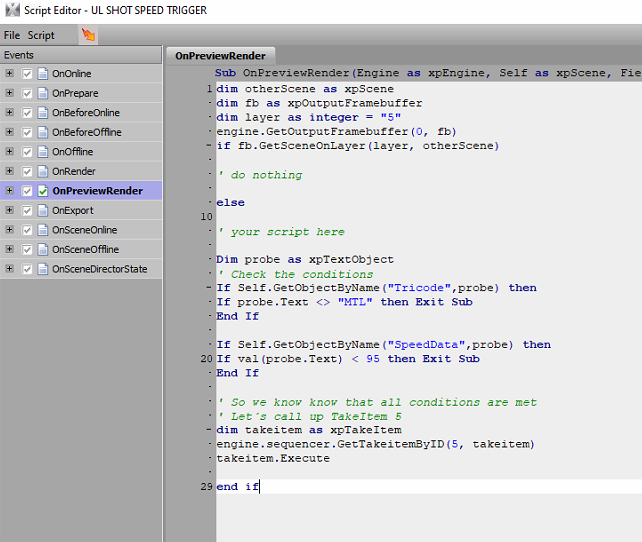
dim otherScene as xpScene
dim fb as xpOutputFramebuffer
dim layer as integer = "5"
engine.GetOutputFramebuffer(0, fb)
if fb.GetSceneOnLayer(layer, otherScene)
' do nothing
else
' your script here
Dim probe as xpTextObject
' Check the conditions
If Self.GetObjectByName("Tricode",probe) then
If probe.Text <> "MTL" then Exit Sub
End If
If Self.GetObjectByName("SpeedData",probe) then
If val(probe.Text) < 95 then Exit Sub
End If
' So we know know that all conditions are met
' Let´s call up TakeItem 5
dim takeitem as xpTakeItem
engine.sequencer.GetTakeitemByID(5, takeitem)
takeitem.Execute
end if
------------------------------
Sonja Broomfield
On-Air graphics (Duet & Xpression)
Freelance
Canada
Original Message:
Sent: 10-12-2025 06:09
From: Simon Redmile
Subject: How to take online and playout a scene automatically when data conditions are met
could you copy and paste the script here rather than a screen shot, then I don't have to write the script from scratch to help :)
------------------------------
Simon Redmile
Senior Graphic Programmer & Designer
Ross Video
Bristol United Kingdom
Original Message:
Sent: 10-12-2025 06:07
From: Sonja Broomfield
Subject: How to take online and playout a scene automatically when data conditions are met
------------------------------
Sonja Broomfield
On-Air graphics (Duet & Xpression)
Freelance
Canada
Original Message:
Sent: 10-12-2025 05:52
From: Simon Redmile
Subject: How to take online and playout a scene automatically when data conditions are met
On set text will always play first time it goes on air unless you use the check script I already provided above?
The way you have this written it will play if either of those condition are met, you haven't written it in a way that requires both to be true.
Please show me the example where you have also included the check script I provided?
------------------------------
Simon Redmile
Senior Graphic Programmer & Designer
Ross Video
Bristol United Kingdom
Original Message:
Sent: 10-11-2025 14:52
From: Sonja Broomfield
Subject: How to take online and playout a scene automatically when data conditions are met
So far I have a trigger scene, which will always be online.
The idea is that whenever the data changes and the two conditions (SpeedData under 95 and TriCode=MTL) are met, this scene would trigger another scene to play out with the correct info on it (i.e. the name of a Montréal player and the speed of the shot).
Here is my script which I am using in my trigger scene, playing out TakeItem 5 (in theory) whenever the SpeedData changes (OnSetText) and conditions are met:
What happens:
-
Take Item 5 plays out regardless of conditions whenever I click on the Trigger page in the sequencer. I don't even have to put it online. I don't want this to happen ever.
-
Once I put the Trigger page online, if the data changes, it does not play out the first shot that meets the conditions.
-
After that it plays out correctly until a condition changes. Then it gets 1 wrong, and continues correctly until conditions change again.
I think the trigger is happening before the conditions are being evaluated. I think that happens every time, which is why when two shots occur back-to-back with similar conditions, it is accurate, but not if conditions differ from one shot to the next.
I am going crazy trying to figure this out!
Any insights you might have would be most welcome.
Thanks again for your help.
Sonja
Anna Sophia (Sonja) Broomfield
(514) 803-6662
Original Message:
Sent: 10/10/2025 4:03:00 AM
From: Simon Redmile
Subject: RE: How to take online and playout a scene automatically when data conditions are met
Share your entire script with me.
------------------------------
Simon Redmile
Senior Graphic Programmer & Designer
Ross Video
Bristol United Kingdom
Original Message:
Sent: 10-09-2025 21:51
From: Sonja Broomfield
Subject: How to take online and playout a scene automatically when data conditions are met
OK one last wrinkle.
I didn't notice earlier, but the script only works if my cursor is on the setup page takeitem in the sequencer. The moment I go to do other stuff, the setup page updates (live updates is on), but it does not trigger the graphic. The minute I get back to it, it triggers.
Ideas?
Original Message:
Sent: 10/7/2025 11:41:00 AM
From: Simon Redmile
Subject: RE: How to take online and playout a scene automatically when data conditions are met
Nice one! :)
------------------------------
Simon Redmile
Senior Graphic Programmer & Designer
Ross Video
Bristol United Kingdom
Original Message:
Sent: 10-07-2025 11:15
From: Sonja Broomfield
Subject: How to take online and playout a scene automatically when data conditions are met
Perfect! Thank you for your expert help.
I also made sure I was not updating live or refreshing dynamic materials on data changes, so the player didn't change while the last shot graphic was playing out.
Original Message:
Sent: 10/7/2025 6:39:00 AM
From: Simon Redmile
Subject: RE: How to take online and playout a scene automatically when data conditions are met
Wrap the rest of you script in this.
dim otherScene as xpScene
dim fb as xpOutputFramebuffer
dim layer as integer = "your layer number for takeitem 5"
engine.GetOutputFramebuffer(0, fb)
if fb.GetSceneOnLayer(layer, otherScene)
' do nothing
else
' your script here
end if
------------------------------
Simon Redmile
Senior Graphic Programmer & Designer
Ross Video
Bristol United Kingdom
Original Message:
Sent: 10-07-2025 06:17
From: Simon Redmile
Subject: How to take online and playout a scene automatically when data conditions are met
hmmmm actually now I think about this the above method works because the way I make things the scene with the animation is always online, you'll actually need a different check to what I just wrote. Instead you just need to check if the scene is online rather than if the animation is playing.
Do you know how to check a layer for a scene?
------------------------------
Simon Redmile
Senior Graphic Programmer & Designer
Ross Video
Bristol United Kingdom
Original Message:
Sent: 10-07-2025 06:13
From: Simon Redmile
Subject: How to take online and playout a scene automatically when data conditions are met
dim sd as xpSceneDirector
self.GetSceneDirectorByName("the animation scene director you are after", sd)
if sd.Position <> 0
' do nothing as it must be playing since its not at 0
else
'put the rest of your code here
end if
I think you should also make sure that scene you are triggering goes offair after playing if you aren't already doing that.
------------------------------
Simon Redmile
Senior Graphic Programmer & Designer
Ross Video
Bristol United Kingdom
Original Message:
Sent: 10-07-2025 06:04
From: Sonja Broomfield
Subject: How to take online and playout a scene automatically when data conditions are met
Yes, thanks, that's exactly what I don't know how to do. :)
------------------------------
Sonja Broomfield
On-Air graphics (Duet & Xpression)
Freelance
Canada
Original Message:
Sent: 10-07-2025 05:47
From: Simon Redmile
Subject: How to take online and playout a scene automatically when data conditions are met
Wrap it all in an if statement that checks if the graphic is already playing like I mentioned higher up.
------------------------------
Simon Redmile
Senior Graphic Programmer & Designer
Ross Video
Bristol United Kingdom
Original Message:
Sent: 10-06-2025 16:20
From: Sonja Broomfield
Subject: How to take online and playout a scene automatically when data conditions are met
A good theory, but I have two conditions, not just speed.
Here is what I have so far, and it sort of works. I made the scene script pretty much as Mr. Lehmann kindly advised, but instead of playing out a sequence director I played a take item, as Mr. Redmile suggested:
Dim probe as xpTextObject
' Check the conditions
If Self.GetObjectByName("TRI",probe) then
If probe.Text <> "MTL" then Exit Sub
End If
If Self.GetObjectByName("SPEED",probe) then
If val(probe.Text) < 100 then Exit Sub
End If
' So we know know that all conditions are met
' Call up TakeItem 5
dim takeitem as xpTakeItem
engine.sequencer.GetTakeitemByID(5, takeitem)
takeitem.Execute
The only problem is when there are two shots back-to-back, the graphic updates in mid-playout, even though live update is off for all objects. Not sure how to fix this.
------------------------------
Sonja Broomfield
On-Air graphics (Duet & Xpression)
Freelance
Canada
Original Message:
Sent: 10-06-2025 09:22
From: Aleksander Stalsberg
Subject: How to take online and playout a scene automatically when data conditions are met
@Simon Redmile - Would it not be possible to use a text objects "onChange" for this?
Like when the text for speed goes higher than a specific value, then trigger the scene director or scene?
Or does that not trigger from a DataLinq source perhaps?
@Sonja Broomfield - Where's the data for the speed comming from?
External System -> DataLinq -> Xpression?
External System -> DashBoard -> DataLinq -> Xpression?
------------------------------
Aleksander Stalsberg
Inland Norway University of Applied Sciences/Lillehammer Icehockey Club
Norway
Original Message:
Sent: 12-18-2024 08:41
From: Simon Redmile
Subject: How to take online and playout a scene automatically when data conditions are met
One idea I had that would have minimal scripting would be if those conditions are met they play a scene director.
That scene director could have a script on it that takes the scene on air.
dim take1 as xpTakeItem
Engine.sequencer.getTakeItemByID(1001,take1)
take1.execute
------------------------------
Simon Redmile
Senior Graphic Programmer & Designer
Ross Video
Bristol United Kingdom