Broadcast video is 10 Bit .. so 16 bit is not going to do much either..
Carbonite IS taking the properties correctly.. When it puts the image into video space it splits up the video and the alpha and create the 4:2:2 based exactly on the image..
A OS or web browser may be able to interpret the content and display it how you would prefer it be seen.. However the image contains a channel that is telling it to display with white..
The exporting from GIMP from the PSD you supplied also exports the PNG correctly.. There is a setting or something that causes this.. I wish I could nail it down for you but I can't..
Could you please supply the "bad" export from photoshop via a dropbox link so that I can look at the file in an inspector please.
Original Message:
Sent: 06-29-2023 17:05
From: Garrett
Subject: Media Manager Displays Alpha Weird
Yeah, up to 14 different ways of trying to save it as a PNG out of Photoshop. Same results each time. Looks fine in different operating systems and web browsers. But Carbonite is not taking the properties correctly.
https://www.dropbox.com/scl/fo/7h7jqp20vzdkdt077jac3/h?dl=0&rlkey=3nx1s8vrhtzifprmiui9ipid7
This photoshop file is directly to the 14 different attempts of exporting in different ways. Instead of uploading the PNG to the website and then someone downloading it and then it working.
------------------------------
Garrett Hall
Overtime Elite
------------------------------
Original Message:
Sent: 06-29-2023 16:55
From: Garrett
Subject: Media Manager Displays Alpha Weird
So by adding an dartboard it did give me something different, but still not correct. Attached is a screen shot and then one version of an exported image as well. - In the screen shot. On the left thumbnail that is an 8 bits of color space png, and on the right is 16 bits. Just trying as many different things as possible.
------------------------------
Garrett Hall
Overtime Elite
Original Message:
Sent: 06-29-2023 16:42
From: Les
Subject: Media Manager Displays Alpha Weird
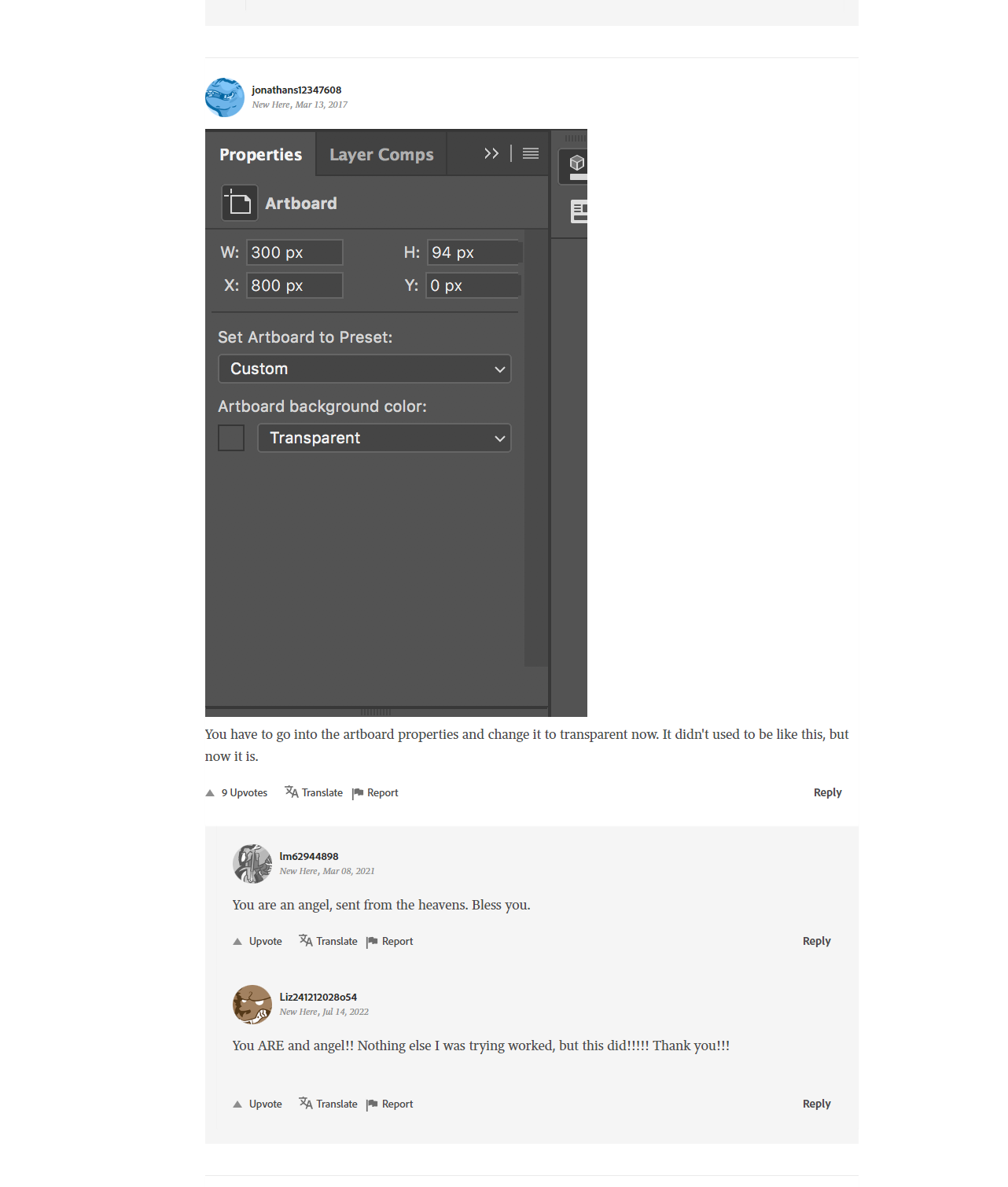
https://community.adobe.com/t5/photoshop-ecosystem-discussions/transparent-background-but-white-background-shows-after-file-is-saved-as-a-png/td-p/8897999
maybe try this found on the link above
------------------------------
Les O'Reilly
Director - Switcher Product Management
Original Message:
Sent: 06-29-2023 15:48
From: Les
Subject: Media Manager Displays Alpha Weird
Then it is for sure something in the file data that is modified when uploaded here to this community and then the file is different ....
https://community.adobe.com/t5/photoshop-ecosystem-discussions/png-exporting-with-black-background/td-p/11720831
https://community.adobe.com/t5/photoshop-ecosystem-discussions/why-transparent-background-turns-white/m-p/12934977
Need to look into what your setting it to when exporting to make sure it replaces the "transparent" area with black I guess..
------------------------------
Les O'Reilly
Director - Switcher Product Management
Original Message:
Sent: 06-29-2023 15:38
From: Garrett
Subject: Media Manager Displays Alpha Weird
So yes, after I downloaded the image back from the web, then the image appears correctly in the Multiviewer and in Media Manager.
The original image is just a photoshop file exported as a PNG. I am not the creative type, I just needed some basic slates for a partner about to use our space.
------------------------------
Garrett Hall
Overtime Elite
Original Message:
Sent: 06-29-2023 15:35
From: Garrett
Subject: Media Manager Displays Alpha Weird
Then maybe the ross website is converting it in some way before you download it. I literally took the file that I moved onto my USB drive and then attached it and uploaded it here.
Carbonite Ultra running 7.1.0.9816
I will try to download from the Ross website and re add into the carbonite and see if I get a different result.
------------------------------
Garrett Hall
Overtime Elite
Original Message:
Sent: 06-29-2023 15:27
From: Les
Subject: Media Manager Displays Alpha Weird
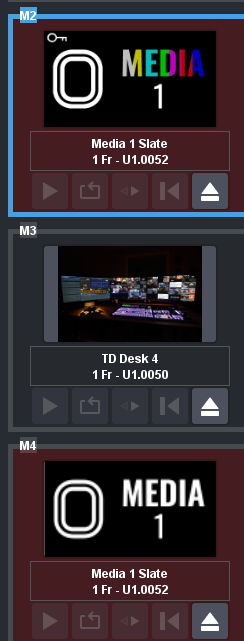
That is in Graphite ... So the Image you are posting here looks to be a different PNG than the one on your system .. instead of Black where the alpha is having black yours still has White .. which happens with Photoshop sometimes if you don't define that other area to be black it puts white in it
------------------------------
Les O'Reilly
Director - Switcher Product Management
Original Message:
Sent: 06-29-2023 15:23
From: Garrett
Subject: Media Manager Displays Alpha Weird
It looks the same in a multi viewer or in a bus, until it is placed onto a key. So if I do an auto select key with the media channel, and then put that keyer on air, it looks as I would expect it to look. - If I load the content into a Media Channel, says "M1", and then put M1 to a mutliviewer box, it looks the same in the multi viewer as it does in the media manager.
------------------------------
Garrett Hall
Overtime Elite
Original Message:
Sent: 06-29-2023 15:14
From: Les
Subject: Media Manager Displays Alpha Weird
The issue is that is how your Image for the Fill really looks ..
this is how the media element is exported via your image editor.. since it is being exported as an Un Shaped Key type (Non Additive) media.
Just look at the video channel and alpha channel in a MV or on a bus directly.
------------------------------
Les O'Reilly
Director - Switcher Product Management