Sorry, didn't see the image before I responded earlier...
Original Message:
Sent: 01-04-2024 21:43
From: Les O'Reilly
Subject: Media Wipe media format
sorry for the delay .. I am still out of the office on vacation so was having issues from my phone.
From the image you posted above it looks like you have a Graphite Not an Ultra.
Ultra has 2 x 4GB Ram Cache (with channels 1&3 on 4GB and 2&4 on 4GB)
Graphite only has 2x 1GB Ram Cache again with 1&3 on 1GB and 2&4 on 1GB of shared ram cache.
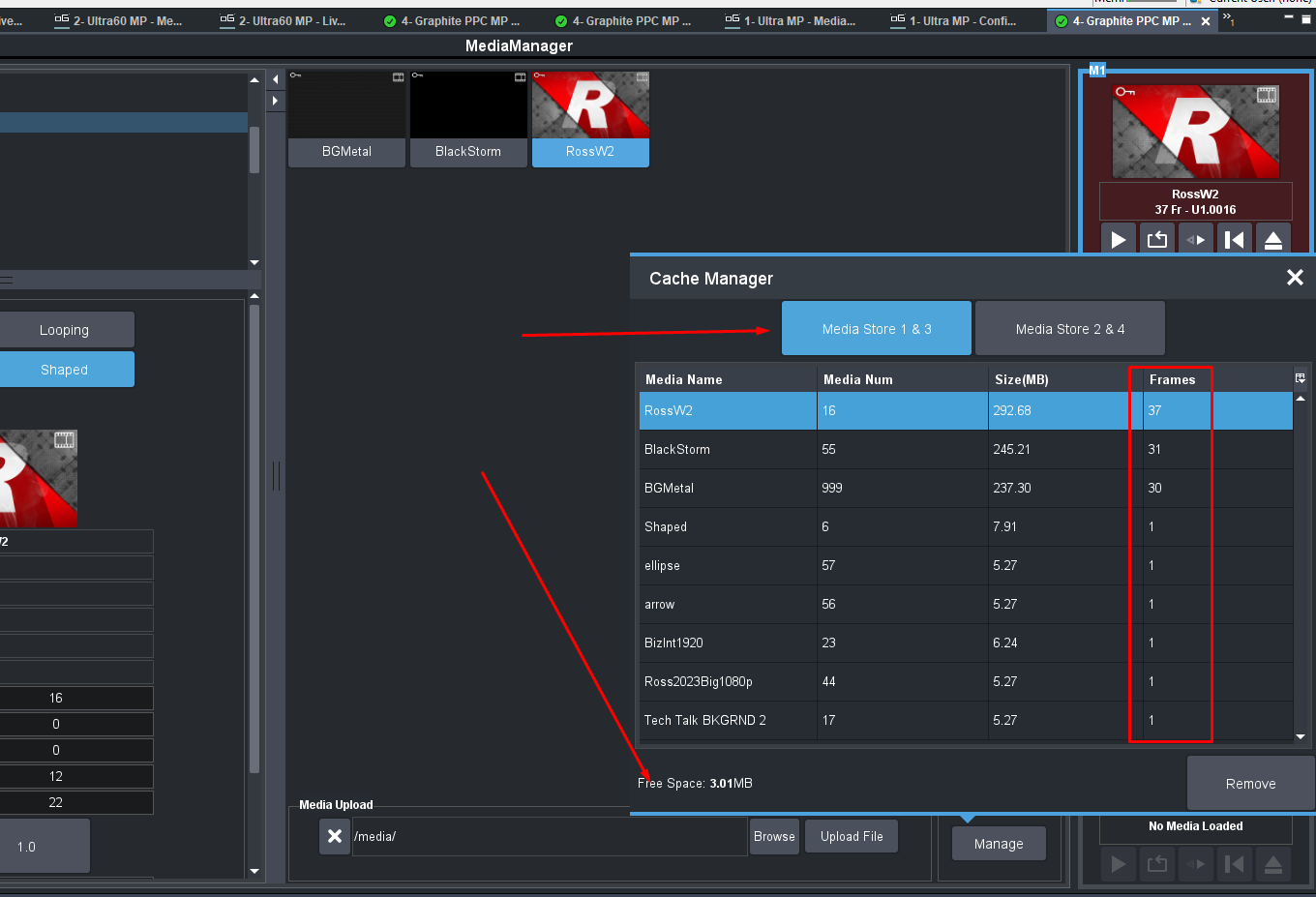
You can see in the image that from the Cache Manager really in 1080 with alpha your around the 100ish frame mark.
Since you have a graphite you would have 2 Clip Channels in XPression that both also have Alpha channels. There is effectively "endless" amounts of bumps and transitions that you can play out of those.
------------------------------
Les O'Reilly
Director - Switcher Product Management
------------------------------
Original Message:
Sent: 01-04-2024 18:59
From: David Barnes
Subject: Media Wipe media format
Les,
If I understand the information in the link you provided earlier with the specifications:
https://help.rossvideo.com/ultra/Topics/Operation/Media-Store/File-Size.html
the number of frames for a 1920x1080 animation is 494
The image sequence I created is 1920x1080 and 181 frames
------------------------------
David Barnes
PRINCE GEORGES COMMUNITY TELEVISION
Largo United States
Original Message:
Sent: 01-04-2024 18:12
From: Les O'Reilly
Subject: Media Wipe media format
Hi David,
210MB is the compressed size not the uncompressed size.
it still has to turn it into video space and that is why it is telling you it is too large.
------------------------------
Les O'Reilly
Director - Switcher Product Management
Original Message:
Sent: 01-04-2024 17:59
From: David Barnes
Subject: Media Wipe media format
Ted,
Thanks for your responses. I'm still unable to make this work, but you were correct to point out the file-naming format. I had the images as a numbered sequence but, initially, I did not have the underscore "_" immediately preceding the frame number. Once, I corrected that, the media wipe appeared as a single clip in the Media Store with the filmstrip icon, however, it does not let me cue/load the wipe.
I get this error message the "FILE LARGER THAN THE CACHE"
The first attempt we had was a targa sequence, which was over the 1 GB Media Store limit, but the png image sequence for this 6-second media wipe is only 210 MB (I've uploaded on of the frames)
Choosing "Free Up the Media Number" seems to have no effect.
Let me know what additional information I can provide that would helpful towards a solution.
------------------------------
David Barnes
PRINCE GEORGES COMMUNITY TELEVISION
Largo United States
Original Message:
Sent: 01-01-2024 07:48
From: Tedd Tramaloni
Subject: Media Wipe media format
Good day, all. I've found that there are two big differences between the .png and .tga file formats. First, .tga files are usually larger than .png, sometimes by quite a bit. Second, some programs don't open .tga files natively. (PowerPoint is one example...) So if file size and the ability to open the graphics file(s) in other applications are important considerations, then .png might be a better choice.
As for playback speed, I'm guessing the issue has to do with the fact that AfterEffects is an animation environment that is based on a known playback rate. (The version that Creative Cloud just updated defaults to 59.94 fps/drop frame.) However, when the animation is exported as a Targa sequence, it is simply saving a series of stills so the concept of "playback rate" becomes somewhat meaningless. I'm not enough of an AfterEffects expert to be able to dissect the process, but I suspect that AE can't "divide" the number of frames in the animation correctly to arrive at a given number of full-frame stills; hence, some frames get dropped. But again, I'm not really an expert in this so perhaps other community members can provide a more detailed (or more correct!) explanation.
Hope that helps.
------------------------------
Tedd Tramaloni
Ross Video
Original Message:
Sent: 12-31-2023 19:00
From: Danny Skarka
Subject: Media Wipe media format
Tagging up on this, I use this function quite often. One thing that seems to crop up on me is playback speed. I export from After Effects at a known playback rate and Media Player plays it back faster. A 30-second animation seems to play back at about 20 frames. Other than that, this is a nice feature.
Also curious, is there any advantage of png over tga files?
------------------------------
[Danny] [Skarka] Ross Pilot since Synergy
[Producer, Director, Technical Director]
Original Message:
Sent: 12-31-2023 11:22
From: Tedd Tramaloni
Subject: Media Wipe media format
Good day, David, and Happy New Year. It sounds as if you might be exporting your .mov file incorrectly. As you've discovered, .mov animations are not directly supported. Instead, you can use image sequences (.tga, .png., or .jpg only) to create animated media transitions. However, when you're exporting your animation file, its important to properly name the resulting images. The required file format is: File_001.extension where "File" is the name of the image and ".extension" is the file type. The first file must begin with _001 and then each successive file must increment sequentially in order for the switcher to recognize the relationship among all the separate files. For example, if I wish to create an image sequence named "Test," I would name the first file as "Test_.png" (Depending on which application you use to export the files, you may have to start with "Test_001.png") When the file is exported, the sequential numbers (001, 002, etc.) should be added automatically. The result would be a series of still images names Test_001.png, Test_002.png, etc. Carbonite should then recognize the files and load them as an animation. I generally create a folder and then export the image files to that folder just so all the separate files are in a single folder.
Also note that image file specifications can be found in any of the Carbonite/Graphite Operations Manuals in the MediaStore section. The manuals can be downloaded at no cost from our website.
Try that and let us know if you have any difficulties.
Good luck.
------------------------------
Tedd Tramaloni
Ross Video
Original Message:
Sent: 12-29-2023 14:31
From: David Barnes
Subject: Media Wipe media format
I need some help getting the correct format for this. I have read the information in the above help link and viewed the Ross Media Wipe video tutorial at
https://www.rossvideo.com/resources/ross-university/using-mediawipes/
Initially, I tried to add an .mov file to my USB drive and that didn't work.
Then, I exported an image sequence, however it just shows up as all of the individual image files instead of the film-strip symbol
thanks
------------------------------
David Barnes
PRINCE GEORGES COMMUNITY TELEVISION
Original Message:
Sent: 01-20-2023 08:04
From: Les O'Reilly
Subject: Media Wipe media format
Hi Danny,
Here is a link to the media store file specifications. It has all the details on the formats and structures... Note that only TGA and PNG will have Alpha but other image types correctly setup will still perform animation playout without alpha.
https://help.rossvideo.com/ultra/Topics/Operation/Media-Store/File-Spec.html
------------------------------
Les O'Reilly
Director - Switcher Product Management