Hi Eric,
I assume you've added the MIDI device into the Dashboard tree and then included it in the device <context/> of a custom panel.
From there you should be able to link params created in the panel to the controller.
I simple way is to add the midi controllers to the panel using the params button, then setValue() for the parameters you want to control. You can hide the midi controls in the panel after linked to tidy up the panel.
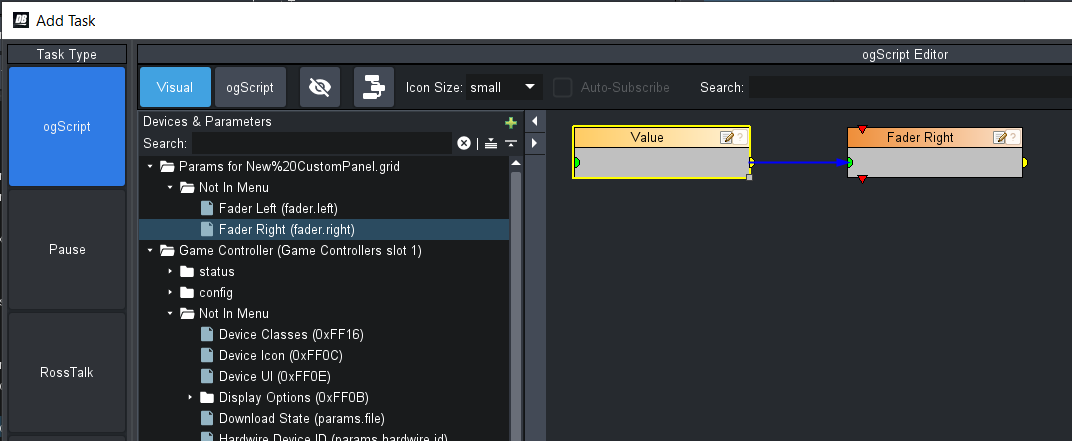
Here is a quick example I've created although with game controller added to Dashboard tree instead. The game controller won't appear on your side when you open this panel, but you can inspect the link in the controller input to see how they update.
Feel free to copy your code in here using "insert/edit code sample" button.
<abs contexttype="opengear" gridsize="20" id="_top" keepalive="false">
<meta>
<params>
<param access="1" constraint="-255.0;255.0;-255.0;255.0;1" constrainttype="INT_STEP_RANGE" name="Fader Left" oid="fader.left" precision="0" type="INT16" value="0" widget="slider-vertical"/>
<param access="1" constraint="0.0;100.0;0.0;100.0;1" constrainttype="INT_STEP_RANGE" name="Fader Right" oid="fader.right" precision="0" type="INT16" value="3" widget="slider-vertical"/>
</params>
</meta>
<meta>
<context contexttype="opengear" id="xbox" objectid="com.rossvideo.joystick.Unknown:0:Controller (XBOX 360 For Windows)" subscriptions="false"/>
</meta>
<abs height="280" left="20" style="bg#B17171;bdr:round;" top="40" width="300">
<abs height="240" left="20" top="20" width="120">
<abs bottom="0" left="0" right="0" style="bg#selectedmuted;" top="0">
<param expand="true" height="240" left="0" oid="fader.left" showlabel="false" top="0" width="120"/>
</abs>
</abs>
<abs height="240" left="160" style="bg#selectedmuted;" top="20" width="120">
<param expand="true" height="240" left="0" oid="fader.right" showlabel="false" top="0" width="120"/>
</abs>
</abs>
<abs height="280" left="340" style="bg#7BD497;bdr:round;" top="40" width="300">
<abs height="240" left="20" top="20" width="120">
<abs bottom="0" left="0" right="0" style="bg#B74BDF59;" top="0">
<param contextid="xbox" editable="false" expand="true" height="240" left="0" oid="ptzjoystick.vel.y" right="0" showlabel="false" top="0" widget="slider-vertical">
<task tasktype="ogscript">/*! block id=1007,1008 !*/
params.setValue('fader.left', 0, params.getParam("xbox", 'ptzjoystick.vel.y', 0).getValue());
/*!!
<block id="1007" type="param__top&amp;Fader Left (fader.left)[0]" x="283" y="10" w="243" SET="ID:1008" />
<block id="1008" type="param_xbox&amp;Value (ptzjoystick.vel.y)[0]" x="10" y="10" w="243" SET="" />
!!*/
/*!!<checksum>2676d00d16919df8c60367e7074334bb</checksum>!!*/</task>
</param>
</abs>
</abs>
<abs height="240" left="160" style="bg#B74BDF59;" top="20" width="120">
<param bottom="0" contextid="xbox" editable="false" expand="true" left="0" oid="ptzjoystick.vel.ry" right="0" showlabel="false" top="0" widget="slider-vertical">
<task tasktype="ogscript">/*! block id=1010,1009 !*/
params.setValue('fader.right', 0, params.getParam("xbox", 'ptzjoystick.vel.ry', 0).getValue());
/*!!
<block id="1010" type="param__top&amp;Fader Right (fader.right)[0]" x="283" y="10" w="243" SET="ID:1009" />
<block id="1009" type="param_xbox&amp;Value (ptzjoystick.vel.ry)[0]" x="10" y="10" w="243" SET="" />
!!*/
/*!!<checksum>72f92e8bbd430eeadd963e5417a20a42</checksum>!!*/</task>
</param>
</abs>
</abs>
<label height="20" left="20" name="Parameter Faders" style="txt-align:west" top="20" width="160"/>
<label height="20" left="340" name="Controller Input" style="txt-align:west" top="20" width="200"/>
</abs>
------------------------------
Richard Crutwell
Ross Video UK
------------------------------