Original Message:
Sent: 07-06-2026 10:21
From: Garner Millward
Subject: Mos Plugin and Datalinq
Can you export the scene or project and send it to me to test?
gmillward@rossvideo.com
Original Message:
Sent: 07-03-2026 13:31
From: David Rock
Subject: Mos Plugin and Datalinq
NOPE!!! I installed the latest version still got the error. Smh
------------------------------
David Rock
------------------------------
Original Message:
Sent: 07-02-2026 11:43
From: Garner Millward
Subject: Mos Plugin and Datalinq
I think could be fixed by newer build of 12.5?
version 12.5 build 6143 (April 22, 2026)
[fixed] HTML Plugin will tolerate a text field that is using an undefined global list
[fixed] HTML Plugin Radio Buttons would fail if another field had no published properties
[fixed] HTML Plugin could not edit Datalinq Key fields. Introduced in 12.4.6091
Original Message:
Sent: 07-02-2026 11:42
From: Garner Millward
Subject: Mos Plugin and Datalinq
Is that published text object assigned to a global list?
Original Message:
Sent: 06-27-2026 14:49
From: David Rock
Subject: Mos Plugin and Datalinq
Well got the ip address sorted. But now encountered a new issue. I am seeing the groups to select but when I select one I am getting an error. Check the pics. Running Xpression v12.5 build 6135
------------------------------
David Rock
------------------------------
Original Message:
Sent: 06-26-2026 15:56
From: David Rock
Subject: Mos Plugin and Datalinq
Thank you so much...I will check with our tech. Will post how it goes. Thanks
------------------------------
David Rock
------------------------------
Original Message:
Sent: 06-26-2026 11:12
From: Jeff Mayer
Subject: Mos Plugin and Datalinq
David,
For Datalinq User Input Controls, the MOS plugin reads Datalinq sources from the Gateway's configured Datalinq Server, not necessarily the project's Datalinq Manager. So you'll want to make sure the same Datalinq Server your project is pointing to is also configured here in the XPression Gateway and that the Datalinq Server is enabled in those Gateway settings: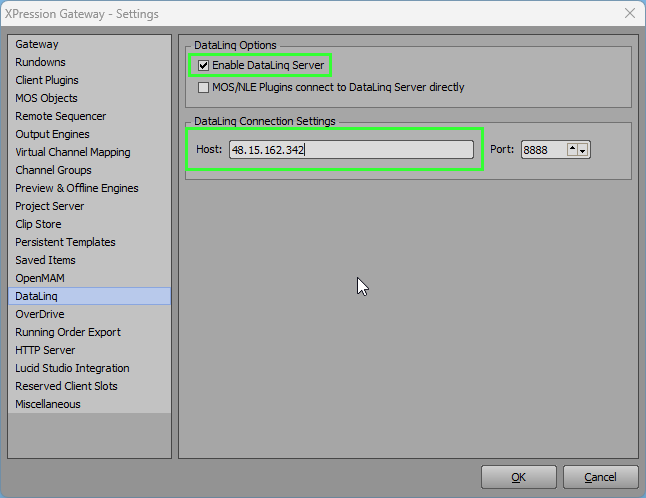
------------------------------
Jeff Mayer
Ross Video
------------------------------