We did that on our old Chyron machine, but didn't know if the same was possible with Xpression. Thank you for the response!! - Brad
Original Message:
Sent: 06-18-2025 12:11
From: Garner Millward
Subject: Multiple Version of Xpression on single PC
It is possible, as long as you have some comfort level with install wizard folder install locations and making desktop shortcuts.
During the XPression Install Wizard steps, you can select the install folder location:
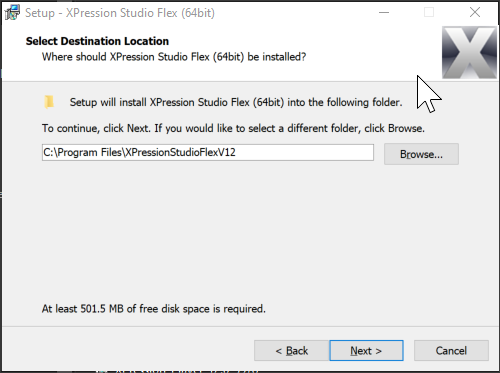
If you install each version to a unique folder location, you can have multiple versions installed. For example, in the above wizard, I put it in a folder with 'V12' at the end.
Then, from the install folder, you can make a shortcut of the XPression.exe:
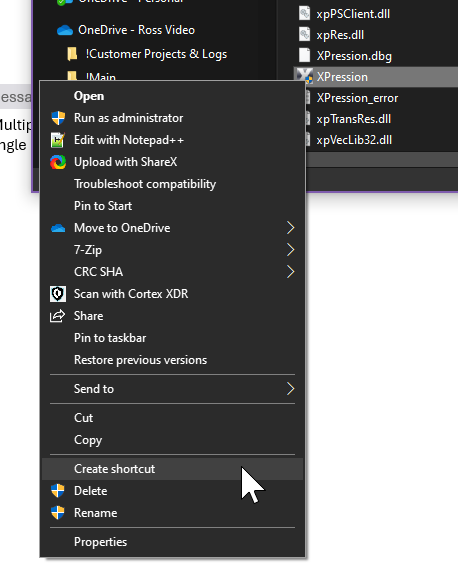
So you can create multiple desktop shortcuts that launch different versions of XPression.
As long as you keep track of things, and double check/test everything it will work well.
Original Message:
Sent: 06-18-2025 11:29
From: Bradley Lyle
Subject: Multiple Version of Xpression on single PC
Hello,
I work on a university campus, and our control room is used by a few departments, most notably our athletics department. The package they use for basketball games requires version 10 of Xpression (issues with macros and scripts that do not work on version 11). We rolled back to version 10, but since we have the option, we would like to upgrade to version 12. Would it be possible to run both versions 10 and 12 off the same machine (obviously not at the same time)?
Thanks.
------------------------------
Bradley Lyle
Studio Manager / Video Production Specialist
University of Tennessee Video Production Center
------------------------------