Production Switchers

 View Only
  • 1.  question for the creatives ones !

    Posted 02-18-2025 13:56

    Hi, 

    Just for the record I'm operating an Ultrix Acuity 3MEs...

    I want to make this effect : the image is B&W with only one color still present like red for exemple so evrything which is red keep its chroma and the rest is B&W. this effect must be applied on the PGM (it potentially can be a ME with a follow...) with this effect I must be able to switch on the PGM row. And of course I need to bring this effect on air with a mix .

    So to sum up : I bring a "color correction" effect on PGM with a mix (same source transforming into the color correction effect) I need to continue switching the live on PGM row. 

    So I tried to make this:

    I put the ME3 (PGM for me) D (clean) into Key 1 of the ME3. KEY 1 ON. I color correct the bus Key 1 of the ME3 so I get B&W. the key can be dissolved in and out so far so good.

    Then I use key2 of ME3 with ultrachrome to chroma key the color I want to keep. (key 1 priority is under key2 ). But I'm stuck here... I would like to invert the chroma key but I can't figure how... I looked everywhere but I didn't find the function...

    If somebody got an idea on how to achieve this effect it would be truly appreciated. 

    here is an exemple of the result I'm looking for...

    Best regards

    Boris


    ------------------------------
    Boris salhaji
    EIC
    France Télévisions
    ------------------------------


  • 2.  RE: question for the creatives ones !

    Posted 02-19-2025 14:23

    Hi me again...

    Simple question regarding this topic, is there a way to key invert a chromakey? 

    It is possible to display the alpha channel of a chromakey but is there a way to get it as a source ? 

    Best regards


    ------------------------------
    Boris salhaji
    EIC
    France Télévisions
    ------------------------------


  • 3.  RE: question for the creatives ones !

    Posted 02-19-2025 16:00

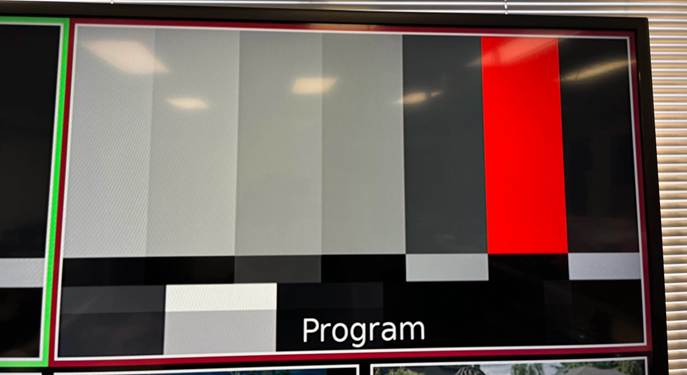
    I used Colour Bars to do this since it is a still in all switchers in the sample sections.
    A screen shot of a program

AI-generated content may be incorrect.

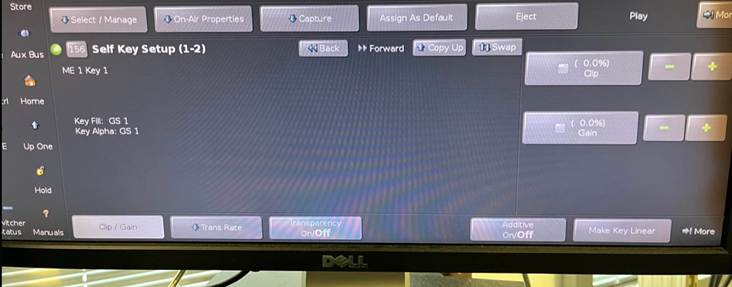
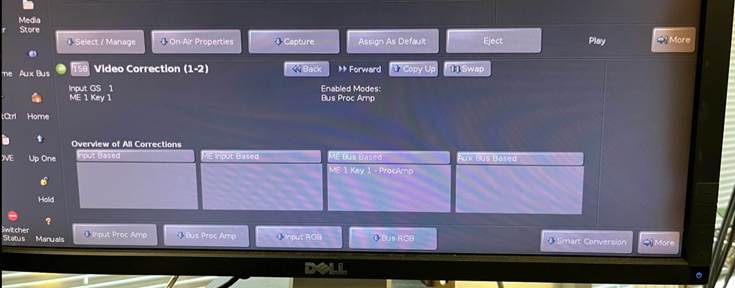
    Key 1 is a Self Key with the Colour Bars (Key 1 can be set to follow the BKGD Bus of the ME using the Auto Follows) Or set it to say PGM B as the source of the ME and have PGM B set to use BKGD/PST but not show any of the keyers (Program Assignments Menu).  If you want to do this on a Higher set of keyers like 5 and 6 that way you could keep PGM B having the K1-K4 you can also do that.

    Key 1 then has the PA with the Cb and Cr set to 0 in Bus Mode so that I could make it black and white.
    A computer screen with a black screen

AI-generated content may be incorrect.

    A computer screen with text on it

AI-generated content may be incorrect.

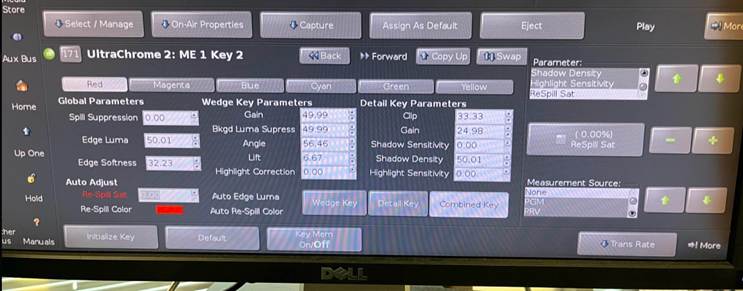
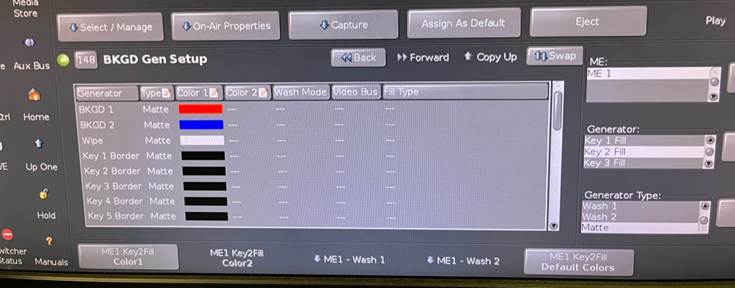
    Key 2 is a Chroma Key, Removing RED, Key Invert and Then I Matte Fill it with a Colour Background which I can then make any colour I want – thus putting RED back into the Keyer.
    A computer screen with text on it

AI-generated content may be incorrect.

    A screen shot of a computer

AI-generated content may be incorrect.

    A black machine with buttons and buttons

AI-generated content may be incorrect.


    ------------------------------
    Les O'Reilly
    Director - Switcher Product Management
    ------------------------------


  • 4.  RE: question for the creatives ones !

    Posted 02-20-2025 17:36

    Thank so much Les ! 

    I tried to make the effect following the steps you explained but I'm still stuck at some point. 

    just a reminder I'm operating a Ultrix Acuity with a TD2S panel. 

    so I can make the BW I can make the Chroma key. It lock well the color I pick. 

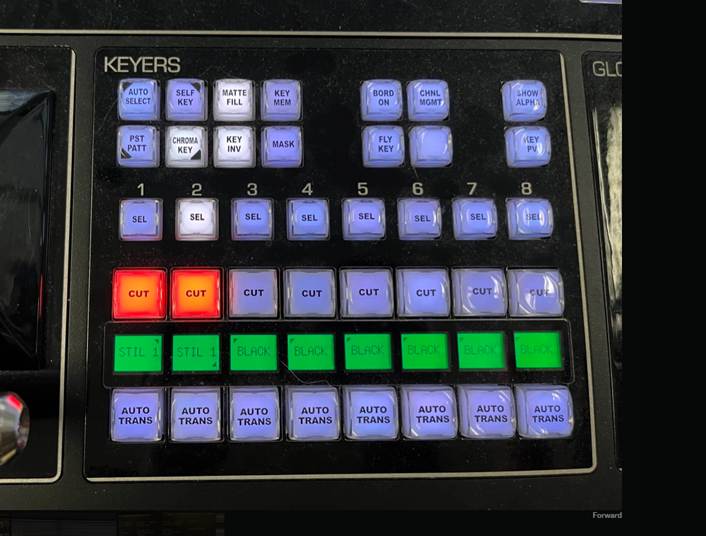
    I saw you did the effect with a Acuity panel as I operate a TD2S I don't have the key inv button and the Matte fill. so I mapped the « key invert » function and the « matte fill » to user buttons. 

    the « aux button » on the photo is replaced by « key invert «  function. When I press it the button goes green if I toggle press the button it goes white again. So I supposed it activate and deactivate the function. But nothing append. The chroma key is not inverted. If I set the key as a luma « key invert » function is then working. If I set back the key as a chroma key it doesn’t work anymore. I tried a lot of things selecting another key then reselect and press key invert. Press the button several times. Nothing make it works. 
    I'm in version 6.3.2 of Ultrix and 13.Ob of acuity. And I'm running a UHD configuration. 
    do you have an idea how to solve this issue? 
    Best regards 


    ------------------------------
    Boris salhaji
    EIC
    France Télévisions
    ------------------------------


  • 5.  RE: question for the creatives ones !

    Posted 02-20-2025 17:58

    I will take another look at it tomorrow...

    Panel should not matter (awesome you found the extra user buttons!! One thing I won't have to cover)

    There is a chance that I was on an Acuity system no Ultrix Acuity ...  currently there is a system in our lab that is running version 14 code to try and get the other frames on the same version as Ultrix Acuity.  I was informed that I may have been on it and NOT on an Ultrix Acuity...

    I will try to get back in front of one tomorrow.


    ------------------------------
    Les O'Reilly
    Director - Switcher Product Management
    ------------------------------


  • 6.  RE: question for the creatives ones !

    Posted 03-04-2025 05:19

    Hi, 

    Any news on this topic ? It is not critical but I would like to know if there is a misoperation on my side or if there is something related to the switcher.

    Best regards, 

    Boris


    ------------------------------
    Boris salhaji
    EIC
    France Télévisions
    ------------------------------