I totally got what you're saying. It was just something I've stumbled upon while trying to figure why it's not working. Those DashBoard menus are really scary for me 😄
Up until now all i did was to drag and drop buttons from existing menus. When I will have more time, I will watch all those clips from DashBoard University.
Thanks again, Les, for all your help. Your patience is amazing.
Original Message:
Sent: 07-17-2026 12:58
From: Les O'Reilly
Subject: Question regarding loading sets on Carbonite
I am not suggesting it is wrong to do it the way you did -- it's infact a way to ensure that "multiple" things don't run from the Global.
Running a local listener allows you to create a different port and "connection" for each panel. The Global Listener is just there for convenience and will pass GPI events to all panels running.
Others I am sure will find this thread at some later date and I just want to ensure that they are also aware of what is possible.
The ability to use Text Strings for some makes it easier to track what events they are trying to trigger in the custom panel --
This was not a suggestion that you undo what you have done.
------------------------------
Les O'Reilly
Director, Switcher Product Management
------------------------------
Original Message:
Sent: 07-17-2026 11:45
From: Sorin Podeanu
Subject: Question regarding loading sets on Carbonite
Well, I don't know what to say. Yesterday when I left the studio the buttons weren't working, today when I came back I changed the IDs and suddenly they worked.
I did restarted Caprica and DashBoard again, after changing the IDs and I also changed the port number. Who knows.
The important thing is that the Load Memories commands now work. It takes about 12 second for Carbonite to acknowledge the new mems, but it does not affect anything else on screen. And that was my goal.
Oh, and if you go to the field where you have to input the trigger ID, all the way to the right there's a question mark. I pressed on that and there's was a pop-up message. That's where it's saying to set the GPI listening port in the container where the buttons are.
------------------------------
Sorin Podeanu
technical director
Euronews Romania
------------------------------
Original Message:
Sent: 07-17-2026 10:42
From: Les O'Reilly
Subject: Question regarding loading sets on Carbonite
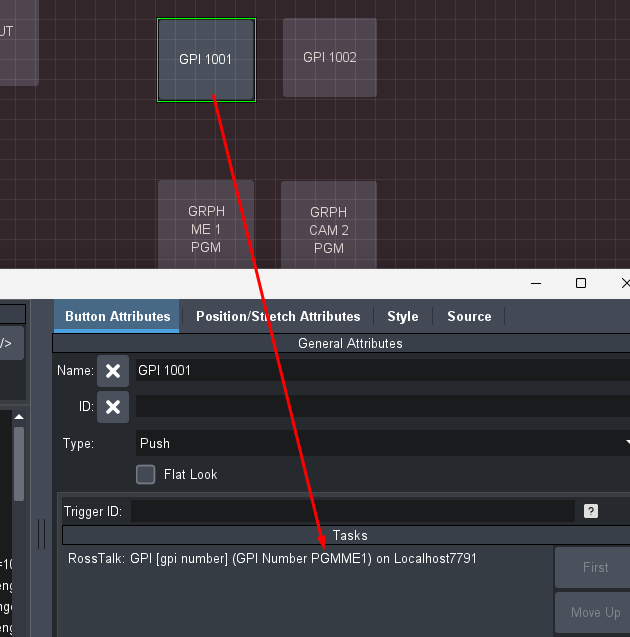
Example as I guess if I keep the capture small it looks okay...
I have rosstalk sending out GPI PGMME1 as the value from that button.
And the one bellow now has that as the trigger id
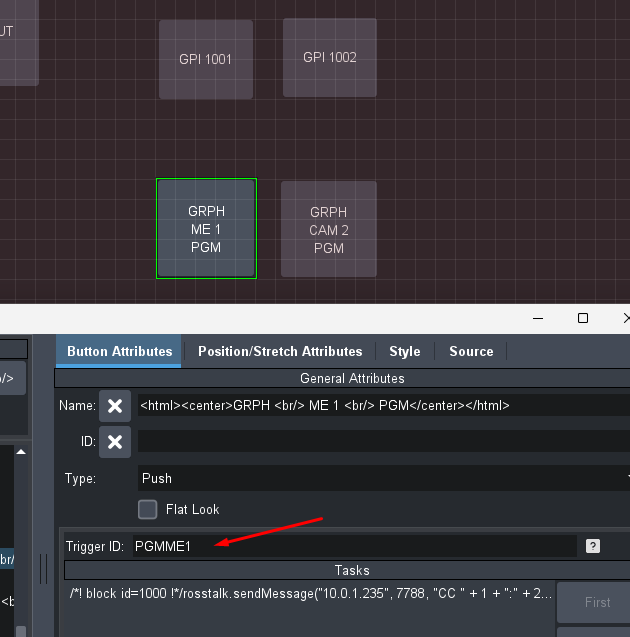
and they work. For sure the issue with the value is not DashBoards limit to a character set. And the internal listeners on different ports are used by the Team that builds Custom Panels for Arenas and Stadiums with the labels instead of numbers as well.
------------------------------
Les O'Reilly
Director, Switcher Product Management
------------------------------
Original Message:
Sent: 07-17-2026 10:36
From: Les O'Reilly
Subject: Question regarding loading sets on Carbonite
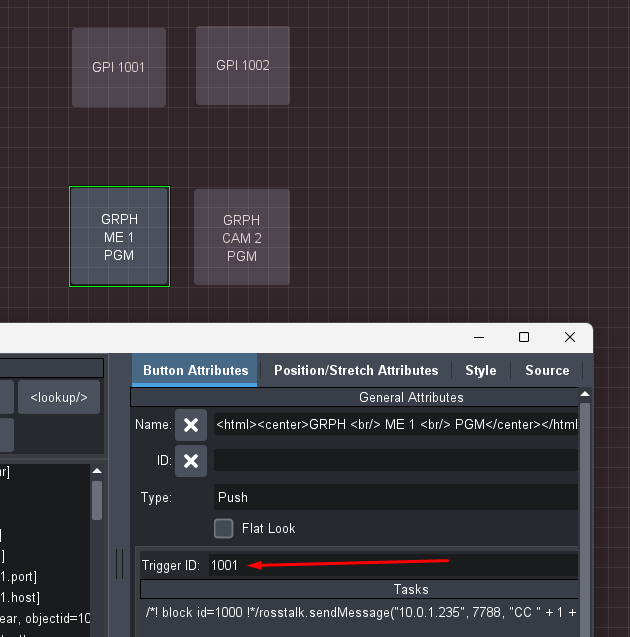
Hopefully that stay readable -- I made two buttons to send two different CCs to my switcher
I then gave them GPI 1001 and GPI 1002
I then Made two Buttons above that send RossTalk to the Global listener that I setup on 7791 and those buttons just send GPI 1001 or GPI 1002
pressing the RT buttons on top triggers the buttons below.
DashBoard will also allow you to use any ASCII text -- if you want to name the Trigger "wideboxes" or "narrowboxes" then you can use the custom type in command and build a message that sends "GPI wideboxes" and "GPI narrowboxes" and those will also work.
------------------------------
Les O'Reilly
Director, Switcher Product Management
------------------------------
Original Message:
Sent: 07-17-2026 09:40
From: Sorin Podeanu
Subject: Question regarding loading sets on Carbonite
oh, I also tried to trigger those buttons using the html method, but instead of running the custom controls, the browser simply displayed the panel and the buttons, it ignored the trigger ID. So i guess the max number of digits is DashBoard related, rather than Caprica.
------------------------------
Sorin Podeanu
technical director
Euronews Romania
------------------------------
Original Message:
Sent: 07-17-2026 09:23
From: Les O'Reilly
Subject: Question regarding loading sets on Carbonite
I will next time I guess just put it in a Word doc and post that ... I did not realize that the posts were compressing the images and that you could not click on them to make them bigger.
FYI - you are doing something different then what I last posted if you needed to turn on the internal listener - I only used the global listener for this.
If GPI above 1000 is not working from Caprica then that sounds like an issue we should look into - maybe they cap at 999
------------------------------
Les O'Reilly
Director, Switcher Product Management
------------------------------
Original Message:
Sent: 07-17-2026 06:20
From: Sorin Podeanu
Subject: Question regarding loading sets on Carbonite
Hey Les!
After 6 days of tweaking during a lot of 5 minutes breaks between broadcasting segments, I finally managed to make it work!
Your guide was most helpful, although the screenshots were quite hard to use because of the poor quality.
It took me a while to figure out that i have to enable the GPI listening port inside the button container, not the global GPI port in the DashBoard settings.. Also, it took me a while to realize that selecting constrain values with the mouse pointer will change the values slightly. So if anyone else reads this, Ctrl+A/Ctrl+C is the way to go :)
But what prevented me to make it work was something unexpected: my choice of the trigger number. Because for 5 days i kept testing using trigger numbers such as 1001, 1002, 1003 and so on. And today i thought using a smaller number, so I went with 103 and it worked! I've used the GPI command built in Caprica, I assume i could have also used the GPI command from Carbonite custom controls menu but it's easier to implement a Caprica custom control in our workflow.
Thanks again Les for your patience and advice!
------------------------------
Sorin Podeanu
technical director
Euronews Romania
------------------------------
Original Message:
Sent: 07-10-2026 16:47
From: Les O'Reilly
Subject: Question regarding loading sets on Carbonite
Okay New plan...
Let's just make it all in visual Logic and our own buttons instead of dragging the file set buttons and trying to attach to them.
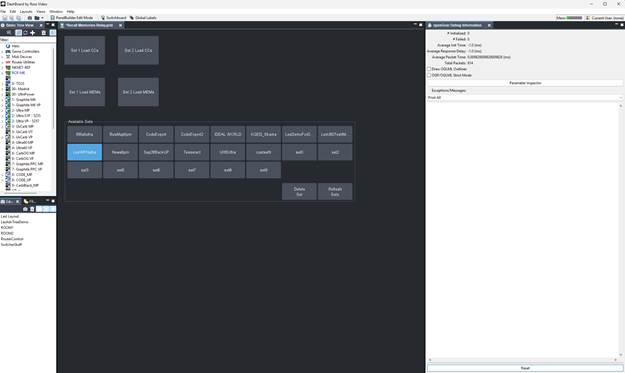
I have kept the entire File Set interface (but only to make it easy to find the "values" of the constraint to pass for the Set I want to get access too.
First we will just make a regular button and then Edit it.
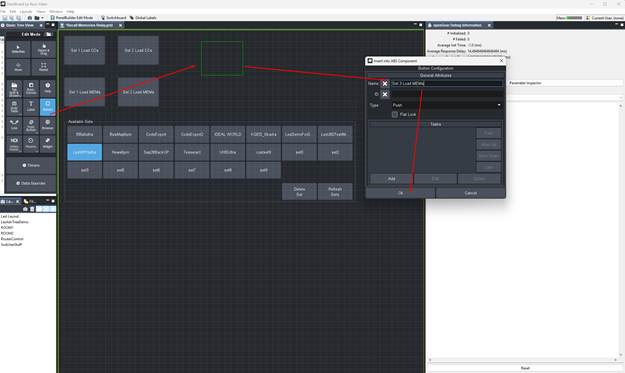
Okay now we will double click and edit the button -- We can now give it the Trigger ID we would like for the GPI value to send (I am going with 113)
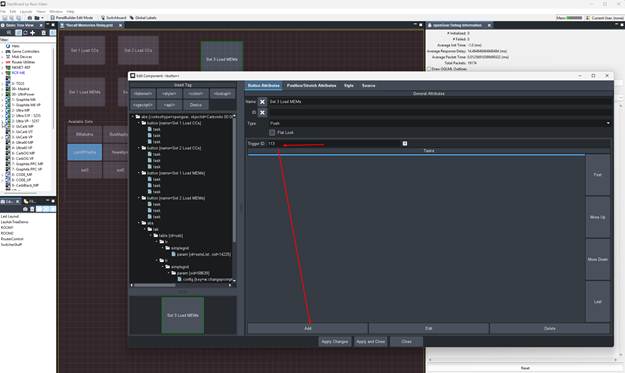
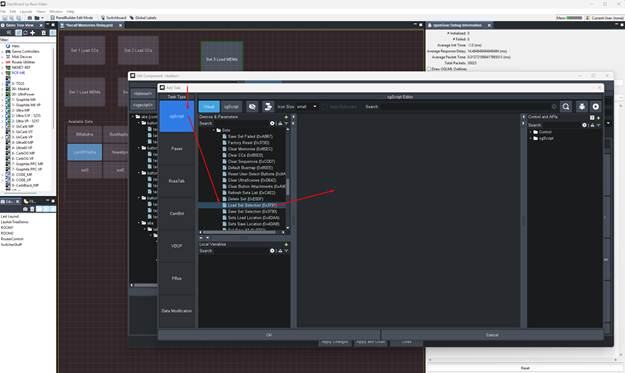
Now lets add the first Task:
use ogScript -- and then highlight you Carbonite Ultra device drill down to the Sets section under Config and find the Load Set Selection (also can search for 0x3791 which is the OID)
Now Click or Drag it into the right hand Side
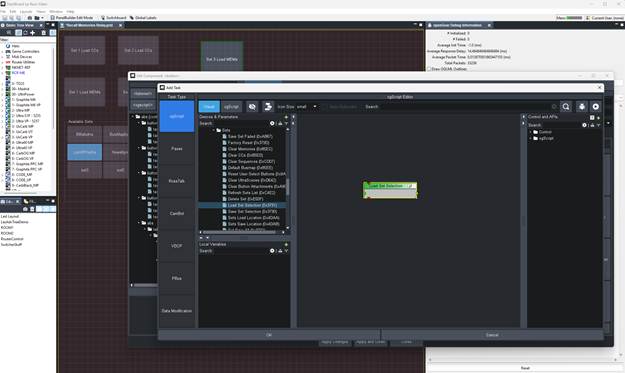
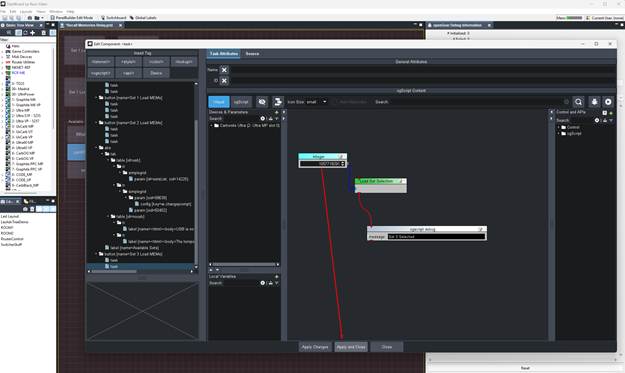
On the Right Control Section Search for "integer" and add that to the panel:
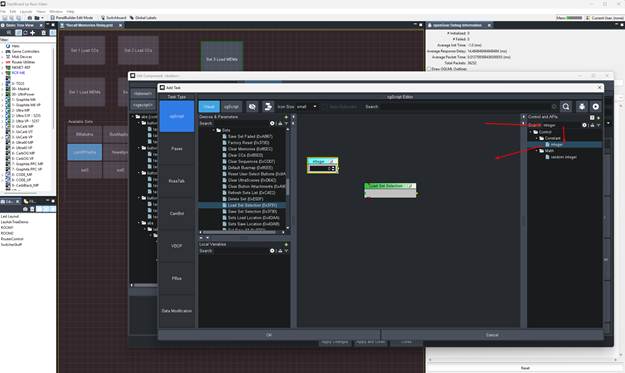
Increase the integer value to 1 and then connect it to the Load Set Data INPUT node.
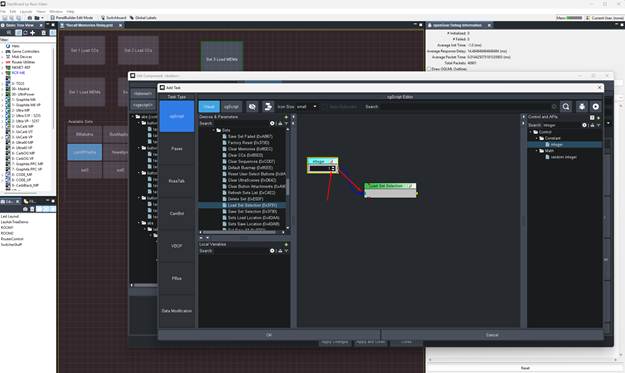
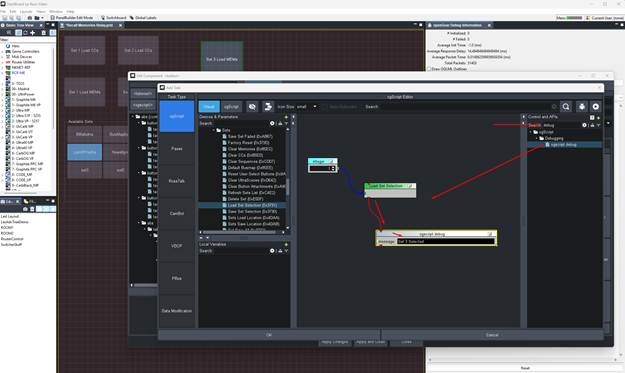
Now we can add a "debug" message that will show up in the DashBoard Debug panel found under views. on the control side just search for Debug and then add that to the panel and then connect the "flow" or Event Order from the Load Set Selection to the Debug Message and give it a message to post by typing in something like Set 3 Selected:
At this point we need to press OK and accept this as we need to actually figure out now what that integer value really is:
To do this we will "apply changes and close" and then we can open the paramater of the available setts clicking on it.
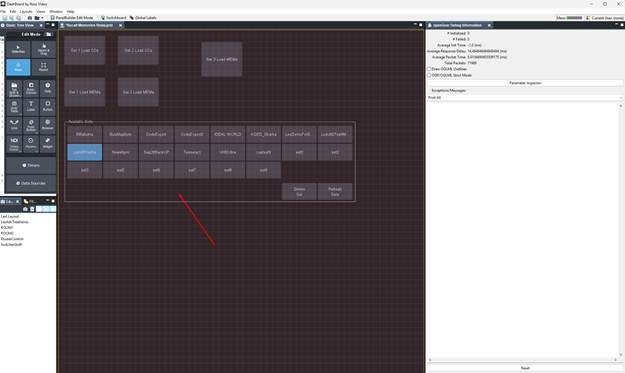
double click in here to go back into edit
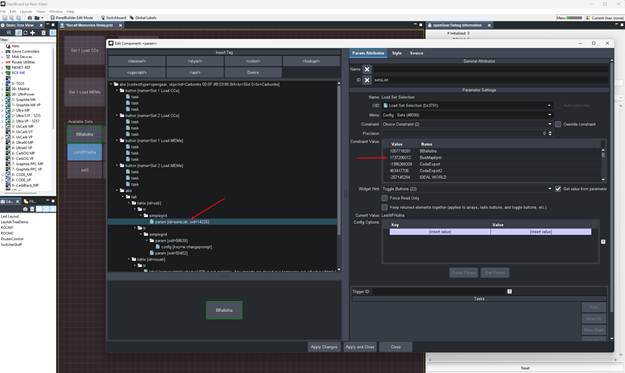
There you will be able to highlight the setslist param and then on the right side you can now see the "value" of each file set that you will need to pass into the "button". If you check the Override Constraint box it will allow you to "edit" but also makes it easy to copy that value and then hit CTRL+C
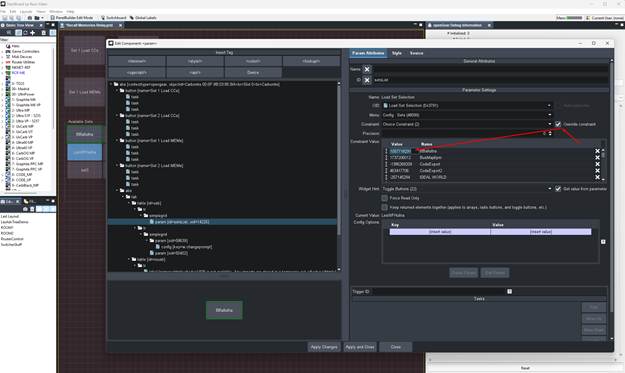
Now that you have the value we will go back to our button and continue to edit it.
you can navigate the Tree on the left to get there or just Close the editor panel and say NO to apply changes since we don't need to apply what we just did with the constraint --
Now double click on the Button we were editing to go back into edit mode with that button in focus.
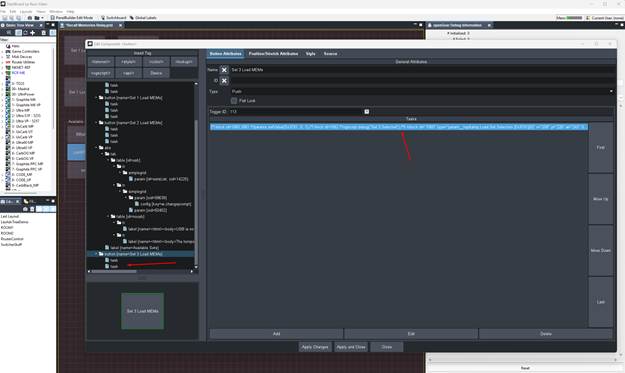
either select the task from the tree on the left or just double click on it in the Tasks section to open it up.
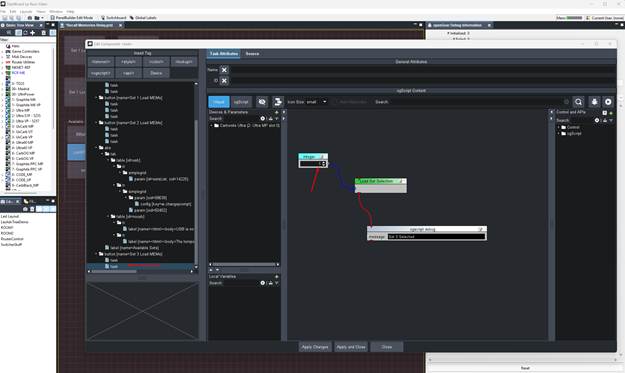 No lets paste that value we copied into the Integer box so that we will "pass" that into the OID from the button being triggered.
Now press apply and close:
We can do a Test now to see that this button press will in fact change the selection.
so exit panel builder and then press the button and watch your available sets switch:
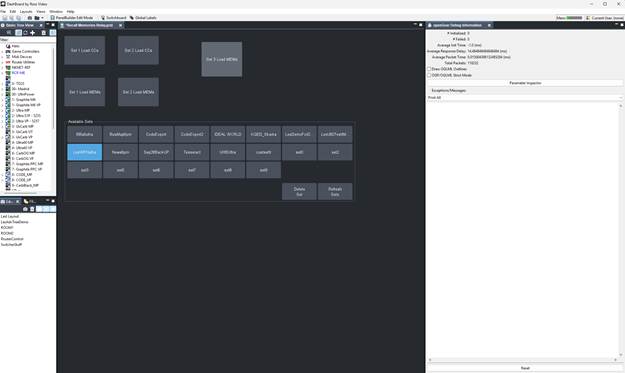
and see the debug message show up on the right
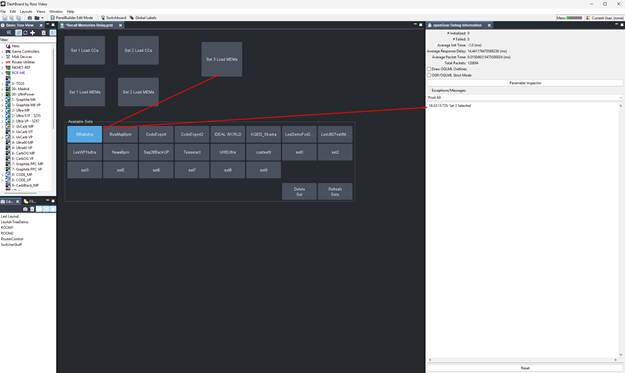
Okay now you could have also done that by sending the RossTalk GPI event from the external device and that would show it as well.. now lets get the pressing of the Memory Load Button as well.
But First we will add a 1 second pause to make sure the "ui has focused".
go back into edit mode and double click on the button to edit it
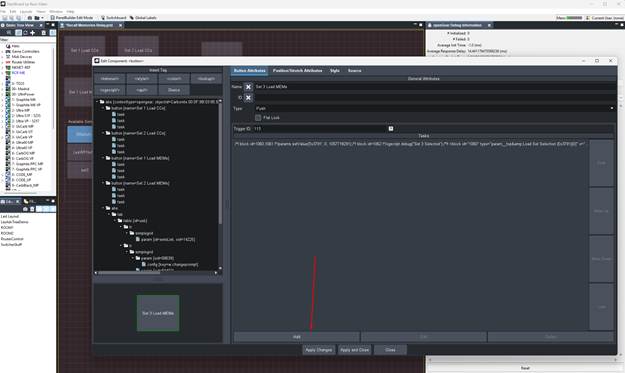
Now press the ADD button to add another Task -- we will add the Pause event and set that to 1 second and press OK
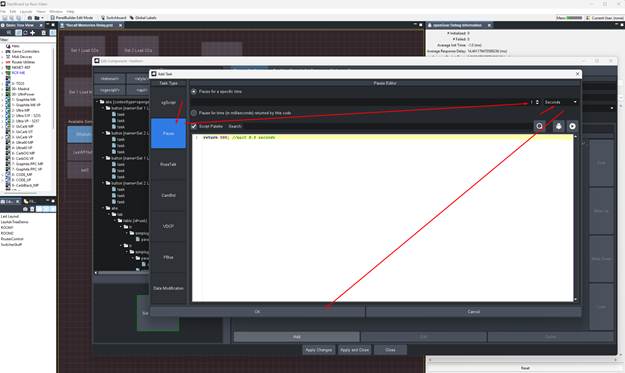
Now we will ADD another event
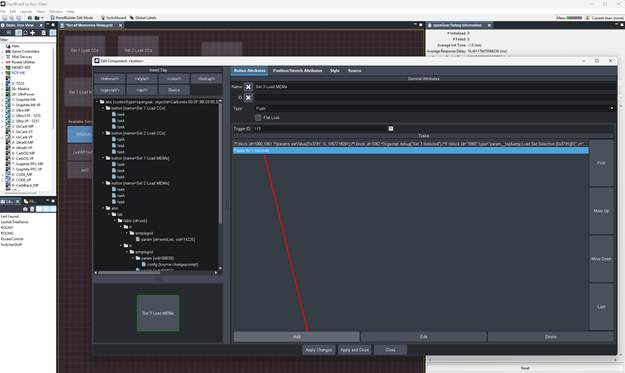
We will stay with ogScript visual logic and we can search for "Set Load Mems" to filter it down:
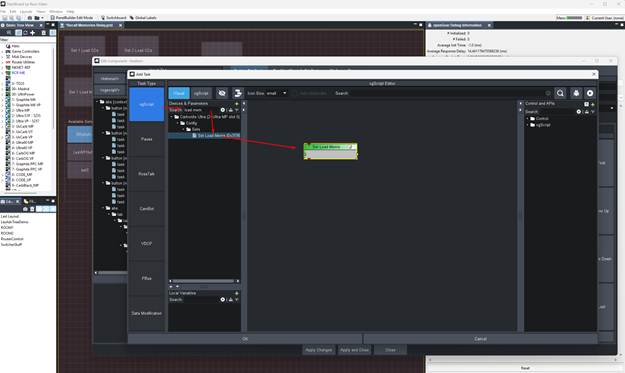
Drag that or double click to add it to the middle.
on the right search for Integer again and add that -- to press the button we will only need to set that to a 1 and connect it to the value input:
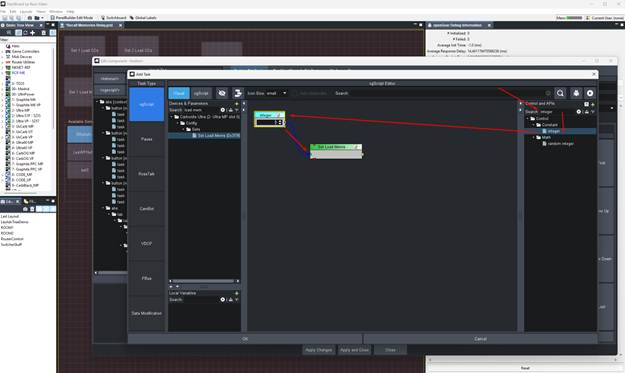
Now we can also add a debug message for the sake of it:
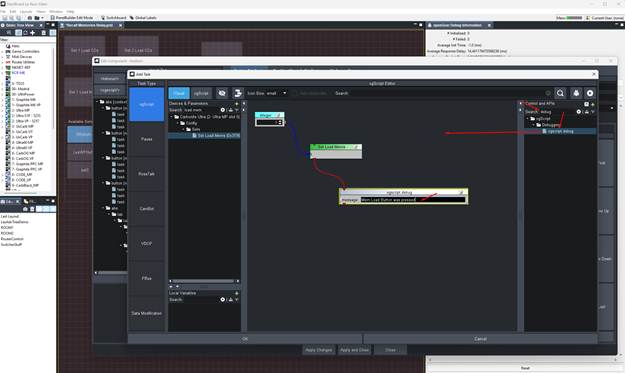
Press Ok and then Apply changes and close the panel -- then exit building mode (CTRL+G)
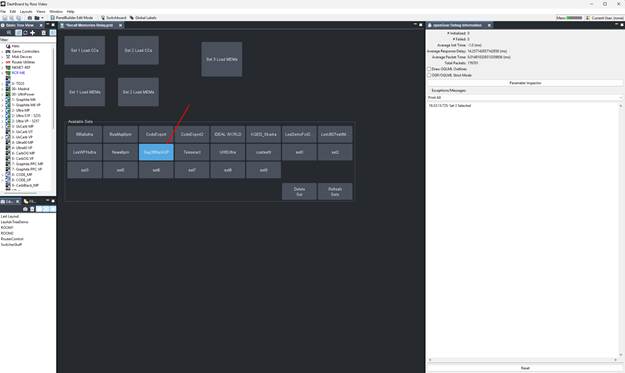
Select a different Set so that you can test your button:
All Should be working and the Debug messages will show we got through all the steps. No send RT messages and you will be good.
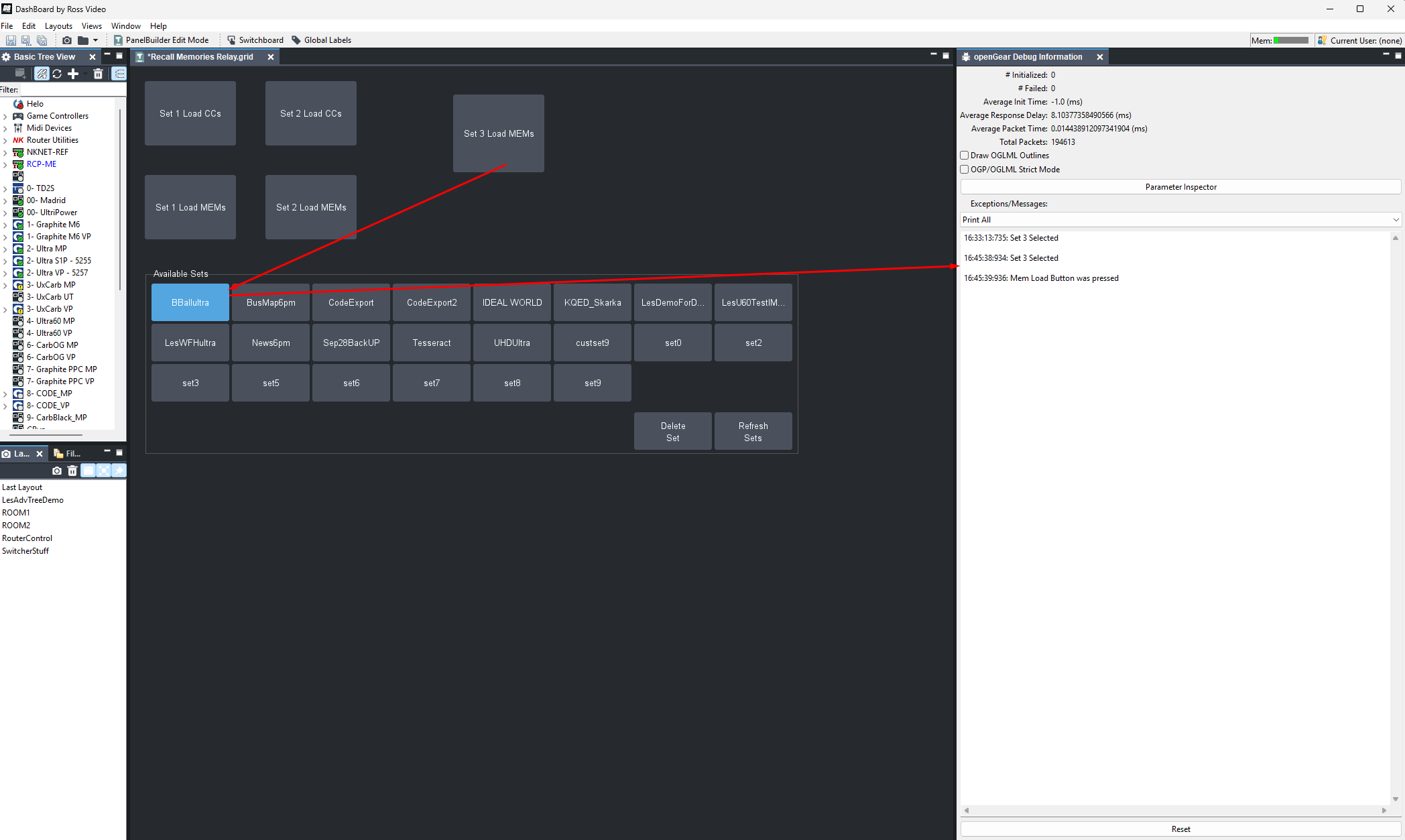
Sorry for that last one -- it was a mistake on trying to attach the RT trigger to the Constraint of the selector -- the Mem button would work but the selector would not.
------------------------------
Les O'Reilly
Director, Switcher Product Management
------------------------------
Original Message:
Sent: 07-10-2026 09:49
From: Sorin Podeanu
Subject: Question regarding loading sets on Carbonite
Thank you Les for the detailed guide. I had already built my custom panel, I was at the stage with the confirmation for the "Load Set" button.
The panel works, mouse clicks reflect in the Carbonite menu.
Next I filled in the field with the trigger numbers, 1001 and 1002 respectively, for both "select set" buttons.
I've enabled the GPI listening port in DashBoard preference menu, I tried both the default port and a different one. I've added the IP (and the port) of the PC that's running DashBoard in the Caprica Ports menu. But unfortunately I cannot trigger those buttons. I've tried both built in RossTalk commands: Trigger and GPI, to no avail. I've checked with a cmd command and the port is opened. I also have restarted DashBoard and Caprica, just in case.
Probably I've missed a step somewhere, but I can't figure out where.
Thank you for your patience, I will resume testing Monday, next time I will try sending the RossTalk commands from the switcher, instead of Caprica.
------------------------------
Sorin Podeanu
technical director
Euronews Romania
------------------------------
Original Message:
Sent: 07-09-2026 18:46
From: Les O'Reilly
Subject: Question regarding loading sets on Carbonite
okay so I figured out how to make it work.
you can open the switcher Config Load Sets page in Carbonite and enable "edit mode" using CTRL+G
Now in your custom panel also enable Edit Mode and then Drag the Button from Carbonite into the custom Panel:
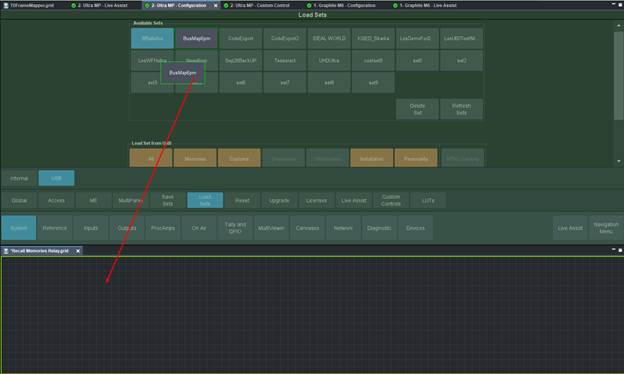 and it should look like this so make sure to include Parm Name and press OK
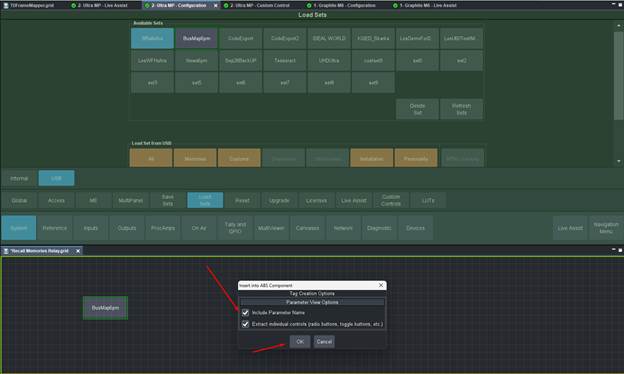
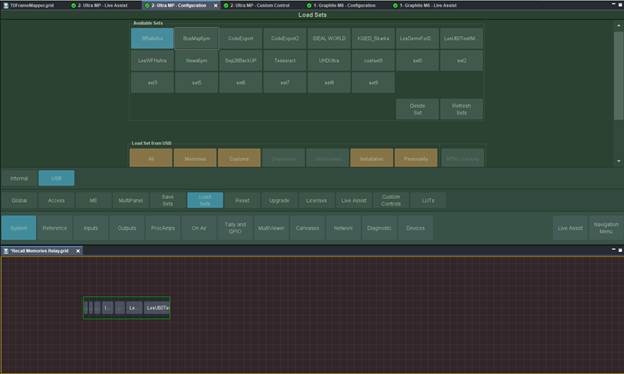
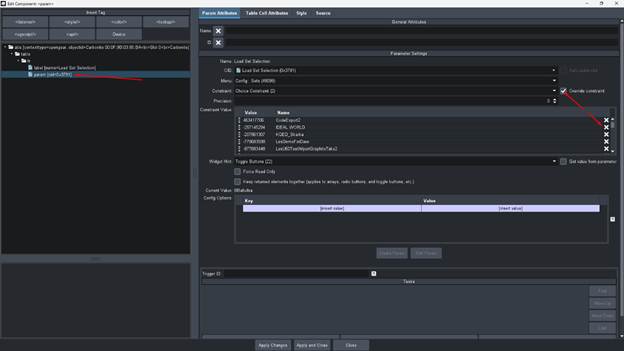
Now lets edit the constraint
We Override it so that we can then remove the Sets we don't need. just click on the X next to them and then apply and close it
Now Resize the result to get the button layout you like
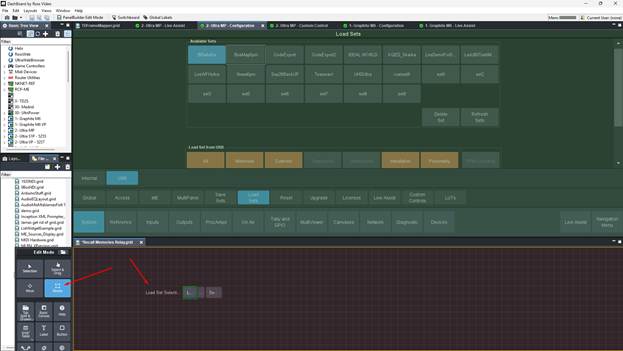
Like this
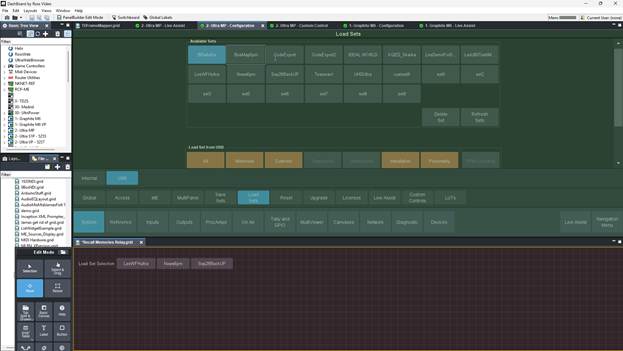
Now we need to break them apart so we can have a Trigger for each button from RossTalk ... So duplicate it the number of individual set you will need -- CTRL+C and CTRL+V to copy paste and then move it:
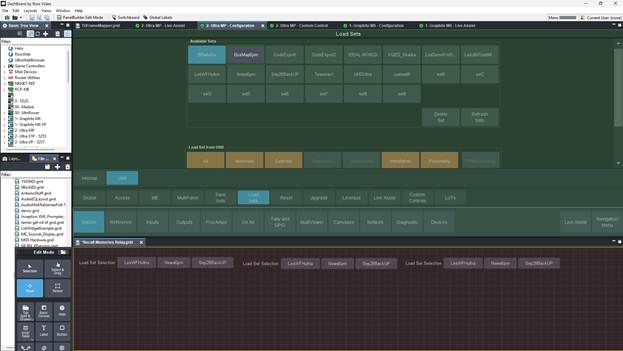
Now you will want to edit the constraint again to remove the other memories from the same one. Like this:
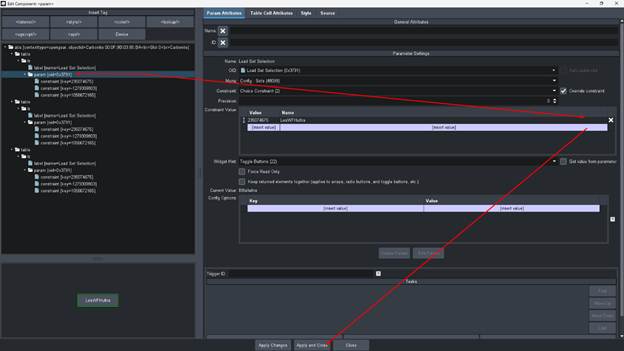 and this will show:
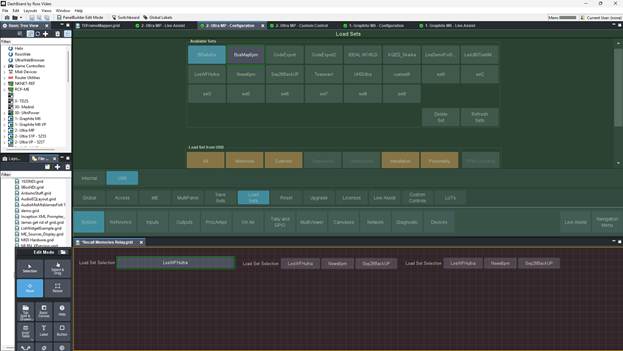 Now repeat for the other two buttons so that you are left with individual buttons for each set:
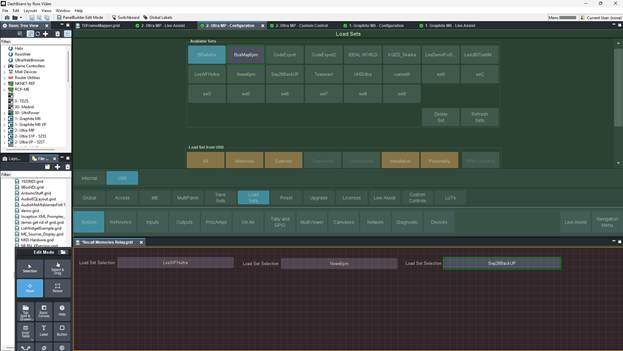
Now Drag down the Memories button:
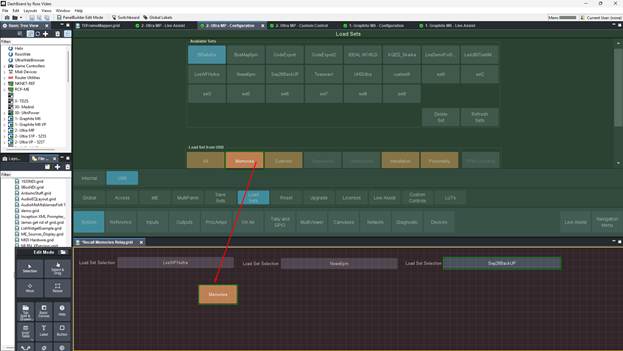
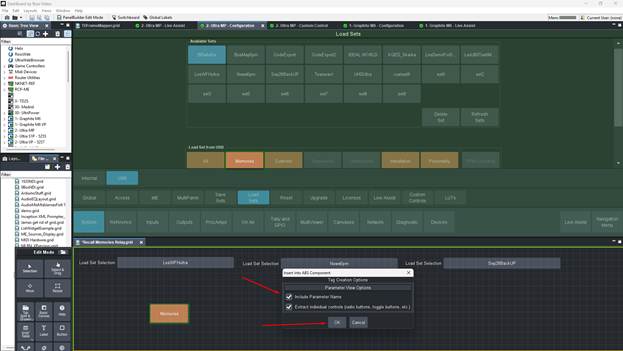
Now we can Edit the Constraint so we can remove the Button type that asks for the confirmation POP UP.
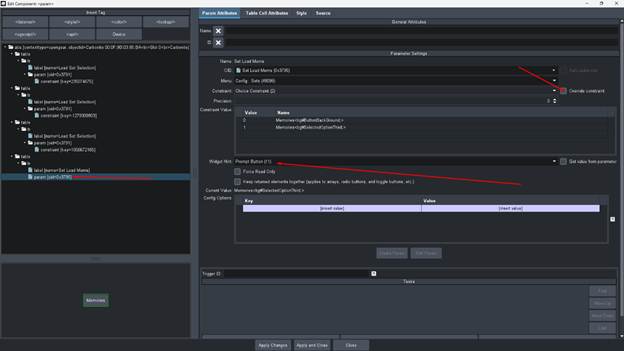
Change it to a Push Button from a Prompt Button.
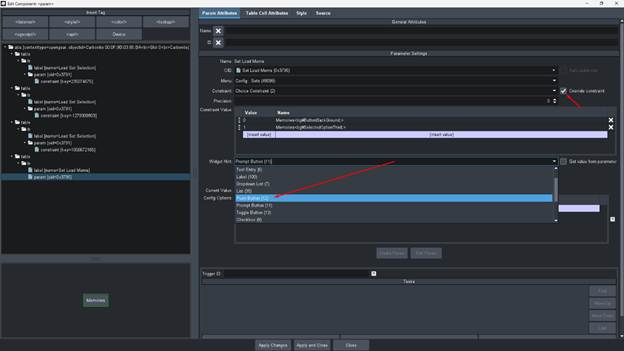
Should look like this:
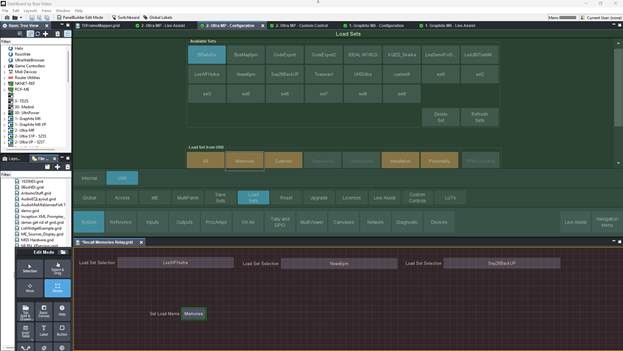
Now we can take them out of Edit mode to test also dont forget to CTRL+S to save your custom panel work:
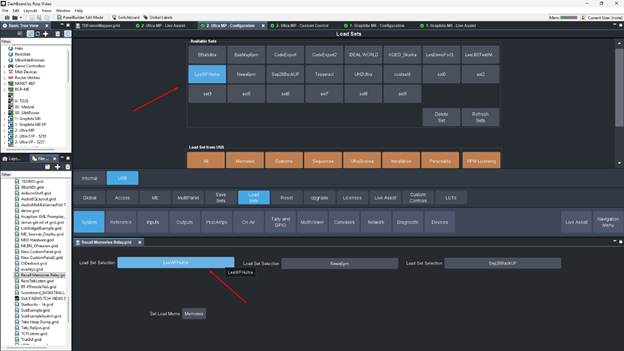
press one of the buttons on the custom panel and you will see the switcher panel also reflect it.
feel free to press the memories load button to now load with no confirmation.
Now you can go ahead and setup the GPI Ross talk triggers:
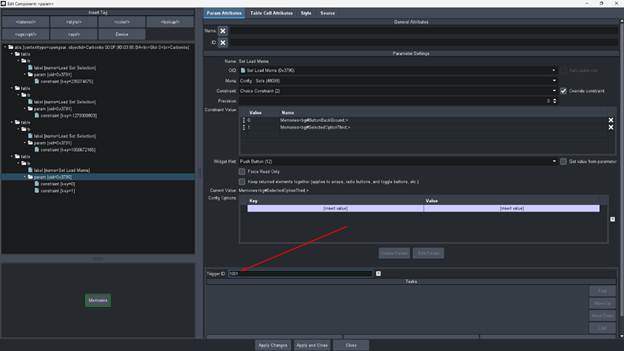
Give it an ID number and then the Global Listener RT in dashBoard will forward that GPI 1001 Ross talk event and trigger this button. Assign values to your other buttons..
Make sure the CC is first sending the GPI to set the switcher Set button and then a pause of a few frames and then trigger the Load Memories button.
I always make the DB listener the non standard port (default is 7788) incase the computer this runs on might have it's own RT Listener running on 7788 already.
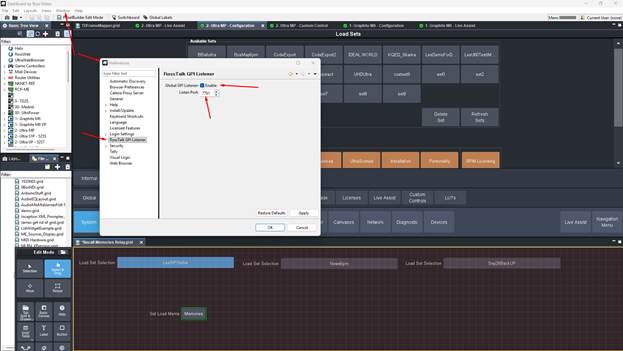
Now you can trigger it to recall the memories with a RT command in a cc
------------------------------
Les O'Reilly
Director, Switcher Product Management
------------------------------
Original Message:
Sent: 07-08-2026 13:51
From: Sorin Podeanu
Subject: Question regarding loading sets on Carbonite
Thank you Les for letting me know there is a possibility to build a custom panel. I tried to do that a few days ago, without much succes. I will try again. Hopefully I will find a way to send confirmation via RossTalk also, or through any other means. If I won't succeed, I will open a ticket.
Thanks again!
------------------------------
Sorin Podeanu
technical director
Euronews Romania
------------------------------
Original Message:
Sent: 07-08-2026 11:25
From: Les O'Reilly
Subject: Question regarding loading sets on Carbonite
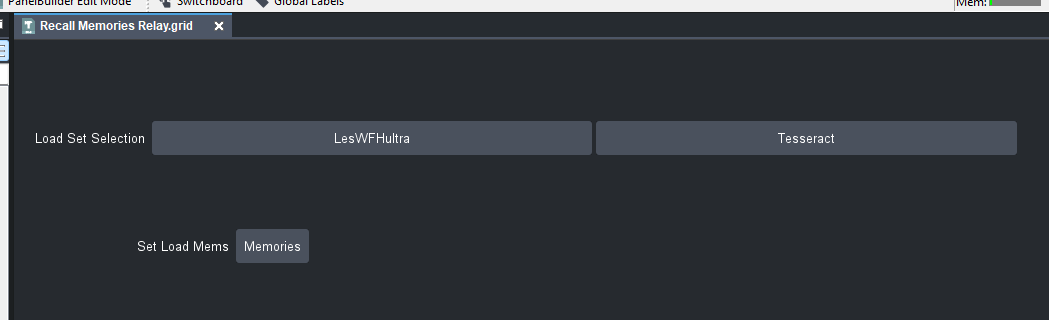
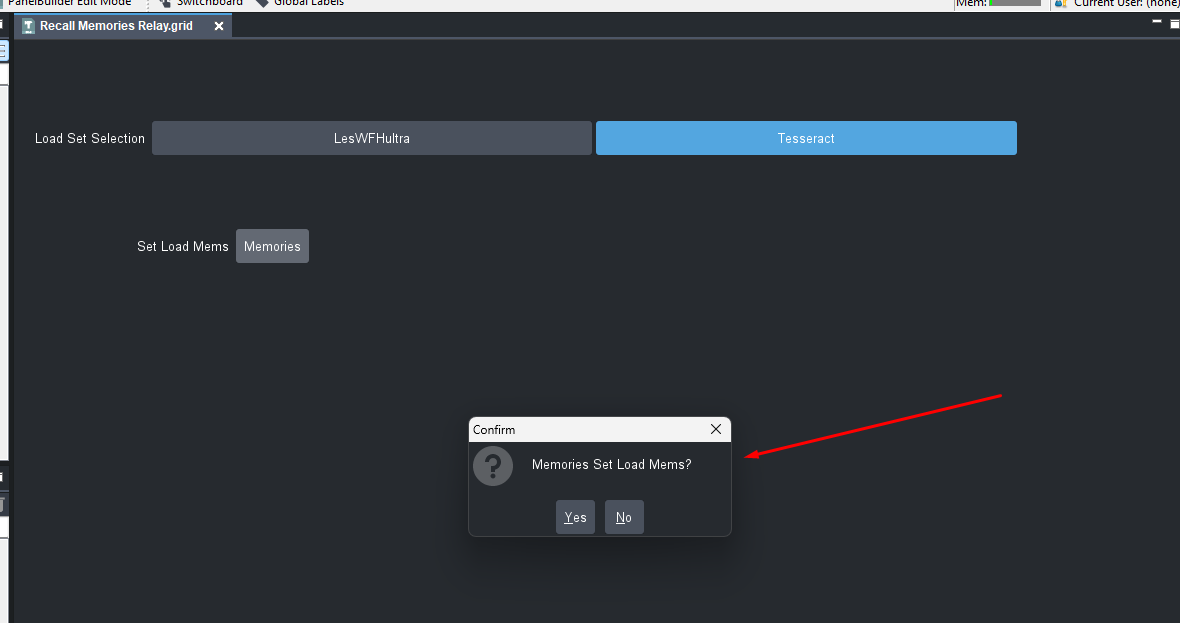
You could build something like that and send RossTalk messages -- however the issue you can't get around is that the user will still have to press the Confirmation Pop up manually.
------------------------------
Les O'Reilly
Director, Switcher Product Management
------------------------------
Original Message:
Sent: 07-08-2026 10:22
From: Sorin Podeanu
Subject: Question regarding loading sets on Carbonite
So, I did some further testing and that RossTalk command does not recall memory 0. Instead, I suspect that it tries (and succeeds) to initialize all the settings, no matter if the set contains only the memories. While the DashBoard menu sends selective load commands.
I will try to re-create the commands used by DashBoard, maybe by building a custom panel, and trigger them via http, if it's possible. I will go to the Connectivity community, maybe someone there will help me.
Thank you
------------------------------
Sorin Podeanu
technical director
Euronews Romania
------------------------------
Original Message:
Sent: 06-30-2026 17:43
From: Les O'Reilly
Subject: Question regarding loading sets on Carbonite
if you are sure that it is recalling Memory 0 you can try to change the Attributes for memory 0 to disable Everything so that nothing changes on the recall of 0
------------------------------
Les O'Reilly
Director, Switcher Product Management
------------------------------
Original Message:
Sent: 06-30-2026 17:20
From: Sorin Podeanu
Subject: Question regarding loading sets on Carbonite
Thank you Michael, I'm beginning to understand the idea behind this variable thing. The only problem is that I'm not that technically savvy to create those things in DashBoard.
Also we do not use buttons on Overdrive to recall boxes, we have shots for that. So I would have to add to each shot a CC that does the thing you've suggested (look for a variable and load the memory accordingly) and have that CC run whenever the shot is prepared.
While my initial thought (the one with two memory sets) would be way more simple. Only if it could work :)
------------------------------
Sorin Podeanu
technical director
Euronews Romania
------------------------------
Original Message:
Sent: 06-30-2026 16:56
From: Michael Misel
Subject: Question regarding loading sets on Carbonite
If you wanted to have variables for the show now, you could use a Dashboard panel to store a parameter that contains the current BoxSize for the show. Whenever the user presses the buttons on the Overdrive to call a memory on the switcher for the boxes, that button could instead use a Rosstalk command to talk to the Dashboard panel, and use some 'if then' statements in the Dashboard panel to figure out which memory is the correct one to recall. That way there aren't more buttons on the Overdrive, and as long as you make sure the Dashboard panel is set to the right BoxSize value, it would work. The downside here is you are relying on a Dashboard panel to handle that logic. If the computer running Dashboard were to crash, have a network issue or a Windows Update mid show, it would no longer work. I have used this on a show that I TD, and while it can be useful I always make sure to know my memories incase I have to call them manually.
------------------------------
Michael Misel
------------------------------
Original Message:
Sent: 06-30-2026 16:46
From: Sorin Podeanu
Subject: Question regarding loading sets on Carbonite
That's exactly what I did. I created two empty folders on the USB drive, test1 and test2. I saved only the memories on each of them.
Recalling those two sets with the mouse via DashBoard works with no issues. Loading them via the RossTalk command also works but it runs memory 0 on load, and memory 0 is basically black on every bus.
And I can already recall Carbonite CCs using Overdrive templates, since Caprica is able to do that. Now I only need to understand what do you mean when you talk about variables and how to set them up :)
------------------------------
Sorin Podeanu
technical director
Euronews Romania
------------------------------
Original Message:
Sent: 06-30-2026 16:00
From: Les O'Reilly
Subject: Question regarding loading sets on Carbonite
Make 2 empty sets of Show Files then
ONLY put memories in each of them. Nothing else.
Only recall those via the RossTalk Command to mitigate the elements being recalled.
in the Fall when version 12.2 of carbonite is out you should be able to change the templates to trigger custom controls on the switcher instead of a memory that you can then use Custom Control Logic to Evaluate against.
So you could have a Variable called "BoxSize" and then have that be 0 for Size 1 and then 1 for Size two etc.
You can then build RossTalk commands or Custom Controls that will change that Value --- so as part of the rundown you can trigger the change.
Now for the templates they will run the CC automatically which would recall the different Memories within the same showfile based on that user variable.
------------------------------
Les O'Reilly
Director, Switcher Product Management
------------------------------
Original Message:
Sent: 06-30-2026 15:43
From: Sorin Podeanu
Subject: Question regarding loading sets on Carbonite
Hi Les, thanks for replying!
Unfortunately, the only viable way to answer the producers request is by finding a way to use two different memory sets.
They specifically asked me to make it possible to change it back and forth mid show. Having two sets of automated templates is impossible, since our Overdrive shots are integrated in our NRCS system (Dalet), that generates them automatically whenever a new story is created.
I could add a CC to each template to manually change the boxes in the preview relative ME, but that would be tedious for the TDs and my colleagues would hate me for that.
So I really have to find a way to make this work via a general CC. Two CCs actually, because we have to revert to the default boxes whenever needed.
Thank you,
Sorin
------------------------------
Sorin Podeanu
technical director
Euronews Romania
------------------------------
Original Message:
Sent: 06-30-2026 15:13
From: Les O'Reilly
Subject: Question regarding loading sets on Carbonite
Loading File Sets in the middle of the show is a "bad" approach. Loading the set like this is going to recall everything -- this can mess up personality settings and installation settings while in the middle of operation.
Saying the switcher needs to act differently while keeping the automation system operation and templates the same is the reverse of what should be happening. A different set of templates --- or a Set of Story Event which will recall a different set of memories so that you can have different boxes in the same template makes more sense that is less likely to create on air issues.
The solution really needs to be handled from the automation system -- recalling show files via rosstalk in the middle of a show is going to cause a problem eventually.
------------------------------
Les O'Reilly
Director, Switcher Product Management
------------------------------