Oh no, shame we haven't an IP68 rated TouchDrive yet!
Jack is spot on, first place to look is setup the Dashboard Soft Panel.
If you wanted to use the Bitfocus Companion it would have to be configured using out RossTalk protocol, I have included a UG for this protocol.
------------------------------
Richard Crutwell
Ross Video UK
------------------------------
Original Message:
Sent: 04-02-2025 04:30
From: Jack Horry
Subject: Ross touch drive panel doesnt work!
Sorry coffee is great for a pick me up but put electronics to sleep.
Most of our Carbonite's come with Soft Panel so you can use I like a normal panel but from Dashboard. Carbonite Black does have it but you need to be on the later versions of software from memory. In Dashboard make a new connection to your Carbonite but in the port area use 5257. This will give you a new device in your Dashboard tree. For more information look at out help site here https://help.rossvideo.com/ultra/Topics/Operation/DashBoard/Panel/SoftPanel.html?hl=soft%2Cpanel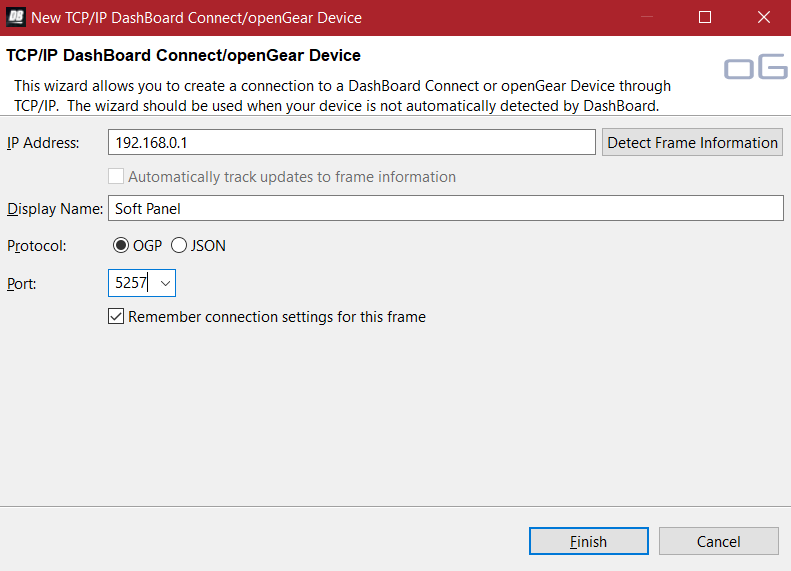
Hope that helps till you can get the touch drive serviced.
Jack
------------------------------
Jack Horry
Product Manager
Quorum
Ross Video | Living Live
------------------------------