Without knowledge of the Take ID, Rosstalk won't let you set template data for a specific MOS item, and even if it did have the Take ID, you might run into bigger issues with your rundown by editing a MOS item this way.
You might be able to use a GPI trigger to run a script, however, to update the text after you play the graphic online. It sounds like you're looking to clear a specific field (i.e., "TAB TEXT" or "LINE 2") and the graphic is on a consistent framebuffer or layer.
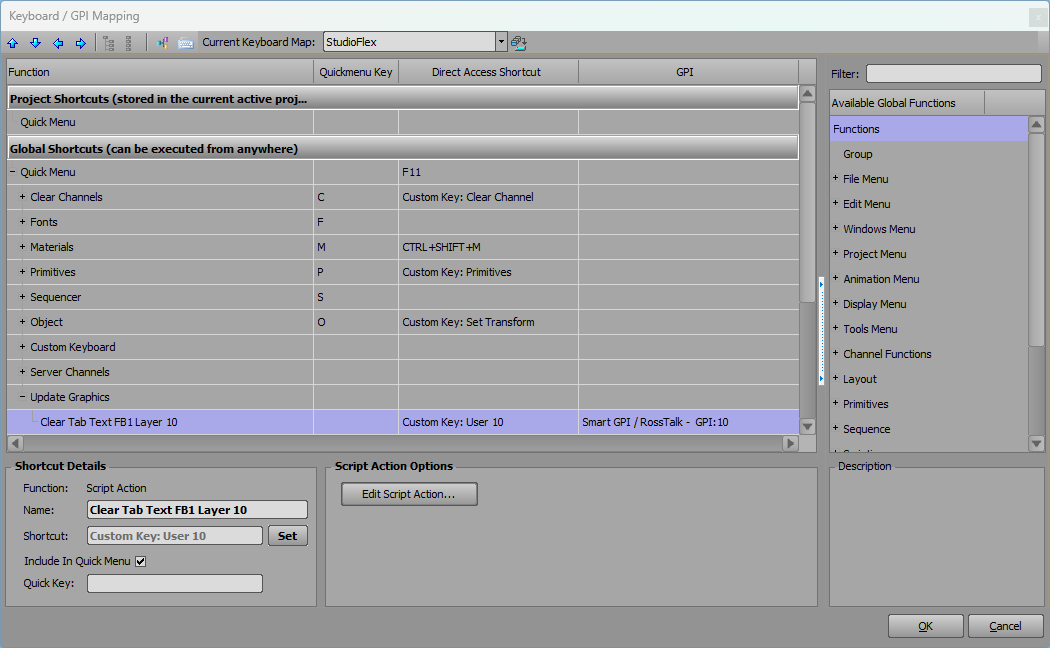
Add a Keyboard/GPI Map Script Action to your XPression engine like this:
dim fb as xpOutputFrameBuffer
dim scene as xpScene
dim text as xpTextObject

engine.GetOutputFrameBuffer(0,fb)
fb.GetSceneOnLayer(10,scene)
scene.GetObjectByName("TAB TEXT",text)

text.Text = ""
In this case, we'd be looking to clear the "TAB TEXT" field on a graphic online in Framebuffer 1 (Index Value "0") on Layer 10. Replace any of those values with those of your graphic. The graphic would update on-air without having to retrigger the item in Overdrive.
The script could be triggered by a keyboard shortcut directly on the XPression Engine, or a GPI Trigger sent via RossTalk from another device.
------------------------------
Jeff Mayer
Ross Video
------------------------------
Original Message:
Sent: 05-13-2025 19:52
From: billy hammond
Subject: Rosstalk graphic control
Yes mos but not fixed IDs. Working in a news scenario. Our lower thirds have multiple fields so hoping for a easy clear field solution of an in air graphic
Sent from my iPhone
Original Message:
Sent: 5/13/2025 2:50:00 PM
From: Garner Millward
Subject: RE: Rosstalk graphic control
Is this in a MOS workflow?
If yes, is it using Static Take IDs?