Excellent work Matt. Which way did you go, several scene directors or just the one? If this is for the field board I have to take in a Cougar ballgame. Thank you for letting me tinker around a little.
Original Message:
Sent: 02-22-2023 19:12
From: Matt
Subject: Script running scene directors
Mal and Red,
I can't thank you enough for your expertise and suggestions. I was able to get it working the way I intended thanks to your help. Here's what it looks like:
https://byu.box.com/s/cfiwxuugg8e4h6wjhtalp128qtuz7ie1
------------------------------
Matt Finlayson
Brigham Young University
------------------------------
Original Message:
Sent: 02-22-2023 14:35
From: MalThePal
Subject: Script running scene directors
can't upload. Says it must be a supported file. Matt, send me a private message here with a good email.
------------------------------
Malcolm Thorpe
Free Lance Xpression Designer/Carbonite TD
Original Message:
Sent: 02-22-2023 14:30
From: MalThePal
Subject: Script running scene directors
Matt,
Here is your dashboard that I have revised putting Red's array choice in place of your checkboxes. Parameter is Z_order
------------------------------
Malcolm Thorpe
Free Lance Xpression Designer/Carbonite TD
Original Message:
Sent: 02-22-2023 13:45
From: Matt
Subject: Script running scene directors
Do you mind sharing your Dashboard grid with me? I'm curious how you've set it up. My Dashboard has some intricacies that I don't want to break if I make changes.
Thanks.
------------------------------
Matt Finlayson
Brigham Young University
Original Message:
Sent: 02-22-2023 13:12
From: Red
Subject: Script running scene directors
In my dashboard it makes an integer value 1 through 9
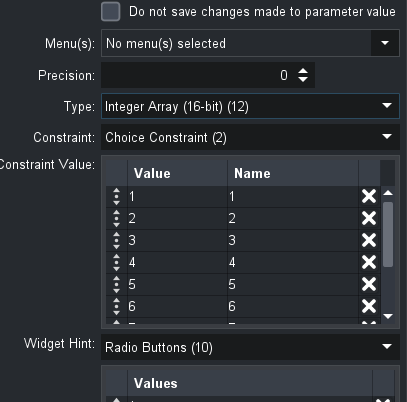
Visually it looks like this;

In the XPression scene the value of that integer is in a textbox with liveupdate checked.

This text object has the onsettext script I shared earlier.
------------------------------
Simon Redmile
Senior Graphic Programmer & Designer
Ross Video
Bristol United Kingdom
Original Message:
Sent: 02-22-2023 13:02
From: Matt
Subject: Script running scene directors
Thanks, Red. I appreciate the suggestion. I created a hilite control text object and applied the script to OnSetText. I was able to get the scene to work if I were to type in number 1-9 in the template data and hit Take. My challenge now is how to populate that text object with a number and to run while the scene is still online. The scene remains online throughout an inning. My Dashboard gives a 0 or 1 value when a certain batter is up. I have hidden text objects that receive that data. For example, "at bat data 1", "at bat data 2", and so on. I tried adding the below script to the same hilite control text object, just above the script you shared. It was unsuccessful though. I'll keep trying some things. Let me know if you have any thoughts.
dim ab1, ab2, ab3, ab4, ab5, ab6, ab7, ab8, ab9 as xpTextObject
Self.GetObjectByName("at bat data 1", ab1)
Self.GetObjectByName("at bat data 2", ab2)
Self.GetObjectByName("at bat data 3", ab3)
Self.GetObjectByName("at bat data 4", ab4)
Self.GetObjectByName("at bat data 5", ab5)
Self.GetObjectByName("at bat data 6", ab6)
Self.GetObjectByName("at bat data 7", ab7)
Self.GetObjectByName("at bat data 8", ab8)
Self.GetObjectByName("at bat data 9", ab9)
If ab1.Text= "1" then
Text= "1"
else if ab2.Text= "1" then
Text= "2"
Else If ab3.Text= "1" then
Text= "3"
Else If ab4.Text= "1" then
Text= "4"
Else If ab5.Text= "1" then
Text= "5"
Else If ab6.Text= "1" then
Text= "6"
Else If ab7.Text= "1" then
Text= "7"
Else If ab8.Text= "1" then
Text= "8"
Else If ab9.Text= "1" then
Text= "9"
End If
------------------------------
Matt Finlayson
Brigham Young University
Original Message:
Sent: 02-22-2023 04:11
From: Red
Subject: Script running scene directors
Hey guys, you were headed in the right direction, this is what I do for the same thing.
I have one scene director that moves all the highlights and then my script looks simply like this.
This goes on text object linked to an integer coming from my dashboard onSetText
dim Hlite as xpSceneDirector
scene.GetSceneDirectorByName("Lineup_Highlight", Hlite)
'Move SD Highlight
if text = "1"
Hlite.Play
Hlite.Position = 241
else if text = "2"
Hlite.PlayRange(0,30)
Hlite.AutoStop = true
else if text = "3"
Hlite.PlayRange(31,60)
Hlite.AutoStop = true
else if text = "4"
Hlite.PlayRange(61,90)
Hlite.AutoStop = true
else if text = "5"
Hlite.PlayRange(91,120)
Hlite.AutoStop = true
else if text = "6"
Hlite.PlayRange(121,150)
Hlite.AutoStop = true
else if text = "7"
Hlite.PlayRange(151,180)
Hlite.AutoStop = true
else if text = "8"
Hlite.PlayRange(181,210)
Hlite.AutoStop = true
else if text = "9"
Hlite.PlayRange(211,240)
Hlite.AutoStop = true
end if
My scene director looks like this

Ignore the pauses they are just for testing that track is turned off now.
The last event is for playing 1 to 9.
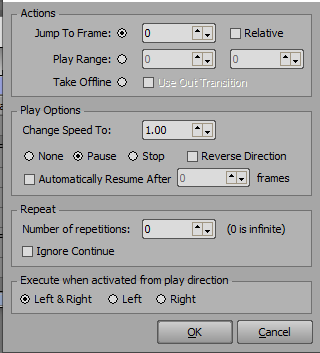
That's why you'll see that if = 1 is slightly different.
------------------------------
Simon Redmile
Senior Graphic Programmer & Designer
Ross Video
Bristol United Kingdom
Original Message:
Sent: 02-21-2023 23:44
From: Matt
Subject: Script running scene directors
I'm not sure how I would change the text value on a single hidden text object. However, I have 9 hidden text objects which receive a 0 or 1 based on whether or not the checkbox in Dashboard is active or not. Your suggestion got me thinking that maybe I could have each of those have an OnSetText script. This is what I tried, but it didn't work. Do I need an "Else if" statement too? If so, what would that look like? Any thoughts?
dim ab1 as xpTextObject
Dim m1 as xpSceneDirector
Self.GetObjectByName("at bat data 1", ab1)
Self.GetSceneDirectorByName("anim1", m1)
If ab1.Text=1 then
m1.Playrange(0,110)
End If
Matt Finlayson
Manager, Live Event Content Creation
BYU AV
301.332.6626 Cell
801.422.0180 Office
1030B ITB
Original Message:
Sent: 2/21/2023 11:22:00 PM
From: MalThePal
Subject: RE: Script running scene directors
Looks great. Could you have a single text object (hidden) with a script on it that would change every time there is a change in that text value? aka OnSetText, rather than on the entire scene. You could put the if else script there, and it would look at the value and run a scene director based on the value of that text.
------------------------------
Malcolm Thorpe
Free Lance Xpression Designer/Carbonite TD
Original Message:
Sent: 02-21-2023 23:12
From: Matt
Subject: Script running scene directors
Here's the dashboard and a screenshot of the dashboard. The yellow box highlights the checkboxes that I use to indicate current player at bat. This is datalinqed with the "at bat data" in the Xpression scene.
If I put the script in OnOnline, it will only run an animation when the scene goes from offline to online. I don't know if OnRender is the correct place for my script. It seemed to make sense for a script that should run when the scene is already online. I could be wrong though. I'm still learning scripting.
Matt Finlayson
Manager, Live Event Content Creation
BYU AV
301.332.6626 Cell
801.422.0180 Office
1030B ITB
Original Message:
Sent: 2/21/2023 10:53:00 PM
From: MalThePal
Subject: RE: Script running scene directors
Can you share the dashboard grid file too? Also, I see you have it on the OnRender tab. Why there? Trying to wrap my head around this. BTW, Red from Ross Video will have it solved before you and I wake up tomorrow. He is in Great Britain.
------------------------------
Malcolm Thorpe
Free Lance Xpression Designer/Carbonite TD
Original Message:
Sent: 02-21-2023 22:35
From: Matt
Subject: Script running scene directors
Leave it to a Ute to sabotage BYU. �� Just kidding. Thank you for your help.
Matt Finlayson
Manager, Live Event Content Creation
BYU AV
301.332.6626 Cell
801.422.0180 Office
1030B ITB
Original Message:
Sent: 2/21/2023 10:30:00 PM
From: MalThePal
Subject: RE: Script running scene directors
Grrr.....maybe it's because I'm a Ute fan, up in SLC. I will snag your scene and play around with it.
------------------------------
Malcolm Thorpe
Free Lance Xpression Designer/Carbonite TD
Original Message:
Sent: 02-21-2023 22:26
From: Matt
Subject: Script running scene directors
Same results, unfortunately.
Matt Finlayson
Manager, Live Event Content Creation
BYU AV
301.332.6626 Cell
801.422.0180 Office
1030B ITB
Original Message:
Sent: 2/21/2023 10:18:00 PM
From: MalThePal
Subject: RE: Script running scene directors
I made a mistake it should be Playrange(0, 30). Give that a try
------------------------------
Malcolm Thorpe
Free Lance Xpression Designer/Carbonite TD
Original Message:
Sent: 02-21-2023 22:12
From: Matt
Subject: Script running scene directors
Thanks for the quick reply, Mal. Great suggestion. Still doesn't seem to be working for me. The scene directors play fine when I play sequentially. I can go from batter 3 to 4 or from 4 to 7, but not if I want to go from batter 3 to batter 2 or 1. Or batter 9 to 1. I adjusted the script to include the move9.Play(0,60) where ("delay","end of scene director"). I'm including the scene here, if anyone wants to take a look at it or test some theories.
https://byu.box.com/s/yoxsa1i6s2erhx7374xum1oxsbb1wl1h
Thanks.
------------------------------
Matt Finlayson
Brigham Young University
Original Message:
Sent: 02-21-2023 21:11
From: MalThePal
Subject: Script running scene directors
for starters, if you use move9.Play(0,30) however long it is, then each time it plays it will basically "reset" when it plays again. From the looks of it, your scene director plays and then just sits there at the end, but if you set a start and end, it will play exactly that much of the scene director. Also, you can say dim ab1, ab2, ab3, ab4, ab5 as xpTextObject just to simplify it a bit. I hope this helps.
------------------------------
Malcolm Thorpe
Free Lance Xpression Designer/Carbonite TD