I'm extremely sorry for the delayed response but thank you for all the help on this issue. I've spent some time reviewing the script you shared and when I went back and reviewed everything i see what I did wrong. Thank you again to everyone for helping me.
Original Message:
Sent: 05-16-2023 12:18
From: Red
Subject: Scripting
So the issues I found were stopping your script were, BLACK, WHITE and REFLECT.
Commenting those out meant the script gets to the end.
engine.DebugMessage("start", 0)
dim homelogo2, homelogo3, homelogo, awaylogo, awaylogo2, awaylogo3, homeprimary, awayprimary, homesecondary, awaysecondary, awaychip, awaygrad, awaygradsec, awaywipe, homechip, homegrad, homewipe, homestatgrad, lowershort, lowerlong, lowerdouble, homecourt, homesuper, homechip2, homechip3 as xpBaseObject
dim homelogo2mat, homelogo3mat, homelogomat, awaylogomat, awaylogo2mat, awaylogo3mat, homeprimarymat, awayprimarymat, homesecondarymat, awaysecondarymat, awaychipmat, awaygradmat, awaygradsecmat, awaywipemat, homechipmat, homegradmat, homewipemat, homestatgradmat, lowershortmat, lowerlongmat, lowerdoublemat, homecourtmat, homesupermat, homechip2mat, homechip3mat as xpMaterial
dim homelogo2shad, homelogo3shad, homelogoshad, awaylogoshad, awaylogo2shad, awaylogo3shad, homeprimaryshad, awayprimaryshad, homesecondaryshad, awaysecondaryshad, awaychipshad, awaygradshad, awaygradsecshad, awaywipeshad, awaywiperefshad, homechipshad, homegradshad, homewipeshad, homewiperefshad, homestatgradshad, lowershortshad, lowerlongshad, lowerdoubleshad, homecourtshad, homesupershad, homechip2shad, homechip3shad as xpBaseShader
dim filepath, home, away as xpTextObject
self.GetObjectByName("HOME PRIMARY", homeprimary)
self.GetObjectByName("AWAY PRIMARY", awayprimary)
self.GetObjectByName("HOME SECONDARY", homesecondary)
self.GetObjectByName("AWAY SECONDARY", awaysecondary)
self.GetObjectByName("HOME LOGO", homelogo)
'self.GetObjectByName("HOME LOGO BLACK", homelogo2)
'self.GetObjectByName("HOME LOGO WHITE", homelogo3)
self.GetObjectByName("AWAY LOGO", awaylogo)
'self.GetObjectByName("AWAY LOGO BLACK", awaylogo2)
'self.GetObjectByName("AWAY LOGO WHITE", awaylogo3)
self.GetObjectByName("HOME", home)
self.GetObjectByName("AWAY", away)
self.GetObjectByName("FILEPATH", filepath)
self.GetObjectByName("HOME LOGO", homelogo)
self.GetObjectByName("AWAY CHIP", awaychip)
self.GetObjectByName("HOME CHIP2", homechip2)
self.GetObjectByName("HOME CHIP3", homechip3)
self.GetObjectByName("HOME CHIP", homechip)
self.GetObjectByName("AWAY GRADIENT", awaygrad)
self.GetObjectByName("HOME GRADIENT", homegrad)
self.GetObjectByName("AWAY GRADIENT_SECONDARY", awaygradsec)
self.GetObjectByName("AWAY WIPE REFLECT", awaywipe)
self.GetObjectByName("HOME WIPE REFLECT", homewipe)
self.GetObjectByName("HOME STAT GRADIENT", homestatgrad)
self.GetObjectByName("LOWER LONG", lowerlong)
self.GetObjectByName("LOWER DOUBLE", lowerdouble)
self.GetObjectByName("LOWER SHORT", lowershort)
self.GetObjectByName("HOME SUPER", homesuper)
'shot chart specific elements
self.GetObjectByName("HOME COURT", homecourt)
homecourt.GetMaterial(0, homecourtmat)
homecourtmat.GetShader(0, homecourtshad)
homecourtshad.SetFilename(filepath.Text & "PHX\" & home.Text & "\COURT.PNG")
dim SCchipPath, SCborderPath as String
if home.Text = "VALLEY" then
SCchipPath = "PHX\ORANGE\Primary.PNG"
SCborderPath = "PHX\VALLEY\PRIMARY.png"
else
SCchipPath = "PHX\" & home.Text & "\PRIMARY.PNG"
SCborderPath = "PHX\" & home.Text & "\SECONDARY.PNG"
END IF
'shot chart logo bg
self.GetObjectByName("HOME SHOTCHART LOGO BG", homecourt)
homecourt.GetMaterial(0, homecourtmat)
homecourtmat.GetShader(0, homecourtshad)
homecourtshad.SetFilename(filepath.Text & SCchipPath)
'shot chart logo borde
self.GetObjectByName("HOME SHOTCHART LOGO BORDER", homecourt)
homecourt.GetMaterial(0, homecourtmat)
homecourtmat.GetShader(0, homecourtshad)
homecourtshad.SetFilename(filepath.Text & SCborderPath)
'----
self.GetObjectByName("AWAY LOGO", awaylogo)
awaylogo.GetMaterial(0, awaylogomat)
awaylogomat.GetShader(0, awaylogoshad)
awaylogoshad.SetFilename(filepath.Text & away.text & "\LOGO.PNG")
'self.GetObjectByName("AWAY LOGO WHITE", awaylogo2)
'awaylogo2.GetMaterial(0, awaylogo2mat)
'awaylogo2mat.GetShader(0, awaylogo2shad)
'awaylogo2shad.SetFilename(filepath.Text & away.text & "\WHITE LOGO.PNG")
'
'self.GetObjectByName("AWAY LOGO BLACK", awaylogo3)
'awaylogo3.GetMaterial(0, awaylogo3mat)
'awaylogo3mat.GetShader(0, awaylogo3shad)
'awaylogo3shad.SetFilename(filepath.Text & away.text & "\BLACK LOGO.PNG")
self.GetObjectByName("AWAY LOGO OUTLINE", awaylogo)
awaylogo.GetMaterial(0, awaylogomat)
awaylogomat.GetShader(0, awaylogoshad)
awaylogoshad.SetFilename(filepath.Text & away.text & "\LOGO OUTLINE.PNG")
self.GetObjectByName("AWAY PRIMARY", awayprimary)
awayprimary.GetMaterial(0, awayprimarymat)
awayprimarymat.GetShader(0, awayprimaryshad)
awayprimaryshad.SetFileName(filepath.Text & away.Text & "\PRIMARY.PNG")
self.GetObjectByName("AWAY SECONDARY", awaysecondary)
awaysecondary.GetMaterial(0, awaysecondarymat)
awaysecondarymat.GetShader(0, awaysecondaryshad)
awaysecondaryshad.SetFileName(filepath.Text & away.Text & "\SECONDARY.PNG")
self.GetObjectByName("AWAY CHIP", awaychip)
awaychip.GetMaterial(0, awaychipmat)
awaychipmat.GetShader(0, awaychipshad)
awaychipshad.SetFileName(filepath.Text & away.Text & "\TEAM CHIP.PNG")
self.GetObjectByName("AWAY GRADIENT", awaygrad)
awaygrad.GetMaterial(0, awaygradmat)
awaygradmat.GetShader(0, awaygradshad)
awaygradshad.SetFileName(filepath.Text & away.Text & "\PRIMARY.PNG")
self.GetObjectByName("AWAY GRADIENT_SECONDARY", awaygradsec)
awaygradsec.GetMaterial(0, awaygradsecmat)
awaygradsecmat.GetShader(0, awaygradsecshad)
awaygradsecshad.SetFileName(filepath.Text & away.Text & "\SECONDARY.PNG")
self.GetObjectByName("AWAY ANGLE", awaygradsec)
awaygradsec.GetMaterial(0, awaygradsecmat)
awaygradsecmat.GetShader(0, awaygradsecshad)
awaygradsecshad.SetFileName(filepath.Text & away.Text & "\PRIMARY.PNG")
self.GetObjectByName("AWAY UNDERLINE", awaygradsec)
awaygradsec.GetMaterial(0, awaygradsecmat)
awaygradsecmat.GetShader(0, awaygradsecshad)
awaygradsecshad.SetFileName(filepath.Text & away.Text & "\PRIMARY.PNG")
'
'self.GetObjectByName("AWAY WIPE REFLECT", awaywipe)
'awaywipe.GetMaterial(0, awaywipemat)
'awaywipemat.GetShader(0, awaywipeshad)
'awaywipeshad.SetFileName(filepath.Text & away.Text & "\SECONDARY.PNG")
'self.GetObjectByName("AWAY WIPE REFLECT", awaywipe)
'awaywipe.GetMaterial(0, awaywipemat)
'awaywipemat.GetShader(1, awaywiperefshad)
'awaywiperefshad.SetFileName(filepath.Text & away.Text & "\LOGO.PNG")
self.GetObjectByName("HOME LOGO", homelogo)
homelogo.GetMaterial(0, homelogomat)
homelogomat.GetShader(0, homelogoshad)
homelogoshad.SetFilename(filepath.Text & "PHX\" & home.text & "\LOGO.PNG")
'self.GetObjectByName("HOME LOGO BLACK", homelogo2)
'homelogo2.GetMaterial(0, homelogo2mat)
'homelogo2mat.GetShader(0, homelogo2shad)
'homelogo2shad.SetFilename(filepath.Text & "PHX\" & home.text & "\BLACK LOGO.PNG")
'
'self.GetObjectByName("HOME LOGO WHITE", homelogo3)
'homelogo3.GetMaterial(0, homelogo3mat)
'homelogo3mat.GetShader(0, homelogo3shad)
'homelogo3shad.SetFilename(filepath.Text & "PHX\" & home.text & "\WHITE LOGO.PNG")
self.GetObjectByName("HOME PRIMARY", homeprimary)
homeprimary.GetMaterial(0, homeprimarymat)
homeprimarymat.GetShader(0, homeprimaryshad)
homeprimaryshad.SetFileName(filepath.Text & home.Text & "\PRIMARY.PNG")
self.GetObjectByName("HOME SECONDARY", homesecondary)
homesecondary.GetMaterial(0, homesecondarymat)
homesecondarymat.GetShader(0, homesecondaryshad)
homesecondaryshad.SetFileName(filepath.Text & home.text & "\SECONDARY.PNG")
self.GetObjectByName("HOME CHIP", homechip)
homechip.GetMaterial(0, homechipmat)
homechipmat.GetShader(0, homechipshad)
homechipshad.SetFileName(filepath.Text & "PHX\" & home.Text & "\SHOTCHARTBKG.PNG")
self.GetObjectByName("HOME CHIP2", homechip2)
homechip2.GetMaterial(0, homechip2mat)
homechip2mat.GetShader(0, homechip2shad)
homechip2shad.SetFileName(filepath.Text & "PHX\" & home.Text & "\BACKGROUND.PNG")
self.GetObjectByName("HOME CHIP3", homechip3)
homechip3.GetMaterial(0, homechip3mat)
homechip3mat.GetShader(0, homechip3shad)
homechip3shad.SetFileName(filepath.Text & "PHX\" & home.Text & "\SCORE BACKGROUND.PNG")
self.GetObjectByName("HOME GRADIENT", homegrad)
homegrad.GetMaterial(0, homegradmat)
homegradmat.GetShader(0, homegradshad)
homegradshad.SetFileName(filepath.Text & "PHX\" & home.Text & "\GRADIENT.PNG")
'
'self.GetObjectByName("HOME WIPE REFLECT", homewipe)
'homewipe.GetMaterial(0, homewipemat)
'homewipemat.GetShader(0, homewipeshad)
'homewipeshad.SetFileName(filepath.Text & "PHX\" & home.Text & "\PRIMARY.PNG")
'
'self.GetObjectByName("HOME WIPE REFLECT", homewipe)
'homewipe.GetMaterial(0, homewipemat)
'homewipemat.GetShader(1, homewiperefshad)
'homewiperefshad.SetFileName(filepath.Text & "PHX\" & home.Text & "\LOGO.PNG")
engine.DebugMessage("here", 0)
self.GetObjectByName("HOME STAT GRADIENT", homestatgrad)
homestatgrad.GetMaterial(0, homestatgradmat)
homestatgradmat.GetShader(0, homestatgradshad)
homestatgradshad.SetFileName(filepath.Text & "PHX\" & home.Text & "\STAT GRADIENT.PNG")
self.GetObjectByName("LOWER LONG", lowerlong)
lowerlong.GetMaterial(0, lowerlongmat)
lowerlongmat.GetShader(0, lowerlongshad)
lowerlongshad.SetFileName(filepath.Text & "PHX\" & home.Text & "\LOWER LONG.AVI")
self.GetObjectByName("LOWER DOUBLE", lowerdouble)
lowerdouble.GetMaterial(0, lowerdoublemat)
lowerdoublemat.GetShader(0, lowerdoubleshad)
lowerdoubleshad.SetFileName(filepath.Text & "PHX\" & home.Text & "\LOWER DOUBLE.AVI")
self.GetObjectByName("LOWER SHORT", lowershort)
lowershort.GetMaterial(0, lowershortmat)
lowershortmat.GetShader(0, lowershortshad)
lowershortshad.SetFileName(filepath.Text & "PHX\" & home.Text & "\LOWER SHORT.AVI")
self.GetObjectByName("HOME SUPER", homesuper)
homesuper.GetMaterial(0, homesupermat)
homesupermat.GetShader(0, homesupershad)
homesupershad.SetFileName(filepath.Text & "PHX\" & home.Text & "\LARGEX.PNG")
engine.DebugMessage("end", 0)
------------------------------
Simon Redmile
Senior Graphic Programmer & Designer
Ross Video
Bristol United Kingdom
------------------------------
Original Message:
Sent: 05-16-2023 12:02
From: Red
Subject: Scripting
I have a debug messsage start and end.
This is my debugger.
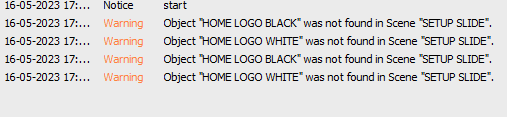
it's getting stuck where it cannot find these objects.
------------------------------
Simon Redmile
Senior Graphic Programmer & Designer
Ross Video
Bristol United Kingdom
Original Message:
Sent: 05-16-2023 11:53
From: Azathoth
Subject: Scripting
Could what you want to do be solved with linking to a Spreadsheet/DataLinq?
Each column with a path to the images assigned to an object?
------------------------------
Azathoth
Son of Cthulhu
Original Message:
Sent: 05-16-2023 11:29
From: EricR
Subject: Scripting
Hi Roger,
I've uploaded the xpp file. I'm currently running the debugger trying to see if something is not working.
------------------------------
ERIC RODRIGUEZ
Xpression designer, and operator
Phoenix Suns & Phoenix Mercury
Phoenix
Original Message:
Sent: 05-16-2023 10:59
From: Rajimon
Subject: Scripting
I checked your original script file in an IDE and there are no syntax errors that I can see. I'm assuming there are no other errors or you would have told us about them, so I'd lean toward the problem residing somewhere else. Make sure that your file paths are correct. Is it possible that these png files are not what you are expecting them to be? And can you upload the scene/project or show us a picture of your object manager? And sometimes I've had issues where I'd change something in my scene and wouldn't see the change until I replaced the take item in my sequencer, so I always try that too when I'm stumped.
------------------------------
Roger Heyward
Original Message:
Sent: 05-16-2023 02:49
From: EricR
Subject: Scripting
I just tried to start completely over. I can get everything to work but after I get to a certain point it just stops working. I had everything working but just decided to keep adding without testing each new thing. Now when I trace my steps backwards nothing will work. I've never had this many problems scripting before.
------------------------------
ERIC RODRIGUEZ
Xpression designer, and operator
Phoenix Suns & Phoenix Mercury
Phoenix
Original Message:
Sent: 05-15-2023 16:55
From: Azathoth
Subject: Scripting
Another thought. If after a successful implementation you've simplified everything and you've checked your spelling and the problem still persists - check your materials. See if there are multiple textures or layers to a material. If so, the subroutine needs to have a loop added to go through the layers to set the filepath.
------------------------------
Azathoth
Son of Cthulhu
Original Message:
Sent: 05-15-2023 16:24
From: EricR
Subject: Scripting
Thank you I will give this a try. It's only changing the primary and secondary color chips. It will not change any of the other object materials. The blue button is on in the Layout. It's like no matter what I add or update in the script it will not change anything other than the color materials and not the logos or extra artwork.
------------------------------
ERIC RODRIGUEZ
Xpression designer, and operator
Phoenix Suns & Phoenix Mercury
Phoenix
Original Message:
Sent: 05-15-2023 16:07
From: Azathoth
Subject: Scripting
Is it failing during testing in Sequencer?
Or is it failing in production testing?
I have written scripts that test fine but fail in production. I seem to remember reading somewhere that "Blue Box" might be the culprit, but I need to put in a bug report before I can confirm that problem.
Make a subroutine in global scripts. This will greatly help with debugging in this case. Try something like:
Sub AssignFileToShader(Scene as xpScene, oName as String, theFile as String) Dim obj as xpBaseObject Dim shad as xpBaseShader Dim mat as xpMaterial Scene.GetObjectByName("SCORE BACKGROUND", obj) obj.GetMaterial(0, mat) mat.GetShader(0, shad) shad.SetFileName(theFile)End SubNot tested, but it looks right.
Make a new string in your script:
Dim corePath as StringcorePath = filepath.Text & "PHX\" & home.text & "\"
Now you can make all those calls like this:
AssignFileToShader(self,"AWAY PRIMARY",corePath & "PRIMARY.PNG")
Now there is less chances of failing due to typos. Take it one step further and do:
Try AssignFileToShader(self,"AWAY PRIMARY",corePath & "PRIMARY.PNG")CatchEnd Try
Now it is more likely that the script will execute and you just go back and check your spelling on the materials that did not get assigned.
This may help you track down the problem yourself.
------------------------------
Azathoth
Son of Cthulhu