Ah I see, I'll look into that. I am connecting via the API, and I need to. I am generating a preview frame and displaying it in the app whenever the keyboard macro executes. No data going back into XPression, and no Datalinq in this one. Thank you for your help!
Edit: All is working perfectly. Thanks again.
Original Message:
Sent: 12-04-2023 13:54
From: Simon Latus
Subject: Send Rosstalk/Message Via API to Windows Forms app?
Hi
You don't listen for the message from XPression in the API, you need to use Winsock to create either a TCP or UDP listener.
I'm assuming you are connecting to XPression via the API? Do you need too? Are you getting data into XPression via your app and the API, or Datalinq?
Simon
------------------------------
Simon Latus
Simon Latus Media Ltd
United Kingdom
------------------------------
Original Message:
Sent: 12-04-2023 09:27
From: Jack Reynolds
Subject: Send Rosstalk/Message Via API to Windows Forms app?
Hey Simon,
Thanks so much for this, this is incredibly helpful. I had started playing with this before I called it a night. A follow up, the sending message makes complete sense. How do I listen for the message on the other end? The engine.OnGPI event only receives a pin state, so what would be listening for a string?
------------------------------
Jack Reynolds
Original Message:
Sent: 12-04-2023 04:51
From: Simon Latus
Subject: Send Rosstalk/Message Via API to Windows Forms app?
Hi Jack
I've sent message over TCP from XPression back to Dashboard, so this would work for you too.
In your hardware setup, do something like the below. If you are running your app on the same machine as XPression make sure your TCP port is different to your incoming network settings port. I've used TCP, but you can use UDP if your app is on the same machine as it's slightly easier to implement.
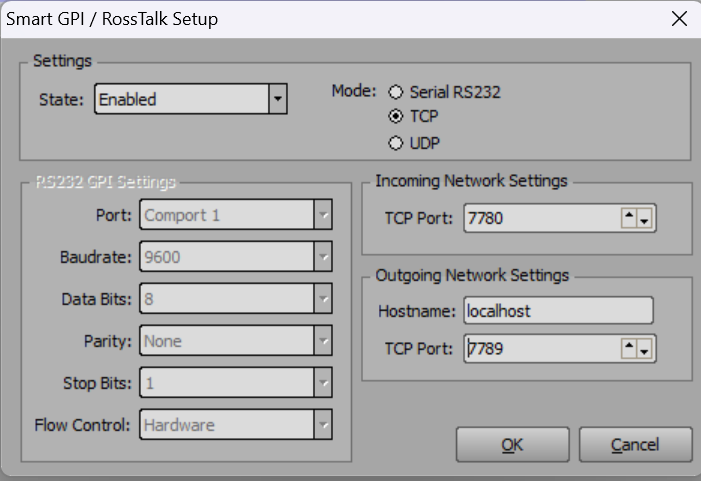
Then I have a global function (Edit->Scripting->Global Methods) as per below.
You can call this from anywhere in your project. I've assumed that the GPI board with the return connection is the first one in your hardware list.
You can then send any string message you like. I tend to send messages with pipe delimiters so I can send a data field and a value, (eg "Goals|3" ) then end it all with a VBcr.
This makes parsing it in your app quite easy.
sub sendMessageToDashboard(engine as xpEngine,message as string)dim gpiBoard as xpGPIBoardengine.GetGPIBoard(0,gpiBoard)gpiBoard.SendMessage(message)end sub
As to where to put calls to this function, depends on what you are trying to achieve. If you are looking at the sequencer OnFocusItemChanged, you could put a call in the OnPreviewRender function of each scene. Bit of a pain to have to add it to each scene though!
If I think of a better way i'll let you know!
Hope this helps,
Simon
------------------------------
Simon Latus
Simon Latus Media Ltd
United Kingdom