Facility Control

 View Only
Expand all | Collapse all

Send trigger to ProPresenter 7 to fire Macro

  • 1.  Send trigger to ProPresenter 7 to fire Macro

    Posted 09-07-2022 23:43
    This may seem a little off base but please bear with me. I'm sure those of your staff who work in the church market are familiar with ProPresenter by Renewed Vision. Recently, they came out with a public API for controlling a number of functions remotely over the network. I would like to create a button on Dashboard to accomplish one simple task: fire a macro set up inside of ProPresenter. Unfortunately, looking at their website API page, it's all kinda Greek to me.

    On that page (ProPresenter API) it lists the following make it work:

    First, there's a "request URL" of:
    http://localhost:50001/v1/macro/206ba350-a981-4b55-b09b-28621e1631bc/trigger
    and I know I would need to replace localhost with the IP address of the machine running ProPresenter along with the port after the colon (and yes, both the machine running Dashboard and the ProPresenter computer are on the same netwok) I also know that the long number string between macro/ and /trigger are the macro's internal UUID within ProPresenter. .

    OR there's code for Curl (whatever that is):
    curl -X 'GET' \
      'http://localhost:50001/v1/macro/206ba350-a981-4b55-b09b-28621e1631bc/trigger' \
      -H 'accept: */*'
    Again, I would need to change the appropriate parameters as mentioned above. My question is that it appears I could use one or the other to make this work, so which method would be advisable. Finally, how do I code the button in Dashboard to execute this command?.

    Hope you folks can help.

    ------------------------------
    Steve Witwicki
    Video Technical Director
    Light of Christ Church
    ------------------------------


  • 2.  RE: Send trigger to ProPresenter 7 to fire Macro

    Posted 09-08-2022 07:27
    Hey Steve this should be simple. 
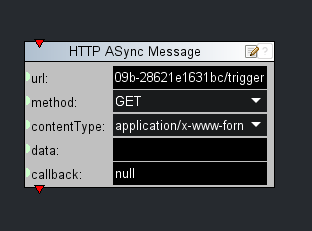
    Create a button and add a task. In the visual logic pane on the right look for OGSCRIPT>COMMUNICATION  find HTTP Async message. Open the visual logic block and paste the URL into the top box and then press ok.  The button should (all being well sometimes these things are tricky) operate your macro on the device. 

    Hope that helps and good luck with it. 

    Jack 


    ------------------------------
    Jack Horry
    Product Manager
    DashBoard, Interstellar, PowerPlay, Lightning
    Ross Video | Living Live
    ------------------------------


  • 3.  RE: Send trigger to ProPresenter 7 to fire Macro

    Posted 09-08-2022 22:35
    Dang! Doesn't seem to work. OK, so when I put the following URL (command) in the address bar of my browser with ProPresenter running, it does what I want:
    http://localhost:50001/v1/macro/Preservice%20Countdown/trigger

    Then, when I put this same command in the URL field of the top box after creating my button and choosing HTTP Async messageitgeneratesthefollowingcode:

    <button buttontype="push" height="130" id="Fire Macro" left="182" name="Fire Macro" top="174" width="243">
    <task tasktype="ogscript">/*! block id=1000 !*/
    ogscript.asyncHTTP("http://localhost:50001/v1/macro/Preservice%20Countdown/trigger", "GET", "application/x-www-form-urlencoded", "", null);
    /*!!
    &lt;block id="1000" type="ogscript_async" x="10" y="100" w="318" URL="http://localhost:50001/v1/macro/Preservice%20Countdown/trigger" METHOD="GET" TYPE="application/x-www-form-urlencoded" DATA="" CALLBACK="null" /&gt;
    !!*/
    /*!!&lt;checksum&gt;49d452306b388aefcfa070a07f78c657&lt;/checksum&gt;!!*/</task>
    </button>

    And, unfortunately, when I press the button on the panel, nothing happens in ProPresenter. Is there something I'm missing?

    ------------------------------
    Steve Witwicki
    Video Technical Director
    Light of Christ Church
    ------------------------------


  • 4.  RE: Send trigger to ProPresenter 7 to fire Macro

    Posted 09-12-2022 09:45
    Hi Steve
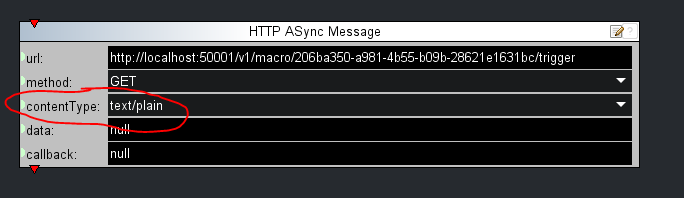
    It is likely that the server is rejecting the message for some reason. I would try setting the content type to text/plain and set the data field to null to make it the most simple type of interaction between DashBoard and the server.
    If this doesn't work, the next thing to try would be setting additional header properties to look a little more like the web browser (for example, some servers require the "user-agent" header to be set).

    ------------------------------
    James Peltzer
    Ross Video
    ------------------------------


  • 5.  RE: Send trigger to ProPresenter 7 to fire Macro

    Posted 09-12-2022 15:02

    Sorry James-but as I mentioned in my initial post on this topic, I'm a total newb on the syntax of this kind of programming. So how/where exactly would I change the content type to "text/plain" in the command it's sending from Dashboard. Can I simply change (in the source tab for the button) the code I posted in my previous post (see below)? If so, where-I don't see a 'content-type' label but I do see two others, one called 'type="ogscript_asynch" and another as TYPE="application/x-www-form-urlencoded". Do I replace what's in quotes on one of those or something else?

    <button buttontype="push" height="130" id="Fire Macro" left="182" name="Fire Macro" top="174" width="243">
    <task tasktype="ogscript">/*! block id=1000 !*/
    ogscript.asyncHTTP("http://localhost:50001/v1/macro/Preservice%20Countdown/trigger", "GET", "application/x-www-form-urlencoded", "", null);
    /*!!
    &lt;block id="1000" type="ogscript_async" x="10" y="100" w="318" URL="http://localhost:50001/v1/macro/Preservice%20Countdown/trigger" METHOD="GET" TYPE="application/x-www-form-urlencoded" DATA="" CALLBACK="null" /&gt;
    !!*/
    /*!!&lt;checksum&gt;49d452306b388aefcfa070a07f78c657&lt;/checksum&gt;!!*/</task>
    </button>


    ------------------------------
    Steve Witwicki
    Video Technical Director
    Light of Christ Church
    ------------------------------


  • 6.  RE: Send trigger to ProPresenter 7 to fire Macro

    Posted 09-12-2022 15:16
    Hi Steve
    "text/plain" is one of the content type options in the async HTTP message Visual scripting blocks:


    ------------------------------
    James Peltzer
    Ross Video
    ------------------------------


  • 7.  RE: Send trigger to ProPresenter 7 to fire Macro

    Posted 09-22-2022 14:39
    Sorry I didn't respond sooner. I've tried this 6 ways to Sunday and still can't seem to get it to work. I know that both computers are on the same network. If I place the command in a web browser address bar on the computer that runs Dashboard,
    http://172.16.1.72:60768/v1/macro/STOP%20Announcements%20for%20Broadcast/trigger
    it will execute on the receiving computer running ProPresenter flawlessly. When I press the button I created to do the same thing within Dashboard, nothing happens. This is the source code it generated for the button in Dashboard:
    <button buttontype="push" height="51" id="StartBroadcast" left="835" name="Start Broadcast" style="size:18;fg#modaloverlay;bg#orange;font:bold;" top="500" width="160">
    <task tasktype="ogscript">/*! block id=1000 !*/
    ogscript.asyncHTTP(http://172.16.1.72:60768/v1/macro/STOP%20Announcements%20for%20Broadcast/trigger", "GET", "application/x-www-form-urlencoded", "", null);
    /*!!
    &lt;block id="1000" type="ogscript_async" x="135" y="177" w="318" URL="http://172.16.1.72:60768/v1/macro/STOP%20Announcements%20for%20Broadcast/trigger" METHOD="GET" TYPE="application/x-www-form-urlencoded" DATA="" CALLBACK="null" /&gt;
    !!*/
    /*!!&lt;checksum&gt;03c56212d68a6db6cca0c1c4845edb65&lt;/checksum&gt;!!*/</task>
    </button>

    Since the server is not blocking anything sent from a browser on the computer, can it be blocking something sent from Dashboard? Is there something else it could be?

    ------------------------------
    Steve Witwicki
    Video Technical Director
    Light of Christ Church
    ------------------------------


  • 8.  RE: Send trigger to ProPresenter 7 to fire Macro

    Posted 09-29-2022 02:33
    Anyone want to give this a stab so i can get it to work?

    ------------------------------
    Steve Witwicki
    Video Technical Director
    Light of Christ Church
    ------------------------------


  • 9.  RE: Send trigger to ProPresenter 7 to fire Macro

    Posted 10-20-2022 18:59
    HELP! I am really trying to get this button to work and cannot figure out why it never does anything. CAN SOMEONE PLEASE HELP ME?

    Trying to send an HTML API command from Dashboard to another computer on the network when a button is pushed. Destination IP address and port are correct.

    The source code that the Dashboard wizard generated was as follows:

    <button buttontype="push" height="51" id="StartBroadcast" left="835" name="Start Broadcast" style="size:18;fg#modaloverlay;bg#orange;font:bold;" top="500" width="160">
    <task tasktype="ogscript">/*! block id=1000 !*/
    ogscript.asyncHTTP("http://172.16.1.72:60768/v1/macro/STOP%20Announcements%20for%20Broadcast/trigger", "GET", "text/plain", "", null);
    /*!!
    &lt;block id="1000" type="ogscript_async" x="135" y="177" w="318" URL="http://172.16.1.72:60768/v1/macro/STOP%20Announcements%20for%20Broadcast/trigger" METHOD="GET" TYPE="text/plain" DATA="" CALLBACK="null" /&gt;
    !!*/
    /*!!&lt;checksum&gt;03c56212d68a6db6cca0c1c4845edb65&lt;/checksum&gt;!!*/</task>
    </button>

    If I put that same command: http://172.16.1.72:60768/v1/macro/STOP%20Announcements%20for%20Broadcast/trigger in the address bar of my browser on that same computer, it works just fine. Am I wrong in guessing that Dashboard is simply not sending anything? Or do i have other problems with the code?


    ------------------------------
    Steve Witwicki
    Video Technical Director
    Light of Christ Church
    ------------------------------


  • 10.  RE: Send trigger to ProPresenter 7 to fire Macro

    Posted 10-24-2022 06:55
    So this could be lots of things. Do you get a response from your Debug information (VIEWS/openGear Debug Information)
    What operating system are you using and do you have a overzealous firewall that is blocking the DashBoard  application on port :60768

    ------------------------------
    Jack Horry
    Product Manager
    DashBoard, PowerPlay, Lightning
    Ross Video | Living Live
    ------------------------------


  • 11.  RE: Send trigger to ProPresenter 7 to fire Macro

    Posted 10-25-2022 14:45

    Dashboard is running on a Windows 10 OS machine. The target computer that is running ProPresenter (which is the application I'm trying to communicate with) is a 2018 Mac Mini running Monterrey (12.6). As I said in my original post, if I put the http command in the Chrome browser window, it works just fine on the Mac.

    When I click the button that I added on Dashboard and then look at the DeBug info it says: 13.33.54.234: Connection refused: connect    Is that the info you wanted to know? What does it mean? Is there something else I need to check or change?

    Thanks.

    LOC Logo   Steve Witwicki
    LIGHT OF CHRIST CHURCH
    Production Team Video Lead
    Cell: 847-271-0623
     
    Light of Christ exists to INVITE people into Christian community, NURTURE them in a life-changing
    relationship with Jesus Christ, so they can faithfully and joyfully SERVE Him.
     
     
    On 10/24/2022 5:57 AM, Jack Horry via Ross Video Limited wrote:
    0100018409a3db7e-59313012-27cc-482d-bf4e-3b66086e06a9-000000@email.amazonses.com">
    So this could be lots of things. Do you get a response from your Debug information (VIEWS/openGear Debug Information) What operating system are... -posted to the "Facility Control" community
    Ross Video Limited

    Facility Control

    Post New Message
    Re: Send trigger to ProPresenter 7 to fire Macro
    Reply to Group Reply to Sender
    Oct 24, 2022 6:55 AM
    Jack Horry
    So this could be lots of things. Do you get a response from your Debug information (VIEWS/openGear Debug Information)
    What operating system are you using and do you have a overzealous firewall that is blocking the DashBoard  application on port :60768

    ------------------------------
    Jack Horry
    Product Manager
    DashBoard, PowerPlay, Lightning
    Ross Video | Living Live
    ------------------------------
      Reply to Group Online   View Thread   Recommend   Forward   Flag as Inappropriate  


    You are receiving this notification because you followed the 'Send trigger to ProPresenter 7 to fire Macro' message thread. If you do not wish to follow this, please click here.

    Update your email preferences to choose the types of email you receive

    Unsubscribe from all participation emails


    Original Message:
    Sent: 10/24/2022 6:55:00 AM
    From: Jack Horry
    Subject: RE: Send trigger to ProPresenter 7 to fire Macro

    So this could be lots of things. Do you get a response from your Debug information (VIEWS/openGear Debug Information)
    What operating system are you using and do you have a overzealous firewall that is blocking the DashBoard  application on port :60768

    ------------------------------
    Jack Horry
    Product Manager
    DashBoard, PowerPlay, Lightning
    Ross Video | Living Live
    ------------------------------

    Original Message:
    Sent: 10-20-2022 18:58
    From: Steve Witwicki
    Subject: Send trigger to ProPresenter 7 to fire Macro

    HELP! I am really trying to get this button to work and cannot figure out why it never does anything. CAN SOMEONE PLEASE HELP ME?

    Trying to send an HTML API command from Dashboard to another computer on the network when a button is pushed. Destination IP address and port are correct.

    The source code that the Dashboard wizard generated was as follows:

    <button buttontype="push" height="51" id="StartBroadcast" left="835" name="Start Broadcast" style="size:18;fg#modaloverlay;bg#orange;font:bold;" top="500" width="160">
    <task tasktype="ogscript">/*! block id=1000 !*/
    ogscript.asyncHTTP("http://172.16.1.72:60768/v1/macro/STOP%20Announcements%20for%20Broadcast/trigger", "GET", "text/plain", "", null);
    /*!!
    &lt;block id="1000" type="ogscript_async" x="135" y="177" w="318" URL="http://172.16.1.72:60768/v1/macro/STOP%20Announcements%20for%20Broadcast/trigger" METHOD="GET" TYPE="text/plain" DATA="" CALLBACK="null" /&gt;
    !!*/
    /*!!&lt;checksum&gt;03c56212d68a6db6cca0c1c4845edb65&lt;/checksum&gt;!!*/</task>
    </button>

    If I put that same command: http://172.16.1.72:60768/v1/macro/STOP%20Announcements%20for%20Broadcast/trigger in the address bar of my browser on that same computer, it works just fine. Am I wrong in guessing that Dashboard is simply not sending anything? Or do i have other problems with the code?


    ------------------------------
    Steve Witwicki
    Video Technical Director
    Light of Christ Church

    Original Message:
    Sent: 09-29-2022 02:33
    From: Steve Witwicki
    Subject: Send trigger to ProPresenter 7 to fire Macro

    Anyone want to give this a stab so i can get it to work?

    ------------------------------
    Steve Witwicki
    Video Technical Director
    Light of Christ Church

    Original Message:
    Sent: 09-22-2022 14:39
    From: Steve Witwicki
    Subject: Send trigger to ProPresenter 7 to fire Macro

    Sorry I didn't respond sooner. I've tried this 6 ways to Sunday and still can't seem to get it to work. I know that both computers are on the same network. If I place the command in a web browser address bar on the computer that runs Dashboard,
    http://172.16.1.72:60768/v1/macro/STOP%20Announcements%20for%20Broadcast/trigger
    it will execute on the receiving computer running ProPresenter flawlessly. When I press the button I created to do the same thing within Dashboard, nothing happens. This is the source code it generated for the button in Dashboard:
    <button buttontype="push" height="51" id="StartBroadcast" left="835" name="Start Broadcast" style="size:18;fg#modaloverlay;bg#orange;font:bold;" top="500" width="160">
    <task tasktype="ogscript">/*! block id=1000 !*/
    ogscript.asyncHTTP(http://172.16.1.72:60768/v1/macro/STOP%20Announcements%20for%20Broadcast/trigger", "GET", "application/x-www-form-urlencoded", "", null);
    /*!!
    &lt;block id="1000" type="ogscript_async" x="135" y="177" w="318" URL="http://172.16.1.72:60768/v1/macro/STOP%20Announcements%20for%20Broadcast/trigger" METHOD="GET" TYPE="application/x-www-form-urlencoded" DATA="" CALLBACK="null" /&gt;
    !!*/
    /*!!&lt;checksum&gt;03c56212d68a6db6cca0c1c4845edb65&lt;/checksum&gt;!!*/</task>
    </button>

    Since the server is not blocking anything sent from a browser on the computer, can it be blocking something sent from Dashboard? Is there something else it could be?

    ------------------------------
    Steve Witwicki
    Video Technical Director
    Light of Christ Church

    Original Message:
    Sent: 09-12-2022 15:15
    From: James Peltzer
    Subject: Send trigger to ProPresenter 7 to fire Macro

    Hi Steve
    "text/plain" is one of the content type options in the async HTTP message Visual scripting blocks:


    ------------------------------
    James Peltzer
    Ross Video

    Original Message:
    Sent: 09-12-2022 15:02
    From: Steve Witwicki
    Subject: Send trigger to ProPresenter 7 to fire Macro

    Sorry James-but as I mentioned in my initial post on this topic, I'm a total newb on the syntax of this kind of programming. So how/where exactly would I change the content type to "text/plain" in the command it's sending from Dashboard. Can I simply change (in the source tab for the button) the code I posted in my previous post (see below)? If so, where-I don't see a 'content-type' label but I do see two others, one called 'type="ogscript_asynch" and another as TYPE="application/x-www-form-urlencoded". Do I replace what's in quotes on one of those or something else?

    <button buttontype="push" height="130" id="Fire Macro" left="182" name="Fire Macro" top="174" width="243">
    <task tasktype="ogscript">/*! block id=1000 !*/
    ogscript.asyncHTTP("http://localhost:50001/v1/macro/Preservice%20Countdown/trigger", "GET", "application/x-www-form-urlencoded", "", null);
    /*!!
    &lt;block id="1000" type="ogscript_async" x="10" y="100" w="318" URL="http://localhost:50001/v1/macro/Preservice%20Countdown/trigger" METHOD="GET" TYPE="application/x-www-form-urlencoded" DATA="" CALLBACK="null" /&gt;
    !!*/
    /*!!&lt;checksum&gt;49d452306b388aefcfa070a07f78c657&lt;/checksum&gt;!!*/</task>
    </button>


    ------------------------------
    Steve Witwicki
    Video Technical Director
    Light of Christ Church

    Original Message:
    Sent: 09-12-2022 09:44
    From: James Peltzer
    Subject: Send trigger to ProPresenter 7 to fire Macro

    Hi Steve
    It is likely that the server is rejecting the message for some reason. I would try setting the content type to text/plain and set the data field to null to make it the most simple type of interaction between DashBoard and the server.
    If this doesn't work, the next thing to try would be setting additional header properties to look a little more like the web browser (for example, some servers require the "user-agent" header to be set).

    ------------------------------
    James Peltzer
    Ross Video

    Original Message:
    Sent: 09-08-2022 22:35
    From: Steve Witwicki
    Subject: Send trigger to ProPresenter 7 to fire Macro

    Dang! Doesn't seem to work. OK, so when I put the following URL (command) in the address bar of my browser with ProPresenter running, it does what I want:
    http://localhost:50001/v1/macro/Preservice%20Countdown/trigger

    Then, when I put this same command in the URL field of the top box after creating my button and choosing HTTP Async messageitgeneratesthefollowingcode:

    <button buttontype="push" height="130" id="Fire Macro" left="182" name="Fire Macro" top="174" width="243">
    <task tasktype="ogscript">/*! block id=1000 !*/
    ogscript.asyncHTTP("http://localhost:50001/v1/macro/Preservice%20Countdown/trigger", "GET", "application/x-www-form-urlencoded", "", null);
    /*!!
    &lt;block id="1000" type="ogscript_async" x="10" y="100" w="318" URL="http://localhost:50001/v1/macro/Preservice%20Countdown/trigger" METHOD="GET" TYPE="application/x-www-form-urlencoded" DATA="" CALLBACK="null" /&gt;
    !!*/
    /*!!&lt;checksum&gt;49d452306b388aefcfa070a07f78c657&lt;/checksum&gt;!!*/</task>
    </button>

    And, unfortunately, when I press the button on the panel, nothing happens in ProPresenter. Is there something I'm missing?

    ------------------------------
    Steve Witwicki
    Video Technical Director
    Light of Christ Church

    Original Message:
    Sent: 09-08-2022 07:26
    From: Jack Horry
    Subject: Send trigger to ProPresenter 7 to fire Macro

    Hey Steve this should be simple. 
    Create a button and add a task. In the visual logic pane on the right look for OGSCRIPT>COMMUNICATION  find HTTP Async message. Open the visual logic block and paste the URL into the top box and then press ok.  The button should (all being well sometimes these things are tricky) operate your macro on the device. 

    Hope that helps and good luck with it. 

    Jack 


    ------------------------------
    Jack Horry
    Product Manager
    DashBoard, Interstellar, PowerPlay, Lightning
    Ross Video | Living Live

    Original Message:
    Sent: 09-07-2022 23:43
    From: Steve Witwicki
    Subject: Send trigger to ProPresenter 7 to fire Macro

    This may seem a little off base but please bear with me. I'm sure those of your staff who work in the church market are familiar with ProPresenter by Renewed Vision. Recently, they came out with a public API for controlling a number of functions remotely over the network. I would like to create a button on Dashboard to accomplish one simple task: fire a macro set up inside of ProPresenter. Unfortunately, looking at their website API page, it's all kinda Greek to me.

    On that page (ProPresenter API) it lists the following make it work:

    First, there's a "request URL" of:
    http://localhost:50001/v1/macro/206ba350-a981-4b55-b09b-28621e1631bc/trigger
    and I know I would need to replace localhost with the IP address of the machine running ProPresenter along with the port after the colon (and yes, both the machine running Dashboard and the ProPresenter computer are on the same netwok) I also know that the long number string between macro/ and /trigger are the macro's internal UUID within ProPresenter. .

    OR there's code for Curl (whatever that is):
    curl -X 'GET' \  'http://localhost:50001/v1/macro/206ba350-a981-4b55-b09b-28621e1631bc/trigger' \  -H 'accept: */*'
    Again, I would need to change the appropriate parameters as mentioned above. My question is that it appears I could use one or the other to make this work, so which method would be advisable. Finally, how do I code the button in Dashboard to execute this command?.

    Hope you folks can help.

    ------------------------------
    Steve Witwicki
    Video Technical Director
    Light of Christ Church
    ------------------------------


  • 12.  RE: Send trigger to ProPresenter 7 to fire Macro

    Posted 10-27-2022 07:03
    Hey Steve this is Network/Firewall related. 
    DashBoard needs to communicate on what ever path you have specified. I see you have multiple IP addresses and multiple ports in the examples you have given.
    To illustrate this, a path beginning
    http://10.20.30.40:50001/v1/macro
     10.20.30.40 is the IP address and 50001 is the port number. 
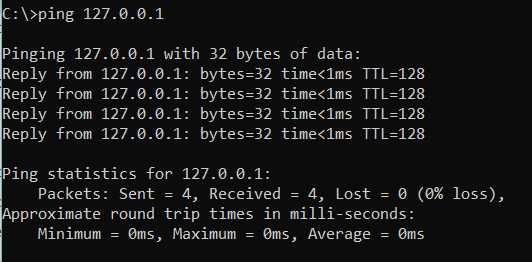
    First of all both IP addresses need to be able to communicate with each other. Try pinging the Mac with Mac's IP address from the windows machine as a first check. If you have a response like this you should have passed the first hurdle.
    Operating systems have sophisticated firewalls bundled inside them these days. These allow good traffic and block out bad and generally turned on by default.   They not only block traffic between computers but also some individual programs. 
    You may need to set the firewall up to allow communications to your desired port number from the DashBoard program. Even when that is complete you may need to do the same on the Mac to receive the command successfully. 
    These firewalls are confusing and are potentially risky to operate in some modes, especially if the machines are on the public internet, so if you have any doubt I suggest finding a network specialist to help you with your issue.

    Jack


    ------------------------------
    Jack Horry
    Product Manager
    DashBoard, PowerPlay, Lightning
    Ross Video | Living Live
    ------------------------------


  • 13.  RE: Send trigger to ProPresenter 7 to fire Macro

    Posted 11-08-2022 21:58
    Jack-
    Sorry but I'm really at a loss here. I tried pinging the Mac from the Windows machine and it was fine. As I already mentioned, when I put the command in the address bar of chrome, it works fine. I had my network guy in and he says there is no firewall on this network. It's a separate network from our regular wifi dedicated for Production usage: audio, video, lighting and the like. All connections for these two computers are wired. Is there a way I could somehow submit a ticket and someone could remote in to our system to check it out?

    ------------------------------
    Steve Witwicki
    Video Technical Director
    Light of Christ Church
    ------------------------------


  • 14.  RE: Send trigger to ProPresenter 7 to fire Macro

    Posted 11-09-2022 10:04
    Hi Steve
    One last thing before we escalate the investigation - are you able to set the "data" argument for your ogscript block to null instead of a blank? This will make a slight change in how DashBoard tries to communicate with the server.

    ------------------------------
    James Peltzer
    Ross Video
    ------------------------------


  • 15.  RE: Send trigger to ProPresenter 7 to fire Macro

    Posted 11-10-2022 13:42
    This post is ANSWERED, thanks James. In the ogscript I changed the data parameter from " " (blank) to "null" and now it works.

    ------------------------------
    Steve Witwicki
    Video Technical Director
    Light of Christ Church
    ------------------------------